Lock screen messages


Extract this batch file. Run it from the command line, since you can't pass command-line arguments from clicking it on File Explorer.
Code:
LockScreenTips.bat NoTips
Code:
LockScreenTips.bat
 

Attachments

My Computer

System One

  • OS
    Windows 7
Extract this batch file. Run it from the command line, since you can't pass command-line arguments from clicking it on File Explorer.
Code:
LockScreenTips.bat NoTips
Code:
LockScreenTips.bat
I'm sure I'm missing something obvious, but what I'm doing isn't working:


C:\Windows\System32>LockScreenTips.bat NoTips
'LockScreenTips.bat' is not recognized as an internal or external command,
operable program or batch file.

C:\Windows\System32>cd C:\Users\skybe\Downloads\LockScreenTips.zip
The directory name is invalid.

C:\Windows\System32>C:\Users\skybe\Downloads\
'C:\Users\skybe\Downloads\' is not recognized as an internal or external command,
operable program or batch file.

C:\Windows\System32>cd C:\Users\skybe\Downloads\

C:\Users\skybe\Downloads>LockScreenTips.bat NoTips
'LockScreenTips.bat' is not recognized as an internal or external command,
operable program or batch file.

C:\Users\skybe\Downloads>run LockScreenTips.bat NoTips
'run' is not recognized as an internal or external command,
operable program or batch file.

C:\Users\skybe\Downloads>notips
'notips' is not recognized as an internal or external command,
operable program or batch file.

 

My Computer

System One

  • OS
    Windows 11 Pro - version 24H2
    Computer type
    PC/Desktop
    CPU
    AMD Ryzen 5 7600X 6 Core AM5 5.3GHz CPU
    Motherboard
    2024 MSI MAG B650 GAMING PLUS WIFI
    Memory
    Silicon Power XPOWER Zenith 32GB (16GBx2) CL30,1.35V UDIMM 6000MHz DDR5 RAM
    Graphics Card(s)
    MSI GeForce RTX 4060 Ventus 2X Black 8G OC Graphics Card
    Monitor(s) Displays
    Asus ROG Strix XG32WCS - 32in HDR VA 180Hz USB Type-C FreeSync Curved Gaming Monitor
    Screen Resolution
    2560 x 1440
    Hard Drives
    1) Silicon Power 1TB P34A60 Gen3x4 TLC R/W up to 2,200/1,600 MB/s PCIe M.2 NVMe SSD

    2) Crucial 1TB E100 CT1000E100SSD8 Gen4 M.2 NVMe SSD
    PSU
    MSI 750W MAG A750GL 80+ Gold PCIe 5 ATX 3.0 Modular Power Supply
    Case
    SilverStone Fara R1 Pro V2 Tempered Glass ATX Case - Black
    Cooling
    Thermalright Peerless Assassin 120 SE ARGB Dual Loop CPU Cooler, 120mm Fan
    Antivirus
    Microsoft Defender
1. Download the ZIP file.
2. Extract the ZIP file to any folder you want.
3. Open a CMD window and go to the folder where the batch file was extracted.
4. "LockScreenTips.bat NoTips"
 

My Computer

System One

  • OS
    Windows 7
1. Download the ZIP file.
2. Extract the ZIP file to any folder you want.
3. Open a CMD window and go to the folder where the batch file was extracted.
4. "LockScreenTips.bat NoTips"

1. Download the ZIP file.
2. Extract the ZIP file to any folder you want.
3. Open a CMD window and go to the folder where the batch file was extracted.
4. "LockScreenTips.bat NoTips"

It worked! Thanks Garlin! I tried it out and there's just the screen now.

Plus I got more experience working with the CMD window.

When is it necessary to use the Administrative function? Or should one always use it?
 

My Computer

System One

  • OS
    Windows 11 Pro - version 24H2
    Computer type
    PC/Desktop
    CPU
    AMD Ryzen 5 7600X 6 Core AM5 5.3GHz CPU
    Motherboard
    2024 MSI MAG B650 GAMING PLUS WIFI
    Memory
    Silicon Power XPOWER Zenith 32GB (16GBx2) CL30,1.35V UDIMM 6000MHz DDR5 RAM
    Graphics Card(s)
    MSI GeForce RTX 4060 Ventus 2X Black 8G OC Graphics Card
    Monitor(s) Displays
    Asus ROG Strix XG32WCS - 32in HDR VA 180Hz USB Type-C FreeSync Curved Gaming Monitor
    Screen Resolution
    2560 x 1440
    Hard Drives
    1) Silicon Power 1TB P34A60 Gen3x4 TLC R/W up to 2,200/1,600 MB/s PCIe M.2 NVMe SSD

    2) Crucial 1TB E100 CT1000E100SSD8 Gen4 M.2 NVMe SSD
    PSU
    MSI 750W MAG A750GL 80+ Gold PCIe 5 ATX 3.0 Modular Power Supply
    Case
    SilverStone Fara R1 Pro V2 Tempered Glass ATX Case - Black
    Cooling
    Thermalright Peerless Assassin 120 SE ARGB Dual Loop CPU Cooler, 120mm Fan
    Antivirus
    Microsoft Defender
Admin privilege is required for both changes.

When you're using the Settings app, it has proxy rights to make limited system changes on your behalf. Which is why it never asks for permission beforehand. The drawback is you're limited to whatever MS decided to put into Settings. Like I said before, you don't have the same checkbox for Spotlight because it's by deliberate design.
 

My Computer

System One

  • OS
    Windows 7
Admin privilege is required for both changes.

When you're using the Settings app, it has proxy rights to make limited system changes on your behalf. Which is why it never asks for permission beforehand. The drawback is you're limited to whatever MS decided to put into Settings. Like I said before, you don't have the same checkbox for Spotlight because it's by deliberate design.

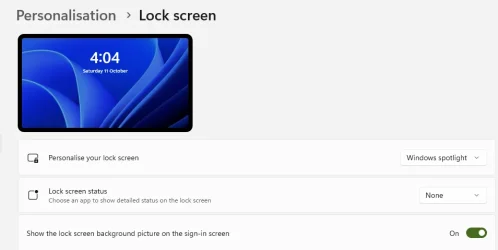
I'm having a bit of a problem now. Even though I have Lock Screen settings set to Windows Spotlight, it now defaults to one of the Windows pictures, as shown in this screenshot of the Settings window.
 

Attachments

  • Lock screen 1.webp
    Lock screen 1.webp
    17.3 KB · Views: 2

My Computer

System One

  • OS
    Windows 11 Pro - version 24H2
    Computer type
    PC/Desktop
    CPU
    AMD Ryzen 5 7600X 6 Core AM5 5.3GHz CPU
    Motherboard
    2024 MSI MAG B650 GAMING PLUS WIFI
    Memory
    Silicon Power XPOWER Zenith 32GB (16GBx2) CL30,1.35V UDIMM 6000MHz DDR5 RAM
    Graphics Card(s)
    MSI GeForce RTX 4060 Ventus 2X Black 8G OC Graphics Card
    Monitor(s) Displays
    Asus ROG Strix XG32WCS - 32in HDR VA 180Hz USB Type-C FreeSync Curved Gaming Monitor
    Screen Resolution
    2560 x 1440
    Hard Drives
    1) Silicon Power 1TB P34A60 Gen3x4 TLC R/W up to 2,200/1,600 MB/s PCIe M.2 NVMe SSD

    2) Crucial 1TB E100 CT1000E100SSD8 Gen4 M.2 NVMe SSD
    PSU
    MSI 750W MAG A750GL 80+ Gold PCIe 5 ATX 3.0 Modular Power Supply
    Case
    SilverStone Fara R1 Pro V2 Tempered Glass ATX Case - Black
    Cooling
    Thermalright Peerless Assassin 120 SE ARGB Dual Loop CPU Cooler, 120mm Fan
    Antivirus
    Microsoft Defender
Well revert the changes by running the batch file with no arguments. Spotlight should refresh itself in a day or so. I'll have to do some digging around, the permissions block might be too restrictive for when Spotlight rotates a fresh batch of images.
 

My Computer

System One

  • OS
    Windows 7
Well revert the changes by running the batch file with no arguments. Spotlight should refresh itself in a day or so. I'll have to do some digging around, the permissions block might be too restrictive for when Spotlight rotates a fresh batch of images.

No worries. After running DISM and other disk repair programs, the Lock Screen seems to have righted itself. Thanks for the help.
 

My Computer

System One

  • OS
    Windows 11 Pro - version 24H2
    Computer type
    PC/Desktop
    CPU
    AMD Ryzen 5 7600X 6 Core AM5 5.3GHz CPU
    Motherboard
    2024 MSI MAG B650 GAMING PLUS WIFI
    Memory
    Silicon Power XPOWER Zenith 32GB (16GBx2) CL30,1.35V UDIMM 6000MHz DDR5 RAM
    Graphics Card(s)
    MSI GeForce RTX 4060 Ventus 2X Black 8G OC Graphics Card
    Monitor(s) Displays
    Asus ROG Strix XG32WCS - 32in HDR VA 180Hz USB Type-C FreeSync Curved Gaming Monitor
    Screen Resolution
    2560 x 1440
    Hard Drives
    1) Silicon Power 1TB P34A60 Gen3x4 TLC R/W up to 2,200/1,600 MB/s PCIe M.2 NVMe SSD

    2) Crucial 1TB E100 CT1000E100SSD8 Gen4 M.2 NVMe SSD
    PSU
    MSI 750W MAG A750GL 80+ Gold PCIe 5 ATX 3.0 Modular Power Supply
    Case
    SilverStone Fara R1 Pro V2 Tempered Glass ATX Case - Black
    Cooling
    Thermalright Peerless Assassin 120 SE ARGB Dual Loop CPU Cooler, 120mm Fan
    Antivirus
    Microsoft Defender
Back
Top Bottom