Losing fan control during a game


rzn6jw

Well-known member
Member
Local time
1:04 PM
Posts
272
OS
Win 11Pro v25H2 build 26200.7171
I recently replaced my old AMD Ryzen 9 3900X with a 5950X. I also installed a 3-fan DeepCool AIO. I currently have 4 fans installed 1 CPU fan connected to the mobo cpu-fan slot and the 3 DeepCool fans in: sys-fan1, sys-fan2, and sys-fan4 mobo slots. Running normally the fans would keep the 5950X at about 130F idle.

I now use HwInfo64 after each boot and it speeds up the fans noticeably and keep the 5950X at about 113-120F idle.

However, I began noticing that after starting The Last of Us game, the fans would quiet down and would only be noticeable sometimes during the game reving up and then quieting back down, etc. After quitting the game, the fans would return to their HwInfo64 rpms.

Running Elden Ring doesn't affect the fans in any way. How or why would a game take over managing a PC's fan speeds? I have never heard of this before.
 

My Computer My Computer

At a glance

Win 11Pro v25H2 build 26200.7171AMD Ryzen 7 9800X3D64G DDR5 6000ASUS RTX 4070 Ti Super OC
OS
Win 11Pro v25H2 build 26200.7171
Computer type
PC/Desktop
Manufacturer/Model
DIY
CPU
AMD Ryzen 7 9800X3D
Motherboard
Gigabyte X670 Aorus Elite AX
Memory
64G DDR5 6000
Graphics Card(s)
ASUS RTX 4070 Ti Super OC
Sound Card
Soundblaster Z SE
Monitor(s) Displays
LG 24"
Screen Resolution
3480 x 2160
Hard Drives
C: drive SOLIDIGM P44 PRO 2TB SSD
D: drive SOLIDIGM P44 PRO 2TB SSD
H: drive Samsung 970 EVO Plus 2TB SSD
PSU
Corsair RM850X
Case
GameMax
Cooling
NZXT Kraken Elite 360 RGB 2024
Keyboard
Corsair
Mouse
Razor
Internet Speed
Gigabyte
Browser
Firefox
Antivirus
Norton 360
What are you using to control the fans? I had all kinds of problems like that when I had a gigabyte board and used their software app to control the fans. I ended up getting rid of their software and setting the curves in BIOS. Didn't have issues from then on.
 

My Computers My Computers

  • At a glance

    Windows 11 Pro x64i9 14900K P/E 5.8/4.5 GHz, cache 5.0 GHz96GB (2x48) G.skill Ripjaws 6800 MT/sAsus ROG Strix 4070 Ti OC
    OS
    Windows 11 Pro x64
    Computer type
    PC/Desktop
    Manufacturer/Model
    📷🔈🎧 🪛 DIY Photoshop/Audio/Game/tinker
    CPU
    i9 14900K P/E 5.8/4.5 GHz, cache 5.0 GHz
    Motherboard
    Asus ROG Maximus Z790 Dark Hero
    Memory
    🐏 96GB (2x48) G.skill Ripjaws 6800 MT/s
    Graphics Card(s)
    Asus ROG Strix 4070 Ti OC
    Sound Card
    🔊Bowers & Wilkins 606 S3 speakers; Audiolabs 7000a integrated amp; RSL 10S Mk2 sub; Creative Pebble Pro Minimilist
    Monitor(s) Displays
    🖥️🖥️ Eizo CG2730 ColorEdge, ViewSonic VP2768
    Screen Resolution
    🖥️🖥️ 2560 x 1440p x 2
    Hard Drives
    💾 WDC SN850X 4TB nvme, SN850 1TB nvme, SK-Hynix 2 TB P41 nvme,. Sabrent USB-C DS-SC5B 5-bay docking station: 6TB WDC Black, 6TB Ironwolf Pro; 2x 2TB WDC Black HDD
    PSU
    ⚡️ 850W Seasonic Vertex PX-850 ATX 3.0/PCI-E 5.0
    Case
    Fractal Design North XL Mesh, Black Walnut
    Cooling
    ❄️ EK Nucleus black 360 AIO w/Phanteks T30-120 fans, 2 Noctua NF-A14 Chromax case fan, 1 T30-120 fan cooling memory
    Keyboard
    ⌨️ Keychron Q3 Max TKL with custom GMK Redsuns Red Samuri keycaps, TX Stabs
    Mouse
    🖱️ Logitech G305 wireless gaming
    Internet Speed
    ⬇️ 500 Mb/s ⬆️ 12 Mb/s
    Browser
    🔥🦊 Firefox
    Antivirus
    🦺 Defender, Macrium Reflect X 🏆
    Other Info
    Phangkey Amaterasu V2 Desk Mat
  • At a glance

    Apple M1
    Computer type
    Laptop
    Manufacturer/Model
    💻 Apple 13" Macbook Pro 2020 (m1)
    CPU
    Apple M1
    Screen Resolution
    2560x1600
    Browser
    Firefox
How or why would a game take over managing a PC's fan speeds? I have never heard of this before.

The game does not manage fan speeds, not directly. The fan speeds are dependent on the temperature monitoring of the CPU and GPU.

The temperature will depend on the power consumption of the CPU and GPU which will vary depending on the game, how it is written and what is happening during the game.
 

My Computer My Computer

At a glance

Windows 11
OS
Windows 11
In looking around, Last of Us is a CPU dependent game from PS5 that was ported to PC. In a steam thread, one user shows mentions that his 5800x shows only 2 - 5 % CPU usage when playing the game, indicating that the game is GPU dependent on PC rather than being CPU dependent.


The post right after lists full specs of system and shows also very low CPU usage as well.

Your CPU is not being used much. You can verify that by looking at actual CPU usage while playing the game. It is is below 10% usage, more than likely there is almost no need for the fans to run at all.
 

My Computers My Computers

  • At a glance

    Windows 11 23H2 Current buildAMD Ryzen 9 3950X4 * 32 GB - Corsair Vengeance 3600 MHzEVGA GeForce RTX 3080 Ti XC3 ULTRA GAMING (12...
    OS
    Windows 11 23H2 Current build
    Computer type
    PC/Desktop
    Manufacturer/Model
    HomeBrew
    CPU
    AMD Ryzen 9 3950X
    Motherboard
    MSI MEG X570 GODLIKE
    Memory
    4 * 32 GB - Corsair Vengeance 3600 MHz
    Graphics Card(s)
    EVGA GeForce RTX 3080 Ti XC3 ULTRA GAMING (12G-P5-3955-KR)
    Sound Card
    Realtek® ALC1220 Codec
    Monitor(s) Displays
    2x Eve Spectrum ES07D03 4K Gaming Monitor (Matte) | Eve Spectrum ES07DC9 4K Gaming Monitor (Glossy)
    Screen Resolution
    3x 3840 x 2160
    Hard Drives
    3x Samsung 980 Pro NVMe PCIe 4 M.2 2 TB SSD (MZ-V8P2T0B/AM) } 3x Sabrent Rocket NVMe 4.0 1 TB SSD (USB)
    PSU
    PC Power & Cooling’s Silencer Series 1050 Watt, 80 Plus Platinum
    Case
    Fractal Design Define 7 XL Dark ATX Full Tower Case
    Cooling
    Arctic Liquid Freezer III 420 RGB + Air 3x 140mm case fans (pull front) + 1x 120 mm (push back) and 1 x 120 mm (pull bottom)
    Keyboard
    SteelSeries Apex Pro Wired Gaming Keyboard
    Mouse
    Logitech MX Master 3S | MX Master 3 for Business
    Internet Speed
    AT&T LightSpeed Gigabit Duplex Ftth
    Browser
    Nightly (default) + Firefox (stable), Chrome, Edge , Arc
    Antivirus
    Defender + MB 5 Beta
  • At a glance

    ChromeOS Flex Dev Channel (current)Intel(R) Core(TM) i5-6300U CPU @ 2.40GHz, 250...16 GBIntel(R) HD Graphics 520
    Operating System
    ChromeOS Flex Dev Channel (current)
    Computer type
    Laptop
    Manufacturer/Model
    Dell Latitude E5470
    CPU
    Intel(R) Core(TM) i5-6300U CPU @ 2.40GHz, 2501 Mhz, 2 Core(s), 4 Logical Processor(s)
    Motherboard
    Dell
    Memory
    16 GB
    Graphics card(s)
    Intel(R) HD Graphics 520
    Sound Card
    Intel(R) HD Graphics 520 + RealTek Audio
    Monitor(s) Displays
    Dell laptop display 15"
    Screen Resolution
    1920 * 1080
    Hard Drives
    Toshiba 128GB M.2 22300 drive
    INTEL Cherryville 520 Series SSDSC2CW180A 180 GB SATA III SSD
    PSU
    Dell
    Case
    Dell
    Cooling
    Dell
    Keyboard
    Dell
    Mouse
    Logitech MX Master 3S (shared w. Sys 1) | Dell TouchPad
    Internet Speed
    AT&T LightSpeed Gigabit Duplex Ftth
Helmut, with HwInfo64 I have a constant ~2400 rpm on the DeepCool fans (speed increases when CPU gets hotter). When TLoU starts up, the fan speed decreases, then it's up and down as the game goes on. Game end, back to constant speed. So somewhere in the code or something, the game ends up apparently controlling the fans. CPU usage by the game is only 2-3%.
 

My Computer My Computer

At a glance

Win 11Pro v25H2 build 26200.7171AMD Ryzen 7 9800X3D64G DDR5 6000ASUS RTX 4070 Ti Super OC
OS
Win 11Pro v25H2 build 26200.7171
Computer type
PC/Desktop
Manufacturer/Model
DIY
CPU
AMD Ryzen 7 9800X3D
Motherboard
Gigabyte X670 Aorus Elite AX
Memory
64G DDR5 6000
Graphics Card(s)
ASUS RTX 4070 Ti Super OC
Sound Card
Soundblaster Z SE
Monitor(s) Displays
LG 24"
Screen Resolution
3480 x 2160
Hard Drives
C: drive SOLIDIGM P44 PRO 2TB SSD
D: drive SOLIDIGM P44 PRO 2TB SSD
H: drive Samsung 970 EVO Plus 2TB SSD
PSU
Corsair RM850X
Case
GameMax
Cooling
NZXT Kraken Elite 360 RGB 2024
Keyboard
Corsair
Mouse
Razor
Internet Speed
Gigabyte
Browser
Firefox
Antivirus
Norton 360
Helmut, with HwInfo64 I have a constant ~2400 rpm on the DeepCool fans (speed increases when CPU gets hotter). When TLoU starts up, the fan speed decreases, then it's up and down as the game goes on. Game end, back to constant speed. So somewhere in the code or something, the game ends up apparently controlling the fans. CPU usage by the game is only 2-3%.


It's not the game controlling the fans... it's the temperature.
Always set the fan curves in the BIOS. Don't use those 3rd party fan speed utilities.
 

My Computers My Computers

  • At a glance

    Win 11 Home ♦♦♦26200.8655 ♦♦♦♦♦♦♦25H2AMD Ryzen 7 3700XG.Skill (F4-3200C14D-16GTZKW)EVGA RTX 2070 (08G-P4-2171-KR)
    OS
    Win 11 Home ♦♦♦26200.8655 ♦♦♦♦♦♦♦25H2
    Computer type
    PC/Desktop
    Manufacturer/Model
    Built by Ghot® [May 2020]
    CPU
    AMD Ryzen 7 3700X
    Motherboard
    Asus Pro WS X570-ACE (BIOS 5302)
    Memory
    G.Skill (F4-3200C14D-16GTZKW)
    Graphics Card(s)
    EVGA RTX 2070 (08G-P4-2171-KR)
    Sound Card
    Realtek ALC1220P / ALC S1220A
    Monitor(s) Displays
    Dell U3011 30"
    Screen Resolution
    2560 x 1600
    Hard Drives
    2x Samsung 860 EVO 500GB,
    WD 4TB Black FZBX - SATA III,
    WD 8TB Black FZBX - SATA III,
    DRW-24B1ST CD/DVD Burner
    PSU
    PC Power & Cooling 750W Quad EPS12V
    Case
    Cooler Master ATCS 840 Tower
    Cooling
    CM Hyper 212 EVO (push/pull)
    Keyboard
    Ducky DK9008 Shine II Blue LED
    Mouse
    Logitech Optical M-100
    Internet Speed
    300/300
    Browser
    Firefox (latest)
    Antivirus
    Bitdefender Total Security
    Other Info
    Speakers: Klipsch Pro Media 2.1
  • At a glance

    Windows XP Pro 32bit w/SP3AMD Athlon 64 X2 5000+ (OC'd @ 3.2Ghz)TWIN2X2048-6400C4DHX (2 x 1GB, DDR2 800)EVGA 256-P2-N758-TR GeForce 8600GT SSC
    Operating System
    Windows XP Pro 32bit w/SP3
    Computer type
    PC/Desktop
    Manufacturer/Model
    Built by Ghot® (not in use)
    CPU
    AMD Athlon 64 X2 5000+ (OC'd @ 3.2Ghz)
    Motherboard
    ASUS M2N32-SLI Deluxe Wireless Edition
    Memory
    TWIN2X2048-6400C4DHX (2 x 1GB, DDR2 800)
    Graphics card(s)
    EVGA 256-P2-N758-TR GeForce 8600GT SSC
    Sound Card
    Onboard
    Monitor(s) Displays
    ViewSonic G90FB Black 19" Professional (CRT)
    Screen Resolution
    up to 2048 x 1536
    Hard Drives
    WD 36GB 10,000rpm Raptor SATA
    Seagate 80GB 7200rpm SATA
    Lite-On LTR-52246S CD/RW
    Lite-On LH-18A1P CD/DVD Burner
    PSU
    PC Power & Cooling Silencer 750 Quad EPS12V
    Case
    Generic Beige case, 80mm fans
    Cooling
    ZALMAN 9500A 92mm CPU Cooler
    Keyboard
    Logitech Classic Keybooard 200
    Mouse
    Logitech Optical M-BT96a
    Internet Speed
    300/300
    Browser
    Firefox 3.x ??
    Antivirus
    Symantec (Norton)
    Other Info
    Still assembled, still runs. Haven't turned it on for 15 years?
I recently replaced my old AMD Ryzen 9 3900X with a 5950X. I also installed a 3-fan DeepCool AIO. I currently have 4 fans installed 1 CPU fan connected to the mobo cpu-fan slot and the 3 DeepCool fans in: sys-fan1, sys-fan2, and sys-fan4 mobo slots. Running normally the fans would keep the 5950X at about 130F idle.

I now use HwInfo64 after each boot and it speeds up the fans noticeably and keep the 5950X at about 113-120F idle.

However, I began noticing that after starting The Last of Us game, the fans would quiet down and would only be noticeable sometimes during the game reving up and then quieting back down, etc. After quitting the game, the fans would return to their HwInfo64 rpms.

Running Elden Ring doesn't affect the fans in any way. How or why would a game take over managing a PC's fan speeds? I have never heard of this before.
I to would use the BIOS settings to control fans and speeds. Check BIOS to see what sys 1, 2,3,4 are set to monitor the Motherboard or CPU. My ASUS board gives me this choice. Your using 4 pin fans PWM a standardized pulse signal that controls the fan speeds Pulse Width Modulation.
 

My Computer My Computer

At a glance

Windows 11 ProIntel Core i7 10700KF 3.8 MHzG.Skill Trident RGB Series 64GB DDR4-3600MHzASUS ROG Strix GeForce RTX 3060 Ti OC Edition
OS
Windows 11 Pro
Computer type
PC/Desktop
Manufacturer/Model
jds63 /self built
CPU
Intel Core i7 10700KF 3.8 MHz
Motherboard
ASUS ROG Strix Z490-E Gaming
Memory
G.Skill Trident RGB Series 64GB DDR4-3600MHz
Graphics Card(s)
ASUS ROG Strix GeForce RTX 3060 Ti OC Edition
Sound Card
Creative Sound BlasterX AE-5 Plus
Monitor(s) Displays
ASUS VG28UQL1A 28" 144 Mhz 4K Monitor
Screen Resolution
3840 X 2160p HDR
Hard Drives
Samsung 970 EVO Plus NVMe 500GB M.2 Drive, (2) Samsung 870 EVO 1TB SATA III Internal SSD, (2) Samsung 860 EVO 1TB SATA III Internal SSD & Seagate Barracuda 2TB
PSU
ASUS ROG Thor 850 80+ Platinum 850W Fully Modular RGB Power Supply
Case
Lian Li Lancool II Mesh Performance
Cooling
Noctua NH-U12A CPU Cooler, (5) Noctua NF-A12x15 chromax.black.swap 120mm, (3) Lepa BOL.Quiet PWM LED 120mm
Keyboard
Logitech MX Keys
Mouse
Logitech MX Ergo Trackball
Internet Speed
325Mbps/ 20Mbps
Browser
Mozilla Firefox 64-bit, Microsoft Edge
Antivirus
Kaspersky Plus 2023
Other Info
Pioneer Blu-Ray/DVD Burner 209DBK, Logitech Z906 5.1 Speakers and Epson XP7100 All-in-One Printer
I recently replaced my old AMD Ryzen 9 3900X with a 5950X. I also installed a 3-fan DeepCool AIO. I currently have 4 fans installed 1 CPU fan connected to the mobo cpu-fan slot and the 3 DeepCool fans in: sys-fan1, sys-fan2, and sys-fan4 mobo slots. Running normally the fans would keep the 5950X at about 130F idle.

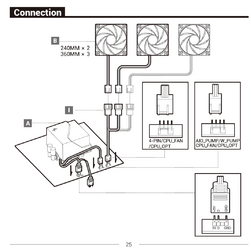
Why? Why not connect it the way Deepcool recommends in the manual and use the included 3 fan adapter/connector to connect all three fans to the CPU fan header? From the manual,

1687998018595.png


Also no mention of if or where you connected the pump to.


My Computer My Computer

At a glance

Windows 11Ryzen 5 5600T-Force Vulcan Z - 32 GB (2x16) @ 3600 MHzSapphire RX 7600
OS
Windows 11
Computer type
PC/Desktop
CPU
Ryzen 5 5600
Motherboard
MSI B550 Tomahawk
Memory
T-Force Vulcan Z - 32 GB (2x16) @ 3600 MHz
Graphics Card(s)
Sapphire RX 7600
Monitor(s) Displays
Sansui ES-G27F2Q
Screen Resolution
2560 x 1440P
Hard Drives
XPG SX8200 240GB M.2 PCIe Gen3x4 NVMe
Samsung 850 EVO 250 GB
Adata SU800 1 TB
WD Black SN750 500GB
PSU
EVGA SuperNOVA 650 G3
Case
Deepcool CK500WH
Cooling
Thermalright Frozen Warframe 240 SE, plus 3 140 MM case fans (2 in front, 1 in rear)
Keyboard
Logitech G213 Prodigy
Mouse
Logitech ERGO M575
Why? Why not connect it the way Deepcool recommends in the manual and use the included 3 fan adapter/connector to connect all three fans to the CPU fan header? From the manual,

View attachment 63563


Also no mention of if or where you connected the pump to.

thought that to !! Good one
 

My Computer My Computer

At a glance

Windows 11 ProIntel Core i7 10700KF 3.8 MHzG.Skill Trident RGB Series 64GB DDR4-3600MHzASUS ROG Strix GeForce RTX 3060 Ti OC Edition
OS
Windows 11 Pro
Computer type
PC/Desktop
Manufacturer/Model
jds63 /self built
CPU
Intel Core i7 10700KF 3.8 MHz
Motherboard
ASUS ROG Strix Z490-E Gaming
Memory
G.Skill Trident RGB Series 64GB DDR4-3600MHz
Graphics Card(s)
ASUS ROG Strix GeForce RTX 3060 Ti OC Edition
Sound Card
Creative Sound BlasterX AE-5 Plus
Monitor(s) Displays
ASUS VG28UQL1A 28" 144 Mhz 4K Monitor
Screen Resolution
3840 X 2160p HDR
Hard Drives
Samsung 970 EVO Plus NVMe 500GB M.2 Drive, (2) Samsung 870 EVO 1TB SATA III Internal SSD, (2) Samsung 860 EVO 1TB SATA III Internal SSD & Seagate Barracuda 2TB
PSU
ASUS ROG Thor 850 80+ Platinum 850W Fully Modular RGB Power Supply
Case
Lian Li Lancool II Mesh Performance
Cooling
Noctua NH-U12A CPU Cooler, (5) Noctua NF-A12x15 chromax.black.swap 120mm, (3) Lepa BOL.Quiet PWM LED 120mm
Keyboard
Logitech MX Keys
Mouse
Logitech MX Ergo Trackball
Internet Speed
325Mbps/ 20Mbps
Browser
Mozilla Firefox 64-bit, Microsoft Edge
Antivirus
Kaspersky Plus 2023
Other Info
Pioneer Blu-Ray/DVD Burner 209DBK, Logitech Z906 5.1 Speakers and Epson XP7100 All-in-One Printer
OK, so my fans are at ~2400rpm on the desktop, no games or programs outside of normal Windows stuff running. Start TLoU and the fans drop to <1200rpm then vary throughout the game. Sure, I can see the temp getting up to 150 but the fans increase, then decrease, then increase, etc until the game ends, then back to ~2400rpm. What I'm saying is the game takes control of the fans to drop them below 2400rpm, they vary from there depending on temp, then they're back to 2400rpm when the game ends.

If temp dictated the speed, and the 'normal idle' speed was ~2400rpm, then, when running the game, the speed should vary from ~2400 upwards and downwards back to 2400rpm, not drop like it's doing. Again, this doesn't happen running Elden Ring, Uncharted, the Witcher 3, God of War, or Jedi Survivor, just TLoU so my curiosity was up.

I originally had the fans connected as in the DeepCool diagram but I wanted to control the 3 fans independently.
 

My Computer My Computer

At a glance

Win 11Pro v25H2 build 26200.7171AMD Ryzen 7 9800X3D64G DDR5 6000ASUS RTX 4070 Ti Super OC
OS
Win 11Pro v25H2 build 26200.7171
Computer type
PC/Desktop
Manufacturer/Model
DIY
CPU
AMD Ryzen 7 9800X3D
Motherboard
Gigabyte X670 Aorus Elite AX
Memory
64G DDR5 6000
Graphics Card(s)
ASUS RTX 4070 Ti Super OC
Sound Card
Soundblaster Z SE
Monitor(s) Displays
LG 24"
Screen Resolution
3480 x 2160
Hard Drives
C: drive SOLIDIGM P44 PRO 2TB SSD
D: drive SOLIDIGM P44 PRO 2TB SSD
H: drive Samsung 970 EVO Plus 2TB SSD
PSU
Corsair RM850X
Case
GameMax
Cooling
NZXT Kraken Elite 360 RGB 2024
Keyboard
Corsair
Mouse
Razor
Internet Speed
Gigabyte
Browser
Firefox
Antivirus
Norton 360
Ok let's come back to how the fans are connected,

I recently replaced my old AMD Ryzen 9 3900X with a 5950X. I also installed a 3-fan DeepCool AIO. I currently have 4 fans installed 1 CPU fan connected to the mobo cpu-fan slot and the 3 DeepCool fans in: sys-fan1, sys-fan2, and sys-fan4 mobo slots. Running normally the fans would keep the 5950X at about 130F idle.


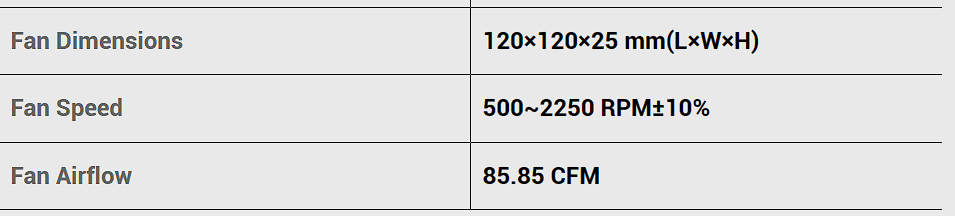
What fan is actually connected to the CPU header? Also according to the specs for the fans that came with that AIO, the only way you are going to have any of them running at 2400 RPM is if they are at 100% and running at the rated +/- 10%,

1687999495851.png

Also why would you want to run the fans on the AIO independently?
 

My Computer My Computer

At a glance

Windows 11Ryzen 5 5600T-Force Vulcan Z - 32 GB (2x16) @ 3600 MHzSapphire RX 7600
OS
Windows 11
Computer type
PC/Desktop
CPU
Ryzen 5 5600
Motherboard
MSI B550 Tomahawk
Memory
T-Force Vulcan Z - 32 GB (2x16) @ 3600 MHz
Graphics Card(s)
Sapphire RX 7600
Monitor(s) Displays
Sansui ES-G27F2Q
Screen Resolution
2560 x 1440P
Hard Drives
XPG SX8200 240GB M.2 PCIe Gen3x4 NVMe
Samsung 850 EVO 250 GB
Adata SU800 1 TB
WD Black SN750 500GB
PSU
EVGA SuperNOVA 650 G3
Case
Deepcool CK500WH
Cooling
Thermalright Frozen Warframe 240 SE, plus 3 140 MM case fans (2 in front, 1 in rear)
Keyboard
Logitech G213 Prodigy
Mouse
Logitech ERGO M575
I wanted to see if I could get them to each run individually and get an independent curve going. I guess this has gotten a little out of hand now, so I went back to the original installation of 3 on 1. I'm happy with that.

Sorry about all the confusion and thanks for taking your time on this quest.
 

My Computer My Computer

At a glance

Win 11Pro v25H2 build 26200.7171AMD Ryzen 7 9800X3D64G DDR5 6000ASUS RTX 4070 Ti Super OC
OS
Win 11Pro v25H2 build 26200.7171
Computer type
PC/Desktop
Manufacturer/Model
DIY
CPU
AMD Ryzen 7 9800X3D
Motherboard
Gigabyte X670 Aorus Elite AX
Memory
64G DDR5 6000
Graphics Card(s)
ASUS RTX 4070 Ti Super OC
Sound Card
Soundblaster Z SE
Monitor(s) Displays
LG 24"
Screen Resolution
3480 x 2160
Hard Drives
C: drive SOLIDIGM P44 PRO 2TB SSD
D: drive SOLIDIGM P44 PRO 2TB SSD
H: drive Samsung 970 EVO Plus 2TB SSD
PSU
Corsair RM850X
Case
GameMax
Cooling
NZXT Kraken Elite 360 RGB 2024
Keyboard
Corsair
Mouse
Razor
Internet Speed
Gigabyte
Browser
Firefox
Antivirus
Norton 360

Latest Support Threads

Back
Top Bottom