Solved Losing time - Clock sometimes out of sync on startup since installing Windows 11 24H2


thatstimming

Member
Local time
11:08 AM
Posts
7
OS
Windows 11
Hi all,

Since installing Windows 11 24H2, the time in Windows is sometimes out of sync, losing a about 0.1-0.2 seconds per minute, which adds up over the course of a day (and is super frustrating when working).

The CMOS battery has been changed to a new one (the old battery proved to still be holding charge, though).

This issue does not occur on Windows 11 23H2.

Motherboard, CPU and RAM all about 2 months old: X670E Gigabyte Aorus Master (Bios v. F33d), Ryzen 7 7800X3D, G.Skill Trident Z 6000 CL30.

I haven't been able to work out the exact conditions for when this occurs.

I have flashed older bios versions (F21, F22, F33c) and cleared CMOS, etc. in addition to changing the battery.

I have recorded the time on the motherboard BIOS ticking over, and it does not lose time when I have observed it.

If I reboot to BIOS and set the time manually after I notice the issue, the next boot of Windows keeps the time. Sometimes, though, Windows doesn't sync the slipping time to BIOS - so sometimes the BIOS time is still correct even if it is a few to many seconds out in Windows.

When the symptom does occur, I notice that the time can start falling behind even if just at the Windows login/lock screen (I always sign out before shutting down due to having two Windows accounts - both local, one at administrator level).

It's a strange and also infuriating issue.

Has anyone else experienced this or spotted whether this is a known issue with Windows 11 24H2?

Regards,

Tim
 

My Computer My Computer

At a glance

Windows 11AMD Ryzen 7 7800X3D64 GB G.Skill Trident 6000 MHz CL30Gigabyte RTX 2080 Ti Gaming OC
OS
Windows 11
Computer type
PC/Desktop
CPU
AMD Ryzen 7 7800X3D
Motherboard
Gigabyte X670E Aorus Master
Memory
64 GB G.Skill Trident 6000 MHz CL30
Graphics Card(s)
Gigabyte RTX 2080 Ti Gaming OC
Monitor(s) Displays
LG 34GN850-B
Screen Resolution
3440x1440
PSU
Corsair RM1000e
Case
Corsair 7000D
Keyboard
Corsair K63
Mouse
Razer Naga Pro
Internet Speed
1000/50
Hello @thatstimming and welcome to ElevenForum. :-)


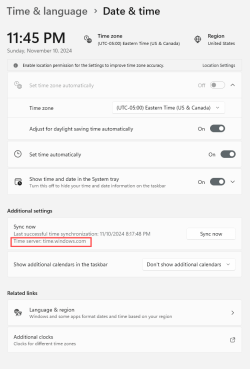
I'm on the latest stable version of Win 11 24H2, and I don't have problems with losing time.
These are my setting, related to that...
(I'm in the east coast USA time zone)

Image1.png


__________________________________________________________________________________________________________________

Here's some unrelated stuff that you may find useful...


My Computers My Computers

  • At a glance

    Win 11 Home ♦♦♦26200.9168 ♦♦♦♦♦♦♦25H2AMD Ryzen 7 3700XG.Skill (F4-3200C14D-16GTZKW)EVGA RTX 2070 (08G-P4-2171-KR)
    OS
    Win 11 Home ♦♦♦26200.9168 ♦♦♦♦♦♦♦25H2
    Computer type
    PC/Desktop
    Manufacturer/Model
    Built by Ghot® [May 2020]
    CPU
    AMD Ryzen 7 3700X
    Motherboard
    Asus Pro WS X570-ACE (BIOS 5302)
    Memory
    G.Skill (F4-3200C14D-16GTZKW)
    Graphics Card(s)
    EVGA RTX 2070 (08G-P4-2171-KR)
    Sound Card
    Realtek ALC1220P / ALC S1220A
    Monitor(s) Displays
    Dell U3011 30"
    Screen Resolution
    2560 x 1600
    Hard Drives
    2x Samsung 860 EVO 500GB,
    WD 4TB Black FZBX - SATA III,
    WD 8TB Black FZBX - SATA III,
    DRW-24B1ST CD/DVD Burner
    PSU
    PC Power & Cooling 750W Quad EPS12V
    Case
    Cooler Master ATCS 840 Tower
    Cooling
    CM Hyper 212 EVO (push/pull)
    Keyboard
    Ducky DK9008 Shine II Blue LED
    Mouse
    Logitech Optical M-100
    Internet Speed
    300/300
    Browser
    Firefox (latest)
    Antivirus
    Bitdefender Total Security
    Other Info
    Speakers: Klipsch Pro Media 2.1
  • At a glance

    Windows XP Pro 32bit w/SP3AMD Athlon 64 X2 5000+ (OC'd @ 3.2Ghz)TWIN2X2048-6400C4DHX (2 x 1GB, DDR2 800)EVGA 256-P2-N758-TR GeForce 8600GT SSC
    Operating System
    Windows XP Pro 32bit w/SP3
    Computer type
    PC/Desktop
    Manufacturer/Model
    Built by Ghot® (not in use)
    CPU
    AMD Athlon 64 X2 5000+ (OC'd @ 3.2Ghz)
    Motherboard
    ASUS M2N32-SLI Deluxe Wireless Edition
    Memory
    TWIN2X2048-6400C4DHX (2 x 1GB, DDR2 800)
    Graphics card(s)
    EVGA 256-P2-N758-TR GeForce 8600GT SSC
    Sound Card
    Onboard
    Monitor(s) Displays
    ViewSonic G90FB Black 19" Professional (CRT)
    Screen Resolution
    up to 2048 x 1536
    Hard Drives
    WD 36GB 10,000rpm Raptor SATA
    Seagate 80GB 7200rpm SATA
    Lite-On LTR-52246S CD/RW
    Lite-On LH-18A1P CD/DVD Burner
    PSU
    PC Power & Cooling Silencer 750 Quad EPS12V
    Case
    Generic Beige case, 80mm fans
    Cooling
    ZALMAN 9500A 92mm CPU Cooler
    Keyboard
    Logitech Classic Keybooard 200
    Mouse
    Logitech Optical M-BT96a
    Internet Speed
    300/300
    Browser
    Firefox 3.x ??
    Antivirus
    Symantec (Norton)
    Other Info
    Still assembled, still runs. Haven't turned it on for 15 years?

My Computer My Computer

At a glance

Windows 11 ProCore i7-13700K64 GB Kingston Fury Beast DDR5Gigabyte GeForce RTX 2060 Super Gaming OC 8G
OS
Windows 11 Pro
Computer type
PC/Desktop
Manufacturer/Model
Self build
CPU
Core i7-13700K
Motherboard
Asus TUF Gaming Plus WiFi Z790
Memory
64 GB Kingston Fury Beast DDR5
Graphics Card(s)
Gigabyte GeForce RTX 2060 Super Gaming OC 8G
Sound Card
Realtek S1200A
Monitor(s) Displays
Viewsonic VP2770 & Dell (secondary)
Screen Resolution
2560 x 1440
Hard Drives
Kingston KC3000 2TB NVME SSD & SATA HDDs & SSD
PSU
EVGA SuperNova G2 850W
Case
Nanoxia Deep Silence 1
Cooling
Noctua NH-D14
Keyboard
Microsoft Digital Media Pro
Mouse
Logitech Wireless
Internet Speed
80 Mb / s
Browser
Chrome
Antivirus
Defender, Malwarebytes Free & AdwCleaner
There is a bug affecting some PCs including mine. I use NetTime NetTime - Network Time Synchronization Tool
Hey Steve. Thanks for confirming. I spotted that program and I'm using it - but I appreciate the reiteration to use it as a workaround.

It's of some comfort that I'm not the only one experiencing the issue.

Do you/others know what the cause of the bug is?

Do any of your motherboard/CPU/RAM match mine?

Much appreciated to you (and to Ghot) for engaging with my post.
 

My Computer My Computer

At a glance

Windows 11AMD Ryzen 7 7800X3D64 GB G.Skill Trident 6000 MHz CL30Gigabyte RTX 2080 Ti Gaming OC
OS
Windows 11
Computer type
PC/Desktop
CPU
AMD Ryzen 7 7800X3D
Motherboard
Gigabyte X670E Aorus Master
Memory
64 GB G.Skill Trident 6000 MHz CL30
Graphics Card(s)
Gigabyte RTX 2080 Ti Gaming OC
Monitor(s) Displays
LG 34GN850-B
Screen Resolution
3440x1440
PSU
Corsair RM1000e
Case
Corsair 7000D
Keyboard
Corsair K63
Mouse
Razer Naga Pro
Internet Speed
1000/50
Hey Steve. Thanks for confirming. I spotted that program and I'm using it - but I appreciate the reiteration to use it as a workaround.

It's of some comfort that I'm not the only one experiencing the issue.

Do you/others know what the cause of the bug is?

Do any of your motherboard/CPU/RAM match mine?

Much appreciated to you (and to Ghot) for engaging with my post.
Fill out your system spec! I reported the bug the MS ages ago. Let's hope they fix it.
 

My Computer My Computer

At a glance

Windows 11 ProCore i7-13700K64 GB Kingston Fury Beast DDR5Gigabyte GeForce RTX 2060 Super Gaming OC 8G
OS
Windows 11 Pro
Computer type
PC/Desktop
Manufacturer/Model
Self build
CPU
Core i7-13700K
Motherboard
Asus TUF Gaming Plus WiFi Z790
Memory
64 GB Kingston Fury Beast DDR5
Graphics Card(s)
Gigabyte GeForce RTX 2060 Super Gaming OC 8G
Sound Card
Realtek S1200A
Monitor(s) Displays
Viewsonic VP2770 & Dell (secondary)
Screen Resolution
2560 x 1440
Hard Drives
Kingston KC3000 2TB NVME SSD & SATA HDDs & SSD
PSU
EVGA SuperNova G2 850W
Case
Nanoxia Deep Silence 1
Cooling
Noctua NH-D14
Keyboard
Microsoft Digital Media Pro
Mouse
Logitech Wireless
Internet Speed
80 Mb / s
Browser
Chrome
Antivirus
Defender, Malwarebytes Free & AdwCleaner
Fill out your system spec! I reported the bug the MS ages ago. Let's hope they fix it.
Checked out your PC. No similar components. So, just a dirty Windows bug.

Thanks for the input.
 

My Computer My Computer

At a glance

Windows 11AMD Ryzen 7 7800X3D64 GB G.Skill Trident 6000 MHz CL30Gigabyte RTX 2080 Ti Gaming OC
OS
Windows 11
Computer type
PC/Desktop
CPU
AMD Ryzen 7 7800X3D
Motherboard
Gigabyte X670E Aorus Master
Memory
64 GB G.Skill Trident 6000 MHz CL30
Graphics Card(s)
Gigabyte RTX 2080 Ti Gaming OC
Monitor(s) Displays
LG 34GN850-B
Screen Resolution
3440x1440
PSU
Corsair RM1000e
Case
Corsair 7000D
Keyboard
Corsair K63
Mouse
Razer Naga Pro
Internet Speed
1000/50
I looked in Task Scheduler and there were two tasks in Microsoft...Windows...Time Synchroniation. They were not running as scheduled.
I deleted both of them and created a new task that runs daily.

I followed this guide and now my clock is accurate to within a second.


My Computers My Computers

  • At a glance

    Windows 11 Pro 25H2 26200.9168AMD Ryzen 7 5825U with Radeon Graphics16GB
    OS
    Windows 11 Pro 25H2 26200.9168
    Computer type
    Laptop
    Manufacturer/Model
    Acemagic LX15PRO
    CPU
    AMD Ryzen 7 5825U with Radeon Graphics
    Motherboard
    BIOS CT_BI_AMI_LX15PRO_AB8139_A-004
    Memory
    16GB
    Screen Resolution
    1920 x 1080
    Hard Drives
    SSD 2TB
    Internet Speed
    30 Mbps
    Browser
    Brave
    Antivirus
    Webroot SecureAnywhere Complete beta
  • At a glance

    Windows 11 Pro 23H2 22631.2506Atom N450 1.66GHz2GB
    Operating System
    Windows 11 Pro 23H2 22631.2506
    Computer type
    Laptop
    Manufacturer/Model
    HP Mini 210-1090NR PC (bought in late 2009!)
    CPU
    Atom N450 1.66GHz
    Memory
    2GB
    Browser
    Brave
    Antivirus
    Webroot
  • Acer Swift SF114-34 laptop
    OS Windows 11 Pro 26200.8894
    CPU Pentium Silver N6000
    RAM 4GB
    BIOS v1.17
    SSD Samsung 970 EVO Plus SSD 2TB (an upgrade)
I looked in Task Scheduler and there were two tasks in Microsoft...Windows...Time Synchroniation. They were not running as scheduled.
I deleted both of them and created a new task that runs daily.

I followed this guide and now my clock is accurate to within a second.

Thanks, Kelper! I'll take a look tomorrow. Much obliged.

Tim
 

My Computer My Computer

At a glance

Windows 11AMD Ryzen 7 7800X3D64 GB G.Skill Trident 6000 MHz CL30Gigabyte RTX 2080 Ti Gaming OC
OS
Windows 11
Computer type
PC/Desktop
CPU
AMD Ryzen 7 7800X3D
Motherboard
Gigabyte X670E Aorus Master
Memory
64 GB G.Skill Trident 6000 MHz CL30
Graphics Card(s)
Gigabyte RTX 2080 Ti Gaming OC
Monitor(s) Displays
LG 34GN850-B
Screen Resolution
3440x1440
PSU
Corsair RM1000e
Case
Corsair 7000D
Keyboard
Corsair K63
Mouse
Razer Naga Pro
Internet Speed
1000/50
Last edited:

My Computer My Computer

At a glance

WindowsXP/7/8/8.1/10/11,Linux,Android,FreeBSD...Intel® Core™ i7-8750H 8th Gen 2.2Ghz up to 4....64GB using 2x32GB CL16 Mushkin redLine modulesIntel UHD 630 & NVIDIA GeForce GTX 1050 Ti wi...
OS
WindowsXP/7/8/8.1/10/11,Linux,Android,FreeBSD Unix
Computer type
Laptop
Manufacturer/Model
Dell XPS 15 9570
CPU
Intel® Core™ i7-8750H 8th Gen 2.2Ghz up to 4.1Ghz
Motherboard
Dell XPS 15 9570
Memory
64GB using 2x32GB CL16 Mushkin redLine modules
Graphics Card(s)
Intel UHD 630 & NVIDIA GeForce GTX 1050 Ti with 4GB DDR5
Sound Card
Realtek ALC3266-CG
Monitor(s) Displays
15.6" 4K Touch UltraHD 3840x2160 made by Sharp
Screen Resolution
3840x2160 4K UltraHD
Hard Drives
Samsung MZ-V9P4T0B/AM 990 PRO 4TB PCIe®4.0 NVMe™ M.2 SSD was Toshiba KXG60ZNV1T02 NVMe 1TB SSD
PSU
Dell XPS 15 9570
Case
Dell XPS 15 9570
Cooling
Stock
Keyboard
Stock
Mouse
SwitftPoint ProPoint
Internet Speed
Comcast/XFinity 1.44Gbps/42.5Mbps
Browser
Microsoft EDGE (Chromium based) & Google Chrome
Antivirus
Windows Defender that came with Windows

My Computer My Computer

At a glance

Windows 11AMD Ryzen 7 7800X3D64 GB G.Skill Trident 6000 MHz CL30Gigabyte RTX 2080 Ti Gaming OC
OS
Windows 11
Computer type
PC/Desktop
CPU
AMD Ryzen 7 7800X3D
Motherboard
Gigabyte X670E Aorus Master
Memory
64 GB G.Skill Trident 6000 MHz CL30
Graphics Card(s)
Gigabyte RTX 2080 Ti Gaming OC
Monitor(s) Displays
LG 34GN850-B
Screen Resolution
3440x1440
PSU
Corsair RM1000e
Case
Corsair 7000D
Keyboard
Corsair K63
Mouse
Razer Naga Pro
Internet Speed
1000/50

My Computer My Computer

At a glance

Windows 11 ProCore i7-13700K64 GB Kingston Fury Beast DDR5Gigabyte GeForce RTX 2060 Super Gaming OC 8G
OS
Windows 11 Pro
Computer type
PC/Desktop
Manufacturer/Model
Self build
CPU
Core i7-13700K
Motherboard
Asus TUF Gaming Plus WiFi Z790
Memory
64 GB Kingston Fury Beast DDR5
Graphics Card(s)
Gigabyte GeForce RTX 2060 Super Gaming OC 8G
Sound Card
Realtek S1200A
Monitor(s) Displays
Viewsonic VP2770 & Dell (secondary)
Screen Resolution
2560 x 1440
Hard Drives
Kingston KC3000 2TB NVME SSD & SATA HDDs & SSD
PSU
EVGA SuperNova G2 850W
Case
Nanoxia Deep Silence 1
Cooling
Noctua NH-D14
Keyboard
Microsoft Digital Media Pro
Mouse
Logitech Wireless
Internet Speed
80 Mb / s
Browser
Chrome
Antivirus
Defender, Malwarebytes Free & AdwCleaner
These are my setting, related to that

I change it to the National Institute of Standards and Technology time server as there are times the windows server has issues.

Screenshot 2024-11-13 070823.jpg
 

My Computer My Computer

At a glance

Windows 11 Pro
OS
Windows 11 Pro
I change it to the National Institute of Standards and Technology time server as there are times the windows server has issues.

View attachment 116156


I've never had issues with... time.windows.com

But I would think that nist should be fine. :-)
 

My Computers My Computers

  • At a glance

    Win 11 Home ♦♦♦26200.9168 ♦♦♦♦♦♦♦25H2AMD Ryzen 7 3700XG.Skill (F4-3200C14D-16GTZKW)EVGA RTX 2070 (08G-P4-2171-KR)
    OS
    Win 11 Home ♦♦♦26200.9168 ♦♦♦♦♦♦♦25H2
    Computer type
    PC/Desktop
    Manufacturer/Model
    Built by Ghot® [May 2020]
    CPU
    AMD Ryzen 7 3700X
    Motherboard
    Asus Pro WS X570-ACE (BIOS 5302)
    Memory
    G.Skill (F4-3200C14D-16GTZKW)
    Graphics Card(s)
    EVGA RTX 2070 (08G-P4-2171-KR)
    Sound Card
    Realtek ALC1220P / ALC S1220A
    Monitor(s) Displays
    Dell U3011 30"
    Screen Resolution
    2560 x 1600
    Hard Drives
    2x Samsung 860 EVO 500GB,
    WD 4TB Black FZBX - SATA III,
    WD 8TB Black FZBX - SATA III,
    DRW-24B1ST CD/DVD Burner
    PSU
    PC Power & Cooling 750W Quad EPS12V
    Case
    Cooler Master ATCS 840 Tower
    Cooling
    CM Hyper 212 EVO (push/pull)
    Keyboard
    Ducky DK9008 Shine II Blue LED
    Mouse
    Logitech Optical M-100
    Internet Speed
    300/300
    Browser
    Firefox (latest)
    Antivirus
    Bitdefender Total Security
    Other Info
    Speakers: Klipsch Pro Media 2.1
  • At a glance

    Windows XP Pro 32bit w/SP3AMD Athlon 64 X2 5000+ (OC'd @ 3.2Ghz)TWIN2X2048-6400C4DHX (2 x 1GB, DDR2 800)EVGA 256-P2-N758-TR GeForce 8600GT SSC
    Operating System
    Windows XP Pro 32bit w/SP3
    Computer type
    PC/Desktop
    Manufacturer/Model
    Built by Ghot® (not in use)
    CPU
    AMD Athlon 64 X2 5000+ (OC'd @ 3.2Ghz)
    Motherboard
    ASUS M2N32-SLI Deluxe Wireless Edition
    Memory
    TWIN2X2048-6400C4DHX (2 x 1GB, DDR2 800)
    Graphics card(s)
    EVGA 256-P2-N758-TR GeForce 8600GT SSC
    Sound Card
    Onboard
    Monitor(s) Displays
    ViewSonic G90FB Black 19" Professional (CRT)
    Screen Resolution
    up to 2048 x 1536
    Hard Drives
    WD 36GB 10,000rpm Raptor SATA
    Seagate 80GB 7200rpm SATA
    Lite-On LTR-52246S CD/RW
    Lite-On LH-18A1P CD/DVD Burner
    PSU
    PC Power & Cooling Silencer 750 Quad EPS12V
    Case
    Generic Beige case, 80mm fans
    Cooling
    ZALMAN 9500A 92mm CPU Cooler
    Keyboard
    Logitech Classic Keybooard 200
    Mouse
    Logitech Optical M-BT96a
    Internet Speed
    300/300
    Browser
    Firefox 3.x ??
    Antivirus
    Symantec (Norton)
    Other Info
    Still assembled, still runs. Haven't turned it on for 15 years?
Hi all. This appears somewhat fixed. I no longer have any loss of time when signed into a Windows account. The time on lock screen can still fall behind at times, though (fixed by just signing in).

Can anyone else correlate?
 

My Computer My Computer

At a glance

Windows 11AMD Ryzen 7 7800X3D64 GB G.Skill Trident 6000 MHz CL30Gigabyte RTX 2080 Ti Gaming OC
OS
Windows 11
Computer type
PC/Desktop
CPU
AMD Ryzen 7 7800X3D
Motherboard
Gigabyte X670E Aorus Master
Memory
64 GB G.Skill Trident 6000 MHz CL30
Graphics Card(s)
Gigabyte RTX 2080 Ti Gaming OC
Monitor(s) Displays
LG 34GN850-B
Screen Resolution
3440x1440
PSU
Corsair RM1000e
Case
Corsair 7000D
Keyboard
Corsair K63
Mouse
Razer Naga Pro
Internet Speed
1000/50
Hi all. This appears somewhat fixed. I no longer have any loss of time when signed into a Windows account. The time on lock screen can still fall behind at times, though (fixed by just signing in).

Can anyone else correlate?
Definitely not fixed. I still noticed it on my X670E / 7800X3D system (before sending off the motherboard due to a separate issue). I'm back to using my Z390 / 9900K system for now.
 

My Computer My Computer

At a glance

Windows 11AMD Ryzen 7 7800X3D64 GB G.Skill Trident 6000 MHz CL30Gigabyte RTX 2080 Ti Gaming OC
OS
Windows 11
Computer type
PC/Desktop
CPU
AMD Ryzen 7 7800X3D
Motherboard
Gigabyte X670E Aorus Master
Memory
64 GB G.Skill Trident 6000 MHz CL30
Graphics Card(s)
Gigabyte RTX 2080 Ti Gaming OC
Monitor(s) Displays
LG 34GN850-B
Screen Resolution
3440x1440
PSU
Corsair RM1000e
Case
Corsair 7000D
Keyboard
Corsair K63
Mouse
Razer Naga Pro
Internet Speed
1000/50

Latest Support Threads

Back
Top Bottom