Spotify Newsroom:
Lossless on Spotify Premium is here.
Lossless audio has been one of the most anticipated features on Spotify and now, finally, it’s started rolling out to Premium listeners in select markets. Premium subscribers will receive a notification in Spotify once Lossless becomes available to them. Whether you’re diving into a new album or revisiting old favorites, lossless delivers the highest music audio quality on Spotify.
“The wait is finally over; we’re so excited lossless sound is rolling out to Premium subscribers,” said Gustav Gyllenhammar, VP Subscriptions, Spotify. “We’ve taken time to build this feature in a way that prioritizes quality, ease of use, and clarity at every step, so you always know what’s happening under the hood. With Lossless, our premium users will now have an even better listening experience.”
Lossless is part of our commitment to continually improve Spotify Premium so fans can discover and enjoy the music they love. This highly requested feature takes your Premium experience to the next level. Together with popular features like DJ, Jam, AI Playlist, brand-new Mix, and daylist, as well as playlists curated by our leading global music editorial team, the world’s most popular audio streaming subscription service continues to get better.
With Lossless, you can now stream tracks in up to 24-bit/44.1 kHz FLAC, unlocking greater detail across nearly every song available on Spotify. So you can enjoy new releases and your favorite tracks, in the highest quality, while being immersed in the music.
Your device, your music, your listening experience, your choice
We know everyone listens differently, so we’re giving you custom settings for Wi-Fi, cellular, and downloads. Choose between Low, Normal, High, Very High, and now Lossless music quality to provide maximum flexibility and control. You’ll be able to see how much data each of these requires to make choosing easier.Lossless is available on mobile, desktop, and tablet, as well as on many devices that support Spotify Connect, including Sony, Bose, Samsung, Sennheiser, and more. Support for additional devices, including those from Sonos and Amazon, arrives next month.
How to enable Lossless
To turn on lossless audio in the Spotify app:- Tap your profile icon in the top left.
- Go to Settings & Privacy → Media Quality.
- Select where you want to enable lossless audio: Wi-Fi, cellular, downloads.
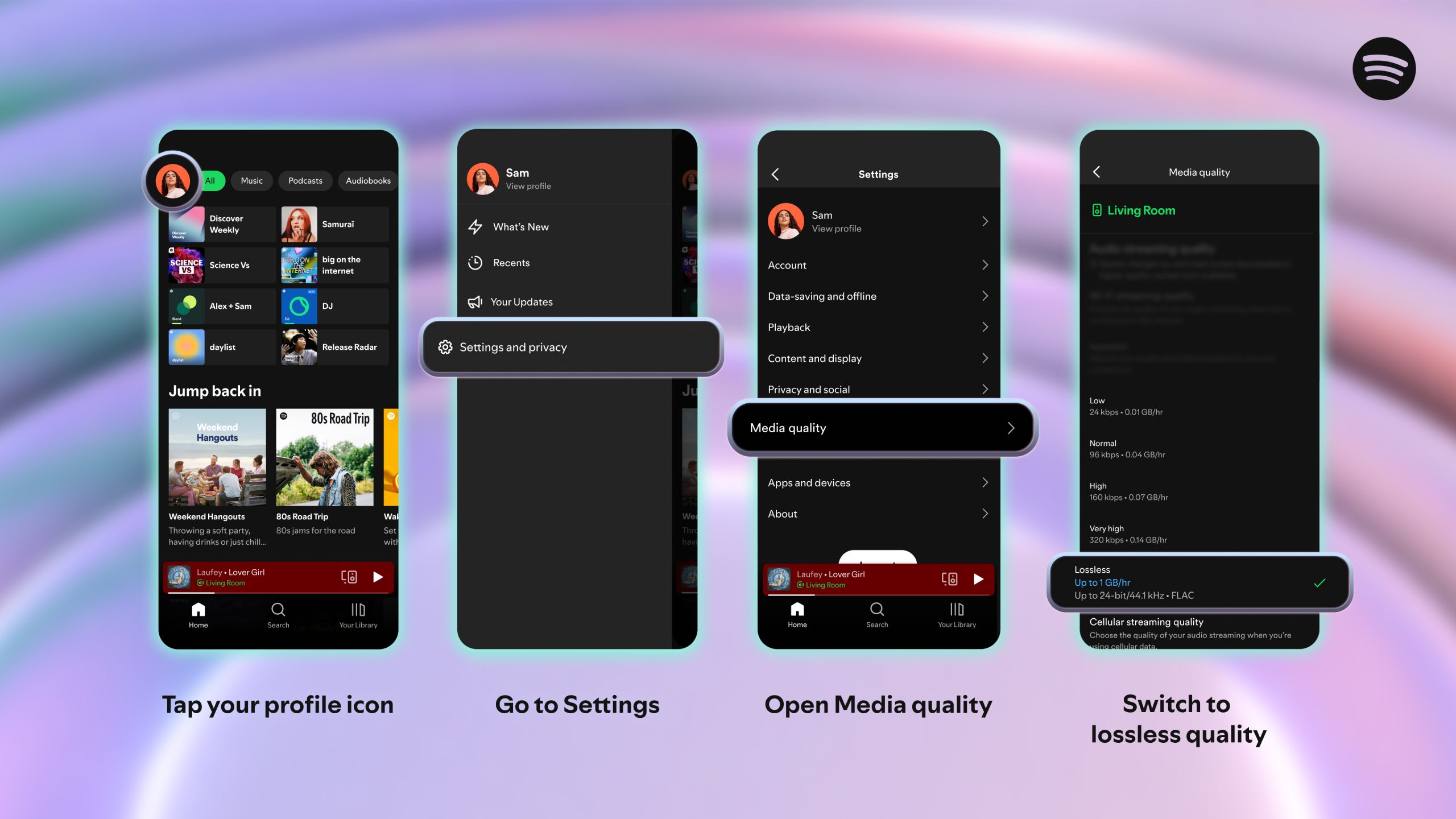
And just to note: You’ll need to enable Lossless manually on each device. You’ll know Lossless is on because the Lossless indicator will appear in the Now Playing view or bar, and via the Connect Picker.
For the smoothest and best listening experience, we recommend streaming lossless music on Wi-Fi using wired headphones or speakers on a non-Bluetooth connection, like Spotify Connect. Currently, Bluetooth doesn’t provide enough bandwidth to transmit lossless audio, so the signal has to be compressed before being sent.
Lossless gives listeners every detail of the music, which means the audio files can be larger. As users enable lossless on their devices, it may take a moment for the track to play. But once it’s cached and loaded, you are ready to listen.
When can I start listening?
Lossless is rolling out gradually to more than 50 markets through October. Premium subscribers in Australia, Austria, Czechia, Denmark, Germany, Japan, New Zealand, the Netherlands, Portugal, Sweden, the US, and the UK have already started to get access. Source:
Lossless Listening Arrives on Spotify Premium With a Richer, More Detailed Listening Experience — Spotify
Lossless on Spotify Premium is here. Lossless audio has been one of the most anticipated features on Spotify and now, finally, it’s started rolling out to Premium listeners in select markets. Premium subscribers will receive a notification in Spotify once Lossless becomes available to them...
 newsroom.spotify.com