- Local time
- 3:27 AM
- Posts
- 391
- OS
- Windows 11 PRO 25H2 (OS Build 26200.6725)
I have no idea where to post this; move it as needed.
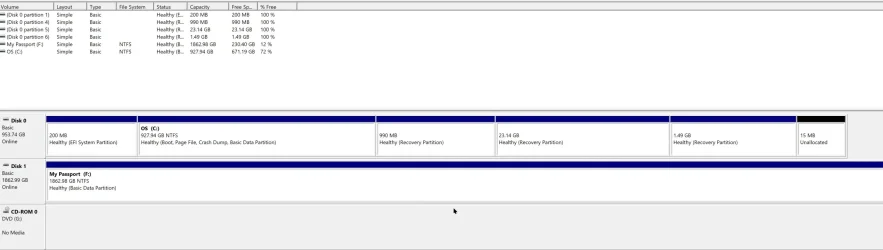
I have an odd problem that I have been unable to solve: In the process of installing a new computer, I found that I could not use my Macrium rescue program to restore the new machine. I had to call on my technician, who went through many gyrations that are far beyond me, but was able to use Macrium X to copy a known backup file to the new machine. Somehow, Macrium also copied the separate D:\ folders to the C:\ drive. These were all shown in a column of other entries, a column that I cannot find.
I knew this when, somehow I opened a file or whatever which showed the D:\ folders, one of which was the one I need to find the program update that I downloaded a short time ago. As my downloaded program is hiding in that non-existent location, obviously I can not run it. There is a download folder on he new computer, but it does not show any recent additions, so it is not the folder that I have to assume, without seeing it, is the one I need to access.
I don't even know if I have explained my dilemma in a fashion so that someone who knows how to access the D:\ Downloads folder. If more information, even possibly in a comprehensible manner, kindly let me know. i look forward to having all problems caused by the unusual process the tech, who is quite knowledgeable, had to resort to get me this far.
As is my usual method, please accept in advance and and all assistance that may be offered.
I have an odd problem that I have been unable to solve: In the process of installing a new computer, I found that I could not use my Macrium rescue program to restore the new machine. I had to call on my technician, who went through many gyrations that are far beyond me, but was able to use Macrium X to copy a known backup file to the new machine. Somehow, Macrium also copied the separate D:\ folders to the C:\ drive. These were all shown in a column of other entries, a column that I cannot find.
I knew this when, somehow I opened a file or whatever which showed the D:\ folders, one of which was the one I need to find the program update that I downloaded a short time ago. As my downloaded program is hiding in that non-existent location, obviously I can not run it. There is a download folder on he new computer, but it does not show any recent additions, so it is not the folder that I have to assume, without seeing it, is the one I need to access.
I don't even know if I have explained my dilemma in a fashion so that someone who knows how to access the D:\ Downloads folder. If more information, even possibly in a comprehensible manner, kindly let me know. i look forward to having all problems caused by the unusual process the tech, who is quite knowledgeable, had to resort to get me this far.
As is my usual method, please accept in advance and and all assistance that may be offered.
My Computer
At a glance
Windows 11 PRO 25H2 (OS Build 26200.6725)Intel Core i7-13700 2.10GHz32 GBNVidia GetForce RTX 4060 Ti
- OS
- Windows 11 PRO 25H2 (OS Build 26200.6725)
- Computer type
- PC/Desktop
- Manufacturer/Model
- Dell XPS 8960
- CPU
- Intel Core i7-13700 2.10GHz
- Motherboard
- Dell
- Memory
- 32 GB
- Graphics Card(s)
- NVidia GetForce RTX 4060 Ti
- Sound Card
- Realtec
- Monitor(s) Displays
- Dell U2722D
- Screen Resolution
- 2560 x 1440
- Hard Drives
- 1024GB SSD boot drive; 2TB Internal Mechanical Hard Disc; WD My Passport (1Tb) external; My Passport Ultra (2Tb) external
- Keyboard
- Dell
- Mouse
- MX Master 3
- Internet Speed
- 40Mbps (Bonded DSL)
- Browser
- Firefox (default)
- Antivirus
- Malwarebytes, MS Defender AV