
Lost internet connection after 11 Pro update. Moving on to Linux Mint


MAXcaliber

Member
Local time
10:58 AM
Posts
6
OS
Windows 11 Pro 64
Sorry, this is going to be a rant, and I hope you don't mind if I use ElevenForum to get it all out. I have seen a number of complaints of losing internet connection after Windows update, which also happened to me. In my case, Windows 11 Pro. I tried everything to restore Internet, including, troubleshooting through Windows, sfc /scannow, DISM (which apparently needs an Internet connection to work), tried DISM using ISO, tried repair install using ISO, checked to see if registry issues, installed latest Broadcom Ethernet driver, used an Ethernet USB adapter, various terminal commands to reset internet, etc., Safe Mode, clean boot before trying to install from ISO, unplugged peripherals, deleted migration folder in Windows folder, and tried to use a restore point, and probably a couple of other things that I'm forgetting--Nothing worked. I have pretty much lost all patience with Windows.

The only reason I will use Windows going forward is if I have no choice because I need certain apps for work. Otherwise, I want to ditch Windows altogether. Many years ago, I had a problem with Windows 7 where, after an update, it was pretty much gone--except I was able to get it up and running after 3 days of searching the internet on a laptop trying various potential fixes. Thanks to the many knowledgeable people out there who care enough to give simpletons like me information that can eventually restore Windows, I was able to get 7 up and running. But there has been two or three other times that I have run into major issues with Microsoft updates, which have now brought me to the point that I want to be completely done with Windows. A couple of years ago, another update literally deleted all contents in my Documents folder--and I mean deleted, as in unrecoverable. Maybe they were hidden somewhere. The point is, this should not happen. I know some may be inclined to think it had to be a virus, but google it and you will see others have had the same experience. I am tired of wondering if the next Windows update will do damage or simply make me once again have to work to try to get Windows working again. I thought I had a backup image because I do make image backups from time-to-time, but I can't find it. I have a couple of multi-terrabite hard drives where it might be--or maybe not. Regardless, Windows has worn me out.

I am now using latest Linux Mint with a clean install of Windows 11 Pro for those apps that I need for work on a daily basis. I decided to install Mint in dual boot along side the broken Windows 11 Pro. I can see the Windows files when I boot into Mint in a separate folder. Instead of using VMware or Virtualbox, I'm instead using WinBoat. So far, this virtualization app has been impressive. Overall, I think it is as good or better than Virtualbox. I have used VMware for a short period of time and I think I would still prefer WinBoat. If you ever want to go to Linux, I would recommend taking a look at WinBoat. I am not affiliated. I will now see which apps can work on Mint using Wine, PlayOnLinux, Bottles, and I may be CrossOver. Hopefully, I will be able to completely move on from Windows in the near future.
 

My Computer

System One

  • OS
    Windows 11 Pro 64
    Computer type
    PC/Desktop
    CPU
    i9-14900KF
    Motherboard
    ASUS PRIME Z790
    Memory
    32GB
    Graphics Card(s)
    NVIDIA 4070
    Screen Resolution
    4K
    Cooling
    Water
    Mouse
    Razer
    Other Info
    I have had no problem with the i9-14900KF processor, which has been subject to a lot of criticism due to failure. I run consistently between 23-30 degrees Celsius. The first thing I did after buying my computer was to update BIOS. I don't game, so I don't stress the i9 very much. I use my computer for office work. The i9 does a good job with multi-tasking.
Congratulations?
 

My Computers

System One System Two

  • OS
    Windows 11 Pro 25H2 Build 26200.8524
    Computer type
    PC/Desktop
    Manufacturer/Model
    Sin-built 2013
    CPU
    Intel(R) Core(TM) i7-4770K CPU @ 3.50GHz
    Motherboard
    ASUS ROG Maximus VI Formula
    Memory
    32.0 GB of I forget and the box is in storage.
    Graphics Card(s)
    Gigabyte nVidia GeForce GTX 1660 Super OC 6GB
    Sound Card
    Onboard thingy
    Monitor(s) Displays
    5 x LG 25MS500-B - 1 x 24MK430H-B - 1 x Wacom Pro 22" Touch Screen Tablet
    Screen Resolution
    All over the place
    Hard Drives
    Too many to list.
    OS on Samsung 1TB 870 QVO SATA
    PSU
    Silverstone 1500
    Case
    NZXT Phantom 820 Full-Tower Case
    Cooling
    Noctua NH-D15 Elite Class Dual Tower CPU Cooler / 6 x EziDIY 120mm / 2 x Corsair 140mm somethings / 1 x 140mm Thermaltake something / 2 x 200mm Corsair.
    Keyboard
    Corsair K95 / Logitech diNovo Edge Wireless
    Mouse
    Logitech: G402 / G502 / Mx Masters / Mx Air Cordless
    Internet Speed
    2000/500Mbps
    Browser
    All sorts
    Antivirus
    Kaspersky Premium
    Other Info
    ㅤㅤㅤㅤㅤㅤㅤㅤㅤㅤㅤㅤㅤㅤㅤㅤㅤㅤㅤㅤㅤㅤㅤㅤㅤㅤㅤㅤㅤㅤㅤㅤㅤㅤㅤㅤㅤㅤㅤㅤ⠀⠀⠀⠀⠀⠀⠀⠀⠀⠀
    TP-Link BE9300 WiFi 7 Bluetooth 5.4 (Archer TBE550E)
    TP-Link TX201 V1 2.5GB Lan

    Grandstream HT812 - VoIP
    ASUS DSL-AX82U - Mesh
    ASUS RT-AC68U - Mesh
    ASUS RT-BE88U Router

    Brother MFC-L2880DW Printer

    I’m on a horse.
  • Operating System
    Windows 11 Pro 25H2 Build 26200.8524
    Computer type
    Laptop
    Manufacturer/Model
    LENOVO Yoga 7 14IRL8 - 7i EVO OLED 14" Touchscreen i5 12 Core 16GB/512GB
    CPU
    Intel Core 12th Gen i5-1240P Processor (1.7 - 4.4GHz)
    Memory
    16GB LPDDR5 RAM
    Graphics card(s)
    Intel Iris Xe Graphics Processor
    Sound Card
    Optimized with Dolby Atmos®
    Screen Resolution
    QHD 2880 x 1800 OLED
    Hard Drives
    M.2 512GB
    Antivirus
    Defender / Malwarebytes
    Other Info
    …still on a horse.
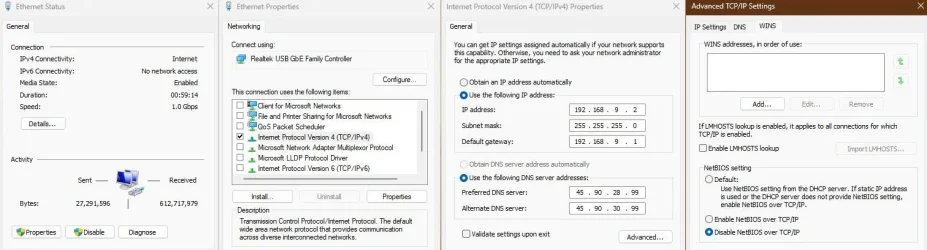
Windows loves to optimize everything, but for the most reliable connection, especially on WiFi (IPv6 kills it):

1. Setup static IP and DNS
2. Disable everything, but IPv4
3. TCP Optimizer

Code:
netsh int ipv6 isatap set state disabled
netsh int teredo set state disabled
netsh interface ipv6 6to4 set state state=disabled undoonstop=disabled
reg add "HKLM\Software\Policies\Microsoft\Windows\TCPIP\v6Transition" /v "6to4_State" /t REG_SZ /d "Disabled" /f
reg add "HKLM\Software\Policies\Microsoft\Windows\TCPIP\v6Transition" /v "ISATAP_State" /t REG_SZ /d "Disabled" /f
reg add "HKLM\Software\Policies\Microsoft\Windows\TCPIP\v6Transition" /v "Teredo_State" /t REG_SZ /d "Disabled" /f
reg add "HKLM\System\CurrentControlSet\Services\Tcpip6\Parameters" /v "DisabledComponents" /t REG_DWORD /d "255" /f
reg add "HKLM\System\CurrentControlSet\Services\Tcpip6\Parameters" /v "EnableICSIPv6" /t REG_DWORD /d "255" /f

capture_02262026_083653.webp

To get rock stable connection on ethernet (not WiFi), you can disable "Network Store Interface Service", but it has some trade offs.

If you ever want to go to Linux, I would recommend taking a look at WinBoat.
Thanks for the tip, I definitely do consider it, since Windows is getting worse and worse and I can not keep up. 😩
 

My Computer

System One

  • OS
    Home26H2Can
    Computer type
    PC/Desktop
    CPU
    AMD Ryzen 5 8600G (07/24)
    Motherboard
    ASROCK B650M-HDV/M.2 (07/24) BIOS 4.21 AGESA ComboAM5 1.3.0.1 (04/26)
    Memory
    2x32GB Kingston FURY DDR5 5600 MHz CL36 @5200 CL36 (07/24)
    Graphics Card(s)
    ASROCK Radeon RX 6600 Challenger D 8G @48FPS (08/24)
    Sound Card
    Creative Sound BlasterX AE-5 Plus (05/24)
    Monitor(s) Displays
    24" Philips 24M1N3200ZS/00 (05/24)
    Screen Resolution
    1920×1080@165Hz via DP1.4
    Hard Drives
    Kingston KC3000 NVMe 2TB (05/24)
    ADATA XPG GAMMIX S11 Pro 512GB (07/19)
    PSU
    Seasonic Core GM 550 Gold (04/24)
    Case
    Fractal Design Define 7 Mini with 3x Noctua NF-P14s/12@555rpm (04/24)
    Cooling
    Noctua NH-U12S with Noctua NF-P12 (04/24)
    Keyboard
    HP Pavilion Wired Keyboard 300 (07/24) + Rabalux 76017 Parker (01/24)
    Mouse
    Logitech M330 Silent Plus (01/26)
    Internet Speed
    500/100 Mbps via RouterOS (05/21) & TCP Optimizer
    Browser
    Edge, Brave for YouTube, LibreWolf for FB
    Antivirus
    NextDNS blocking 1/3 Traffic
    Other Info
    Phone: Motorola Moto G86 (02/26)
    Backup: Hasleo Backup Suite (PreOS)
    Headphones: Sennheiser RS170 (09/10)
    Chair: Huzaro Force 4.4 Grey Mesh (05/24)
    Notifier: Xiaomi Mi Band 9 Milanese (10/24)
    FlexCore USB-C 3.2 Gen 1 (M) to LAN (F) (08/25)
Hi TairikuOkami,
I did try a static IP and disabled IPv6 in Properties, and also manually assigned primary DNS to Google and tried Cloudflare, rebooted on each, and nothing. Thanks for reminding me. I figured I would forget a couple of other things I tried. Nothing worked. I also tried to delete Broadcom Ethernet in Device Manager and then just disable Ethernet and then tried a USB to Ethernet adapter, but nothing. The adapters do work because I have used another brand for a laptop and it works flawlessly, which also has Windows 11 Pro installed. The adapter did show in Device Manager and reported as working, yet, no Internet connection. I haven't update the laptop because I primarily use the i9-14900KF desktop you see in my specs. So, it didn't get the update attention like the desktop. Needless to say, I have paused updates in the laptop.

Another one I forgot to mention is that I uninstalled a couple of Windows updates--one the latest 25H2 update which seems to have started the Ethernet problems, and a security update, reported as causing problems, to see if it would trigger Ethernet to work. Uninstalling updates became one of the last resorts because I don't want to uninstall anything if I don't have to. I also uninstalled a few apps I thought might be causing a conflict, but nothing. The working Sager laptop does not have a couple of the updates that the desktop has. I used command line to install the security updated. Again, last resort because I didn't want to uninstall system updates which could further complicate things.
 

My Computer

System One

  • OS
    Windows 11 Pro 64
    Computer type
    PC/Desktop
    CPU
    i9-14900KF
    Motherboard
    ASUS PRIME Z790
    Memory
    32GB
    Graphics Card(s)
    NVIDIA 4070
    Screen Resolution
    4K
    Cooling
    Water
    Mouse
    Razer
    Other Info
    I have had no problem with the i9-14900KF processor, which has been subject to a lot of criticism due to failure. I run consistently between 23-30 degrees Celsius. The first thing I did after buying my computer was to update BIOS. I don't game, so I don't stress the i9 very much. I use my computer for office work. The i9 does a good job with multi-tasking.
It seems like rather than diagnosing the problem and fixing it, you just threw random things at it. When people do that, it almost invariably
makes the problem worse. If you approach problems the same way in Linux or macOS or whatever, you’re going to have a bad time there as well.

Also, disabling IPv6 is a horrible idea in Windows.
 

My Computer

System One

  • OS
    Windows 11 Pro 25H2
    Computer type
    PC/Desktop
    Manufacturer/Model
    Intel NUC12WSHi7
    CPU
    12th Gen Core i7-1260P
    Motherboard
    NUC12WSBi7
    Memory
    64 GB Micron PC4-25600
    Graphics Card(s)
    Intel Iris Xe Graphics
    Sound Card
    on-board Realtek HD Audio
    Monitor(s) Displays
    Dell U3219Q
    Screen Resolution
    3840 x 2160
    Hard Drives
    Samsung SSD 990 PRO 1TB
    Crucial MX500 2 TB
    Antivirus
    Microsoft Defender
It seems like rather than diagnosing the problem and fixing it, you just threw random things at it. When people do that, it almost invariably
makes the problem worse. If you approach problems the same way in Linux or macOS or whatever, you’re going to have a bad time there as well.

Also, disabling IPv6 is a horrible idea in Windows.
What I did is what 99% of people do when it's unclear why a Windows problem exists. I know about log files, but most do not deal with Windows problems by going to log files. And going to log files does not guarantee a fix. I see posts in forums where log files can lead to an understanding of the situation but not provide sufficient information to lead to a fix. But more to the point, I wish Microsoft would fix the problems with its updates before unleashing them, so we, the end users, don't have to suffer through the often-devastating effects they inflict. In fact, the 25H2 update, which I suspected caused the problem, is being cited as causing Wi-Fi and other network issues. There is nothing wrong with using Windows troubleshooting and trying sfc /scannow, DISM, etc. Also, when I attempted to do a repair using an ISO, Windows provided error codes and text information indicating what might be the problem(s). Accordingly, I went to forums to see what was being said about the error message(s)/code(s) and took advice to see if I could fix the problem--which is what 99.9% of home users do when trying to diagnose a Windows problem and trying to determine a fix. So, your criticisms of my efforts are not just aimed at me, they are aimed at pretty much everyone. Nice One! So, Windows was doing some diagnosing as I was attempting to fix. How many times have you suggested or have seen it suggested to do a clean install of Windows (regardless of version) due to issues that are not being solved. I didn't just throw "random things" at the problem. One of the core problems with Windows is that there are too many "random" problems that are sometimes difficult to fix, if at all. By the way, I disabled IPv6 because it was suggested as a potential means to determine what could be causing network failure. It is completely acceptable to try unusual methods to try to determine where a problem exists. In fact, due to Windows unpredictability and endless bugs, end users are often put in a position where they are willing to try anything to get Windows back up and running. Sometimes the fix is unexpected or something discovered rather than arrived at by a logical step-by-step process.

As far as Linux, I have been using Linux Mint on a laptop for about 3 years for accessing Office 365 online, particularly Outlook, during which, I have updated and upgraded it regularly. Over that time, I have never experienced one crash or one problem caused by a Mint update or upgrade. And Mint updates are consistent, even more updates than Windows. My first experience with Linux was back in 1998 when I purchased it from a CompUSA store for about $45. Then, it was sold retail in a box just link Windows. Over the years I have used Linux off and on, but I always stuck with Windows as my main operating system--for obvious reasons. I get it that there are die-hard Microsoft fans and Windows users. There is nothing wrong with it! But I'm wondering how many more times I have to get slapped around by Windows updates that cause nothing but stress and aggravation before I take a serious look at Linux as my main operating system. That time is here. It’s not because I hate Microsoft or hate Windows, it’s because I no longer have the patience to deal with Windows issues, some of which break the operating system.
 

My Computer

System One

  • OS
    Windows 11 Pro 64
    Computer type
    PC/Desktop
    CPU
    i9-14900KF
    Motherboard
    ASUS PRIME Z790
    Memory
    32GB
    Graphics Card(s)
    NVIDIA 4070
    Screen Resolution
    4K
    Cooling
    Water
    Mouse
    Razer
    Other Info
    I have had no problem with the i9-14900KF processor, which has been subject to a lot of criticism due to failure. I run consistently between 23-30 degrees Celsius. The first thing I did after buying my computer was to update BIOS. I don't game, so I don't stress the i9 very much. I use my computer for office work. The i9 does a good job with multi-tasking.
What entries are there in Reliability History ?
To access it,in the Search box start typing ---reliability ---
 

My Computer

System One

  • OS
    win 10
    Computer type
    PC/Desktop
    Manufacturer/Model
    home built
    CPU
    amd ryzen 5-2600
    Motherboard
    gigabyte b450m-ds3h
    Memory
    ng skill sniper x 16gb
    Graphics Card(s)
    nvidea gtx 1050
    Monitor(s) Displays
    benq fp 92
    Hard Drives
    samsung 860 evo 500gb m2 ssd
    PSU
    antec ea550g
    Case
    nzxt noctis 450
    Browser
    edge
No way am I reading that lengthy diatribe @MAXcaliber . Good luck with Linux.
 

My Computer

System One

  • OS
    Windows 11 Pro 25H2
    Computer type
    PC/Desktop
    Manufacturer/Model
    Intel NUC12WSHi7
    CPU
    12th Gen Core i7-1260P
    Motherboard
    NUC12WSBi7
    Memory
    64 GB Micron PC4-25600
    Graphics Card(s)
    Intel Iris Xe Graphics
    Sound Card
    on-board Realtek HD Audio
    Monitor(s) Displays
    Dell U3219Q
    Screen Resolution
    3840 x 2160
    Hard Drives
    Samsung SSD 990 PRO 1TB
    Crucial MX500 2 TB
    Antivirus
    Microsoft Defender

My Computers

System One System Two

  • OS
    Windows 11 Pro 25H2 Build 26200.8524
    Computer type
    PC/Desktop
    Manufacturer/Model
    Sin-built 2013
    CPU
    Intel(R) Core(TM) i7-4770K CPU @ 3.50GHz
    Motherboard
    ASUS ROG Maximus VI Formula
    Memory
    32.0 GB of I forget and the box is in storage.
    Graphics Card(s)
    Gigabyte nVidia GeForce GTX 1660 Super OC 6GB
    Sound Card
    Onboard thingy
    Monitor(s) Displays
    5 x LG 25MS500-B - 1 x 24MK430H-B - 1 x Wacom Pro 22" Touch Screen Tablet
    Screen Resolution
    All over the place
    Hard Drives
    Too many to list.
    OS on Samsung 1TB 870 QVO SATA
    PSU
    Silverstone 1500
    Case
    NZXT Phantom 820 Full-Tower Case
    Cooling
    Noctua NH-D15 Elite Class Dual Tower CPU Cooler / 6 x EziDIY 120mm / 2 x Corsair 140mm somethings / 1 x 140mm Thermaltake something / 2 x 200mm Corsair.
    Keyboard
    Corsair K95 / Logitech diNovo Edge Wireless
    Mouse
    Logitech: G402 / G502 / Mx Masters / Mx Air Cordless
    Internet Speed
    2000/500Mbps
    Browser
    All sorts
    Antivirus
    Kaspersky Premium
    Other Info
    ㅤㅤㅤㅤㅤㅤㅤㅤㅤㅤㅤㅤㅤㅤㅤㅤㅤㅤㅤㅤㅤㅤㅤㅤㅤㅤㅤㅤㅤㅤㅤㅤㅤㅤㅤㅤㅤㅤㅤㅤ⠀⠀⠀⠀⠀⠀⠀⠀⠀⠀
    TP-Link BE9300 WiFi 7 Bluetooth 5.4 (Archer TBE550E)
    TP-Link TX201 V1 2.5GB Lan

    Grandstream HT812 - VoIP
    ASUS DSL-AX82U - Mesh
    ASUS RT-AC68U - Mesh
    ASUS RT-BE88U Router

    Brother MFC-L2880DW Printer

    I’m on a horse.
  • Operating System
    Windows 11 Pro 25H2 Build 26200.8524
    Computer type
    Laptop
    Manufacturer/Model
    LENOVO Yoga 7 14IRL8 - 7i EVO OLED 14" Touchscreen i5 12 Core 16GB/512GB
    CPU
    Intel Core 12th Gen i5-1240P Processor (1.7 - 4.4GHz)
    Memory
    16GB LPDDR5 RAM
    Graphics card(s)
    Intel Iris Xe Graphics Processor
    Sound Card
    Optimized with Dolby Atmos®
    Screen Resolution
    QHD 2880 x 1800 OLED
    Hard Drives
    M.2 512GB
    Antivirus
    Defender / Malwarebytes
    Other Info
    …still on a horse.
TED talks have gone down hill since I was last at one.
Well, TED did teach me both the proper way to tie my shoes and to dry my hands, so there's that.
 

My Computer

System One

  • OS
    Windows XP (Stable, iconic) 7/8.1/10/11
    Computer type
    PC/Desktop
    Manufacturer/Model
    Alienware PC
    CPU
    Intel i7 4790K
    Motherboard
    ASROCK Z97 EXTREME4
    Memory
    32GB DDR3 1600 MHz
    Graphics Card(s)
    ATI Radeon HD 7770 2GB GDDR5
    Sound Card
    Onboard
    Monitor(s) Displays
    SAMSUNG UE57 Series 28-Inch 4K UHD
    Hard Drives
    SAMSUNG 970 EVO PLUS M.2
    PSU
    EVGA 850 watt
    Case
    Alienware Area 51 Black Tower Case
    Keyboard
    HyperX - Alloy Elite 2 Mechanical Gaming Keyboard.
    Mouse
    Microsoft Wireless
    Internet Speed
    1.2 GHz
    Browser
    Chrome..Edge..Firefox
The funny thing to me is when you have a problem with any linux distro, good luck finding a search result online that helps you solve the problem. And if you do, you better understand what they are saying, because if you dont you can really mess something up.

At least with windows there are multiple avenues to find or fix something.

It does suck to have issues for sure. I hope mint treats you well.

I will say I personally have not had windows "break" since like windows xp before service pack 2 existed.

Even during my career in IT so far, I never had a windows machine just simply be completely broken where it wont boot or something because of a windows update. Some problems have certainly come around with windows updates for sure, but nothing so drastic that it wasn't easily fixed. No update mechanism is perfect.

I will say, the more you tinker with windows with 3rd party software the more likely it will break. That is just a fact. A lot of the people I have seen over the years that have constant issues are using stuff like norton antivirus, third party tools like ccleaner, tools that alter windows in some way etc.

Windows is already a ship with duct tape keeping it afloat, adding tweaks and things doesn't surprise me that they add a hole or two for water to get in.

To me, it honestly is impressive windows works as well as it does, considering the backwards compatibility, third party drivers and everything else.

Mac os, Linux etc were designed from the ground up to be secure and stable by default, as well as being better implemented. Windows has had to constantly fix the ship as it sails.

It also fully depends on your need for a computer, what are you doing on it? Most people would be fine with an ipad or chromebook. A lot of them don't need a full fledged operating system like windows or linux.

Just my 2 cents.
 
Last edited:

My Computers

System One System Two

  • OS
    Windows 11 Pro
    Computer type
    PC/Desktop
    Manufacturer/Model
    Custom Built
    CPU
    Ryzen 7 5700 X3D
    Motherboard
    MSI MPG B550 GAMING PLUS
    Memory
    64 GB DDR4 3600mhz Gskill Ripjaws V
    Graphics Card(s)
    RTX 4070 Super , 12GB VRAM Asus EVO Overclock
    Monitor(s) Displays
    Gigabyte M27Q (rev. 2.0) 2560 x 1440 @ 170hz HDR
    Hard Drives
    2TB Samsung nvme ssd
    4TB Western Digital nvme ssd
    PSU
    CORSAIR RMx SHIFT Series™ RM750x 80 PLUS Gold Fully Modular ATX Power Supply
    Case
    CORSAIR 3500X ARGB Mid-Tower ATX PC Case – Black
    Cooling
    ID-COOLING FROSTFLOW X 240 CPU Water Cooler
    Keyboard
    Logitech G213
    Mouse
    Logitech G203
    Internet Speed
    1.2gbps Fiber 😎
  • Operating System
    Chrome OS
    Computer type
    Laptop
    Manufacturer/Model
    HP Chromebook
    CPU
    Intel Pentium Quad Core
    Memory
    4GB LPDDR4
    Monitor(s) Displays
    14 Inch HD SVA anti glare micro edge display
    Hard Drives
    64 GB emmc
@andrew129260

Linux does have ability to fix boot problems and assorted other issues including reinstalling system files from command line and USB. I don’t know how available information is to troubleshoot Linux because I have never experienced a need to do so.

I agree that the more apps installed in Windows, particularly cleaner apps, or any app that tinkers or competes with Windows native programming increases chances of major problems, which is why I decided to uninstall a few apps to see if they were the culprit in breaking Windows for me. Such as, apps that replace Windows Start menu or background images. But after uninstalling, no difference. I have had problems with Windows updates that are unexplainable as to how something I installed could have caused the problem. So, problems with Windows updates are caused by Microsoft, then one should be cautious when it comes third-party apps.

As far as the 25H2 update, which is reportedly causing WiFi and general network problems, and stability issues, reports indicate problems are widespread, which is certainly not the first time an update created widespread problems. Given the amount of crap (a/k/a bloatware) Microsoft has installed in Windows, I agree it is impressive Microsoft somehow keeps it running. I think they are geniuses for being able to make Windows 11 a functioning operating system. I mean, seriously. Good overall job with making Windows work quite well. And on the flip side, Linux Mint has little to no bloat, no integrated spyware (that I know of), or other assorted crap that makes it susceptible to catastrophic malfunctions. In other words, less can be better. Btw, one reason I’m now more inclined to move on from Windows is Microsoft’s persistent monitoring and/or desire to monitor everything I do with its operating system. It’s not that I’m involved in illicit activity, but I would think it offends most that some corporation essentially does everything it can to monitor and log everything end users do. The constant update issues is the main problem for me, but then the intrusive and scummy manner Microsoft monitors and gathers personal information is just another good reason to say goodbye to Microsoft—at least, dump their operating system—hopefully completely in the near future.

Actually, those responsible over the years for Linux (Mint) have had a deliberate strategy of not rolling out quick changes in order to protect the stability of the operating system, which is why it seems to never change. Visually, it’s generally the same look and feel today as it was 20 years ago. But again, less can be better when it comes to less aggravation. From what I have read and seen on YouTube, people are turning away from Windows.

Below is a quote found on Google:
Windows has lost over 15% of its userbase over the last decade, with its global desktop market share dropping from over 86% in 2015 to around 67%–70% by early 2026. While still dominant, Windows has faced a long-term decline, losing share to macOS, Linux, and the rise of mobile-first computing.
This is a good thing, in my opinion.
 

My Computer

System One

  • OS
    Windows 11 Pro 64
    Computer type
    PC/Desktop
    CPU
    i9-14900KF
    Motherboard
    ASUS PRIME Z790
    Memory
    32GB
    Graphics Card(s)
    NVIDIA 4070
    Screen Resolution
    4K
    Cooling
    Water
    Mouse
    Razer
    Other Info
    I have had no problem with the i9-14900KF processor, which has been subject to a lot of criticism due to failure. I run consistently between 23-30 degrees Celsius. The first thing I did after buying my computer was to update BIOS. I don't game, so I don't stress the i9 very much. I use my computer for office work. The i9 does a good job with multi-tasking.
Reference Post 7.
What results ?
 

My Computer

System One

  • OS
    win 10
    Computer type
    PC/Desktop
    Manufacturer/Model
    home built
    CPU
    amd ryzen 5-2600
    Motherboard
    gigabyte b450m-ds3h
    Memory
    ng skill sniper x 16gb
    Graphics Card(s)
    nvidea gtx 1050
    Monitor(s) Displays
    benq fp 92
    Hard Drives
    samsung 860 evo 500gb m2 ssd
    PSU
    antec ea550g
    Case
    nzxt noctis 450
    Browser
    edge
I will say, the more you tinker with windows with 3rd party software the more likely it will break. That is just a fact. A lot of the people I have seen over the years that have constant issues are using stuff like norton antivirus, third party tools like ccleaner, tools that alter windows in some way etc.

Windows is already a ship with duct tape keeping it afloat, adding tweaks and things doesn't surprise me that they add a hole or two for water to get in.
To me, personally, it's mostly about knowing what works and what doesn't. Finding all the right places to learn and to build on experience is always the key. The Windows userbase is big enough to make that possible. The only real downside is that there also exists a lot of outdated and incomplete/faulty information out there. Trial-and-error still plays a very important role. As does learning to recognize misinformation based on what one already knows. Doing a lot of fact-checking, and doing it properly. To verify that one's conceptions are still correct, and to build rigorous strategies over time while also re-evaluating these strategies when re-evaluation may be necessary.

Yes, of course bad software often tends to break various stuff more easily than Botch Tuesdays. But no, not all third-party software is evil. I know plenty of third-party software applications, tools, and utilities that actually helped me save my bacon on more than several occasions.

Without this particular type of software, I probably wouldn't be on Windows right now. And this also includes tweak/maintenance software to "tinker" like Open-Shell, ExplorerPatcher, Windhawk, portable MiniTool Partition Wizard Free, Driver Store Explorer (RAPR), Display Driver Uninstaller (DDU), Better ClearType Tuner, OfflineReg, Ventoy used together with the bootable Rescue Media ISO of Acronis True Image, rEFInd to chainload iPXE with a custom script, etc., just to name only a few examples.

I have a bit of a knack for the kind of stuff that prevents me from getting in trouble on Windows. You don't like the fact that File Explorer with tabs bugs keeps giving you a bad headache? Then apply the tweak that brings back the classic File Explorer of Windows 10. Problem solved. You don't like the bugs that plague the Windows 11 taskbar? Use ExplorerPatcher for that one too. Two problems solved. I could go on, but I think I already made my point.
 

My Computers

System One System Two

  • OS
    11 Home
    Computer type
    Laptop
    Manufacturer/Model
    Asus TUF Gaming F16 (2024)
    CPU
    i7 13650HX
    Memory
    16GB DDR5
    Graphics Card(s)
    GeForce RTX 4060 Mobile
    Sound Card
    Eastern Electric MiniMax DAC Supreme; Emotiva UMC-200; Astell & Kern AK240
    Monitor(s) Displays
    Sony Bravia XR-55X90J
    Screen Resolution
    3840×2160
    Hard Drives
    512GB SSD internal
    37TB external
    PSU
    Li-ion
    Cooling
    2× Arc Flow Fans, 4× exhaust vents, 5× heatpipes
    Keyboard
    Logitech K800
    Mouse
    Logitech G402
    Internet Speed
    30Mbit/s up, 500Mbit/s down
    Browser
    FF
    Antivirus
    What's an antivirus?
  • Operating System
    11 Home
    Computer type
    Laptop
    Manufacturer/Model
    Medion S15450
    CPU
    i5 1135G7
    Memory
    16GB DDR4
    Graphics card(s)
    Intel Iris Xe
    Sound Card
    Eastern Electric MiniMax DAC Supreme; Emotiva UMC-200; Astell & Kern AK240
    Monitor(s) Displays
    Sony Bravia XR-55X90J
    Screen Resolution
    3840×2160
    Hard Drives
    2TB SSD internal
    37TB external
    PSU
    Li-ion
    Keyboard
    Logitech K800
    Mouse
    Logitech G402
    Internet Speed
    30Mbit/s up, 500Mbit/s down
    Browser
    FF
Reference Post 7.
What results ?
Sorry, but I'm not able to boot into Windows at this point. I will see if it can be salvaged by using a USB to repair. Thank you for the information though. I would like to salvage Windows, but not sure it's going to happen.
 

My Computer

System One

  • OS
    Windows 11 Pro 64
    Computer type
    PC/Desktop
    CPU
    i9-14900KF
    Motherboard
    ASUS PRIME Z790
    Memory
    32GB
    Graphics Card(s)
    NVIDIA 4070
    Screen Resolution
    4K
    Cooling
    Water
    Mouse
    Razer
    Other Info
    I have had no problem with the i9-14900KF processor, which has been subject to a lot of criticism due to failure. I run consistently between 23-30 degrees Celsius. The first thing I did after buying my computer was to update BIOS. I don't game, so I don't stress the i9 very much. I use my computer for office work. The i9 does a good job with multi-tasking.
Just to add one more fix to the list:

If your wired network is suddenly not working and you have tried everything else, check to see if the adapter
is still showing up in device manager. Regardless, the oddball fix is to pull the power cord, pop out the cmos battery,
make sure it is good, hold the power button down for 20sec, pop a good battery back in and boot it up.
Check that the adapter is now showing in device manager. Install a driver if needed.

This has fixed more than one "no wired internet" situation.
 

My Computer

System One

  • OS
    W11p
    Computer type
    PC/Desktop
    Manufacturer/Model
    Dell 7010
    CPU
    i5 3470
    Memory
    8GB
    Graphics Card(s)
    integrated
    Hard Drives
    512GB SSD
Just to add one more fix to the list:

If your wired network is suddenly not working and you have tried everything else, check to see if the adapter
is still showing up in device manager. Regardless, the oddball fix is to pull the power cord, pop out the cmos battery,
make sure it is good, hold the power button down for 20sec, pop a good battery back in and boot it up.
Check that the adapter is now showing in device manager. Install a driver if needed.

This has fixed more than one "no wired internet" situation.
I might just give this a shot... My wired also stopped a few updates ago... It should be working but shows nothing plugged in.. I went to wifi after a few hours... Than added USB to cat 6..
 

My Computer

System One

  • OS
    windows 11
    Computer type
    PC/Desktop
    Manufacturer/Model
    home
    CPU
    AMD Ryzen 9 Granite Ridge 4nm Technology
    Motherboard
    ASUSTeK COMPUTER INC. ROG STRIX X870E-E GAMING WIFI Rev 1.xx
    Memory
    32.0GB Dual-Channel @ 2999MHz (36-44-44-96)
    Graphics Card(s)
    VX2753 SERIES (1920x1080@60Hz) 4095MB NVIDIA GeForce GTX 970 (EVGA)
    Sound Card
    NVIDIA High Definition Audio
    Monitor(s) Displays
    AOC u2879g6
    Screen Resolution
    Current Resolution 3840x2160
    Hard Drives
    7452GB Western Digital WDC WD80EFZX-68UW8N0 (SATA ) 31 °C
    7452GB Seagate ST8000VN004-3CP101 (SATA ) 29 °C
    223GB INTEL SSDSC2CW240A3 (SATA (SSD))
    223GB INTEL SSDSC2CW240A (SATA (SSD))
    476GB Samsung SSD 950 PRO 512GB (Unknown (SSD))
    1863GB Western Digital WDC WD20EARS-00MVWB0 (SATA ) 25 °C
    931GB Seagate ST31000528AS (SATA ) 27 °C
    11176GB Seagate ST12000VN0007-2GS116 (SATA ) 30 °C
    PSU
    850
    Internet Speed
    1100
Back
Top Bottom




