lower case letter problem


JAK

Active member
Member
Local time
12:55 AM
Posts
203
OS
Windows 11
difficult to explain
when i change a upper case letter to lower case it automaticaaly reverts to upper case

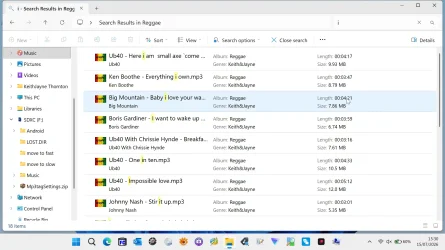
another strange possible related issue is, sometimes i search for a track it will show a lower case i, but then when i open the folder normally it shows an upper case I
 
Last edited:

My Computer My Computer

At a glance

Windows 11Ryzen 78+16 total 24GB
OS
Windows 11
Computer type
Laptop
Manufacturer/Model
Asus
CPU
Ryzen 7
Memory
8+16 total 24GB
Other Info
Asus Vivobook 15 M513U
In one application if so which, or is this happening everything? With the lack of information we can't really provide any help save for random guessing
 

My Computer My Computer

At a glance

Linux Mint
OS
Linux Mint
Computer type
Laptop
Manufacturer/Model
System76 Lemur Pro
windows explorer
 

My Computer My Computer

At a glance

Windows 11Ryzen 78+16 total 24GB
OS
Windows 11
Computer type
Laptop
Manufacturer/Model
Asus
CPU
Ryzen 7
Memory
8+16 total 24GB
Other Info
Asus Vivobook 15 M513U
So what if any third party utilities do you have installed? This isn't expected behavior nor even an option in a vanilla install of Windows 11
 

My Computer My Computer

At a glance

Linux Mint
OS
Linux Mint
Computer type
Laptop
Manufacturer/Model
System76 Lemur Pro
Have apps installed, but only using explorer

when i search for lower case i, i get some tracks with lower case i, but when i open the folder normally they show as upper case I as they should be e.g. the Big Mountain track
Snapshot 2026-07-15 15.30.59 not search.webp
Snapshot 2026-07-15 15.30.31.webp
 
Last edited:

My Computer My Computer

At a glance

Windows 11Ryzen 78+16 total 24GB
OS
Windows 11
Computer type
Laptop
Manufacturer/Model
Asus
CPU
Ryzen 7
Memory
8+16 total 24GB
Other Info
Asus Vivobook 15 M513U
What I do if this happens (and it does): -
Say the filename is FOOTBALL and it will not change to lower case Football.
I think it is a Windows bug that sees Football the same as FOOTBALL so it doesn't recognise the name change.
First rename the file in lower case but add a character (or 2). Say FootballF1.
Because it is a different file name it should retain the lower case.
Then rename it again back to Football (without the additional characters) and it should retain lowercase.
 

My Computers My Computers

  • At a glance

    Windows 11 ProAMD Ryzen 9 8945HS32GB DDR5 SO-DIMMIntegrated AMD Radeon 780M (4.00 GHz)
    OS
    Windows 11 Pro
    Computer type
    PC/Desktop
    Manufacturer/Model
    GMKtec K11
    CPU
    AMD Ryzen 9 8945HS
    Memory
    32GB DDR5 SO-DIMM
    Graphics Card(s)
    Integrated AMD Radeon 780M (4.00 GHz)
    Monitor(s) Displays
    Benq 2250HM
    Screen Resolution
    1920 x 1080
    Hard Drives
    1 TB PCIe 4.0 NVMe M.2 SSD
    Antivirus
    Bit Defender Total Security
  • At a glance

    Windows 11 HomeIntel® Core™ Ultra 7 - 255H processor16 GB LPDDR5 SDRAMIntel Arc 140T onboard graphics
    Operating System
    Windows 11 Home
    Computer type
    Laptop
    Manufacturer/Model
    ASUS Zenbook 14 OLED 14" Laptop - UX3405CA-QL192W
    CPU
    Intel® Core™ Ultra 7 - 255H processor
    Memory
    16 GB LPDDR5 SDRAM
    Graphics card(s)
    Intel Arc 140T onboard graphics
    Screen Resolution
    1920 x 1200 (16:10 WUXGA resolution) OLED Touchscreen
    Hard Drives
    1TB SSD
    Antivirus
    Bit Defender Total Security
Seems like a bug in search. I can reproduce it.
1784127188899.webp


Search is lower casing the i in the results
1784127204399.webp
 

My Computer My Computer

At a glance

Linux Mint
OS
Linux Mint
Computer type
Laptop
Manufacturer/Model
System76 Lemur Pro
Back
Top Bottom