Macrium Reflect - Running two Backup Definition Files one after the other


AlexL

New member
Local time
1:38 AM
Posts
10
OS
Windows 10
Macrium Reflect 7.2 / Windows 10

I start my two Backup definition files (A.xml, B.xml) manually, one after the other.
How can I automate/simplify this: make Reflect run them successively - start B.xml when the first finishes ?

TIA

Alex
 
Windows Build/Version
Windows 10 / 22H2

My Computer My Computer

At a glance

Windows 10
OS
Windows 10
Computer type
PC/Desktop
Manufacturer/Model
Acer Veriton
Macrium Reflect 7.2 / Windows 10

I start my two Backup definition files (A.xml, B.xml) manually, one after the other.
How can I automate/simplify this: make Reflect run them successively - start B.xml when the first finishes ?

TIA

Alex
This is not directly possible (people have asked similar in Macrium Forum).

What you can possibly do is set up a batch file to execute a backup (use call command so focus returns to batch file), then put a time delay in batch file for time it takes to first backup (plus a margin), then execute second backup.
 

My Computer My Computer

At a glance

Windows 11 Pro + Win11 Canary VM.I9 13th gen i9-13900H 2.60 GHZ16 GB solderedIntegrated Intel Iris XE
OS
Windows 11 Pro + Win11 Canary VM.
Computer type
Laptop
Manufacturer/Model
ASUS Zenbook 14
CPU
I9 13th gen i9-13900H 2.60 GHZ
Motherboard
Yep, Laptop has one.
Memory
16 GB soldered
Graphics Card(s)
Integrated Intel Iris XE
Sound Card
Realtek built in
Monitor(s) Displays
laptop OLED screen
Screen Resolution
2880x1800 touchscreen
Hard Drives
1 TB NVME SSD (only weakness is only one slot)
PSU
Internal + 65W thunderbolt USB4 charger
Case
Yep, got one
Cooling
Stella Artois (UK pint cans - 568 ml) - extra cost.
Keyboard
Built in UK keybd
Mouse
Bluetooth , wireless dongled, wired
Internet Speed
900 mbs (ethernet), wifi 6 typical 350-450 mb/s both up and down
Browser
Edge
Antivirus
Defender
Other Info
TPM 2.0, 2xUSB4 thunderbolt, 1xUsb3 (usb a), 1xUsb-c, hdmi out, 3.5 mm audio out/in combo, ASUS backlit trackpad (inc. switchable number pad)

Macrium Reflect Home V8
Office 365 Family (6 users each 1TB onedrive space)
Hyper-V (a vm runs almost as fast as my older laptop)
Perhaps, if you tell us what you are tring to achieve, you'd get more advice!
 

My Computers My Computers

  • At a glance

    Windows 11 Pro 25H2 26200.8655AMD Ryzen 7 5825U with Radeon Graphics16GB
    OS
    Windows 11 Pro 25H2 26200.8655
    Computer type
    Laptop
    Manufacturer/Model
    Acemagic LX15PRO
    CPU
    AMD Ryzen 7 5825U with Radeon Graphics
    Memory
    16GB
    Screen Resolution
    1920 x 1080
    Hard Drives
    SSD 2TB
    Internet Speed
    30 Mbps
    Browser
    Brave
    Antivirus
    Webroot Secure Anywhere
    Other Info
    System 3

    Acer Swift SF114-34 laptop
    OS Windows 11 Pro 26200.8524
    CPU Pentium Silver N6000
    RAM 4GB
    SSD Samsung 970 EVO Plus SSD 2TB (an upgrade)
  • At a glance

    Windows 11 Pro 23H2 22631.2506Atom N450 1.66GHz2GB
    Operating System
    Windows 11 Pro 23H2 22631.2506
    Computer type
    Laptop
    Manufacturer/Model
    HP Mini 210-1090NR PC (bought in late 2009!)
    CPU
    Atom N450 1.66GHz
    Memory
    2GB
    Browser
    Brave
    Antivirus
    Webroot
This is not directly possible (people have asked similar in Macrium Forum).

What you can possibly do is set up a batch file to execute a backup (use call command so focus returns to batch file), then put a time delay in batch file for time it takes to first backup (plus a margin), then execute second backup.
Thank you !
 

My Computer My Computer

At a glance

Windows 10
OS
Windows 10
Computer type
PC/Desktop
Manufacturer/Model
Acer Veriton
Perhaps, if you tell us what you are tring to achieve, you'd get more advice!
I am imaging my HDDs (A.xml) and my SSD (B.xml). Now I am waiting for the first to finish before starting the second one. I would like the start a process which does this unattended.
 

My Computer My Computer

At a glance

Windows 10
OS
Windows 10
Computer type
PC/Desktop
Manufacturer/Model
Acer Veriton
You can just use the Macrium scheduler, allowing sufficient time between them for the first to finish. I use version 8.1 and have to assume that version 7.2 also has scheduled backups.
 

My Computers My Computers

  • At a glance

    Windows 11 Proi716Gb
    OS
    Windows 11 Pro
    Computer type
    Laptop
    Manufacturer/Model
    Lafite 14
    CPU
    i7
    Memory
    16Gb
    Internet Speed
    150Mbps/39Mbps
    Browser
    Firefox
    Antivirus
    Defender
  • At a glance

    Win 11 Proi58Gb
    Operating System
    Win 11 Pro
    Computer type
    PC/Desktop
    Manufacturer/Model
    PC Specialist
    CPU
    i5
    Memory
    8Gb
    Internet Speed
    150Mbps/39Mbps
    Browser
    Firefox
    Antivirus
    Defender
    Other Info
    Incompatible Win 10 Pro PC upgraded to Win 11 Pro
You can just use the Macrium scheduler, allowing sufficient time between them for the first to finish. I use version 8.1 and have to assume that version 7.2 also has scheduled backups.
Thanks for your help !

Yes, this is a possibility. However:
- I prefer starting the imaging manually, at the convenient moment, and
- the first imaging takes variable times (depending on changing made to the disks from the last imaging
 

My Computer My Computer

At a glance

Windows 10
OS
Windows 10
Computer type
PC/Desktop
Manufacturer/Model
Acer Veriton
Of course this is possible! Here is how I do it....

In my case I run a disk image backup after which I want to run a file and folder backup.

I schedule the image backup for 8:00 AM and the file and folder backup for 8:01 AM. Even if the image backup takes an hour (such as when a new base image is created), the file and folder backup gets queued since the system is still performing the image backup at 8:01 AM. As a result, the file and folder backup starts right after the image backup completes.

By doing it this way, I have no need to know how long the first backup will take, nor do I care :-)
 

My Computers My Computers

  • At a glance

    Win11 Pro 25H2 (RTM+)Intel i7-14650HX32 GBNo GPU - Built-in Intel Graphics
    OS
    Win11 Pro 25H2 (RTM+)
    Computer type
    PC/Desktop
    Manufacturer/Model
    Acemagic
    CPU
    Intel i7-14650HX
    Memory
    32 GB
    Graphics Card(s)
    No GPU - Built-in Intel Graphics
    Sound Card
    Integrated
    Monitor(s) Displays
    Varies as machine will often be moved to locations with different monitors
    Screen Resolution
    Varies
    Hard Drives
    1 x 1TB Gen 4 NVMe SSD
    PSU
    120W Power Brick
    Keyboard
    Corsair K70 Max RGB Magnetic Keyboard
    Mouse
    Logitech MX Master 3
    Internet Speed
    1Gb Up / 1 Gb Down
    Browser
    Edge
    Antivirus
    Windows Defender
  • At a glance

    Win11 Pro 25H2 (RTM+)Intel i7-1255U16 GBIntel Iris Xe Graphics
    Operating System
    Win11 Pro 25H2 (RTM+)
    Computer type
    Laptop
    Manufacturer/Model
    Lenovo ThinkBook 13x Gen 2
    CPU
    Intel i7-1255U
    Memory
    16 GB
    Graphics card(s)
    Intel Iris Xe Graphics
    Sound Card
    Realtek® ALC3306-CG codec
    Monitor(s) Displays
    13.3-inch IPS Display
    Screen Resolution
    WQXGA (2560 x 1600)
    Hard Drives
    2 TB 4 x 4 NVMe SSD
    PSU
    USB-C / Thunderbolt 4 Power / Charging
    Keyboard
    Backlit, spill resistant keyboard
    Mouse
    Buttonless Glass Precision Touchpad
    Internet Speed
    1Gb Up / 1Gb Down
    Browser
    Edge
    Antivirus
    Windows Defender
    Other Info
    WiFi 6e / Bluetooth 5.1 / Facial Recognition / Fingerprint Sensor / ToF (Time of Flight) Human Presence Sensor
Of course this is possible! Here is how I do it....

In my case I run a disk image backup after which I want to run a file and folder backup.
[...]
Thank you very much !

I prefer start the process manually, at a convenient moment; I am also doing some cleanup before.
 

My Computer My Computer

At a glance

Windows 10
OS
Windows 10
Computer type
PC/Desktop
Manufacturer/Model
Acer Veriton
Thank you very much !

I prefer start the process manually, at a convenient moment; I am also doing some cleanup before.
Understood. But note that you can kick off multiple backups in succession and the behavior is the same.

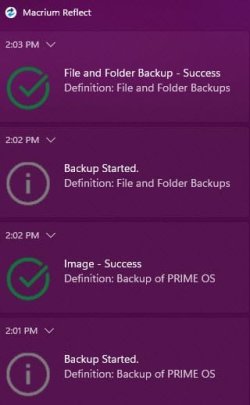
To do this, create your backup jobs and save them as a definition. You do not need to create a schedule. Run the 1st definition file manually and choose the option to run the job in the background. Then do the same thing with the second backup job. Just like a schedule, it will queue the second job until the first is done. I just tried it and it works!

This way you can queue multiple jobs without a schedule and it will just run one job right after the other.

EDIT: Adding a screenshot showing how this worked:

Image1.jpg
 

My Computers My Computers

  • At a glance

    Win11 Pro 25H2 (RTM+)Intel i7-14650HX32 GBNo GPU - Built-in Intel Graphics
    OS
    Win11 Pro 25H2 (RTM+)
    Computer type
    PC/Desktop
    Manufacturer/Model
    Acemagic
    CPU
    Intel i7-14650HX
    Memory
    32 GB
    Graphics Card(s)
    No GPU - Built-in Intel Graphics
    Sound Card
    Integrated
    Monitor(s) Displays
    Varies as machine will often be moved to locations with different monitors
    Screen Resolution
    Varies
    Hard Drives
    1 x 1TB Gen 4 NVMe SSD
    PSU
    120W Power Brick
    Keyboard
    Corsair K70 Max RGB Magnetic Keyboard
    Mouse
    Logitech MX Master 3
    Internet Speed
    1Gb Up / 1 Gb Down
    Browser
    Edge
    Antivirus
    Windows Defender
  • At a glance

    Win11 Pro 25H2 (RTM+)Intel i7-1255U16 GBIntel Iris Xe Graphics
    Operating System
    Win11 Pro 25H2 (RTM+)
    Computer type
    Laptop
    Manufacturer/Model
    Lenovo ThinkBook 13x Gen 2
    CPU
    Intel i7-1255U
    Memory
    16 GB
    Graphics card(s)
    Intel Iris Xe Graphics
    Sound Card
    Realtek® ALC3306-CG codec
    Monitor(s) Displays
    13.3-inch IPS Display
    Screen Resolution
    WQXGA (2560 x 1600)
    Hard Drives
    2 TB 4 x 4 NVMe SSD
    PSU
    USB-C / Thunderbolt 4 Power / Charging
    Keyboard
    Backlit, spill resistant keyboard
    Mouse
    Buttonless Glass Precision Touchpad
    Internet Speed
    1Gb Up / 1Gb Down
    Browser
    Edge
    Antivirus
    Windows Defender
    Other Info
    WiFi 6e / Bluetooth 5.1 / Facial Recognition / Fingerprint Sensor / ToF (Time of Flight) Human Presence Sensor
> choose the option to run the job in the background

I don't have the option to run the job in the background. I only have "Run now"
 

My Computer My Computer

At a glance

Windows 10
OS
Windows 10
Computer type
PC/Desktop
Manufacturer/Model
Acer Veriton
> choose the option to run the job in the background

I don't have the option to run the job in the background. I only have "Run now"
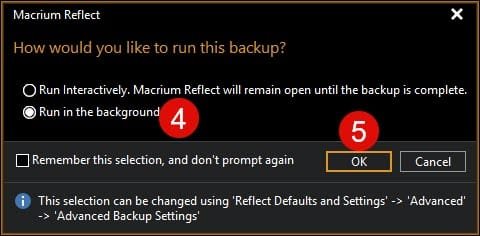
My apologies, I should have clarified that point. Choose "Run now" and THEN it will ask if you want to run interactively or in the background.
 

My Computers My Computers

  • At a glance

    Win11 Pro 25H2 (RTM+)Intel i7-14650HX32 GBNo GPU - Built-in Intel Graphics
    OS
    Win11 Pro 25H2 (RTM+)
    Computer type
    PC/Desktop
    Manufacturer/Model
    Acemagic
    CPU
    Intel i7-14650HX
    Memory
    32 GB
    Graphics Card(s)
    No GPU - Built-in Intel Graphics
    Sound Card
    Integrated
    Monitor(s) Displays
    Varies as machine will often be moved to locations with different monitors
    Screen Resolution
    Varies
    Hard Drives
    1 x 1TB Gen 4 NVMe SSD
    PSU
    120W Power Brick
    Keyboard
    Corsair K70 Max RGB Magnetic Keyboard
    Mouse
    Logitech MX Master 3
    Internet Speed
    1Gb Up / 1 Gb Down
    Browser
    Edge
    Antivirus
    Windows Defender
  • At a glance

    Win11 Pro 25H2 (RTM+)Intel i7-1255U16 GBIntel Iris Xe Graphics
    Operating System
    Win11 Pro 25H2 (RTM+)
    Computer type
    Laptop
    Manufacturer/Model
    Lenovo ThinkBook 13x Gen 2
    CPU
    Intel i7-1255U
    Memory
    16 GB
    Graphics card(s)
    Intel Iris Xe Graphics
    Sound Card
    Realtek® ALC3306-CG codec
    Monitor(s) Displays
    13.3-inch IPS Display
    Screen Resolution
    WQXGA (2560 x 1600)
    Hard Drives
    2 TB 4 x 4 NVMe SSD
    PSU
    USB-C / Thunderbolt 4 Power / Charging
    Keyboard
    Backlit, spill resistant keyboard
    Mouse
    Buttonless Glass Precision Touchpad
    Internet Speed
    1Gb Up / 1Gb Down
    Browser
    Edge
    Antivirus
    Windows Defender
    Other Info
    WiFi 6e / Bluetooth 5.1 / Facial Recognition / Fingerprint Sensor / ToF (Time of Flight) Human Presence Sensor
Some screenshots might be helpful...


Image2.jpg

Image3.jpg
 

My Computers My Computers

  • At a glance

    Win11 Pro 25H2 (RTM+)Intel i7-14650HX32 GBNo GPU - Built-in Intel Graphics
    OS
    Win11 Pro 25H2 (RTM+)
    Computer type
    PC/Desktop
    Manufacturer/Model
    Acemagic
    CPU
    Intel i7-14650HX
    Memory
    32 GB
    Graphics Card(s)
    No GPU - Built-in Intel Graphics
    Sound Card
    Integrated
    Monitor(s) Displays
    Varies as machine will often be moved to locations with different monitors
    Screen Resolution
    Varies
    Hard Drives
    1 x 1TB Gen 4 NVMe SSD
    PSU
    120W Power Brick
    Keyboard
    Corsair K70 Max RGB Magnetic Keyboard
    Mouse
    Logitech MX Master 3
    Internet Speed
    1Gb Up / 1 Gb Down
    Browser
    Edge
    Antivirus
    Windows Defender
  • At a glance

    Win11 Pro 25H2 (RTM+)Intel i7-1255U16 GBIntel Iris Xe Graphics
    Operating System
    Win11 Pro 25H2 (RTM+)
    Computer type
    Laptop
    Manufacturer/Model
    Lenovo ThinkBook 13x Gen 2
    CPU
    Intel i7-1255U
    Memory
    16 GB
    Graphics card(s)
    Intel Iris Xe Graphics
    Sound Card
    Realtek® ALC3306-CG codec
    Monitor(s) Displays
    13.3-inch IPS Display
    Screen Resolution
    WQXGA (2560 x 1600)
    Hard Drives
    2 TB 4 x 4 NVMe SSD
    PSU
    USB-C / Thunderbolt 4 Power / Charging
    Keyboard
    Backlit, spill resistant keyboard
    Mouse
    Buttonless Glass Precision Touchpad
    Internet Speed
    1Gb Up / 1Gb Down
    Browser
    Edge
    Antivirus
    Windows Defender
    Other Info
    WiFi 6e / Bluetooth 5.1 / Facial Recognition / Fingerprint Sensor / ToF (Time of Flight) Human Presence Sensor
Choose "Run now" and THEN it will ask if you want to run interactively or in the background.
It doesn't ask, just starts cloning. Reflect version 7.2
 

My Computer My Computer

At a glance

Windows 10
OS
Windows 10
Computer type
PC/Desktop
Manufacturer/Model
Acer Veriton
Some screenshots might be helpful...
At "Run now" (2) I only have one single "option" : "Clone", and the clone starts, no further questions asked.

In Reflect defaults, Advanced, Advanced Backup Options - I don't have Run interactively and Run in the background
 

My Computer My Computer

At a glance

Windows 10
OS
Windows 10
Computer type
PC/Desktop
Manufacturer/Model
Acer Veriton
At "Run now" (2) I only have one single "option" : "Clone", and the clone starts, no further questions asked.

In Reflect defaults, Advanced, Advanced Backup Options - I don't have Run interactively and Run in the background
Just taking a guess here:

Are you using the free version of Reflect? I'm on the retail Home edition, version 8.1. Maybe this only works in the paid version?
 

My Computers My Computers

  • At a glance

    Win11 Pro 25H2 (RTM+)Intel i7-14650HX32 GBNo GPU - Built-in Intel Graphics
    OS
    Win11 Pro 25H2 (RTM+)
    Computer type
    PC/Desktop
    Manufacturer/Model
    Acemagic
    CPU
    Intel i7-14650HX
    Memory
    32 GB
    Graphics Card(s)
    No GPU - Built-in Intel Graphics
    Sound Card
    Integrated
    Monitor(s) Displays
    Varies as machine will often be moved to locations with different monitors
    Screen Resolution
    Varies
    Hard Drives
    1 x 1TB Gen 4 NVMe SSD
    PSU
    120W Power Brick
    Keyboard
    Corsair K70 Max RGB Magnetic Keyboard
    Mouse
    Logitech MX Master 3
    Internet Speed
    1Gb Up / 1 Gb Down
    Browser
    Edge
    Antivirus
    Windows Defender
  • At a glance

    Win11 Pro 25H2 (RTM+)Intel i7-1255U16 GBIntel Iris Xe Graphics
    Operating System
    Win11 Pro 25H2 (RTM+)
    Computer type
    Laptop
    Manufacturer/Model
    Lenovo ThinkBook 13x Gen 2
    CPU
    Intel i7-1255U
    Memory
    16 GB
    Graphics card(s)
    Intel Iris Xe Graphics
    Sound Card
    Realtek® ALC3306-CG codec
    Monitor(s) Displays
    13.3-inch IPS Display
    Screen Resolution
    WQXGA (2560 x 1600)
    Hard Drives
    2 TB 4 x 4 NVMe SSD
    PSU
    USB-C / Thunderbolt 4 Power / Charging
    Keyboard
    Backlit, spill resistant keyboard
    Mouse
    Buttonless Glass Precision Touchpad
    Internet Speed
    1Gb Up / 1Gb Down
    Browser
    Edge
    Antivirus
    Windows Defender
    Other Info
    WiFi 6e / Bluetooth 5.1 / Facial Recognition / Fingerprint Sensor / ToF (Time of Flight) Human Presence Sensor
Just taking a guess here:

Are you using the free version of Reflect? I'm on the retail Home edition, version 8.1. Maybe this only works in the paid version?
Yes, I am using the free version. Sorry that I didn't mention it.

The conclusion seems to be that I cannot do this in the free version.

OK, then I'll live with it.

Thanks to all

Alex
 

My Computer My Computer

At a glance

Windows 10
OS
Windows 10
Computer type
PC/Desktop
Manufacturer/Model
Acer Veriton
You can just use the Macrium scheduler, allowing sufficient time between them for the first to finish. I use version 8.1 and have to assume that version 7.2 also has scheduled backups.
I've been running automatic backups using the Reflect Scheduler for ages and all works fine. The backups will be scheduled to run insequence if due at the same time.

Reflect Free does allow scheduled backups. You have to edit the backup definition job. See Scheduling your images
 

My Computer My Computer

At a glance

Windows 11 ProCore i7-13700K64 GB Kingston Fury Beast DDR5Gigabyte GeForce RTX 2060 Super Gaming OC 8G
OS
Windows 11 Pro
Computer type
PC/Desktop
Manufacturer/Model
Self build
CPU
Core i7-13700K
Motherboard
Asus TUF Gaming Plus WiFi Z790
Memory
64 GB Kingston Fury Beast DDR5
Graphics Card(s)
Gigabyte GeForce RTX 2060 Super Gaming OC 8G
Sound Card
Realtek S1200A
Monitor(s) Displays
Viewsonic VP2770 & Dell (secondary)
Screen Resolution
2560 x 1440
Hard Drives
Kingston KC3000 2TB NVME SSD & SATA HDDs & SSD
PSU
EVGA SuperNova G2 850W
Case
Nanoxia Deep Silence 1
Cooling
Noctua NH-D14
Keyboard
Microsoft Digital Media Pro
Mouse
Logitech Wireless
Internet Speed
80 Mb / s
Browser
Chrome
Antivirus
Defender, Malwarebytes Free & AdwCleaner
Thank you !

However, I prefer starting the process manually, at a convenient moment; I am also doing some cleanup before.


My Computer My Computer

At a glance

Windows 10
OS
Windows 10
Computer type
PC/Desktop
Manufacturer/Model
Acer Veriton
Back
Top Bottom