JavaScript is disabled. For a better experience, please enable JavaScript in your browser before proceeding.
You are using an out of date browser. It may not display this or other websites correctly.
You should upgrade or use an
alternative browser .
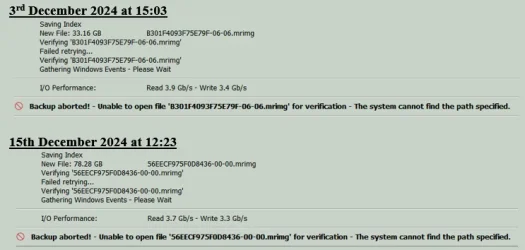
Solved Macrium Reflect v8.1.8325 - Backup sometimes aborts but only during the verifying stage?
Well-known member
Power User
VIP
Windows 11 Pro AMD Ryzen 9 8945HS 32GB DDR5 SO-DIMM Integrated AMD Radeon 780M (4.00 GHz) Windows 11 Pro PC/Desktop GMKtec K11 AMD Ryzen 9 8945HS 32GB DDR5 SO-DIMM Integrated AMD Radeon 780M (4.00 GHz) Benq 2250HM 1920 x 1080 1 TB PCIe 4.0 NVMe M.2 SSD Bit Defender Total Security
Windows 11 Home Intel® Core™ Ultra 7 - 255H processor 16 GB LPDDR5 SDRAM Intel Arc 140T onboard graphics Windows 11 Home Laptop ASUS Zenbook 14 OLED 14" Laptop - UX3405CA-QL192W Intel® Core™ Ultra 7 - 255H processor 16 GB LPDDR5 SDRAM Intel Arc 140T onboard graphics 1920 x 1200 (16:10 WUXGA resolution) OLED Touchscreen 1TB SSD Bit Defender Total Security
Well-known member
Power User
VIP
Thread Starter
I forgot to add that if I use a USB-C to USB-A cable in another port then it doesn't happen.
Windows 11 Pro AMD Ryzen 9 8945HS 32GB DDR5 SO-DIMM Integrated AMD Radeon 780M (4.00 GHz) Windows 11 Pro PC/Desktop GMKtec K11 AMD Ryzen 9 8945HS 32GB DDR5 SO-DIMM Integrated AMD Radeon 780M (4.00 GHz) Benq 2250HM 1920 x 1080 1 TB PCIe 4.0 NVMe M.2 SSD Bit Defender Total Security
Windows 11 Home Intel® Core™ Ultra 7 - 255H processor 16 GB LPDDR5 SDRAM Intel Arc 140T onboard graphics Windows 11 Home Laptop ASUS Zenbook 14 OLED 14" Laptop - UX3405CA-QL192W Intel® Core™ Ultra 7 - 255H processor 16 GB LPDDR5 SDRAM Intel Arc 140T onboard graphics 1920 x 1200 (16:10 WUXGA resolution) OLED Touchscreen 1TB SSD Bit Defender Total Security
Well-known member
Power User
VIP
Thread Starter
Windows 11 Pro AMD Ryzen 9 8945HS 32GB DDR5 SO-DIMM Integrated AMD Radeon 780M (4.00 GHz) Windows 11 Pro PC/Desktop GMKtec K11 AMD Ryzen 9 8945HS 32GB DDR5 SO-DIMM Integrated AMD Radeon 780M (4.00 GHz) Benq 2250HM 1920 x 1080 1 TB PCIe 4.0 NVMe M.2 SSD Bit Defender Total Security
Windows 11 Home Intel® Core™ Ultra 7 - 255H processor 16 GB LPDDR5 SDRAM Intel Arc 140T onboard graphics Windows 11 Home Laptop ASUS Zenbook 14 OLED 14" Laptop - UX3405CA-QL192W Intel® Core™ Ultra 7 - 255H processor 16 GB LPDDR5 SDRAM Intel Arc 140T onboard graphics 1920 x 1200 (16:10 WUXGA resolution) OLED Touchscreen 1TB SSD Bit Defender Total Security
Well-known member
Power User
VIP
Thread Starter
There have been no replies yet so maybe I have posted it in the wrong forum. I will post a link in the Apps & Software forum to see if it elicits replies.
To eliminate the caddy and its internal SATA/external USB-C connection: -
I have ordered a new external USB-C SSD to allow direct USB-C to USB-C connection.
If the problem remains unsolved then it only leaves the USB-C port on the HP computer.
Windows 11 Pro AMD Ryzen 9 8945HS 32GB DDR5 SO-DIMM Integrated AMD Radeon 780M (4.00 GHz) Windows 11 Pro PC/Desktop GMKtec K11 AMD Ryzen 9 8945HS 32GB DDR5 SO-DIMM Integrated AMD Radeon 780M (4.00 GHz) Benq 2250HM 1920 x 1080 1 TB PCIe 4.0 NVMe M.2 SSD Bit Defender Total Security
Windows 11 Home Intel® Core™ Ultra 7 - 255H processor 16 GB LPDDR5 SDRAM Intel Arc 140T onboard graphics Windows 11 Home Laptop ASUS Zenbook 14 OLED 14" Laptop - UX3405CA-QL192W Intel® Core™ Ultra 7 - 255H processor 16 GB LPDDR5 SDRAM Intel Arc 140T onboard graphics 1920 x 1200 (16:10 WUXGA resolution) OLED Touchscreen 1TB SSD Bit Defender Total Security
Well-known member
Power User
VIP
Thread Starter
Using directly connected SSDs with no caddies fixed the issue so I'll call this 'Solved' now.
Windows 11 Pro AMD Ryzen 9 8945HS 32GB DDR5 SO-DIMM Integrated AMD Radeon 780M (4.00 GHz) Windows 11 Pro PC/Desktop GMKtec K11 AMD Ryzen 9 8945HS 32GB DDR5 SO-DIMM Integrated AMD Radeon 780M (4.00 GHz) Benq 2250HM 1920 x 1080 1 TB PCIe 4.0 NVMe M.2 SSD Bit Defender Total Security
Windows 11 Home Intel® Core™ Ultra 7 - 255H processor 16 GB LPDDR5 SDRAM Intel Arc 140T onboard graphics Windows 11 Home Laptop ASUS Zenbook 14 OLED 14" Laptop - UX3405CA-QL192W Intel® Core™ Ultra 7 - 255H processor 16 GB LPDDR5 SDRAM Intel Arc 140T onboard graphics 1920 x 1200 (16:10 WUXGA resolution) OLED Touchscreen 1TB SSD Bit Defender Total Security