
Markedly different internet speeds with Windows 11 and Ubuntu dual boot


Gordonbp

Member
Local time
10:25 PM
Posts
6
OS
Windows 11 25H2 build 26200.7019
Acer Swift 3 - 16MB RAM, Ryzen 7 5000 seies.
I dual-boot Windows 11 24H2 (OS Build 26100.4770) and Ubuntu 24.04 LTS.
Using the same broadband speedchecker on both, I get this:
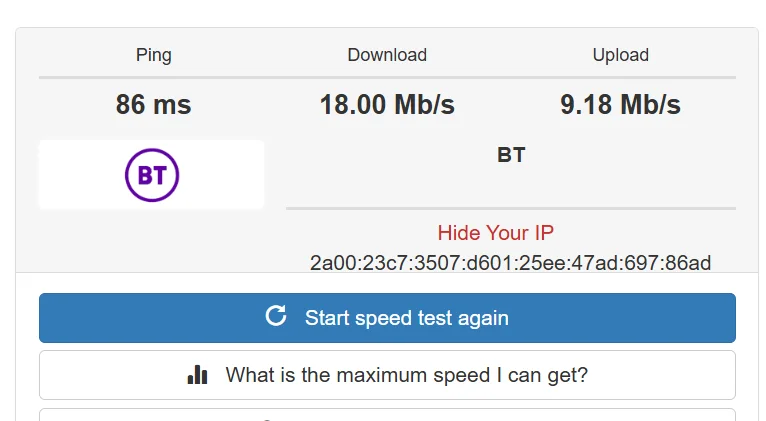
Windows 11 Internet speed.webpUbuntu Internet speed.webp
The 18 Mb/s is Windows and the 66.46 Mb/s is Ubuntu. Using the SAME hardware. All Windows drivers are up to date...
Can anyone help me as to this huge disparity?
 

My Computer My Computer

At a glance

Windows 11 25H2 build 26200.7019AMD Ryzen 7 5700U with Radeon Graphics, 180116GB
OS
Windows 11 25H2 build 26200.7019
Computer type
Laptop
Manufacturer/Model
Acer Swift 3
CPU
AMD Ryzen 7 5700U with Radeon Graphics, 1801
Memory
16GB
Monitor(s) Displays
AMD Radeon(TM) Graphics
Screen Resolution
1920 x 1080 x 60 hertz
Acer Swift 3 - 16MB RAM, Ryzen 7 5000 seies.
I dual-boot Windows 11 24H2 (OS Build 26100.4770) and Ubuntu 24.04 LTS.
Using the same broadband speedchecker on both, I get this:
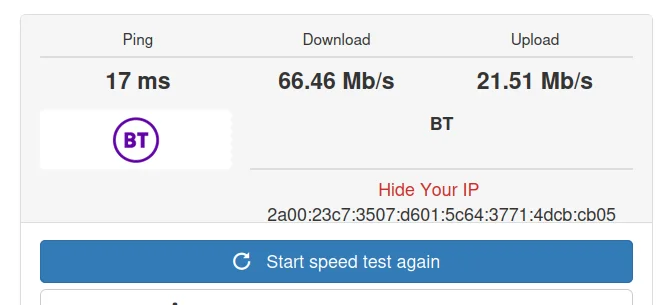
View attachment 141150View attachment 141152
The 18 Mb/s is Windows and the 66.46 Mb/s is Ubuntu. Using the SAME hardware. All Windows drivers are up to date...
Can anyone help me as to this huge disparity?
Linux networking is invariably quicker than Windows - but usually other factors take place -- there might have been a lot of contention on the channel you are using - especially if its wifi -- also Linux where possible (at least with the "Sensible distros) will endeavour to use full duplex mode for the NIC - I think the Windows default is usually half-duplex, plus Linux drivers will arrange (again with the sensible distros) to use both 2.4 and the 5Ghz bands concurrently to maximize traffic.

You should in Windows be able to set the adapter properties. There's often a load of other parameters --I haven't a clue what they do - but some Network Guru should be able to guide you with what could be changed -- the main ones I've found useful though are enabling full duplex mode and concurrent use of 2.4 and 5 GHZ bands if possible.

Cheers
jimbo
 

My Computer My Computer

At a glance

Windows XP,11 Linux Fedora Rawhide pre-releas...2 X Intel i7
OS
Windows XP,11 Linux Fedora Rawhide pre-release 45
Computer type
PC/Desktop
CPU
2 X Intel i7
Screen Resolution
4KUHD X 2
You should in Windows be able to set the adapter properties. There's often a load of other parameters --I haven't a clue what they do - but some Network Guru should be able to guide you with what could be changed -- the main ones I've found useful though are enabling full duplex mode and concurrent use of 2.4 and 5 GHZ bands if possible.

Cheers
jimbo
Hi - thanks for that. I don't have a "full duplex mode" in the adapter properties, but what I did do was to change the preferred band to
5GHz as here:
Screenshot 2025-08-02 121148.webp

I then re ran the speed test and bingo!
Screenshot 2025-08-02 121230.webp

Thanks for the pointer!
 

My Computer My Computer

At a glance

Windows 11 25H2 build 26200.7019AMD Ryzen 7 5700U with Radeon Graphics, 180116GB
OS
Windows 11 25H2 build 26200.7019
Computer type
Laptop
Manufacturer/Model
Acer Swift 3
CPU
AMD Ryzen 7 5700U with Radeon Graphics, 1801
Memory
16GB
Monitor(s) Displays
AMD Radeon(TM) Graphics
Screen Resolution
1920 x 1080 x 60 hertz
You're welcome and thanks for replying !!

Cheers
jimbo
 

My Computer My Computer

At a glance

Windows XP,11 Linux Fedora Rawhide pre-releas...2 X Intel i7
OS
Windows XP,11 Linux Fedora Rawhide pre-release 45
Computer type
PC/Desktop
CPU
2 X Intel i7
Screen Resolution
4KUHD X 2
Back
Top Bottom




