McAfee took about 24 hours to do a full scan. Windows 11 Professional 24H2 OS Build 26100.2454


Ozguy

Member
Member
Local time
1:19 AM
Posts
12
OS
Windows 11 Professional 24H2 OS Build 26100.2605
I've got about 279 gig of used space on my SSD and about 1 gig of used space on my Google drive. It took about half as long when I had Windows 10 Professional. Should I change to Norton Antivirus when my McAfee subrscription is due for renewal, would Norton be faster? Is there any way to speed up McAfee, even though I already chose the option to do a fast scan?
 
Last edited:

My Computer

System One

  • OS
    Windows 11 Professional 24H2 OS Build 26100.2605
    Computer type
    Laptop
    Manufacturer/Model
    Dell Inspiron 15 5000
    CPU
    11th Gen Intel(R) Core(TM) i7-1165G7 @ 2.80GHz 1.69 G
    Memory
    16.0 GB
    Graphics Card(s)
    Discrete: NVIDIA® GeForce® MX450, 2 GB GDDR5
    Antivirus
    McAfee
It's a matter of personal choice but mine is I wouldn't ever use either Norton or McAfee for the simple reason they are, and have always been, resource hogs.
We've had a number of threads on the subject on this forum with many opinions. I believe I'm safe in saying that the general consensus is Defender is the one most used as primary protection. A number of members (me included) run Malwarebytes Premium alongside Defender for extra protection.
Unlike with other AV programs that disable defender, MWB and Defender both run in realtime with no major effect on performance.

Viruses do still exist but the major factor affecting computers today is malware and ransomware. No matter what AV one uses, the biggest deterrent to nasties gettiing into a system is the user and how smart his decisions are in the sites he visits, the ads he clicks on, the emails he opens, and the software he downloads. And the number one rule....NEVER give ANYONE remote access to your system unless you know darn sure who you are dealing with.
Never respond to anyone calling you regarding your computer or any popup on your screen claiming to be Microsoft or any other major company who wants you to call them. These big companies WILL NOT contact you.

Pay attention in your web searches that you go to official sites, not off the wall places that can get you in trouble. You can do this by closely examining the URL before clicking on them.

Nothing helps more than good old common sense.
 

My Computers

System One System Two

  • OS
    Windows 11 Pro 25H2
    Computer type
    PC/Desktop
    Manufacturer/Model
    Dell Optiplex 7080
    CPU
    i9-10900 10 core 20 threads
    Motherboard
    DELL 0J37VM
    Memory
    32 gb
    Graphics Card(s)
    none-Intel UHD Graphics 630
    Sound Card
    Integrated Realtek
    Monitor(s) Displays
    Benq 27
    Screen Resolution
    2560x1440
    Hard Drives
    2x1tb Solidigm m.2 nvme /External drives 512gb Samsung m.2 sata+2tb Kingston m2.nvme
    PSU
    500w
    Case
    MT
    Cooling
    Dell Premium
    Keyboard
    Logitech wired
    Mouse
    Logitech wireless
    Internet Speed
    so slow I'm too embarrassed to tell
    Browser
    #1 Edge #2 Firefox
    Antivirus
    Defender+MWB Premium
  • Operating System
    Windows 11 Pro 24H2 26200.8457
    Computer type
    PC/Desktop
    Manufacturer/Model
    Beelink Mini PC SER5
    CPU
    AMD Ryzen 7 6800U
    Memory
    32 gb
    Graphics card(s)
    integrated
    Sound Card
    integrated
    Monitor(s) Displays
    Benq 27
    Screen Resolution
    2560x1440
    Hard Drives
    1TB Crucial nvme
    Keyboard
    Logitech wired
    Mouse
    Logitech wireless
    Internet Speed
    still too embarrassed to tell
    Browser
    Firefox
    Antivirus
    Defender
    Other Info
    System 3 is non compliant Dell 9020 i7-4770/24gb ram Win11 PRO 26200.8457
It's a matter of personal choice but mine is I wouldn't ever use either Norton or McAfee for the simple reason they are, and have always been, resource hogs.
We've had a number of threads on the subject on this forum with many opinions. I believe I'm safe in saying that the general consensus is Defender is the one most used as primary protection. A number of members (me included) run Malwarebytes Premium alongside Defender for extra protection.
Unlike with other AV programs that disable defender, MWB and Defender both run in realtime with no major effect on performance.

Viruses do still exist but the major factor affecting computers today is malware and ransomware. No matter what AV one uses, the biggest deterrent to nasties gettiing into a system is the user and how smart his decisions are in the sites he visits, the ads he clicks on, the emails he opens, and the software he downloads. And the number one rule....NEVER give ANYONE remote access to your system unless you know darn sure who you are dealing with.
Never respond to anyone calling you regarding your computer or any popup on your screen claiming to be Microsoft or any other major company who wants you to call them. These big companies WILL NOT contact you.

Pay attention in your web searches that you go to official sites, not off the wall places that can get you in trouble. You can do this by closely examining the URL before clicking on them.

Nothing helps more than good old common sense.
Regrettably, common sense is an oxymoron.
 

My Computer

System One

  • OS
    Windows 11 Pro + Win11 Canary VM.
    Computer type
    Laptop
    Manufacturer/Model
    ASUS Zenbook 14
    CPU
    I9 13th gen i9-13900H 2.60 GHZ
    Motherboard
    Yep, Laptop has one.
    Memory
    16 GB soldered
    Graphics Card(s)
    Integrated Intel Iris XE
    Sound Card
    Realtek built in
    Monitor(s) Displays
    laptop OLED screen
    Screen Resolution
    2880x1800 touchscreen
    Hard Drives
    1 TB NVME SSD (only weakness is only one slot)
    PSU
    Internal + 65W thunderbolt USB4 charger
    Case
    Yep, got one
    Cooling
    Stella Artois (UK pint cans - 568 ml) - extra cost.
    Keyboard
    Built in UK keybd
    Mouse
    Bluetooth , wireless dongled, wired
    Internet Speed
    900 mbs (ethernet), wifi 6 typical 350-450 mb/s both up and down
    Browser
    Edge
    Antivirus
    Defender
    Other Info
    TPM 2.0, 2xUSB4 thunderbolt, 1xUsb3 (usb a), 1xUsb-c, hdmi out, 3.5 mm audio out/in combo, ASUS backlit trackpad (inc. switchable number pad)

    Macrium Reflect Home V8
    Office 365 Family (6 users each 1TB onedrive space)
    Hyper-V (a vm runs almost as fast as my older laptop)
I would try and find out the reason why, not easy. It maybe just the settings need adjusting, maybe other security Apps clashing, maybe it is suspicious of some files and digs deeper in analysing them, and so forth. Maybe you should of stayed with 23H2 etc etc.

"wouldn't ever use either Norton or McAfee for the simple reason they are, and have always been, resource hogs."

That sort of classic recycled disinformation on McAfee and Norton is getting to be decades out of date.
I have used several AV apps over the years. Most recent was McAfee and it certainly was not a resource hog, indeed it worked well with minimal resources, though it needed some configuration of notifications, easily done through it's settings.
It was uninstalled because I did not want to pay for it after the trial period.

Having common sense is unfortunately wishful thinking, the vast majority of consumers only have a minimalist knowledge of how computer hardware and software works, even more true of complex Apps like AV software and criminal psychology.
 

My Computer

System One

  • OS
    Windows 11
It's a matter of personal choice but mine is I wouldn't ever use either Norton or McAfee for the simple reason they are, and have always been, resource hogs.
We've had a number of threads on the subject on this forum with many opinions. I believe I'm safe in saying that the general consensus is Defender is the one most used as primary protection.
I too have a Dell computer. The first thing I do with Dell is uninstall McAfee so that Windows built-in Defender takes over.
 

My Computers

System One System Two

  • OS
    Windows 11 Pro
    Computer type
    Laptop
    Manufacturer/Model
    Dell XPS 16 DA16260
    CPU
    Intel Series 3 Core Ultra X9 388H
    Memory
    64GB LPDDR5x 9600 MT/s
    Graphics Card(s)
    Intel Arc graphics B390 Panther Lake
    Monitor(s) Displays
    16" 3.2K Tandem OLED Infinity Edge
    Screen Resolution
    3200 x 2000 16:10 236 PPI
    Hard Drives
    1 Terabyte M.2 PCIe NVMe SSD
    Case
    Black Anodized Aluminum
    Cooling
    Vapor Chamber Cooling
    Mouse
    None
    Internet Speed
    942 Mbps Netgear Mesh + 2 Satellites
    Browser
    Microsoft Edge (Chromium)
    Antivirus
    Windows Security (Defender)
    Other Info
    NPU delivering 67 TOPS
    Microsoft 365 subscription
    Microsoft OneDrive 1TB Cloud
    Microsoft Visual Studio
    Microsoft Visual Studio Code
    Microsoft Sysinternals Suite
    Microsoft BitLocker
    Microsoft Copilot
    Dell Support Assist
    Dell Command | Update
    Macrium Reflect X subscription
    1Password Password Manager
    Amazon Kindle for PC
    Lightroom/Photoshop subscription
    Interactive Brokers Trader Workstation
  • Operating System
    Windows 11 Pro
    Computer type
    Laptop
    Manufacturer/Model
    Microsoft Surface Laptop 7
    CPU
    Snapdragon® X Elite (12 Core) with Hexagon NPU delivering 45 TOPS
    Memory
    32GB LPDDR5x 8448 MT/s
    Graphics card(s)
    Integrated Adreno GPU
    Sound Card
    Omnisonic speakers with Dolby Atmos spatial sound
    Monitor(s) Displays
    13.8″ PixelSense Flow touchscreen 120 Hz 600 NIT
    Screen Resolution
    2304 × 1536 (201 PPI), 3:2 aspect ratio
    Hard Drives
    1 TB PCIe NVMe Gen 4 SSD
    Case
    Black Anodized Aluminum
    Cooling
    Vapor Chamber Cooling
    Mouse
    None
    Internet Speed
    942 Mbps Netgear Mesh + 2 Satellites
    Browser
    Microsoft Edge (Chromium)
    Antivirus
    Windows Security (Defender)
    Other Info
    Microsoft 365 subscription (Office)
    Microsoft OneDrive 1TB Cloud
    Microsoft Visual Studio 2026
    Microsoft Visual Studio Code
    Interactive Brokers Trader Workstation
    Lightroom/Photoshop subscription
    1Password Password Manager
    Microsoft Sysinternals
    Amazon Kindle for PC
    Microsoft BitLocker
    Microsoft Copilot
i only scan C: drive SSD on mine (the OS and most used)... for the rest of the drives I don't see a reason,, and the individual files that go in and out of computer to all the drivers are scanned when they go in/out. If you scan every file on many drives and space you are being overly cautious or wasting time... IMHO I use Norton 360.
 

My Computer

System One

  • OS
    Win11
    Computer type
    PC/Desktop
    Manufacturer/Model
    Asus Home built
    CPU
    i9-13900
    Motherboard
    ASUS Strix Z790-H
    Memory
    64 GB
    Graphics Card(s)
    Nvidia RTX 5070 TI OC
    Monitor(s) Displays
    Sony 55"
    Hard Drives
    SSD
    PSU
    850 watt EVGA
    Case
    Cooler Master Haf 932
    Cooling
    CoolerMaster
    Keyboard
    RedDragon
    Mouse
    CoolerMaster
    Internet Speed
    300/300
    Antivirus
    Defender
    Other Info
    VR, Virtual Reality
That sort of classic recycled disinformation on McAfee and Norton is getting to be decades out of date.
Respectfully, I disagree. It's from a lot of personal experience. While I can say both have gotten better about how much resources they use, they still have a way to go. I have worked on many computers where both of these AV apps stressed a system's resources not leaving much for the user if he wanted to do much that required more cpu or ram. It's not so much the scanner part of these bloated apps that is the issue as it it all the other add-on stuff these 2 companies slip into their package. Avast does the same thing.

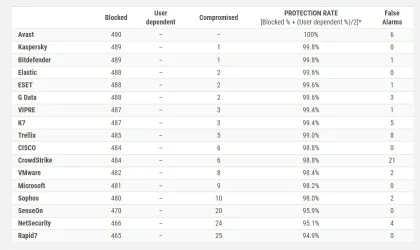
As far as protection, Defender end-point protection ranks right up there with the others tested in the business security tests conducted by AV Comparative,. Mcafee and Norton either didn't even rank or weren't considered for these tests ...and Defender is FREE and part of the OS. It doesn't make much sense to pay for something that is either just marginally better or less better that what one already has for free.
 

My Computers

System One System Two

  • OS
    Windows 11 Pro 25H2
    Computer type
    PC/Desktop
    Manufacturer/Model
    Dell Optiplex 7080
    CPU
    i9-10900 10 core 20 threads
    Motherboard
    DELL 0J37VM
    Memory
    32 gb
    Graphics Card(s)
    none-Intel UHD Graphics 630
    Sound Card
    Integrated Realtek
    Monitor(s) Displays
    Benq 27
    Screen Resolution
    2560x1440
    Hard Drives
    2x1tb Solidigm m.2 nvme /External drives 512gb Samsung m.2 sata+2tb Kingston m2.nvme
    PSU
    500w
    Case
    MT
    Cooling
    Dell Premium
    Keyboard
    Logitech wired
    Mouse
    Logitech wireless
    Internet Speed
    so slow I'm too embarrassed to tell
    Browser
    #1 Edge #2 Firefox
    Antivirus
    Defender+MWB Premium
  • Operating System
    Windows 11 Pro 24H2 26200.8457
    Computer type
    PC/Desktop
    Manufacturer/Model
    Beelink Mini PC SER5
    CPU
    AMD Ryzen 7 6800U
    Memory
    32 gb
    Graphics card(s)
    integrated
    Sound Card
    integrated
    Monitor(s) Displays
    Benq 27
    Screen Resolution
    2560x1440
    Hard Drives
    1TB Crucial nvme
    Keyboard
    Logitech wired
    Mouse
    Logitech wireless
    Internet Speed
    still too embarrassed to tell
    Browser
    Firefox
    Antivirus
    Defender
    Other Info
    System 3 is non compliant Dell 9020 i7-4770/24gb ram Win11 PRO 26200.8457
The way I see it, is microsoft made the operating system, so any protection they made for it will surely know more than some third party.

I also dont think its a good idea for third party AV's to have the deep access level they need to the OS, as it causes many issues. Example: Crowdstrike.

Defender is fine for most people for windows. If you like other features a third party offers you, then sure. But I dont think its a good use of your money.
 

My Computers

System One System Two

  • OS
    Windows 11 Pro
    Computer type
    PC/Desktop
    Manufacturer/Model
    Custom Built
    CPU
    Ryzen 7 5700 X3D
    Motherboard
    MSI MPG B550 GAMING PLUS
    Memory
    64 GB DDR4 3600mhz Gskill Ripjaws V
    Graphics Card(s)
    RTX 4070 Super , 12GB VRAM Asus EVO Overclock
    Monitor(s) Displays
    Gigabyte M27Q (rev. 2.0) 2560 x 1440 @ 170hz HDR
    Hard Drives
    2TB Samsung nvme ssd
    4TB Western Digital nvme ssd
    PSU
    CORSAIR RMx SHIFT Series™ RM750x 80 PLUS Gold Fully Modular ATX Power Supply
    Case
    CORSAIR 3500X ARGB Mid-Tower ATX PC Case – Black
    Cooling
    ID-COOLING FROSTFLOW X 240 CPU Water Cooler
    Keyboard
    Logitech G213
    Mouse
    Logitech G203
    Internet Speed
    1.2gbps Fiber 😎
  • Operating System
    Chrome OS
    Computer type
    Laptop
    Manufacturer/Model
    HP Chromebook
    CPU
    Intel Pentium Quad Core
    Memory
    4GB LPDDR4
    Monitor(s) Displays
    14 Inch HD SVA anti glare micro edge display
    Hard Drives
    64 GB emmc
As far as protection, Defender end-point protection ranks right up there with the others tested in the business security tests conducted by AV Comparative,.

And how many consumers are running business AV solutions?
On that business test you linked Defender was compromised 9 times and was toward the bottom of the list.

Screenshot 2024-12-06 100133.webp
 

My Computer

System One

  • OS
    Windows 11 Pro
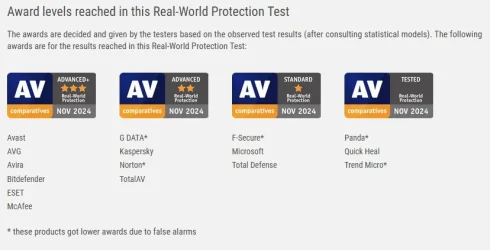
Latest real world protection tests Defender came out as standard.

View attachment 118597
And sometimes they come out as advanced. It changes constantly. AV test sites are great, but it's not the be all or end all. Eventually you have to pick one.

Sometimes they bounce around month to month, you going to constantly switch antivirus programs?

I don't think so.

Anyone is free to choose whatever AV they want, but I don't think the extra hogging of resources and nagging messages are worth it.

Also, which one is correct?


Defender Enterprise security:

 
Last edited:

My Computers

System One System Two

  • OS
    Windows 11 Pro
    Computer type
    PC/Desktop
    Manufacturer/Model
    Custom Built
    CPU
    Ryzen 7 5700 X3D
    Motherboard
    MSI MPG B550 GAMING PLUS
    Memory
    64 GB DDR4 3600mhz Gskill Ripjaws V
    Graphics Card(s)
    RTX 4070 Super , 12GB VRAM Asus EVO Overclock
    Monitor(s) Displays
    Gigabyte M27Q (rev. 2.0) 2560 x 1440 @ 170hz HDR
    Hard Drives
    2TB Samsung nvme ssd
    4TB Western Digital nvme ssd
    PSU
    CORSAIR RMx SHIFT Series™ RM750x 80 PLUS Gold Fully Modular ATX Power Supply
    Case
    CORSAIR 3500X ARGB Mid-Tower ATX PC Case – Black
    Cooling
    ID-COOLING FROSTFLOW X 240 CPU Water Cooler
    Keyboard
    Logitech G213
    Mouse
    Logitech G203
    Internet Speed
    1.2gbps Fiber 😎
  • Operating System
    Chrome OS
    Computer type
    Laptop
    Manufacturer/Model
    HP Chromebook
    CPU
    Intel Pentium Quad Core
    Memory
    4GB LPDDR4
    Monitor(s) Displays
    14 Inch HD SVA anti glare micro edge display
    Hard Drives
    64 GB emmc
There is no argument here. One has to choose what works best for them based on his own past experience, how smart he is in his everday computing, how far one leans in his expectations of infection and what measures he takes to protect his system so that he can recover if necessary, and whether one wants to pay or not. As I said it's a personal choice. There is no one size fits all.
 

My Computers

System One System Two

  • OS
    Windows 11 Pro 25H2
    Computer type
    PC/Desktop
    Manufacturer/Model
    Dell Optiplex 7080
    CPU
    i9-10900 10 core 20 threads
    Motherboard
    DELL 0J37VM
    Memory
    32 gb
    Graphics Card(s)
    none-Intel UHD Graphics 630
    Sound Card
    Integrated Realtek
    Monitor(s) Displays
    Benq 27
    Screen Resolution
    2560x1440
    Hard Drives
    2x1tb Solidigm m.2 nvme /External drives 512gb Samsung m.2 sata+2tb Kingston m2.nvme
    PSU
    500w
    Case
    MT
    Cooling
    Dell Premium
    Keyboard
    Logitech wired
    Mouse
    Logitech wireless
    Internet Speed
    so slow I'm too embarrassed to tell
    Browser
    #1 Edge #2 Firefox
    Antivirus
    Defender+MWB Premium
  • Operating System
    Windows 11 Pro 24H2 26200.8457
    Computer type
    PC/Desktop
    Manufacturer/Model
    Beelink Mini PC SER5
    CPU
    AMD Ryzen 7 6800U
    Memory
    32 gb
    Graphics card(s)
    integrated
    Sound Card
    integrated
    Monitor(s) Displays
    Benq 27
    Screen Resolution
    2560x1440
    Hard Drives
    1TB Crucial nvme
    Keyboard
    Logitech wired
    Mouse
    Logitech wireless
    Internet Speed
    still too embarrassed to tell
    Browser
    Firefox
    Antivirus
    Defender
    Other Info
    System 3 is non compliant Dell 9020 i7-4770/24gb ram Win11 PRO 26200.8457
I wouldn't exactly call a 98.2% protection rate terrible, just saying.
 

My Computers

System One System Two

  • OS
    Windows 11 25H2
    Computer type
    Laptop
    Manufacturer/Model
    Alienware 18 Area-51
    CPU
    Intel Core Ultra 9 275HX (24-Core)
    Motherboard
    Alienware
    Memory
    64GB DDR5 6400MT/s
    Graphics Card(s)
    NVIDIA GeForce RTX 5080 and Intel UHD Graphics
    Sound Card
    Onboard, Realtek high-performance Audio chips (ALC3329 & ALC1708))
    Monitor(s) Displays
    300HZ 18-inch QHD 500 nit Comfort View+
    Screen Resolution
    2560 x 1600
    Hard Drives
    2TB NVMe M.2 PCIe Gen 5 SSD
    Case
    Magnesium Alloy
    Cooling
    Advanced Cryo-Tech Quad-Fan Cooling system & large vapor chamber
    Keyboard
    Cherry MX ultra low profile mechanical keyboard with per key AlienFX RGB lighting
    Mouse
    Logitech MX Master 4
    Browser
    Vivaldi (main), Firefox, Chrome, Edge
    Antivirus
    MS Defender and Malwarebytes Free
  • Operating System
    Windows 11 25H2
    Computer type
    Laptop
    Manufacturer/Model
    Microsoft Surface Laptop 7
    CPU
    Qualcomm Snapdragon X Elite (12 Core) ARM based CPU
    Motherboard
    Microsoft Corp.
    Memory
    16GB LPDDR5
    Graphics card(s)
    Qualcomm Adreno X1-85
    Sound Card
    Omnisonic speakers with Dolby Atmos spatial sound
    Monitor(s) Displays
    120 Hz 13.8-inch 600 nit PixelSense Flow touchscreen
    Screen Resolution
    2304x1536
    Hard Drives
    1TB NVMe Gen 4 SSD
    Case
    Anodized Aluminum
    Cooling
    Traditional active cooling fan system
    Keyboard
    Mechanical QWERTY, backlit when in use
    Mouse
    Logitech MX Master 4 and Surface Arc Mouse
    Browser
    Vivaldi (main), Firefox, Chrome, Edge
    Antivirus
    MS Defender and Malwarebytes Free
I wouldn't exactly call a 98.2% protection rate terrible, just saying.
All it takes is 1 infection to ruin your life, encrypt your files or steal your banking info.
Would you use 98% reliable car, broken 10 days a year, when you need to go to work?
That sort of classic recycled disinformation on McAfee and Norton is getting to be decades out of date.
My boss had Norton preinstalled on a cheap laptop, it took 30 mins to uninstall it and that alone made it faster.
 

My Computer

System One

  • OS
    Home26H2Can
    Computer type
    PC/Desktop
    CPU
    AMD Ryzen 5 8600G (07/24)
    Motherboard
    ASROCK B650M-HDV/M.2 (07/24) BIOS 4.21 AGESA ComboAM5 1.3.0.1 (04/26)
    Memory
    2x32GB Kingston FURY DDR5 5600 MHz CL36 @5200 CL36 (07/24)
    Graphics Card(s)
    ASROCK Radeon RX 6600 Challenger D 8G @48FPS (08/24)
    Sound Card
    Creative Sound BlasterX AE-5 Plus (05/24)
    Monitor(s) Displays
    24" Philips 24M1N3200ZS/00 (05/24)
    Screen Resolution
    1920×1080@165Hz via DP1.4
    Hard Drives
    Kingston KC3000 NVMe 2TB (05/24)
    ADATA XPG GAMMIX S11 Pro 512GB (07/19)
    PSU
    Seasonic Core GM 550 Gold (04/24)
    Case
    Fractal Design Define 7 Mini with 3x Noctua NF-P14s/12@555rpm (04/24)
    Cooling
    Noctua NH-U12S with Noctua NF-P12 (04/24)
    Keyboard
    HP Pavilion Wired Keyboard 300 (07/24) + Rabalux 76017 Parker (01/24)
    Mouse
    Logitech M330 Silent Plus (01/26)
    Internet Speed
    500/100 Mbps via RouterOS (05/21) & TCP Optimizer
    Browser
    Edge, Brave for YouTube, LibreWolf for FB
    Antivirus
    NextDNS blocking 1/3 Traffic
    Other Info
    Phone: Motorola Moto G86 (02/26)
    Backup: Hasleo Backup Suite (PreOS)
    Headphones: Sennheiser RS170 (09/10)
    Chair: Huzaro Force 4.4 Grey Mesh (05/24)
    Notifier: Xiaomi Mi Band 9 Milanese (10/24)
    FlexCore USB-C 3.2 Gen 1 (M) to LAN (F) (08/25)
All it takes is 1 infection to ruin your life, encrypt your files or steal your banking info.
So true about one's life can be ruined, but both those other arguments are negated as long as one has a backup of the files and 2 step verification on his banking account and all other financials. Unless the hacker has my phone, he can't get into my accounts. He can't get any of my passwords either since I use a password manager with an 18 digit master password. I save no logins of any kind in my browser as that's one of the easiest things for even a minor hacker to harvest. I'd much rather spend my money on a password manager than I had an AV as none are infallible.

It's my thinking that steps I take are my own best defense. Had I not been grandfathered in many years ago with my old lifetime license of Malwarebytes Premium, I wouldn't still be using it alongside Defender today.
 

My Computers

System One System Two

  • OS
    Windows 11 Pro 25H2
    Computer type
    PC/Desktop
    Manufacturer/Model
    Dell Optiplex 7080
    CPU
    i9-10900 10 core 20 threads
    Motherboard
    DELL 0J37VM
    Memory
    32 gb
    Graphics Card(s)
    none-Intel UHD Graphics 630
    Sound Card
    Integrated Realtek
    Monitor(s) Displays
    Benq 27
    Screen Resolution
    2560x1440
    Hard Drives
    2x1tb Solidigm m.2 nvme /External drives 512gb Samsung m.2 sata+2tb Kingston m2.nvme
    PSU
    500w
    Case
    MT
    Cooling
    Dell Premium
    Keyboard
    Logitech wired
    Mouse
    Logitech wireless
    Internet Speed
    so slow I'm too embarrassed to tell
    Browser
    #1 Edge #2 Firefox
    Antivirus
    Defender+MWB Premium
  • Operating System
    Windows 11 Pro 24H2 26200.8457
    Computer type
    PC/Desktop
    Manufacturer/Model
    Beelink Mini PC SER5
    CPU
    AMD Ryzen 7 6800U
    Memory
    32 gb
    Graphics card(s)
    integrated
    Sound Card
    integrated
    Monitor(s) Displays
    Benq 27
    Screen Resolution
    2560x1440
    Hard Drives
    1TB Crucial nvme
    Keyboard
    Logitech wired
    Mouse
    Logitech wireless
    Internet Speed
    still too embarrassed to tell
    Browser
    Firefox
    Antivirus
    Defender
    Other Info
    System 3 is non compliant Dell 9020 i7-4770/24gb ram Win11 PRO 26200.8457
Even for Defender, how much protection you get or not depends on how you configure it such as using DefenderUI for example.
 

My Computer

System One

  • OS
    WindowsXP/7/8/8.1/10/11,Linux,Android,FreeBSD Unix
    Computer type
    Laptop
    Manufacturer/Model
    Dell XPS 15 9570
    CPU
    Intel® Core™ i7-8750H 8th Gen 2.2Ghz up to 4.1Ghz
    Motherboard
    Dell XPS 15 9570
    Memory
    64GB using 2x32GB CL16 Mushkin redLine modules
    Graphics Card(s)
    Intel UHD 630 & NVIDIA GeForce GTX 1050 Ti with 4GB DDR5
    Sound Card
    Realtek ALC3266-CG
    Monitor(s) Displays
    15.6" 4K Touch UltraHD 3840x2160 made by Sharp
    Screen Resolution
    3840x2160 4K UltraHD
    Hard Drives
    Samsung MZ-V9P4T0B/AM 990 PRO 4TB PCIe®4.0 NVMe™ M.2 SSD was Toshiba KXG60ZNV1T02 NVMe 1TB SSD
    PSU
    Dell XPS 15 9570
    Case
    Dell XPS 15 9570
    Cooling
    Stock
    Keyboard
    Stock
    Mouse
    SwitftPoint ProPoint
    Internet Speed
    Comcast/XFinity 1.44Gbps/42.5Mbps
    Browser
    Microsoft EDGE (Chromium based) & Google Chrome
    Antivirus
    Windows Defender that came with Windows
"McAwful" should never be let near a home computer -- totally unnecessary. For standard home installations I can't for the life of me see what's wrong these days with just using Windows Defender -- what on Earth are people doing to their machines that they get all sorts of rubbish on them.

Also when downloading ensure you get what you are looking for - not something else and always avoid any "extras". Don't just do click, click,click etc without looking carefully.

IMHO these days scams are likely to be a far more problem for home users rather than sophisticated virial attacks which is what hackers have to do these days to "break" WD -- and that's not not easy -- there's better pickings around !!!!!

Cheers
jimbo
 

My Computer

System One

  • OS
    Windows XP,11 Linux Fedora Rawhide pre-release 45
    Computer type
    PC/Desktop
    CPU
    2 X Intel i7
    Screen Resolution
    4KUHD X 2
The way I see it, is microsoft made the operating system, so any protection they made for it will surely know more than some third party.

I also dont think its a good idea for third party AV's to have the deep access level they need to the OS, as it causes many issues. Example: Crowdstrike.

Defender is fine for most people for windows. If you like other features a third party offers you, then sure. But I dont think its a good use of your money.
Hard to say since yes, they know the internals but it doesn't mean whatever they make is the best there is as Microsoft is known for their OS and Office and not Security Protection. Similar to a car, BMW makes cars but Dinan also sells their BMW's which is better than the stock BMW models. The only way to really know is when something bad happens, if it actually offers protection. I am not talking about the ones it blocks but there are viruses that the AV claims to block but that's after the file is infected so you basically have to replace all files, Win32.tenga is a good example. And while Windows Defender might be good, it can also be more targeted as a attack as it's a more common target.
 
Last edited:

My Computer

System One

  • OS
    WindowsXP/7/8/8.1/10/11,Linux,Android,FreeBSD Unix
    Computer type
    Laptop
    Manufacturer/Model
    Dell XPS 15 9570
    CPU
    Intel® Core™ i7-8750H 8th Gen 2.2Ghz up to 4.1Ghz
    Motherboard
    Dell XPS 15 9570
    Memory
    64GB using 2x32GB CL16 Mushkin redLine modules
    Graphics Card(s)
    Intel UHD 630 & NVIDIA GeForce GTX 1050 Ti with 4GB DDR5
    Sound Card
    Realtek ALC3266-CG
    Monitor(s) Displays
    15.6" 4K Touch UltraHD 3840x2160 made by Sharp
    Screen Resolution
    3840x2160 4K UltraHD
    Hard Drives
    Samsung MZ-V9P4T0B/AM 990 PRO 4TB PCIe®4.0 NVMe™ M.2 SSD was Toshiba KXG60ZNV1T02 NVMe 1TB SSD
    PSU
    Dell XPS 15 9570
    Case
    Dell XPS 15 9570
    Cooling
    Stock
    Keyboard
    Stock
    Mouse
    SwitftPoint ProPoint
    Internet Speed
    Comcast/XFinity 1.44Gbps/42.5Mbps
    Browser
    Microsoft EDGE (Chromium based) & Google Chrome
    Antivirus
    Windows Defender that came with Windows

Latest Support Threads

Back
Top Bottom