Media Creation tool won't run


BrianInEngland

Well-known member
Pro User
VIP
Local time
5:02 PM
Posts
3,105
OS
Windows 11 Pro 25H2 (RP channel)
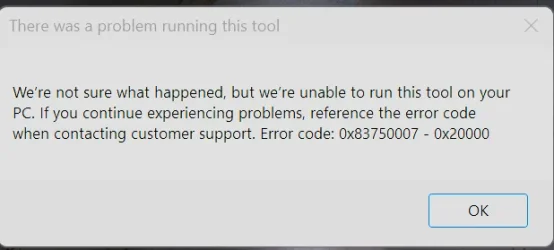
Never seen this error before, any ideas?

Worked the last time I used it, same error on both my main PC and in VirtrualBox 🤔
 

Attachments

  • Screenshot 2026-03-12 193033.webp
    Screenshot 2026-03-12 193033.webp
    17.1 KB · Views: 1

My Computer My Computer

At a glance

Windows 11 Pro 25H2 (RP channel)AMD Ryzen 7 9800X3D 8-core64GB Corsair Titanium 6000/CL30MSI Suprim 5080 SOC
OS
Windows 11 Pro 25H2 (RP channel)
Computer type
PC/Desktop
Manufacturer/Model
MSI
CPU
AMD Ryzen 7 9800X3D 8-core
Motherboard
MEG X870E Godlike
Memory
64GB Corsair Titanium 6000/CL30
Graphics Card(s)
MSI Suprim 5080 SOC
Sound Card
Soundblaster AE-9
Monitor(s) Displays
ASUS TUF Gaming VG289Q
Screen Resolution
3840x2160
Hard Drives
Samsung 9100 Pro 4TB (gen 5 x4, system drive/games)
Samsung 990 Pro 2TB
Samsung 980 Pro 2TB
Samsung 870 Evo 4TB
Samsung 870 Evo 2TB
Samsung T9 4TB
PSU
Seasonic PX-2200
Case
Bequiet! Dark Base Pro 901
Cooling
Noctua NH-D15S Chromax black
Keyboard
Logitech G915 X (wired)
Mouse
Logitech G903 with PowerPlay charger
Internet Speed
900Mb/sec
Browser
Microsoft Edge
Antivirus
Windows Defender
Well they've refreshed MCT to download 26200.8037. It's probably a back-end issue, try again later?
 

My Computer My Computer

At a glance

Windows 7
OS
Windows 7
Well they've refreshed MCT to download 26200.8037. It's probably a back-end issue, try again later?
I kind of guess they would update it, they seem to do it every month now!
Anyway I downloaded the MCT again which was EXACTLY the same version and it works...
 

My Computer My Computer

At a glance

Windows 11 Pro 25H2 (RP channel)AMD Ryzen 7 9800X3D 8-core64GB Corsair Titanium 6000/CL30MSI Suprim 5080 SOC
OS
Windows 11 Pro 25H2 (RP channel)
Computer type
PC/Desktop
Manufacturer/Model
MSI
CPU
AMD Ryzen 7 9800X3D 8-core
Motherboard
MEG X870E Godlike
Memory
64GB Corsair Titanium 6000/CL30
Graphics Card(s)
MSI Suprim 5080 SOC
Sound Card
Soundblaster AE-9
Monitor(s) Displays
ASUS TUF Gaming VG289Q
Screen Resolution
3840x2160
Hard Drives
Samsung 9100 Pro 4TB (gen 5 x4, system drive/games)
Samsung 990 Pro 2TB
Samsung 980 Pro 2TB
Samsung 870 Evo 4TB
Samsung 870 Evo 2TB
Samsung T9 4TB
PSU
Seasonic PX-2200
Case
Bequiet! Dark Base Pro 901
Cooling
Noctua NH-D15S Chromax black
Keyboard
Logitech G915 X (wired)
Mouse
Logitech G903 with PowerPlay charger
Internet Speed
900Mb/sec
Browser
Microsoft Edge
Antivirus
Windows Defender

Well they've refreshed MCT to download 26200.8037. It's probably a back-end issue, try again later?
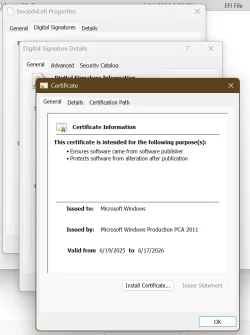
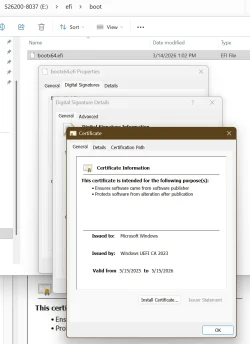
I could not boot on Dell xps8930 and Dell XPS 8940 the media created by MCT for Build 26200.8037.
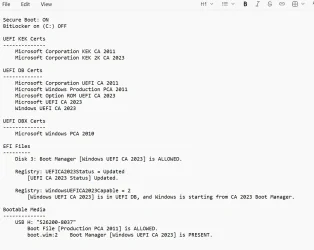
I had to convert the Bootable media for CA 2023. It shows the embedded signature Windows UEFI CA 2023 and the Catalog show Microsoft Windows Production PCA 2011.
This is getting more confusing with every new ISO.

Here is what I see on the USB media after converting for CA 2023 using ADK. 😎
It now boots fine, while the original created by MCT was failing.

1773522527928.webp

1773522829937.webp


1773523179586.webp
 

My Computer My Computer

At a glance

Windows 11 Pro 25H2Intel I9-9900K64GBNVIDIA RTX 2060
OS
Windows 11 Pro 25H2
Computer type
PC/Desktop
Manufacturer/Model
Dell XPS 8930
CPU
Intel I9-9900K
Memory
64GB
Graphics Card(s)
NVIDIA RTX 2060
Sound Card
NVIDIA High Definition Audio
Monitor(s) Displays
4k Samsung
Screen Resolution
3840 x 2160
Hard Drives
512GB NVMe, ADATA SU 800, 2TB HDD
That makes sense, but it sounds like MCT is kinda broken.

Two years ago, W11 24H2 released with our current set of CA 2023 boot files. There was an earlier set of CA 2023 boot files included in 21H2-23H2, but later security updates (higher SVN's) made those files obsolete.

When IT admins are told to follow MS best practices, they will use the Windows ADK toolkit. The ADK includes a complete set of boot files, to allow admins to make bootable media for physical ISO or USB.

Rufus has logic to pull the CA 2023 boot files right out of the ISO distribution. It sounds like MCT doesn't does a poor job of doing the same work. There isn't an option to explicitly force which set of boot files to use.

MCT might be guessing on which boot file based on your current UEFI, but that could be a bad choice, since you could be building the image for an entirely different PC.
 

My Computer My Computer

At a glance

Windows 7
OS
Windows 7
That makes sense, but it sounds like MCT is kinda broken.

Two years ago, W11 24H2 released with our current set of CA 2023 boot files. There was an earlier set of CA 2023 boot files included in 21H2-23H2, but later security updates (higher SVN's) made those files obsolete.

When IT admins are told to follow MS best practices, they will use the Windows ADK toolkit. The ADK includes a complete set of boot files, to allow admins to make bootable media for physical ISO or USB.

Rufus has logic to pull the CA 2023 boot files right out of the ISO distribution. It sounds like MCT doesn't does a poor job of doing the same work. There isn't an option to explicitly force which set of boot files to use.

MCT might be guessing on which boot file based on your current UEFI, but that could be a bad choice, since you could be building the image for an entirely different PC.
@garlin,
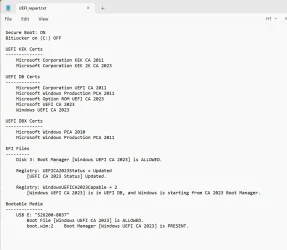
I think I may have figured out why the MCT media fails to boot on this machine.
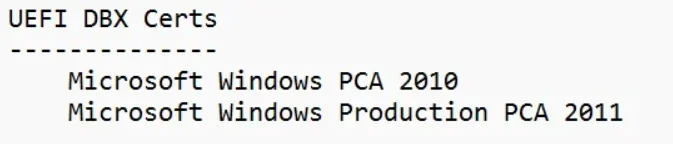
I see that Microsoft Windows Production PCA 2011 is listed in the UEFI DBX Certs.
So, I believe it was already revoked in this machine. I tried booting the same MCT USB media on a different machine that shows only PCA 2010 in the UEFI DBX Certs. and it boots fine.

Is there a way to un-revoke the PCA 2011?


1773546938390.webp

This other machine shows only PCA 2010 in the UEFI DBX Certs and the MCT USB media 26200.8037 booted without a problem.
It sure can be pretty confusing. 😵‍💫

1773548846312.webp
 

My Computer My Computer

At a glance

Windows 11 Pro 25H2Intel I9-9900K64GBNVIDIA RTX 2060
OS
Windows 11 Pro 25H2
Computer type
PC/Desktop
Manufacturer/Model
Dell XPS 8930
CPU
Intel I9-9900K
Memory
64GB
Graphics Card(s)
NVIDIA RTX 2060
Sound Card
NVIDIA High Definition Audio
Monitor(s) Displays
4k Samsung
Screen Resolution
3840 x 2160
Hard Drives
512GB NVMe, ADATA SU 800, 2TB HDD
1. You can't delete a DBX cert from Windows. But if your UEFI allows for manual key management, you can try deleting PCA 2011 from DBX. If your UEFI doesn't support key management, then you need to disable Secure Boot, and reset to Factory Defaults.

The Factory Defaults (for now) will always not include PCA 2011 in DBX.

As you don't have BitLocker enabled, you don't need to suspend or disable it before either deleting PCA 2011 from DBX or resetting to Factory Default. Changing the keys counts as a Secure Boot environment change, and BitLocker will always ask for a recovery key in that instance.

2. The alternative is to have MCT write to a local ISO file, and have Rufus make the USB drive. Rufus has the option to pull the CA 2023 boot file and use it on the USB.

3. Since this USB drive doesn't boot any way, you can try running my update script:
Code:
Update_UEFI-CA2023.ps1 -BootMedia

This should copy a newer boot file into the USB, saving you from having to create it from scratch. If it doesn't work, you have options 1 & 2.
 

Attachments

My Computer My Computer

At a glance

Windows 7
OS
Windows 7
1. You can't delete a DBX cert from Windows. But if your UEFI allows for manual key management, you can try deleting PCA 2011 from DBX. If your UEFI doesn't support key management, then you need to disable Secure Boot, and reset to Factory Defaults.

The Factory Defaults (for now) will always not include PCA 2011 in DBX.

As you don't have BitLocker enabled, you don't need to suspend or disable it before either deleting PCA 2011 from DBX or resetting to Factory Default. Changing the keys counts as a Secure Boot environment change, and BitLocker will always ask for a recovery key in that instance.

2. The alternative is to have MCT write to a local ISO file, and have Rufus make the USB drive. Rufus has the option to pull the CA 2023 boot file and use it on the USB.

3. Since this USB drive doesn't boot any way, you can try running my update script:
Code:
Update_UEFI-CA2023.ps1 -BootMedia

This should copy a newer boot file into the USB, saving you from having to create it from scratch. If it doesn't work, you have options 1 & 2.
I can use the media that was modified with ADK for CA 2023, that boots on all my 3 Dell machines regardless of the PCA 2011 in DBX or not. 🤞
 

My Computer My Computer

At a glance

Windows 11 Pro 25H2Intel I9-9900K64GBNVIDIA RTX 2060
OS
Windows 11 Pro 25H2
Computer type
PC/Desktop
Manufacturer/Model
Dell XPS 8930
CPU
Intel I9-9900K
Memory
64GB
Graphics Card(s)
NVIDIA RTX 2060
Sound Card
NVIDIA High Definition Audio
Monitor(s) Displays
4k Samsung
Screen Resolution
3840 x 2160
Hard Drives
512GB NVMe, ADATA SU 800, 2TB HDD
@garlin,

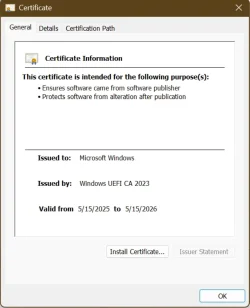
One more question, why is this certificate only valid till 5/15/2026?

1773551252430.webp
 

My Computer My Computer

At a glance

Windows 11 Pro 25H2Intel I9-9900K64GBNVIDIA RTX 2060
OS
Windows 11 Pro 25H2
Computer type
PC/Desktop
Manufacturer/Model
Dell XPS 8930
CPU
Intel I9-9900K
Memory
64GB
Graphics Card(s)
NVIDIA RTX 2060
Sound Card
NVIDIA High Definition Audio
Monitor(s) Displays
4k Samsung
Screen Resolution
3840 x 2160
Hard Drives
512GB NVMe, ADATA SU 800, 2TB HDD
24H2 ADK includes the same boot files as a current 24H2 or 25H2 system, so you can use it as a "donor" if you don't want to install the ADK. You already have the ADK, but some folks don't.

I expect the reason for an one-year expiration is to time-bomb Insider builds. If you check some of the other Insider builds, the cert's date range is always one year long but the start/end date keeps moving around.
 

My Computer My Computer

At a glance

Windows 7
OS
Windows 7
24H2 ADK includes the same boot files as a current 24H2 or 25H2 system, so you can use it as a "donor" if you don't want to install the ADK. You already have the ADK, but some folks don't.

I expect the reason for an one-year expiration is to time-bomb Insider builds. If you check some of the other Insider builds, the cert's date range is always one year long but the start/end date keeps moving around.
More confusion, there are different versions of ADK.


My Computer My Computer

At a glance

Windows 11 Pro 25H2Intel I9-9900K64GBNVIDIA RTX 2060
OS
Windows 11 Pro 25H2
Computer type
PC/Desktop
Manufacturer/Model
Dell XPS 8930
CPU
Intel I9-9900K
Memory
64GB
Graphics Card(s)
NVIDIA RTX 2060
Sound Card
NVIDIA High Definition Audio
Monitor(s) Displays
4k Samsung
Screen Resolution
3840 x 2160
Hard Drives
512GB NVMe, ADATA SU 800, 2TB HDD
The last ADK has the most recent files, but basically if you have a host Windows that's Oct 2025 or later, the same files exist under \Windows\Boot as the ADK. I think it made sense before Windows Update started to push out SecureBootUpdates folder to every system, to use the ADK. But today, it doesn't have any special advantage.

If your Windows has been updated since Oct 2025:
Code:
copy C:\Windows\Boot\EFI_EX\bootmgfw_EX.efi D:\efi\boot\bootx64.efi
 

My Computer My Computer

At a glance

Windows 7
OS
Windows 7
Back
Top Bottom