UPDATE 3/30:

 www.elevenforum.com
Source:
 www.elevenforum.com
Microsoft 365 Insider Beta Channel v2304 build 16327.20038 - March 30
UPDATE 4/04: https://www.elevenforum.com/t/microsoft-365-insider-beta-channel-v2305-build-16403-20000-april-4.13935/ Version 2304 (Build 16327.20038) Source: Release Notes for Beta Channel - Office release notes Update History for Office Beta Channel - Office release notes Office Insiders...
www.elevenforum.com
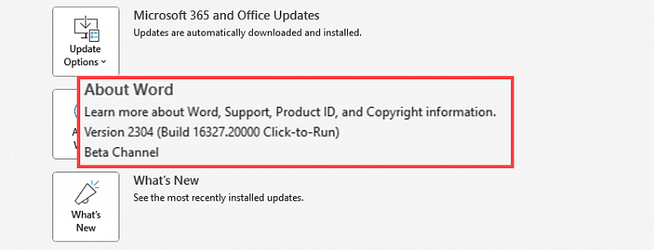
Version 2304 (Build 16327.20000)
Resolved issues
Excel
- We fixed an issue with scrolling the sheet tabs, where a scroll gesture would cause the worksheet to scroll rather than the tabs.
- We fixed an issue where the sheet tab scroll buttons would not scroll left in some workbooks.
- We fixed an issue where Excel would stop working while trying to close a worksheet without saving changes.
Outlook
- We fixed an issue that caused users to see an empty From field drop down when their profile included an SMTP address with an asterisk in it.
- We fixed an issue where AllowPhraseMatch was not working when searching an uncached shared mailbox.
PowerPoint
- We fixed an issue related to text selection when using an Input Method Editor for East Asian languages.
- We fixed an issue when applying Access Restriction and Digital Signature the file could not be saved.
Project
- We fixed an issue where the task pane add-in API for Microsoft Project was not returning the proper value for the Summary, Milestone, and Active properties.
Word
- We fixed a failure to export files to PDF if they were protected with restricted access or sensitivity labels that restrict rights.
- We fixed an issue where the right side of the email body was cut off when printed and in print preview.
- We fixed an issue where the Word macro function Application.PrintOut range:=wdPrintCurrentPage could not print the current page while using the macro in Draft view.
Office Suite
- We fixed an issue where Word would stop working when trying to save a new document to OneDrive.
- We fixed an issue where the "connecting to" dialog box was shown during Save/Save-As when a UNC (Universal Naming Convention) path was set as the default save directory.
- We fixed an issue where right clicking a folder in Outlook could cause Office applications to close unexpectedly.
- We fixed an issue where PowerPoint would hang for a few seconds when the user clicks on an extremely complex shape.
Source:
- Release Notes for Beta Channel - Office release notes
- Update History for Office Beta Channel - Office release notes
- Office Insiders
Latest Office and Microsoft 365 Updates for Windows
https://www.elevenforum.com/t/office-2016-and-office-2019-have-reached-end-of-support.40888/ https://www.elevenforum.com/t/office-ltsc-2021-end-of-support-on-october-13-2026.46145/...
www.elevenforum.com
Last edited: