Microsoft 365 Insider Beta Channel v2502 build 18516.20000 - Jan. 21


UPDATE 2/03:


 Microsoft 365 Insider:

Version 2502 (Build 18516.20000)


 Source:

 
Last edited:
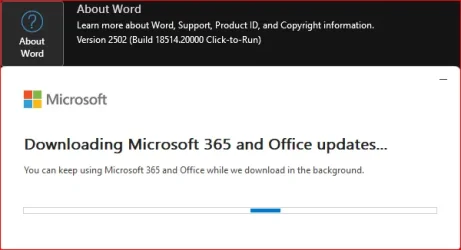
Download started...

mso365-W.webp
 

My Computer My Computer

At a glance

Windows 11Intel® Xeon® X5690 3.47GHz Six-CoreG.Skill PC3-12800 1600MHz 24GBNVIDIA GeForce GTX 1050
OS
Windows 11
Computer type
PC/Desktop
Manufacturer/Model
Asus/Custom Build
CPU
Intel® Xeon® X5690 3.47GHz Six-Core
Motherboard
Asus P6T Deluxe v2
Memory
G.Skill PC3-12800 1600MHz 24GB
Graphics Card(s)
NVIDIA GeForce GTX 1050
Sound Card
SoundMAX ADI AD2000B HD Audio
Monitor(s) Displays
Acer T232HL Touch Screen
Screen Resolution
1920 x 1080 @ 60Hz
Hard Drives
6 Crucial MX500 SSD 1TB each.
PSU
Thermaltake Toughpower Gold 850W
Case
Thermaltake Armor VA8000SWA
Cooling
Thermaltake Air Cooling System
Keyboard
Illuminated Multimedia LED Keyboard
Mouse
M16 Dual Mode Illuminated Mouse - Bluetooth / 2.4 GHz Mode
Internet Speed
800 Mbps
Browser
Edge / Opera / Vivaldi / Chrome / Firefox / Brave
Antivirus
Windows Defender Security
Installed just fine!

mso365-W2.webp
 

My Computer My Computer

At a glance

Windows 11Intel® Xeon® X5690 3.47GHz Six-CoreG.Skill PC3-12800 1600MHz 24GBNVIDIA GeForce GTX 1050
OS
Windows 11
Computer type
PC/Desktop
Manufacturer/Model
Asus/Custom Build
CPU
Intel® Xeon® X5690 3.47GHz Six-Core
Motherboard
Asus P6T Deluxe v2
Memory
G.Skill PC3-12800 1600MHz 24GB
Graphics Card(s)
NVIDIA GeForce GTX 1050
Sound Card
SoundMAX ADI AD2000B HD Audio
Monitor(s) Displays
Acer T232HL Touch Screen
Screen Resolution
1920 x 1080 @ 60Hz
Hard Drives
6 Crucial MX500 SSD 1TB each.
PSU
Thermaltake Toughpower Gold 850W
Case
Thermaltake Armor VA8000SWA
Cooling
Thermaltake Air Cooling System
Keyboard
Illuminated Multimedia LED Keyboard
Mouse
M16 Dual Mode Illuminated Mouse - Bluetooth / 2.4 GHz Mode
Internet Speed
800 Mbps
Browser
Edge / Opera / Vivaldi / Chrome / Firefox / Brave
Antivirus
Windows Defender Security
Done:
2025-01-21 22_38_37-Έγγραφο1 - Word.webp
 

My Computer My Computer

At a glance

Windows 10Ultra Core Ultra 9 185H32GBIntel Arc
OS
Windows 10
Computer type
Laptop
Manufacturer/Model
Lenovo Yoga 7 Pro
CPU
Ultra Core Ultra 9 185H
Motherboard
Lenovo
Memory
32GB
Graphics Card(s)
Intel Arc
If anyone noticed big Word and Outlook problems today, it's not you. About 24 hours after releasing this build, something bad was pushed out, I think via OfficeClickToRun.exe (there was no apparent new build, so it was subtle whatever the change).

I reverted update channel to Current Channel Preview to get past it. Something similar, but a lot less serious, happened a couple months ago, so I figure on the more conservative channel it's less apt to happen again.
 

My Computer My Computer

At a glance

Windows 11
OS
Windows 11
If anyone noticed big Word and Outlook problems today, it's not you. About 24 hours after releasing this build, something bad was pushed out, I think via OfficeClickToRun.exe (there was no apparent new build, so it was subtle whatever the change).

I reverted update channel to Current Channel Preview to get past it. Something similar, but a lot less serious, happened a couple months ago, so I figure on the more conservative channel it's less apt to happen again.
I've noticed those problems. Word and Outlook were crashing all the time. I thought it was the Windows update because I am in RP channel and I uninstalled the Windows update and now is working fine. I had some work to do with Word and this was an easy fix for me.
How can I change the Office update channel?

edit: I've changed it with Office Tool Plus.
 
Last edited:

My Computer My Computer

At a glance

Windows 10Ultra Core Ultra 9 185H32GBIntel Arc
OS
Windows 10
Computer type
Laptop
Manufacturer/Model
Lenovo Yoga 7 Pro
CPU
Ultra Core Ultra 9 185H
Motherboard
Lenovo
Memory
32GB
Graphics Card(s)
Intel Arc
I've noticed those problems. Word and Outlook were crashing all the time. I thought it was the Windows update because I am in RP channel and I uninstalled the Windows update and now is working fine.

It's interesting that removing the WU helped. Do you mean for a problem starting yesterday or some earlier time period/ similar problem? I'm not sure how a WU factored in for the one I was talking about, since I definitely didn't have any of those this week as I'm on Dev (or even a formal, new Office build that day).
 

My Computer My Computer

At a glance

Windows 11
OS
Windows 11
It's interesting that removing the WU helped. Do you mean for a problem starting yesterday or some earlier time period/ similar problem? I'm not sure how a WU factored in for the one I was talking about, since I definitely didn't have any of those this week as I'm on Dev (or even a formal, new Office build that day).
The problem started after WU. Outlook was crashing and then I realised Word was crashing too. I've panicked because I had some work to do and removed the WU. Then office was working normally. Now I've changed the office channel and installed latest WU again.
 

My Computer My Computer

At a glance

Windows 10Ultra Core Ultra 9 185H32GBIntel Arc
OS
Windows 10
Computer type
Laptop
Manufacturer/Model
Lenovo Yoga 7 Pro
CPU
Ultra Core Ultra 9 185H
Motherboard
Lenovo
Memory
32GB
Graphics Card(s)
Intel Arc
I updated again to latest Office beta version and now it's working fine.
 

My Computer My Computer

At a glance

Windows 10Ultra Core Ultra 9 185H32GBIntel Arc
OS
Windows 10
Computer type
Laptop
Manufacturer/Model
Lenovo Yoga 7 Pro
CPU
Ultra Core Ultra 9 185H
Motherboard
Lenovo
Memory
32GB
Graphics Card(s)
Intel Arc
Yes, I expect that it was either fixed with the build or by whatever voodoo happens via the Office scheduled tasks at random times (doing an Office build update might even trigger one or both of the tasks as part of it). The last time something like this happened a couple months ago (horizontal scrollbars disappeared from Outlook) it took about two days for it to correct (no new build). I think I'll stay on Slow though to see if these kinds of problems ever drift this way.

I was thinking about what you said about WU. That would prompt a reboot. And a reboot means that certain scheduled tasks might run right away. And if it was the Office scheduled tasks that did this, then it would certainly appear like one thing caused it (the WU) when it was something more subtle but for a related reason.
 

My Computer My Computer

At a glance

Windows 11
OS
Windows 11
edit: I've changed it with Office Tool Plus.

That's really a nice tool that I didn't know about, but today I accidentally found that I knew of the easiest way all along but forgot about it. At some point in the past, I added "Microsoft 365 Insider" to the Quick Access toolbar, though you don't actually have to add it since just searching for "Insider" in any Office app will turn it up. It has a very helpful function:


My Computer My Computer

At a glance

Windows 11
OS
Windows 11
That's really a nice tool that I didn't know about, but today I accidentally found that I knew of the easiest way all along but forgot about it. At some point in the past, I added "Microsoft 365 Insider" to the Quick Access toolbar, though you don't actually have to add it since just searching for "Insider" in any Office app will turn it up. It has a very helpful function:

Wow I didn't know that! Thanx. Really cool. Although I wouldn't be able to change channel because Word was crashing.
 

My Computer My Computer

At a glance

Windows 10Ultra Core Ultra 9 185H32GBIntel Arc
OS
Windows 10
Computer type
Laptop
Manufacturer/Model
Lenovo Yoga 7 Pro
CPU
Ultra Core Ultra 9 185H
Motherboard
Lenovo
Memory
32GB
Graphics Card(s)
Intel Arc
Wow I didn't know that! Thanx. Really cool. Although I wouldn't be able to change channel because Word was crashing.

You could have accessed it via Excel or PowerPoint, too.
 

My Computer My Computer

At a glance

Windows 11
OS
Windows 11

Latest Support Threads

Back
Top Bottom