Microsoft Defender auto-activates even though I am running MBAM Premium


Mark Phelps

Well-known member
Member
VIP
Local time
7:28 PM
Posts
505
OS
Windows 11
I'm running MBAM Premium version 4.5.9.198 and have all the protections turned on.

So I was surprised when Defender popup happened for a file I was downloading.

I checked Windows Security and Defender runtime checking was enabled -- so I disabled it and used gpedit.msc to do the same.

But ... if you are running a commercial AV product, isn't Defender supposed to be automatically disabled?
 

My Computer My Computer

At a glance

Windows 11Ryzen 5600X16GBEVGA GT 710
OS
Windows 11
Computer type
PC/Desktop
Manufacturer/Model
Custom built
CPU
Ryzen 5600X
Motherboard
ASRock Steel Legend
Memory
16GB
Graphics Card(s)
EVGA GT 710
Sound Card
None
Monitor(s) Displays
23",24", 19" - flat panels
Screen Resolution
1920x1200
Hard Drives
None - only M.2 SATA and NVMe drives
PSU
750W
Case
Antec
Cooling
stock Wraith cooler
Keyboard
Corsair gaming
Mouse
Logitech M720
Internet Speed
1Gb
Hi,
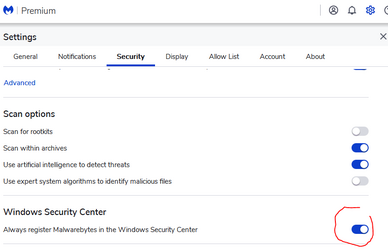
If you have mbam set to register with ms security center it shouldn't popup unless you have periodic scanning enabled in defender.
Defender/ ms security is pestware.

1654391023114.png
 

My Computer My Computer

At a glance

Win-7-10-11Pro's10900k & 9940x & 5930kTrident-Z Royal 4000c16 2x16gb & Trident-Z 36...Titan Xp & 1080ti FTW3 & evga 980ti gaming
OS
Win-7-10-11Pro's
Computer type
PC/Desktop
Manufacturer/Model
Acer 17" Nitro 7840sn/ 2x16gb 5600c40/ 4060/ stock 1tb-os/ 4tb sn850x
CPU
10900k & 9940x & 5930k
Motherboard
z490-Apex & x299-Apex & x99-Sabertooth
Memory
Trident-Z Royal 4000c16 2x16gb & Trident-Z 3600c16 4x8gb & 3200c14 4x8gb
Graphics Card(s)
Titan Xp & 1080ti FTW3 & evga 980ti gaming
Sound Card
Onboard Realtek x3
Monitor(s) Displays
1-AOC G2460PG 24"G-Sync 144Hz/ 2nd 1-ASUS VG248QE 24"/ 3rd LG 43" series
Screen Resolution
1920-1080 not sure what the t.v is besides 43" class scales from 1920-1080 perfectly
Hard Drives
2-WD-sn850x 4tb/ 970evo+500gb/ 980 pro 2tb.
PSU
1000p2 & 1200p2 & 850p2
Case
D450 x2 & 1 Test bench in cherry Entertainment center
Cooling
Custom water loops x3 with 2x mora 360mm rads only 980ti gaming air cooled
Keyboard
G710+x3
Mouse
Redragon x3
Internet Speed
xfinity gigabyte
Browser
Firefox
Antivirus
mbam pro
Hi,
If you have mbam set to register with ms security center it shouldn't popup unless you have periodic scanning enabled in defender.


@Mark Phelps


Hello, Mark.

@ThrashZone is correct in his reply to you (above).

Use limited periodic scanning in Microsoft Defender Antivirus


But interestingly, in Microsoft Community, the question was raised, and it was reported that it will still sometimes ask to run.

Microsoft Community


Just thought you might find the links interesting.


I can not personally verify the issue you described, as I have Windows Security set as primary AV, and do not have Malwarebytes Premium registered in the Security Center. This is what works best for me. Full benefit of real time protection, from both.


Take care.
 

My Computer My Computer

At a glance

Windows 10 Pro 64-bit 22H2 19045.4046Intel i7-3770 @ 3.40GHz8 GBAMD 7500 Radeon HD Series
OS
Windows 10 Pro 64-bit 22H2 19045.4046
Computer type
PC/Desktop
Manufacturer/Model
Dell/Vostro 470 (Year 2012)
CPU
Intel i7-3770 @ 3.40GHz
Memory
8 GB
Graphics Card(s)
AMD 7500 Radeon HD Series
Sound Card
Realtek Hi-Def Audio
Monitor(s) Displays
Dell U2412M
Hard Drives
1 TB 7200 HDD
Keyboard
Dell/USB
Mouse
Dell/USB
Internet Speed
100/10
Browser
Edge
Antivirus
Windows Security/MalwareBytes Premium
Hi,
Yeah updates or at least some might come up with mbam not compatible enough to stay as main av so ms will switch it's self to main av

I get tiered of seeing wd icon with yellow flags just because it doesn't like my personal preferences.
I personally just disable wd with cmd as admin with this string and wd icon disappears completely :look:
To turn off tamper protection leave mbam registering off though otherwise mbam hijacks the setting from being changed in wd.

Code:
rem Disable Windows Defender. For this to work you have to manually disable "Tamper protection"
powershell "if ((Get-ItemProperty -Path 'HKLM:SOFTWARE\Microsoft\Windows Defender\Features').TamperProtection -eq 4) { exit 0; } ; Write-Output 'Windows Defender can not be disabled, Tamper Protection is still active' '' 'Disable Tamper Protection manually, then press OK' | msg /w *"
reg add "HKLM\Software\Policies\Microsoft\Windows Defender\Spynet" /v SpyNetReporting /t REG_DWORD /d 0 /f
reg add "HKLM\Software\Policies\Microsoft\Windows Defender\Spynet" /v SubmitSamplesConsent /t REG_DWORD /d 2 /f
reg add "HKLM\Software\Policies\Microsoft\Windows Defender" /v DisableAntiSpyware /t REG_DWORD /d 1 /f
reg add "HKLM\Software\Policies\Microsoft\Windows Defender\Real-Time Protection" /v DisableRealtimeMonitoring /t REG_DWORD /d 1 /f
reg add "HKLM\Software\Microsoft\Windows\CurrentVersion\Explorer" /v SmartScreenEnabled /t REG_SZ /d "Off" /f
reg add "HKLM\Software\Policies\Microsoft\Windows Defender" /v DisableRoutinelyTakingAction /t REG_DWORD /d 1 /f
reg delete HKLM\Software\Microsoft\Windows\CurrentVersion\Run /v SecurityHealth /f
 

My Computer My Computer

At a glance

Win-7-10-11Pro's10900k & 9940x & 5930kTrident-Z Royal 4000c16 2x16gb & Trident-Z 36...Titan Xp & 1080ti FTW3 & evga 980ti gaming
OS
Win-7-10-11Pro's
Computer type
PC/Desktop
Manufacturer/Model
Acer 17" Nitro 7840sn/ 2x16gb 5600c40/ 4060/ stock 1tb-os/ 4tb sn850x
CPU
10900k & 9940x & 5930k
Motherboard
z490-Apex & x299-Apex & x99-Sabertooth
Memory
Trident-Z Royal 4000c16 2x16gb & Trident-Z 3600c16 4x8gb & 3200c14 4x8gb
Graphics Card(s)
Titan Xp & 1080ti FTW3 & evga 980ti gaming
Sound Card
Onboard Realtek x3
Monitor(s) Displays
1-AOC G2460PG 24"G-Sync 144Hz/ 2nd 1-ASUS VG248QE 24"/ 3rd LG 43" series
Screen Resolution
1920-1080 not sure what the t.v is besides 43" class scales from 1920-1080 perfectly
Hard Drives
2-WD-sn850x 4tb/ 970evo+500gb/ 980 pro 2tb.
PSU
1000p2 & 1200p2 & 850p2
Case
D450 x2 & 1 Test bench in cherry Entertainment center
Cooling
Custom water loops x3 with 2x mora 360mm rads only 980ti gaming air cooled
Keyboard
G710+x3
Mouse
Redragon x3
Internet Speed
xfinity gigabyte
Browser
Firefox
Antivirus
mbam pro
Thank you for the Info, @ThrashZone.

Hopefully the OP will get things resolved.


(y)
 

My Computer My Computer

At a glance

Windows 10 Pro 64-bit 22H2 19045.4046Intel i7-3770 @ 3.40GHz8 GBAMD 7500 Radeon HD Series
OS
Windows 10 Pro 64-bit 22H2 19045.4046
Computer type
PC/Desktop
Manufacturer/Model
Dell/Vostro 470 (Year 2012)
CPU
Intel i7-3770 @ 3.40GHz
Memory
8 GB
Graphics Card(s)
AMD 7500 Radeon HD Series
Sound Card
Realtek Hi-Def Audio
Monitor(s) Displays
Dell U2412M
Hard Drives
1 TB 7200 HDD
Keyboard
Dell/USB
Mouse
Dell/USB
Internet Speed
100/10
Browser
Edge
Antivirus
Windows Security/MalwareBytes Premium
Thanks for the replies -- so I checked and MBAM is set to Always register in the Windows Security Center.

I did use instructions from here to disabled Defender using Group Policy and so far today, it has NOT re-enabled on its own. So, maybe that is the way to disable it.

UPDATE: I just got a popup that Defender detected something -- and I checked, and it HAS turned itself back on!!

I will try the registry entries noted above and see if that works.
 
Last edited:

My Computer My Computer

At a glance

Windows 11Ryzen 5600X16GBEVGA GT 710
OS
Windows 11
Computer type
PC/Desktop
Manufacturer/Model
Custom built
CPU
Ryzen 5600X
Motherboard
ASRock Steel Legend
Memory
16GB
Graphics Card(s)
EVGA GT 710
Sound Card
None
Monitor(s) Displays
23",24", 19" - flat panels
Screen Resolution
1920x1200
Hard Drives
None - only M.2 SATA and NVMe drives
PSU
750W
Case
Antec
Cooling
stock Wraith cooler
Keyboard
Corsair gaming
Mouse
Logitech M720
Internet Speed
1Gb
I have always run Defender and MWB in parallel. They play nice with each other without there being any excess load on my system. Since it is not detriment to my system to run both in real time, I figure twice the protection can't be bad.

Something I discovered about Defender is the same thing that has been around since Windows 7. I noticed Defender using more CPU than I thought it should so I had to add an exclusion to C:\Programdata\Microsoft\Windows Defender\Platform\x.xx.xxxx.x-x\MsMpEng.exe (where the x's is version number.) I restarted and CPU dropped to normal. That little quirk of Defender scanning itself has been around for years and MS still hasn't dealt with it.
 

My Computers My Computers

  • At a glance

    Windows 11 Pro 25H2 26200.8655i9-10900 10 core 20 threads32 gbnone-Intel UHD Graphics 630
    OS
    Windows 11 Pro 25H2 26200.8655
    Computer type
    PC/Desktop
    Manufacturer/Model
    Dell Optiplex 7080
    CPU
    i9-10900 10 core 20 threads
    Motherboard
    DELL 0J37VM
    Memory
    32 gb
    Graphics Card(s)
    none-Intel UHD Graphics 630
    Sound Card
    Integrated Realtek
    Monitor(s) Displays
    Benq 27
    Screen Resolution
    2560x1440
    Hard Drives
    2x1tb Solidigm m.2 nvme /External drives 512gb Samsung m.2 sata+2tb Kingston m2.nvme
    PSU
    500w
    Case
    MT
    Cooling
    Dell Premium
    Keyboard
    Logitech wired
    Mouse
    Logitech wireless
    Internet Speed
    so slow I'm too embarrassed to tell
    Browser
    #1 Edge #2 Firefox
    Antivirus
    Defender+MWB Premium
  • At a glance

    Windows 11 Pro 24H2 26200.8457AMD Ryzen 7 6800U32 gbintegrated
    Operating System
    Windows 11 Pro 24H2 26200.8457
    Computer type
    PC/Desktop
    Manufacturer/Model
    Beelink Mini PC SER5
    CPU
    AMD Ryzen 7 6800U
    Memory
    32 gb
    Graphics card(s)
    integrated
    Sound Card
    integrated
    Monitor(s) Displays
    Benq 27
    Screen Resolution
    2560x1440
    Hard Drives
    1TB Crucial nvme
    Keyboard
    Logitech wired
    Mouse
    Logitech wireless
    Internet Speed
    still too embarrassed to tell
    Browser
    Firefox
    Antivirus
    Defender
    Other Info
    System 3 is non compliant Dell 9020 i7-4770/24gb ram Win11 PRO 26200.8457
Update: Since using the registry entries from thread #4, Defender has NOT reactivated itself -- so maybe NOW, it is actually disabled for good.
 

My Computer My Computer

At a glance

Windows 11Ryzen 5600X16GBEVGA GT 710
OS
Windows 11
Computer type
PC/Desktop
Manufacturer/Model
Custom built
CPU
Ryzen 5600X
Motherboard
ASRock Steel Legend
Memory
16GB
Graphics Card(s)
EVGA GT 710
Sound Card
None
Monitor(s) Displays
23",24", 19" - flat panels
Screen Resolution
1920x1200
Hard Drives
None - only M.2 SATA and NVMe drives
PSU
750W
Case
Antec
Cooling
stock Wraith cooler
Keyboard
Corsair gaming
Mouse
Logitech M720
Internet Speed
1Gb
Update: Since using the registry entries from thread #4, Defender has NOT reactivated itself -- so maybe NOW, it is actually disabled for good.
If you followed these guys advice you should be fine and shouldn't reactivate
 

My Computers My Computers

  • At a glance

    Windows 11 Pro13th Gen Core i9 13900HX32GB DDR5 @4800MHz 2x16GBGeforce RTX 4090HX 16GB
    OS
    Windows 11 Pro
    Computer type
    Laptop
    Manufacturer/Model
    Alienware M18 R1
    CPU
    13th Gen Core i9 13900HX
    Memory
    32GB DDR5 @4800MHz 2x16GB
    Graphics Card(s)
    Geforce RTX 4090HX 16GB
    Sound Card
    Nvidia HD / Realtek ALC3254
    Monitor(s) Displays
    18" QHD+
    Screen Resolution
    25660 X 1600
    Hard Drives
    C: KIOXIA (Toshiba) 2TB KXG80ZNV2T04 NVMe PCIe M.2 SSD
    D: KIOXIA (Toshiba) 2TB KXG80ZNV2T04 NVMe PCIe M.2 SSD
    Case
    Dark Metallic Moon
    Keyboard
    Alienware M Series per-key AlienFX RGB
    Mouse
    Alienware AW610M
    Browser
    Chrome and Firefox
    Antivirus
    Norton
    Other Info
    Killer E3000 Ethernet Controller
    Killer Killer AX1690 Wi-Fi Network Adaptor Wi-Fi 6E
    Bluetooth 5.2
    Alienware Z01G Graphic Amplifier
  • At a glance

    Windows 11 Pro10th Gen i-9 10900 K32Gb Dual Channel DDR4 @ 8843MHzNvidia RTX 2080 Super
    Operating System
    Windows 11 Pro
    Computer type
    Laptop
    Manufacturer/Model
    Alienware Area 51m R2
    CPU
    10th Gen i-9 10900 K
    Memory
    32Gb Dual Channel DDR4 @ 8843MHz
    Graphics card(s)
    Nvidia RTX 2080 Super
    Sound Card
    Nvidia
    Screen Resolution
    1920 x 1080
    Hard Drives
    Hard Drive C: Samsung 2TB SSD PM981a NVMe
    Hard Drive D:Samsung 2TB SSD 970 EVO Plus
    Mouse
    Alienware 610M
    Browser
    Chrome
    Antivirus
    Norton
That little quirk of Defender scanning itself has been around for years and MS still hasn't dealt with it.
I thought it was a good thing that Defender makes sure that it is OK itself before it goes to work.
 

My Computer My Computer

At a glance

Windows 10 Pro
OS
Windows 10 Pro
Update: Since using the registry entries from thread #4, Defender has NOT reactivated itself -- so maybe NOW, it is actually disabled for good.
Hi,
10 days so far has the bugger man got you yet for disabling pretender oops I mean defender :look:
 

My Computer My Computer

At a glance

Win-7-10-11Pro's10900k & 9940x & 5930kTrident-Z Royal 4000c16 2x16gb & Trident-Z 36...Titan Xp & 1080ti FTW3 & evga 980ti gaming
OS
Win-7-10-11Pro's
Computer type
PC/Desktop
Manufacturer/Model
Acer 17" Nitro 7840sn/ 2x16gb 5600c40/ 4060/ stock 1tb-os/ 4tb sn850x
CPU
10900k & 9940x & 5930k
Motherboard
z490-Apex & x299-Apex & x99-Sabertooth
Memory
Trident-Z Royal 4000c16 2x16gb & Trident-Z 3600c16 4x8gb & 3200c14 4x8gb
Graphics Card(s)
Titan Xp & 1080ti FTW3 & evga 980ti gaming
Sound Card
Onboard Realtek x3
Monitor(s) Displays
1-AOC G2460PG 24"G-Sync 144Hz/ 2nd 1-ASUS VG248QE 24"/ 3rd LG 43" series
Screen Resolution
1920-1080 not sure what the t.v is besides 43" class scales from 1920-1080 perfectly
Hard Drives
2-WD-sn850x 4tb/ 970evo+500gb/ 980 pro 2tb.
PSU
1000p2 & 1200p2 & 850p2
Case
D450 x2 & 1 Test bench in cherry Entertainment center
Cooling
Custom water loops x3 with 2x mora 360mm rads only 980ti gaming air cooled
Keyboard
G710+x3
Mouse
Redragon x3
Internet Speed
xfinity gigabyte
Browser
Firefox
Antivirus
mbam pro
Hi,
10 days so far has the bugger man got you yet for disabling pretender oops I mean defender :look:
Actually, no. MBAM Premium runs a scan every day when I reboot and so far, has not found anything at all.
 

My Computer My Computer

At a glance

Windows 11Ryzen 5600X16GBEVGA GT 710
OS
Windows 11
Computer type
PC/Desktop
Manufacturer/Model
Custom built
CPU
Ryzen 5600X
Motherboard
ASRock Steel Legend
Memory
16GB
Graphics Card(s)
EVGA GT 710
Sound Card
None
Monitor(s) Displays
23",24", 19" - flat panels
Screen Resolution
1920x1200
Hard Drives
None - only M.2 SATA and NVMe drives
PSU
750W
Case
Antec
Cooling
stock Wraith cooler
Keyboard
Corsair gaming
Mouse
Logitech M720
Internet Speed
1Gb
Back
Top Bottom