Microsoft Edge fighting notification spam


Web site notifications are great for staying up to date on your favorite webapps, but they can also be used to spam you with messages that can be unwanted or even misleading. We’ve made changes to help customers avoid these spammy messages and increase their peace of mind.

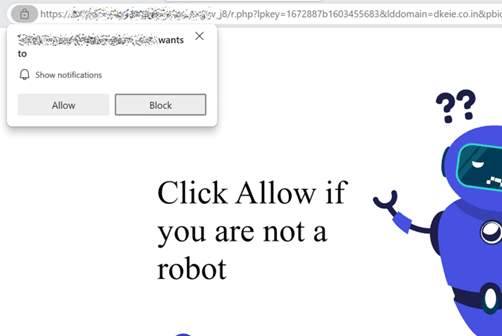
Edge now blocks prompts like these from unfamiliar sites to help protect users from aggressive fake advertising.
Picture1.png


An example of misleading notification requests sent by a scam site. In this example, it’s being used to deceive a customer; for example, asking the user to click allow to “prove they are not a robot”. Some information has been redacted with blurred text. Edge now blocks these requests from unfamiliar sites to protect customers.
Picture2.png


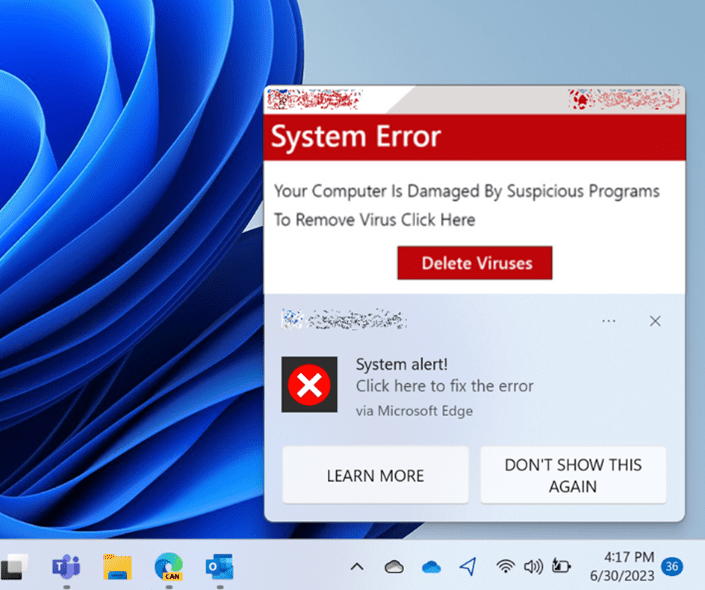
A fake warning notification sent by a scam site after receiving permission. Some information has been redacted with blurred text. Microsoft also works to block these once detected and coordinates with law enforcement authorities.

Sites intending to spam visitors will try to trick users to allow notifications, like in the example above. This site is really trying to get permission to show spammy notifications. Within minutes, this site pushed dozens of fake warnings, all trying to trick victim users into buying software.

While these notifications don’t cause direct harm on their own, they can be unsettling and some customers don’t know how to disable them. Surveys show that around three of every five users have had a similar experience and about 12% have felt some kind of negative impact.

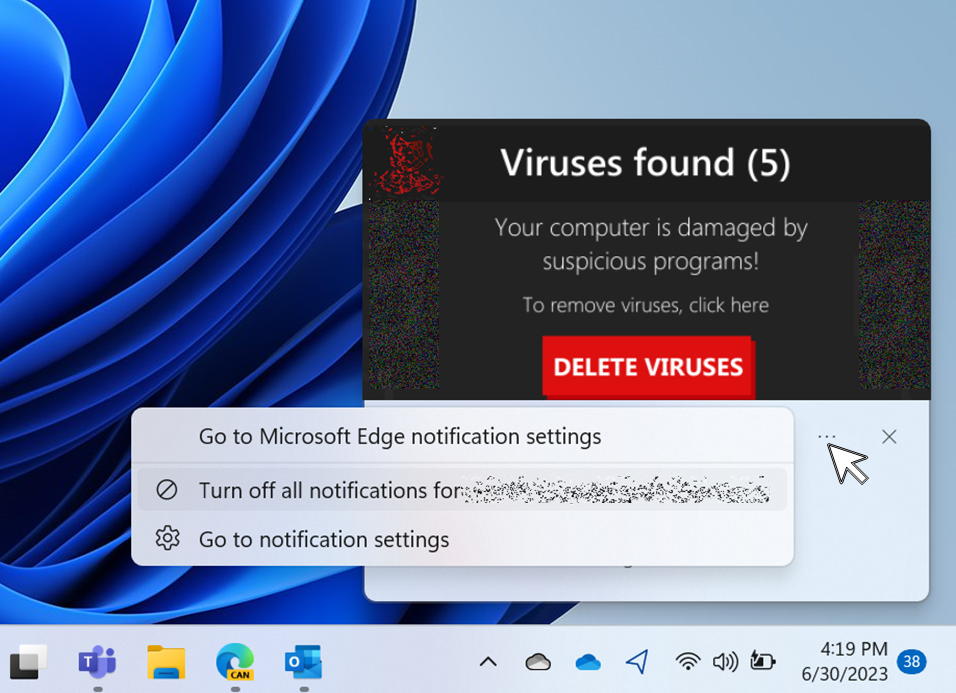
The expanded ellipsis menu on a notification, showing the option to Turn off all notifications for a site.

Users who still see annoying notifications can click the ellipsis to turn off notifications for that site (more info).

Microsoft Edge already helps block known Phishing, Malware and also helps protect against misleading website typos. Now, we’re taking a stand against abusive notifications.

With our partners across Microsoft, we’ve identified and analyzed dozens of types of notifications that most customers would interpret as spammy notifications. In this process we’ve also removed notification privileges from websites that send spammy notifications – in effect blocking billions of misleading notifications. The Microsoft Digital Crimes Unit works with law enforcement agencies to find the source of scams like these and help protect users worldwide.

Starting in May, we took another important step to prevent misleading notifications before customers accept them. Our analysis found most misleading notifications come from unfamiliar sites. In Microsoft Edge 113 and above, the first notification request will be shown “quietly”, with a more subtle message in the address bar, when the notification comes from an unfamiliar site.

We’ve seen a significant decrease in customers reporting issues with notifications after releasing this change.

Notifications will still work if you have already accepted them, and you can accept notifications from sites you and other users visit often. Also, Enterprise admins can configure an allow list to make sure that their internal applications can still prompt users for notifications.

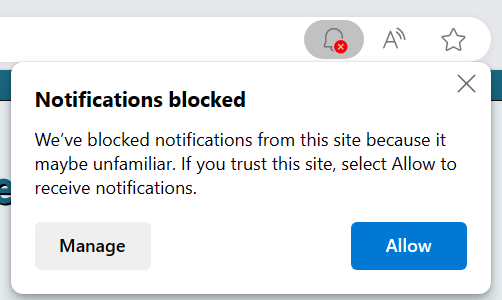
The bell icon in the URL bar is expanded to show a dialog titled Notifications block with the text We've blocked notifications from this site because it may be unfamiliar. If you trust this site, select Allow to receive notifications. There are buttons to Manage and Allow.

Prompts for notifications will be blocked, but users can always click the bell icon to access the prompt to allow them.

Removing known spammy notification senders and streamlining the notification acceptance experience is intended to help you browse confidently and get the most out of notifications.

Tell us about your experience with notifications in Microsoft Edge by going to the > Help and feedback > Send feedback menu in the browser. We welcome your feedback as we look to help you browse safely!
Source:

 
IMHO edge's constant attempts at fooling me into allowing it to become the default browser are the worse notifications of all.
 

My Computers My Computers

  • At a glance

    Windows 11 ProIntel Core i9 14900k, Intel UHD 770 integrated32gb G.Skill Trident Z5 7200Gigabyte RTX 4090 Gaming OC
    OS
    Windows 11 Pro
    Computer type
    PC/Desktop
    Manufacturer/Model
    Self Built
    CPU
    Intel Core i9 14900k, Intel UHD 770 integrated
    Motherboard
    Gigabyte Z790 Aorus Master X
    Memory
    32gb G.Skill Trident Z5 7200
    Graphics Card(s)
    Gigabyte RTX 4090 Gaming OC
    Sound Card
    EVGA Nu Audio, Razer Kraken V3 Pro, Realtek Onboard
    Monitor(s) Displays
    Dell U4025QW nano IPS monitor, Samsung Odyssey G75F, Wisecoco 12.6" IPS sensor panel
    Screen Resolution
    5120X2160 x 2 1920x515
    Hard Drives
    WD Black SN8100, Samsung 990 Pro x 3, WD BLACK SN850x, WD Black 8tb HD
    PSU
    FSP Hydro PTM Pro 1350w
    Case
    Thermaltake Level 20 XT
    Cooling
    ARCTIC Liquid Freezer III 420 ARGB in push/pull, Antec Prism X 120mm ARGB Fans x 15
    Keyboard
    Razer Blackwidow V4 Pro
    Mouse
    Razer Basilik V3 Pro on Razer Firefly V2 mouse pad.
    Internet Speed
    950 Mbps cable primary, 6Mbps secondary vdsl
    Browser
    Chrome primary, FF-Edge-IE secondary
    Antivirus
    Norton 360 Premium
    Other Info
    I sit on a Libernovo Omni chair.😍 Sound by Fosi Audio DA-2120C pushing Magnat Series 503 bookshelf speakers and a SVS SB-1000 Pro subwoofer.

  • At a glance

    Windows 11 ProIntel 14900HX32gb ddr 5 5600Nvidia RTX 4090 mobile
    Operating System
    Windows 11 Pro
    Computer type
    Laptop
    Manufacturer/Model
    2023 Acer Predator Helios 18
    CPU
    Intel 14900HX
    Motherboard
    factory
    Memory
    32gb ddr 5 5600
    Graphics card(s)
    Nvidia RTX 4090 mobile
    Sound Card
    onboard
    Monitor(s) Displays
    18" 250hz IPS
    Screen Resolution
    2560X1600
    Hard Drives
    Samsung 9100 Pro, 990 Pro
    PSU
    factory 330W
    Case
    factory
    Cooling
    factory
    Keyboard
    individual key argb
    Mouse
    touchpad
    Internet Speed
    WiFi 7, 2.5gb ethernet
    Browser
    Chrome primary, FF-IE and Edge secondary
    Antivirus
    Norton 360 Premium
    Other Info
    Acer will not allow WD Black SN8100 to function in m.2 slot 0 and Crucial T710 ssd's to function in either slot.
Surveys show that around three of every five users have had a similar experience and about 12% have felt some kind of negative impact.
The number is actually much higher, but most people think that those come from Windows or AV, especially since Edge is running hidden in the background. I found notifications to be pretty useful, unfortunately the spam became unbearable, even though I did not allow any webpages, they managed to it on their own. So sadly the only way to really deal with this issue is to disable all notifications.
 

My Computer My Computer

At a glance

Home26H2CanAMD Ryzen 5 8600G (07/24)2x32GB Kingston FURY DDR5 5600 MHz CL36 @5200...ASROCK Radeon RX 6600 Challenger D 8G @48FPS ...
OS
Home26H2Can
Computer type
PC/Desktop
CPU
AMD Ryzen 5 8600G (07/24)
Motherboard
ASROCK B650M-HDV/M.2 (07/24) BIOS 4.21 AGESA ComboAM5 1.3.0.1 (04/26)
Memory
2x32GB Kingston FURY DDR5 5600 MHz CL36 @5200 CL36 (07/24)
Graphics Card(s)
ASROCK Radeon RX 6600 Challenger D 8G @48FPS (08/24)
Sound Card
Creative Sound BlasterX AE-5 Plus (05/24)
Monitor(s) Displays
24" Philips 24M1N3200ZS/00 (05/24)
Screen Resolution
1920×1080@165Hz via DP1.4
Hard Drives
Kingston KC3000 NVMe 2TB (05/24)
ADATA XPG GAMMIX S11 Pro 512GB (07/19)
PSU
Seasonic Core GM 550 Gold (04/24)
Case
Fractal Design Define 7 Mini with 3x Noctua NF-P14s/12@555rpm (04/24)
Cooling
Noctua NH-U12S with Noctua NF-P12 (04/24)
Keyboard
HP Pavilion Wired Keyboard 300 (07/24) + Rabalux 76017 Parker (01/24)
Mouse
Logitech M330 Silent Plus (01/26)
Internet Speed
500/100 Mbps via RouterOS (05/21) & TCP Optimizer
Browser
Edge, Brave for YouTube, LibreWolf for FB
Antivirus
NextDNS blocking 1/3 Traffic
Other Info
Phone: Motorola Moto G86 (02/26)
Backup: Hasleo Backup Suite (PreOS)
Headphones: Sennheiser RS170 (09/10)
Chair: Huzaro Force 4.4 Grey Mesh (05/24)
Notifier: Xiaomi Mi Band 9 Milanese (10/24)
FlexCore USB-C 3.2 Gen 1 (M) to LAN (F) (08/25)
The number is actually much higher, but most people think that those come from Windows or AV, especially since Edge is running hidden in the background. I found notifications to be pretty useful, unfortunately the spam became unbearable, even though I did not allow any webpages, they managed to it on their own. So sadly the only way to really deal with this issue is to disable all notifications.
Edge doesn't run in the background if you disable it


My Computer My Computer

At a glance

Windows 11 Pro 25H2 (RP channel)AMD Ryzen 7 9800X3D 8-core64GB Corsair Titanium 6000/CL30MSI Suprim 5080 SOC
OS
Windows 11 Pro 25H2 (RP channel)
Computer type
PC/Desktop
Manufacturer/Model
MSI
CPU
AMD Ryzen 7 9800X3D 8-core
Motherboard
MEG X870E Godlike
Memory
64GB Corsair Titanium 6000/CL30
Graphics Card(s)
MSI Suprim 5080 SOC
Sound Card
Soundblaster AE-9
Monitor(s) Displays
ASUS TUF Gaming VG289Q
Screen Resolution
3840x2160
Hard Drives
Samsung 9100 Pro 4TB (gen 5 x4, system drive/games)
Samsung 990 Pro 2TB
Samsung 980 Pro 2TB
Samsung 870 Evo 4TB
Samsung 870 Evo 2TB
Samsung T9 4TB
PSU
Seasonic PX-2200
Case
Bequiet! Dark Base Pro 901
Cooling
Noctua NH-D15S Chromax black
Keyboard
Logitech G915 X (wired)
Mouse
Logitech G903 with PowerPlay charger
Internet Speed
900Mb/sec
Browser
Microsoft Edge
Antivirus
Windows Defender
IMHO edge's constant attempts at fooling me into allowing it to become the default browser are the worse notifications of all.


My first thought as well.
I don't like when a program that I didn't purposely acquire (to protect me)... offers to protect me.
 
Last edited:

My Computers My Computers

  • At a glance

    Win 11 Home ♦♦♦26200.8655 ♦♦♦♦♦♦♦25H2AMD Ryzen 7 3700XG.Skill (F4-3200C14D-16GTZKW)EVGA RTX 2070 (08G-P4-2171-KR)
    OS
    Win 11 Home ♦♦♦26200.8655 ♦♦♦♦♦♦♦25H2
    Computer type
    PC/Desktop
    Manufacturer/Model
    Built by Ghot® [May 2020]
    CPU
    AMD Ryzen 7 3700X
    Motherboard
    Asus Pro WS X570-ACE (BIOS 5302)
    Memory
    G.Skill (F4-3200C14D-16GTZKW)
    Graphics Card(s)
    EVGA RTX 2070 (08G-P4-2171-KR)
    Sound Card
    Realtek ALC1220P / ALC S1220A
    Monitor(s) Displays
    Dell U3011 30"
    Screen Resolution
    2560 x 1600
    Hard Drives
    2x Samsung 860 EVO 500GB,
    WD 4TB Black FZBX - SATA III,
    WD 8TB Black FZBX - SATA III,
    DRW-24B1ST CD/DVD Burner
    PSU
    PC Power & Cooling 750W Quad EPS12V
    Case
    Cooler Master ATCS 840 Tower
    Cooling
    CM Hyper 212 EVO (push/pull)
    Keyboard
    Ducky DK9008 Shine II Blue LED
    Mouse
    Logitech Optical M-100
    Internet Speed
    300/300
    Browser
    Firefox (latest)
    Antivirus
    Bitdefender Total Security
    Other Info
    Speakers: Klipsch Pro Media 2.1
  • At a glance

    Windows XP Pro 32bit w/SP3AMD Athlon 64 X2 5000+ (OC'd @ 3.2Ghz)TWIN2X2048-6400C4DHX (2 x 1GB, DDR2 800)EVGA 256-P2-N758-TR GeForce 8600GT SSC
    Operating System
    Windows XP Pro 32bit w/SP3
    Computer type
    PC/Desktop
    Manufacturer/Model
    Built by Ghot® (not in use)
    CPU
    AMD Athlon 64 X2 5000+ (OC'd @ 3.2Ghz)
    Motherboard
    ASUS M2N32-SLI Deluxe Wireless Edition
    Memory
    TWIN2X2048-6400C4DHX (2 x 1GB, DDR2 800)
    Graphics card(s)
    EVGA 256-P2-N758-TR GeForce 8600GT SSC
    Sound Card
    Onboard
    Monitor(s) Displays
    ViewSonic G90FB Black 19" Professional (CRT)
    Screen Resolution
    up to 2048 x 1536
    Hard Drives
    WD 36GB 10,000rpm Raptor SATA
    Seagate 80GB 7200rpm SATA
    Lite-On LTR-52246S CD/RW
    Lite-On LH-18A1P CD/DVD Burner
    PSU
    PC Power & Cooling Silencer 750 Quad EPS12V
    Case
    Generic Beige case, 80mm fans
    Cooling
    ZALMAN 9500A 92mm CPU Cooler
    Keyboard
    Logitech Classic Keybooard 200
    Mouse
    Logitech Optical M-BT96a
    Internet Speed
    300/300
    Browser
    Firefox 3.x ??
    Antivirus
    Symantec (Norton)
    Other Info
    Still assembled, still runs. Haven't turned it on for 15 years?
Back
Top Bottom