Microsoft Edge Blog:
Scareware blocker for Microsoft Edge is now enabled by default on most Windows and Mac devices, and the impact is already clear: Scareware blocker shields users from scams before traditional threat intelligence catches them. Behind the scenes, we are improving our systems to help protect even more would-be victims.
Blocks scams before they catch victims
Scareware blocker uses a local computer vision model to spot full screen scams and stop them before users fall into the trap. The model is enabled by default on devices with more than 2 GB of RAM and four CPU cores, where it won’t slow down everyday browsing. IT Pros also now have an enterprise policy they can use to configure Scareware blocker on their desktops and add internal resources to an allow-list.Results from the preview were compelling: when Scareware blocker is active, users are protected from fresh scams hours or even days before they appear on global blocklists. Unsurprisingly, AI-powered features like Scareware blocker will forever change the way we protect customers from attacks.
One report can protect 50 others
Scareware blocker users stepped up to share feedback and protect other users. When someone reports a scam with Scareware blocker, we work directly with Microsoft Defender SmartScreen to get the scam blocked for other customers using SmartScreen. During the preview, each user report protected an additional 50 users on average.These reports were not limited to the familiar “Virus Alert!” popups. We’ve seen reports of scams with fake blue screens, fake control panels, and more. Recently, users reported scams posing as law enforcement, accusing them of crimes, and demanding payment to unlock their PCs. When Scareware blocker caught that scam, it had not yet been blocked by Defender SmartScreen or other services like Google Safe Browsing.
Jump-starting the connection to SmartScreen
Scareware blocker caught the scam mentioned above that impersonated law-enforcement, but before the first user report arrived, 30% of the targeted users had already seen the scam.We saw this throughout the preview: Scareware blocker provided a first line of defense but in the time before users reported scams and SmartScreen was able to start blocking, fast-moving scams still reached too many of their targets.
Edge 142 adds a scareware sensor for faster detection
Starting in November, if Scareware blocker detects a suspicious full-screen page, the new scareware sensor in Edge 142 can notify SmartScreen about the potential scam immediately, without sharing screenshots or any extra data beyond what SmartScreen already receives. This real-time report gives SmartScreen an immediate heads-up to help confirm scams faster and block them worldwide. Later, we’ll add more anonymous detection signals to help Edge recognize recurring scam patterns.
Enable or Disable Scareware Blocker in Microsoft Edge in Windows 11
This tutorial will show you how to turn on or off scareware blocker in Microsoft Edge for your account or all users in Windows 10 and Windows 11. Scareware blocker is now available in for Microsoft Edge, and is turned on by default. Scareware blocker allows Microsoft to use AI to detect...
 www.elevenforum.com
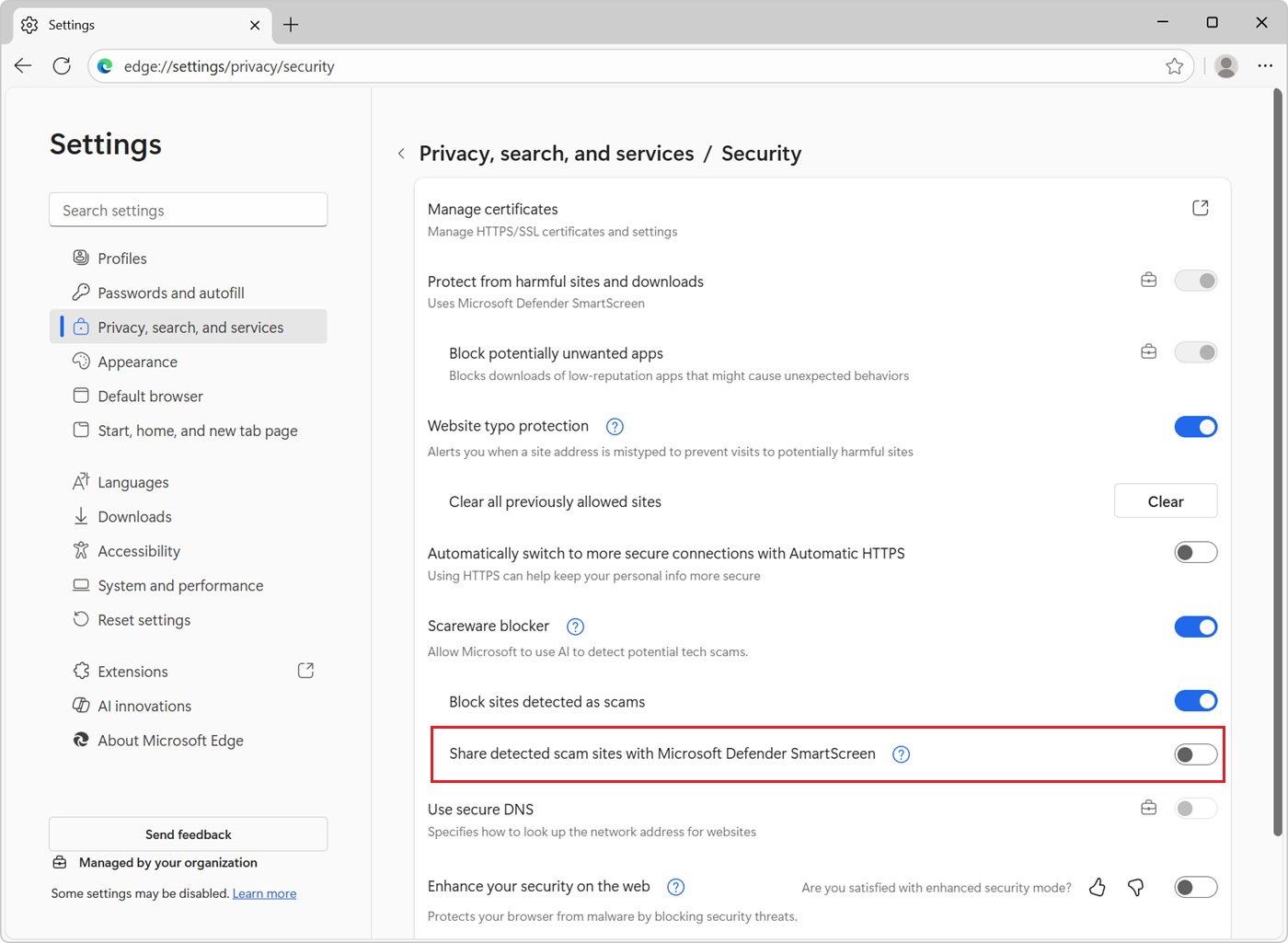
Figure 1 – The setting in Microsoft Edge 142 which enables Scareware blocker to share scams with Microsoft Defender SmartScreen.
This new scareware sensor setting is disabled by default for the time being, but we intend to enable it for users who have SmartScreen enabled, since any scam the sensor detects would be a scam that SmartScreen missed. Even with the scareware sensor disabled though, Scareware blocker will still work as expected. Also, the scareware sensor is always disabled for InPrivate mode. Finally, users can choose to disable SmartScreen entirely, though we strongly recommend leaving it enabled.
While the sensor will help provide earlier detection, please continue to report feedback when you hit a scam! Manually reporting feedback allows you to share the screenshot of the scam and other context to help block attacks at their source, as well as helping identify false positives.
Accelerating the pipeline
Even after a user has reported a scam, it may continue to impact other victims before SmartScreen can start blocking. To address that, we’re working to reduce latency and deliver faster SmartScreen protection for scams reported by Scareware blocker users.Behind the scenes, we’re also upgrading the end-to-end pipeline. Scareware blocker’s connection to SmartScreen started off as a promising prototype and now we’re upgrading it to run on the same production-scale threat intelligence systems that power SmartScreen client protection worldwide.
Scareware blocker caught the same scam described above again recently on a new site. This time though, the improved pipeline responded more rapidly. SmartScreen protection kicked in after the scam reached just 5% of its intended targets and most of those exposed would have had protection from Scareware blocker. With earlier warning from the sensor and more improvements to the pipeline, we hope to reduce exposure even further.
Thanks to the scam-fighting community
We’ve been lucky to work with talented and creative scam-fighters from the community. We are grateful to everyone who helped us deliver the preview and the tens of thousands of users who shared feedback so far. Now, everyone using Edge with Scareware blocker builds on their work and makes things just a little bit harder for scammers. Stay tuned for more! Source:

Protecting more Edge users with expanded Scareware blocker availability and real-time protection
Scareware blocker for Microsoft Edge is now enabled by default on most Windows and Mac devices, and the impact is already clear: Scareware blocker shields users from scams before traditional threat intelligence catches them. Behind t
 blogs.windows.com
Last edited: