Windows Blogs:
Microsoft Edge is moving to a two-week release cycle, bringing new features and improvements to users and organizations faster than ever. This is great news for teams that thrive on innovation: instead of waiting a full month for the next update, you get a steady, continuous stream of new capabilities to put to work sooner.
For organizations that prefer a more deliberate pace, Extended Stable is not changing. We introduced it in 2021 to provide a longer, predictable rhythm, and that commitment remains firmly in place. Extended Stable remains unchanged in timing.
Changes to the release schedule
Starting with Microsoft Edge 152 (Stable on August 27), Edge will move to a 2-week release cycle. Extended Stable will now receive updates every fourth release (for example, 156, 160, 164). The time between Extended Stable updates stays the same, at every eight weeks.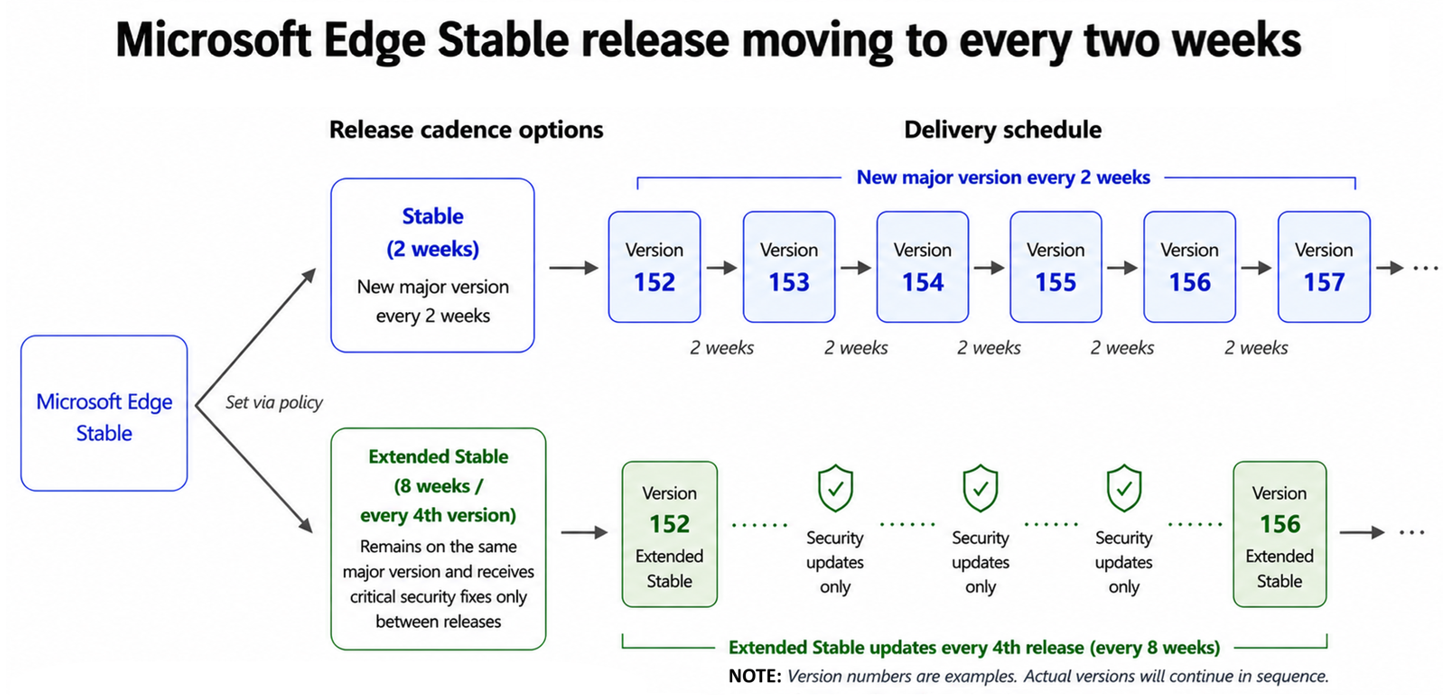
For customers on Stable, the practical effect of the new cycle is smaller, steadier change. Each release brings about half as much new content as before, delivered twice as often. Security and platform improvements reach your users faster, and each change set is smaller, which can make validation more manageable.
Both channels receive critical security updates. The difference is how quickly new features arrive: Stable delivers them on the new 2-week cycle, while Extended Stable spaces feature updates over an 8-week window for organizations that prefer a longer planning rhythm.
Recommended action
In summary, here is what to do, depending on the channel you run:- If you are on Extended Stable: no action needed. Your 8-week cycle and the same support model continue.
- If you are on Stable: plan for smaller, more frequent change sets and faster delivery of security improvements.
- Whichever channel you run: add a pilot group to Beta and start testing from day one to maximize your validation time.
To prepare for the transition, please refer to the updated Microsoft Edge release schedule and the Microsoft Edge Lifecycle page. We will continue to share updates through the Microsoft Edge Blog and the Microsoft 365 Message Center.
The pace of Edge is accelerating, and your users get to enjoy the payoff: more features, more improvements, arriving sooner and more often. And whatever pace suits your organization, you stay in control of it. We appreciate the partnership of our customers, and we are committed to supporting every team, on every channel, as Edge keeps getting better, faster.
Source:

Faster updates, enterprise-friendly schedule: the new Microsoft Edge release cycle
Microsoft Edge is moving to a two-week release cycle, bringing new features and improvements to users and organizations faster than ever. This is great news for teams that thrive on innovation: instead of waiting a full month for the next update, you
 blogs.windows.com