Microsoft Mesh: A new way to connect


 Microsoft 365 Insider Blog:

Greetings, Microsoft 365 Insiders! My name is Michelle Maislen and I’m a Product Manager on the Microsoft Mesh team. I’m excited to introduce you to a new way to connect with others in a digital way.

Microsoft Mesh: A new way to connect​

Microsoft Mesh is like a magical bridge that connects people across different places, even if they’re physically far apart. Imagine stepping into a 3D digital world where you can meet and collaborate with others as if you’re all in the same room. Whether you’re using a computer, or fancy VR gear, Mesh works everywhere.

How it works​

  1. To use immersive spaces, sign in to Teams on your desktop computer.
  2. Select the Calendar icon on the left side of the Teams app window.
  3. Select to your scheduled meeting, and then select the Join button.
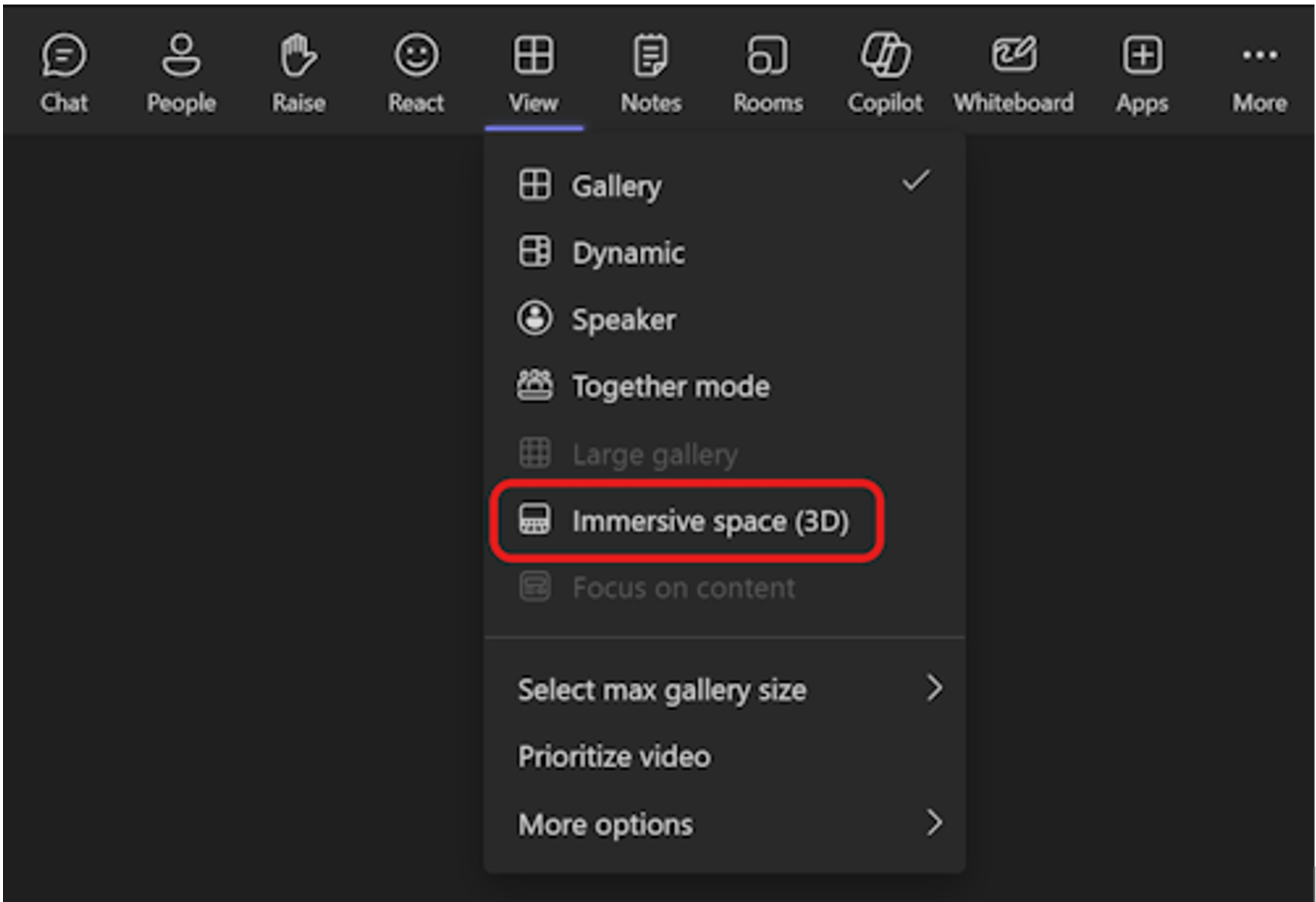
  4. To enter the immersive space pre-join screen, select View > Immersive space (3D).
    MS-Mesh_1.png

  5. Select + or the pencil icon to create or customize your avatar.
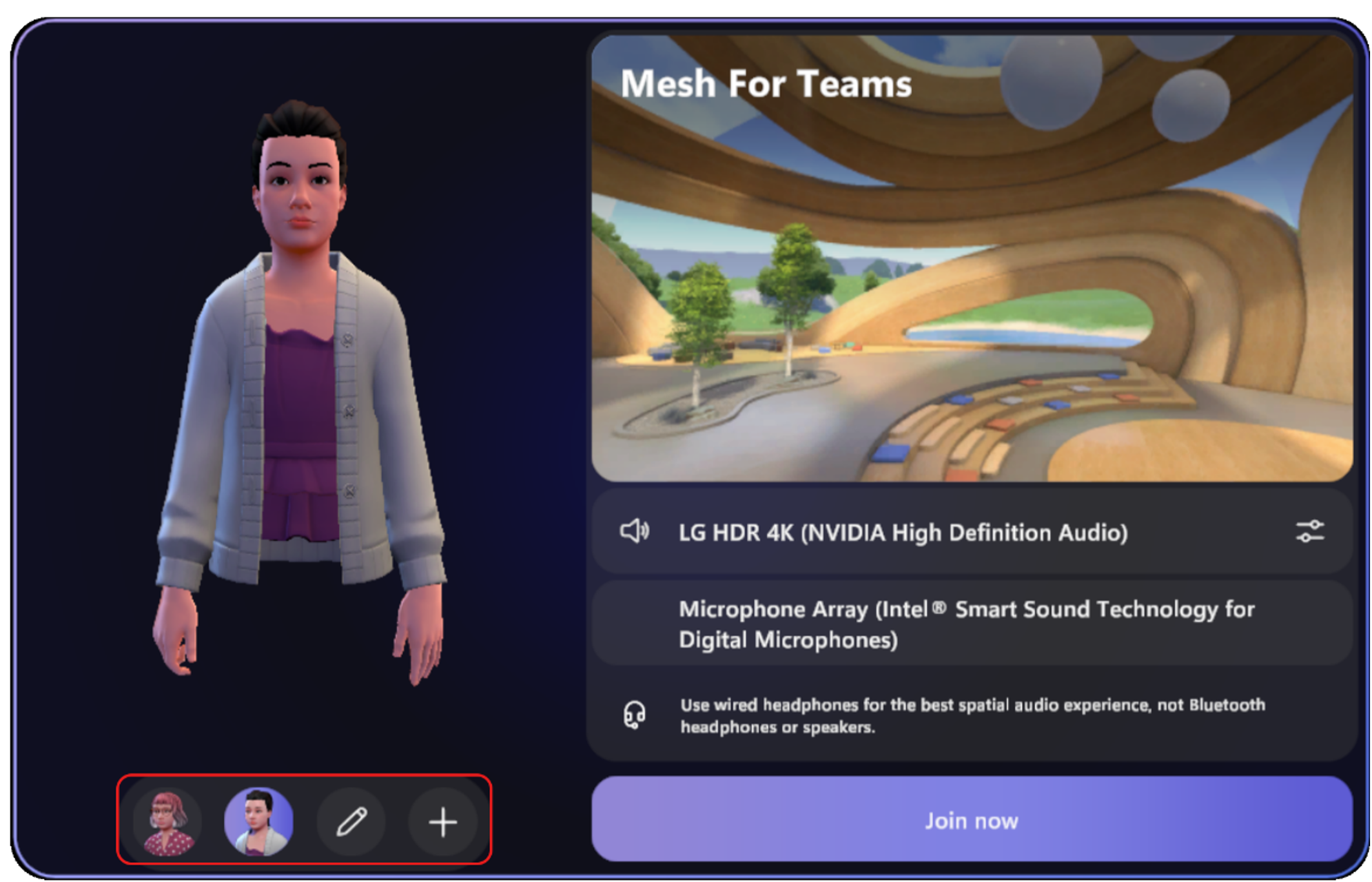
    Customize your avatar

  6. Adjust your audio device from the pre-join screen.
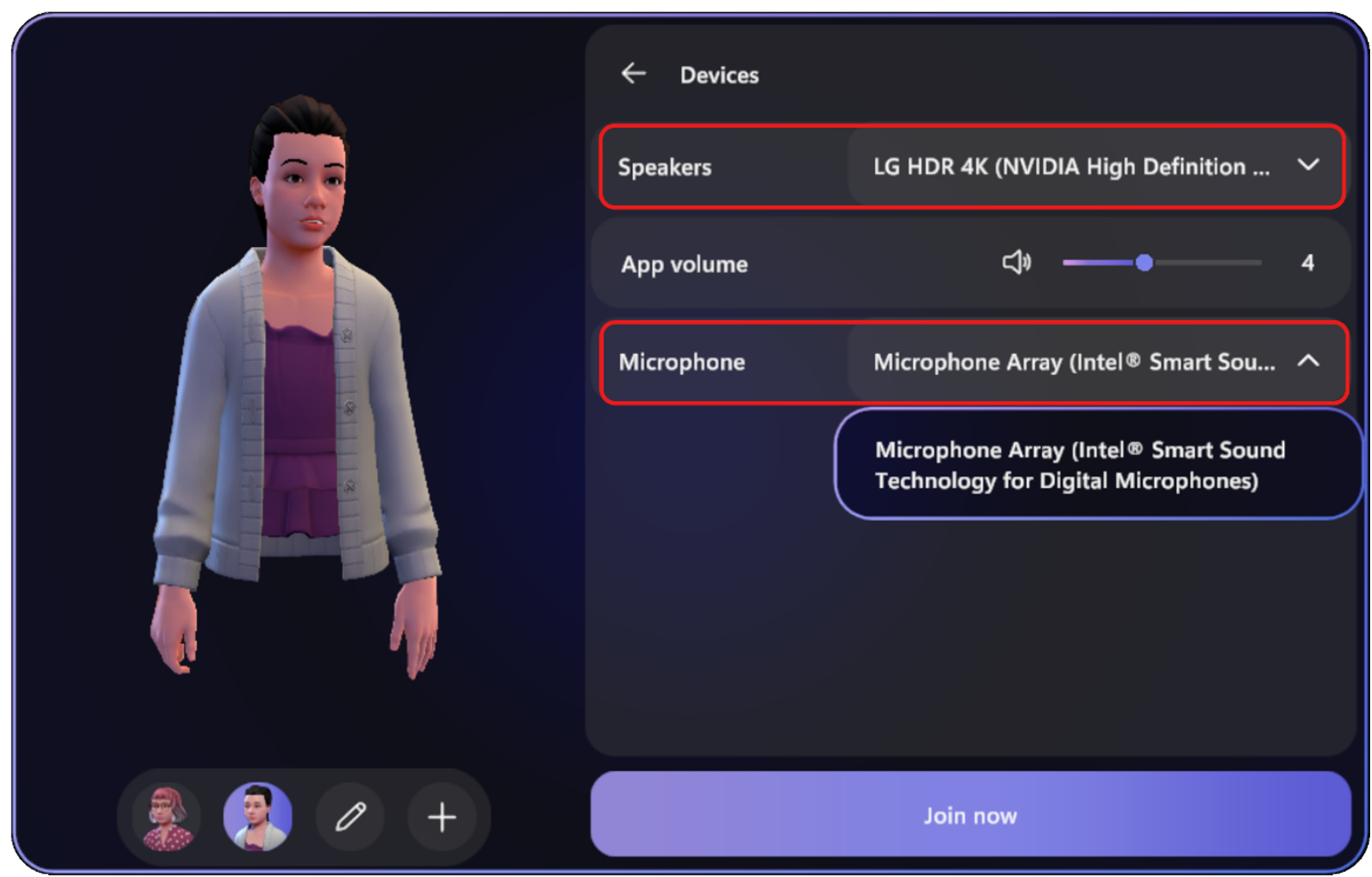
    MS-Mesh_3.png

  7. When you’re ready to join the meeting, select Join now to enter the meeting room.
After you’ve joined the meeting, note that:
  • Participants who did not join the immersive space appear in the virtual gallery.
  • Any screen shared will be visible on the virtual stage.

Scenarios to try​

  • Teams Immersive Spaces: Instead of plain old video calls, Mesh lets you hang out in 3D environments. It’s like being in a virtual room together, where you can chat, share ideas, and feel more connected. You’ll sense the real presence of others, almost like they’re right there with you.
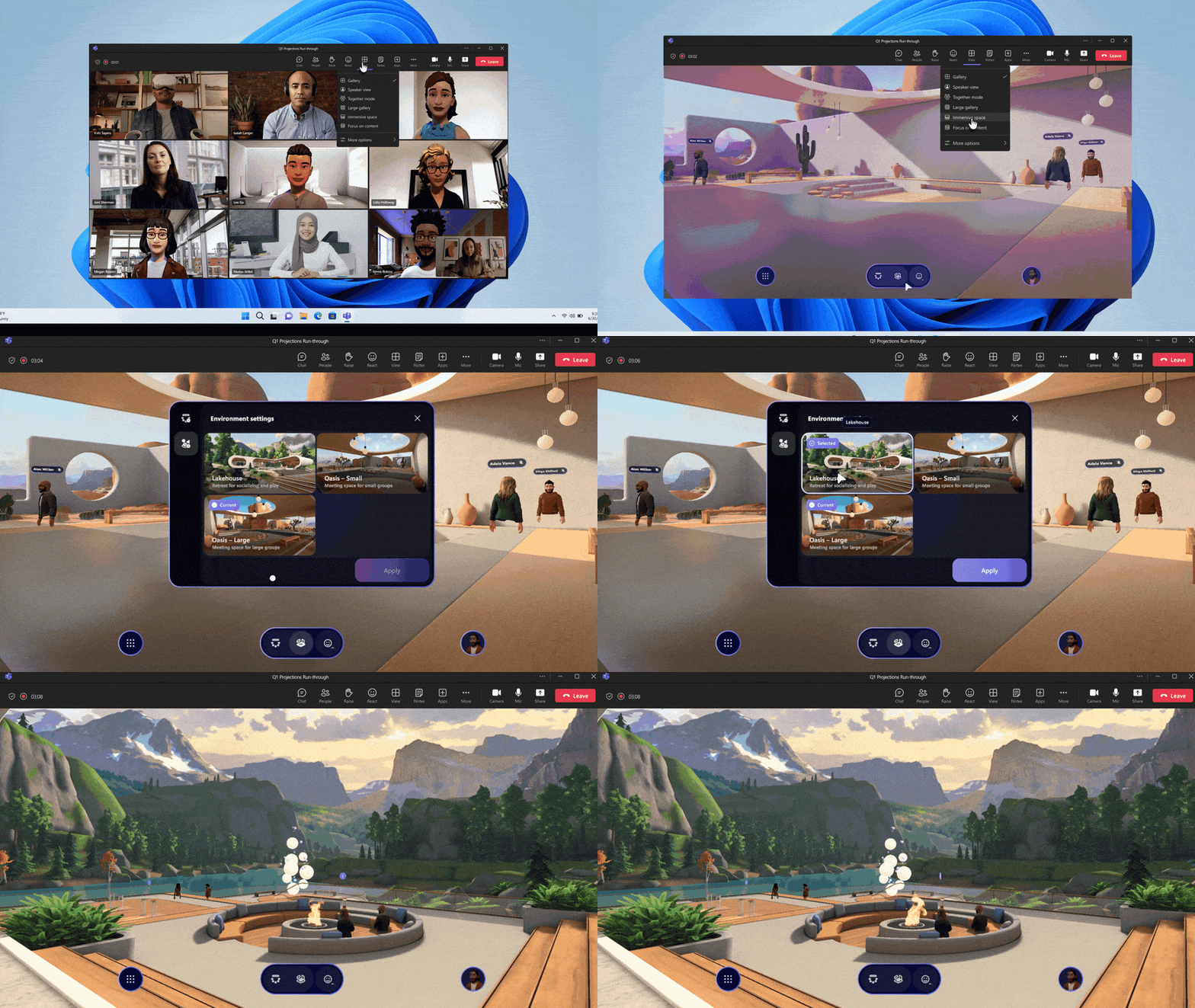
    04_ImmersiveSpaces_Splice.gif

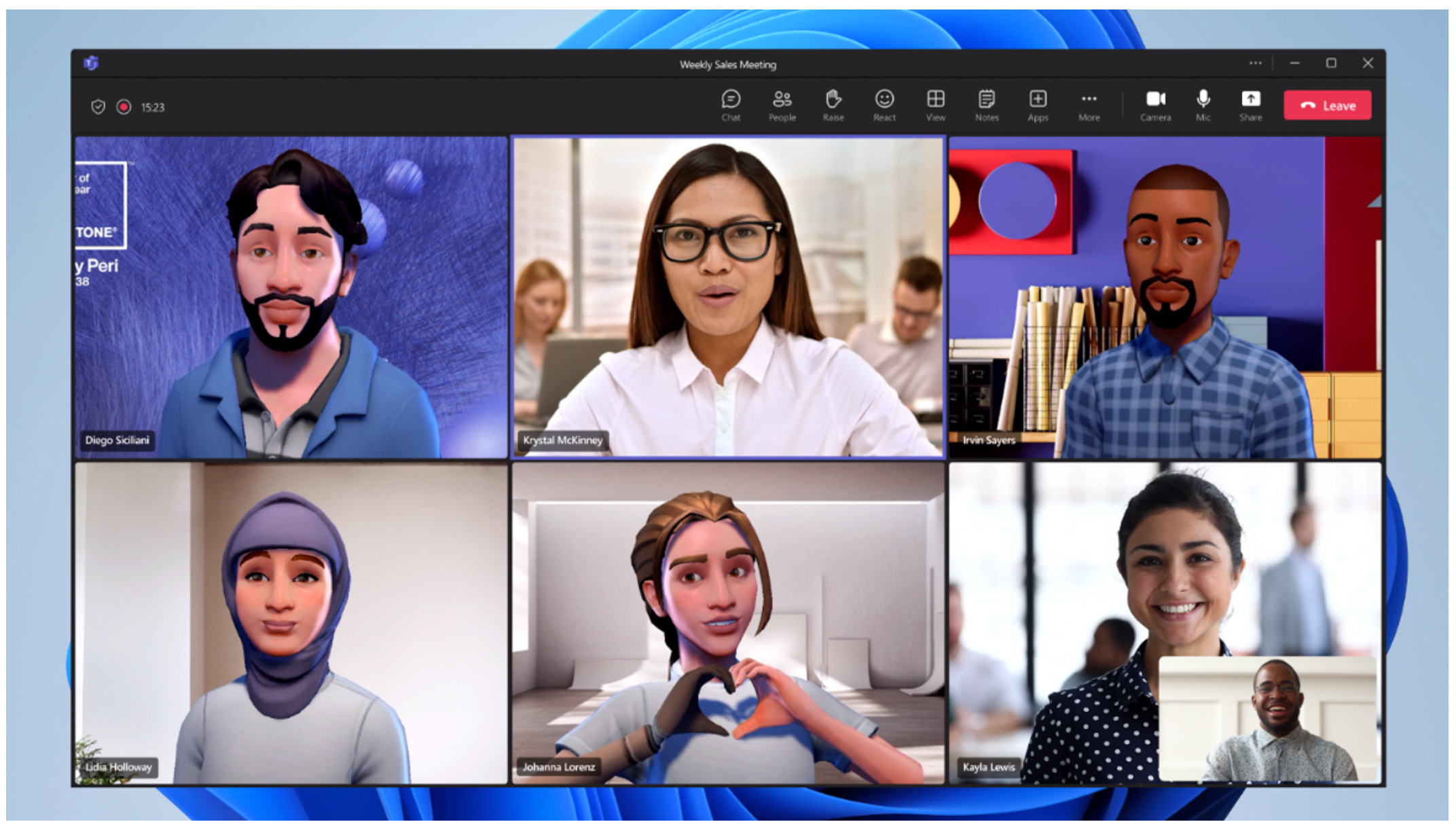
  • Teams Avatars: Avatars allow you to express yourself without being on camera. Instead of a blank screen or a still image, your customizable 3D avatar becomes your visual presence in meetings. You can customize them with different hairstyles, outfits, and even reactions. So, when you’re in a Teams meeting, your avatar can nod, clap, or raise its hand—just like you would! Teams Avatars make meetings more engaging, expressive, and inclusive.
    MS-Mesh_5.png

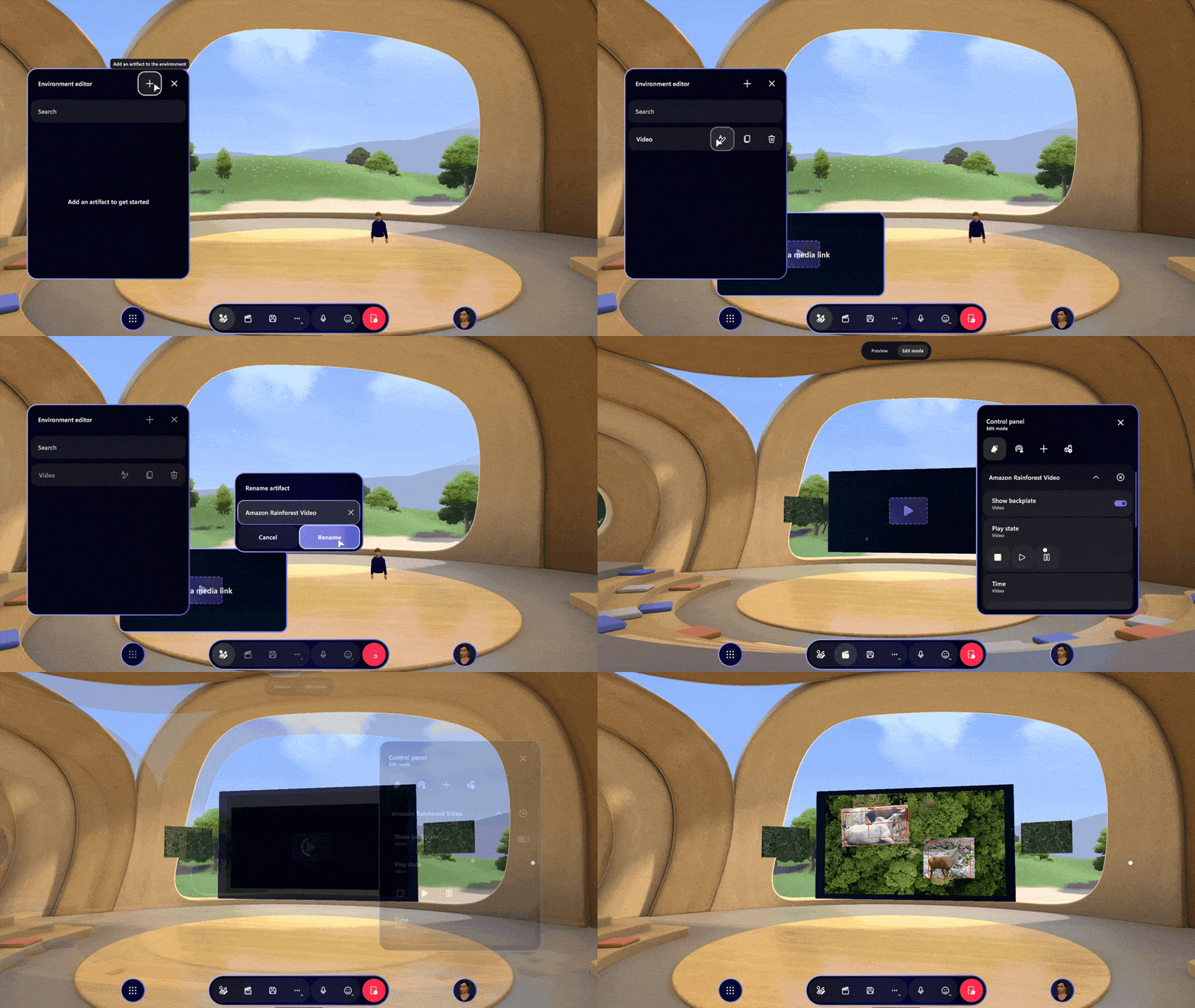
  • Create a custom immersive space with Microsoft Mesh: You can also create custom immersive spaces in Microsoft Mesh that are tailored to your specific business needs such as employee events, training, guided tours, or internal product showcases. Use a no-code editor to easily customize the event or the Mesh toolkit to leverage the power of Unity for fully customizable immersive experiences.
    03_Customization.gif

Requirements​

To use Avatars and immersive spaces in Microsoft Teams or on Meta Quest devices:
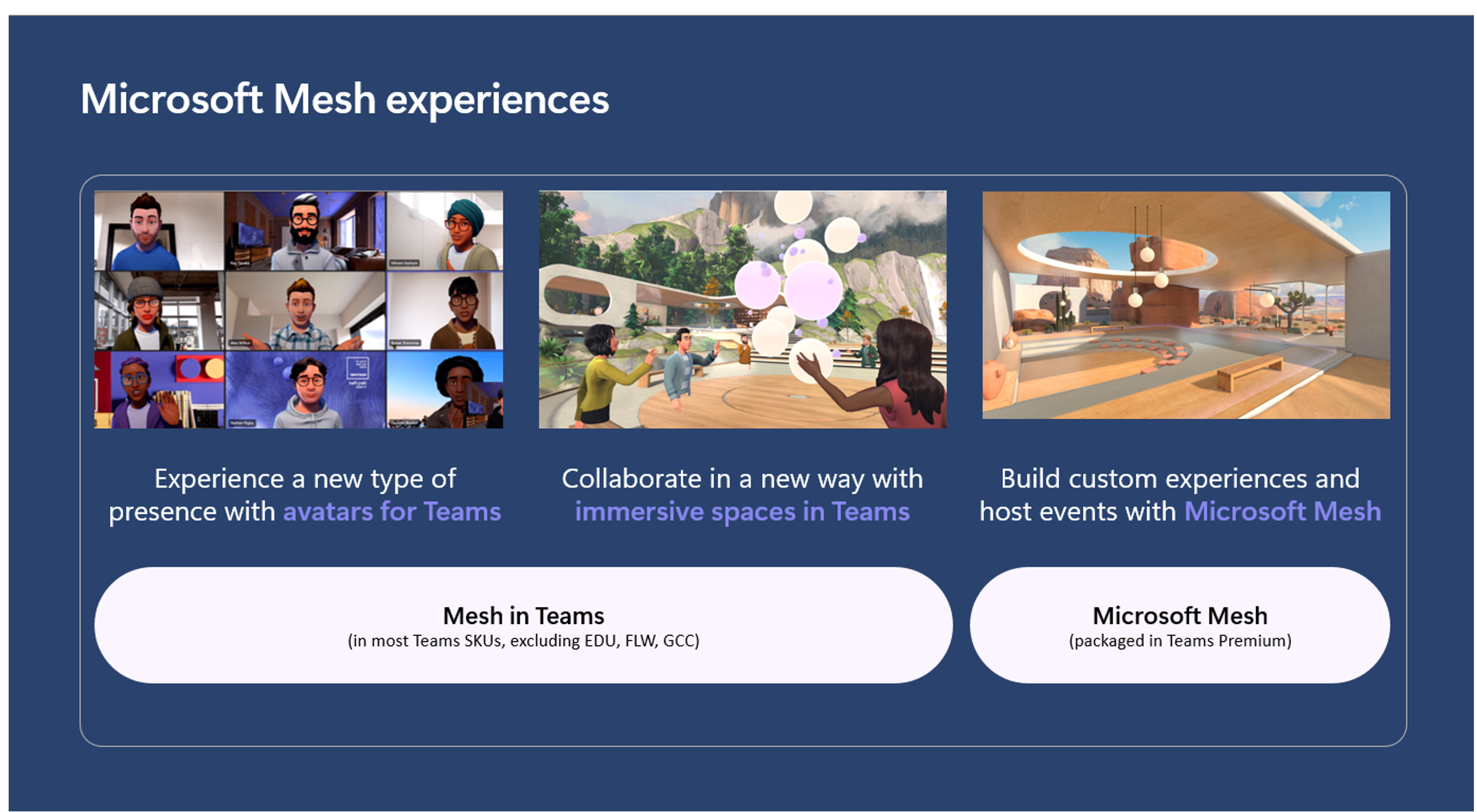
To use the standard Mesh features, including avatars and immersive spaces in Teams meetings, you need a Microsoft 365 or Teams business plan.

To create custom immersive spaces, you need a Teams Premium license or the six month trial for Mesh premium features, and the Mesh app.

Availability​

The standard features are available in the following Teams and Microsoft 365 business plans: Teams Essentials, Microsoft 365 Business Basic, Microsoft 365 Business Standard, Microsoft 365 Business Premium, Microsoft 365 E3 or E5, and Office 365 E1, E3, or E5.

Learn more about how to get started with immersive spaces in Mesh.
MS-Mesh_7.png


Feedback​

We’d love to hear your thoughts about Microsoft Mesh.

Provide feedback from within immersive spaces​

  1. Select the system menu button at the bottom left of the screen.
  2. Select Feedback.

Provide feedback from the Teams menu​

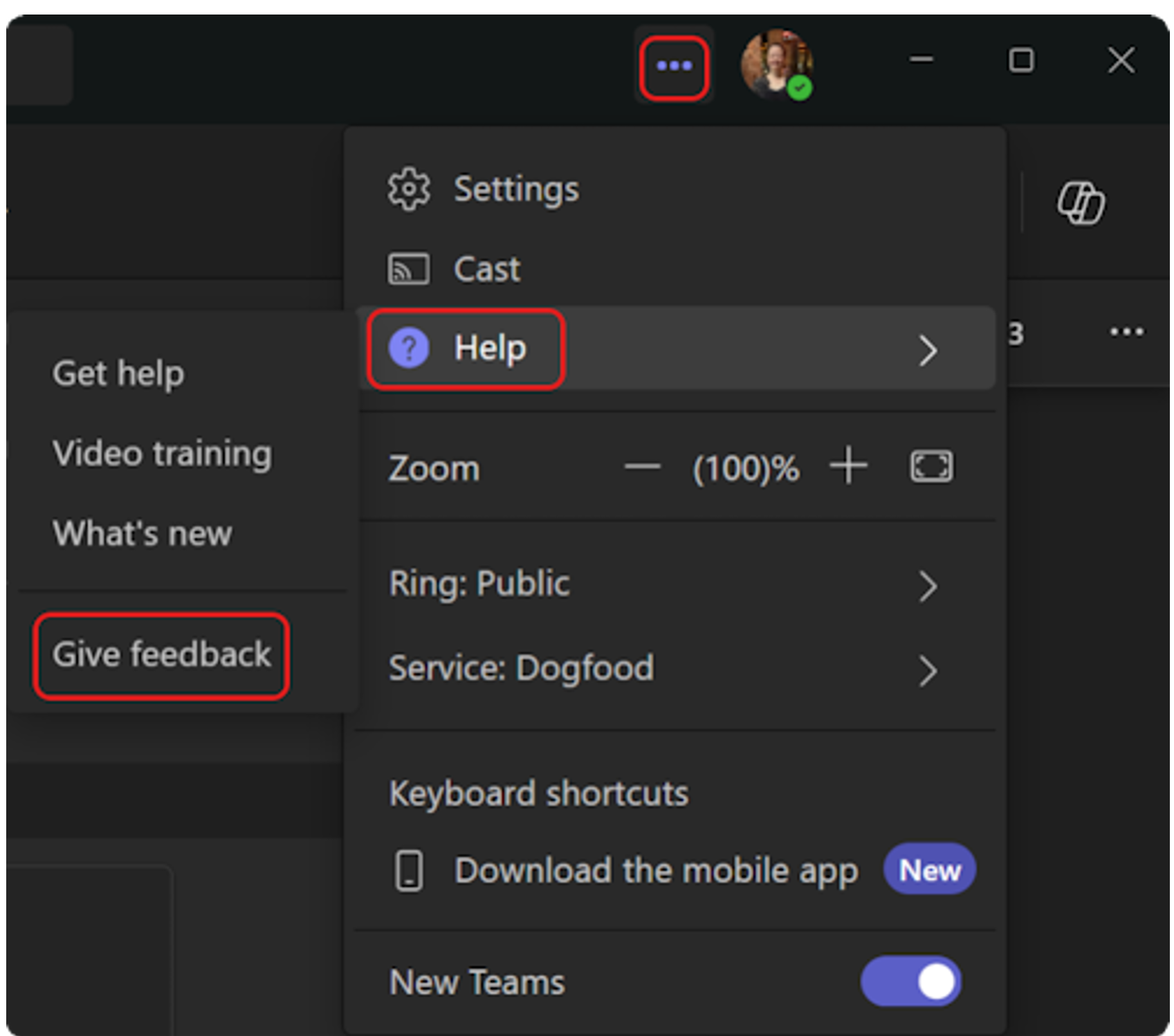
  1. Select Settings and more … next to your profile picture in the upper right corner of Teams, and then select Help > Give feedback.
    MS-Mesh_8.png
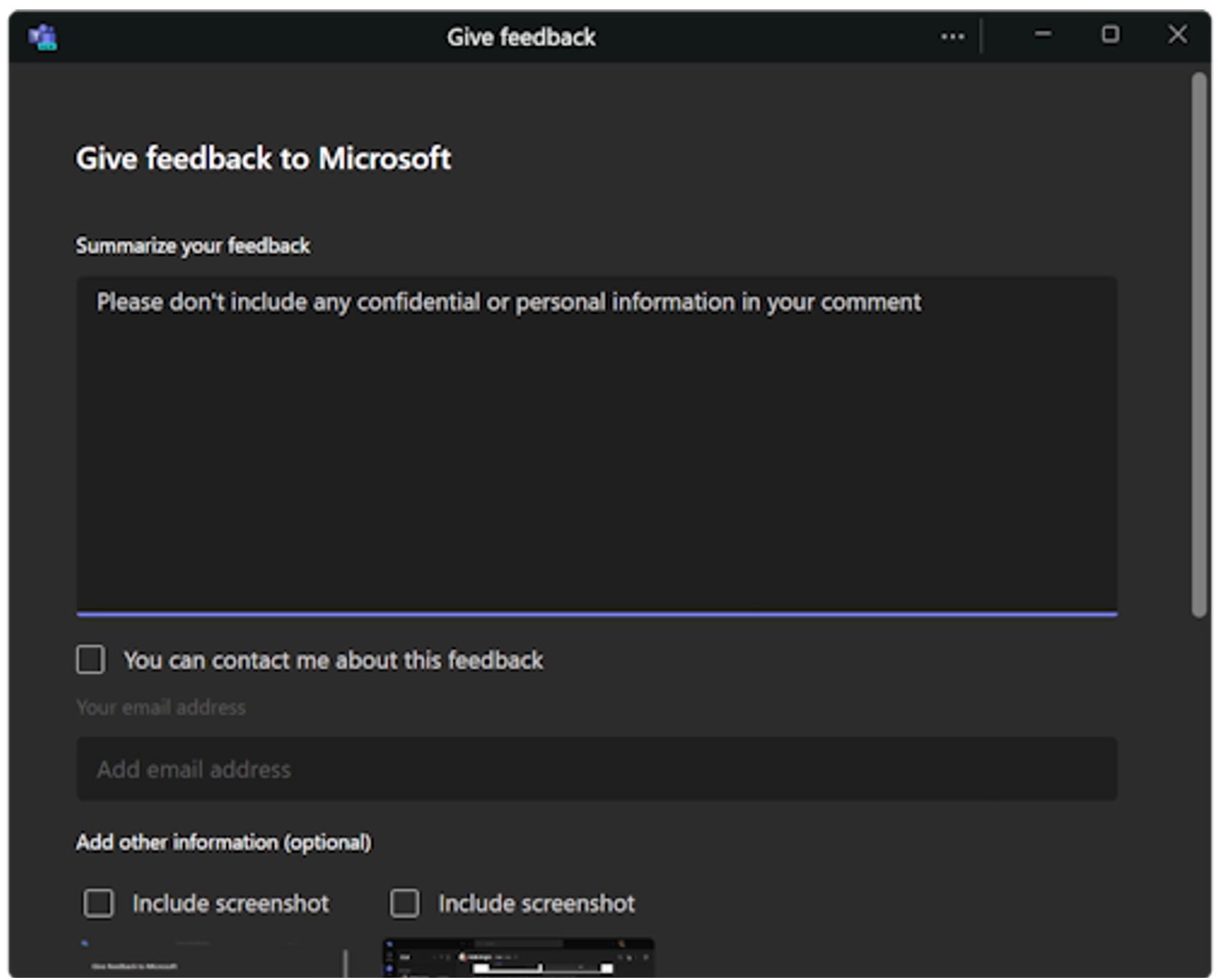
  2. In the Give feedback dialog box, follow the instructions to enter details about your issue.
    MS-Mesh_9.png


 Source:

 
OK then. I suppose it would be cool for people with personal phobias related to their appearance, or introverts. Or annoying kids who like to make duck faces and post reels of themselves miming to rubbish, which I believe would be the demographic.
 

My Computers My Computers

  • At a glance

    Windows 11 Pro 25H2 Build 26200.9168Intel(R) Core(TM) i7-4770K CPU @ 3.50GHz32.0 GB of I forget and the box is in storage.Gigabyte nVidia GeForce GTX 1660 Super OC 6GB
    OS
    Windows 11 Pro 25H2 Build 26200.9168
    Computer type
    PC/Desktop
    Manufacturer/Model
    Sin-built 2013
    CPU
    Intel(R) Core(TM) i7-4770K CPU @ 3.50GHz
    Motherboard
    ASUS ROG Maximus VI Formula
    Memory
    32.0 GB of I forget and the box is in storage.
    Graphics Card(s)
    Gigabyte nVidia GeForce GTX 1660 Super OC 6GB
    Sound Card
    ROG SupremeFX Formula 8-Channel High Definition Audio
    Monitor(s) Displays
    5 x LG 25MS500-B - 1 x 24MK430H-B - 1 x Wacom Pro 22" Touch Screen Tablet
    Screen Resolution
    All over the place
    Hard Drives
    Too many to list. OS on Samsung 1TB 870 QVO SATA
    PSU
    Silverstone 1500
    Case
    NZXT Phantom 820 Full-Tower Case
    Cooling
    Noctua NH-D15 Elite Class Dual Tower CPU Cooler / 6 x EziDIY 120mm / 2 x Corsair 140mm somethings / 1 x 140mm Thermaltake something / 2 x 200mm Corsair.
    Keyboard
    Corsair K95 / Logitech diNovo Edge Wireless
    Mouse
    Logitech: G402 / G502 / Mx Masters / Mx Air Cordless
    Internet Speed
    2000/500Mbps
    Browser
    All sorts
    Antivirus
    Kaspersky Premium
    Other Info
    ㅤㅤㅤㅤㅤㅤㅤㅤㅤㅤㅤㅤㅤㅤㅤㅤㅤㅤㅤㅤㅤㅤㅤㅤㅤㅤㅤㅤㅤㅤㅤㅤㅤㅤㅤㅤㅤㅤㅤㅤ⠀⠀⠀⠀⠀⠀⠀⠀⠀⠀
    TP-Link BE9300 WiFi 7 Bluetooth 5.4 (Archer TBE550E)
    TP-Link TX201 V1 2.5GB Lan

    Grandstream HT812 - VoIP
    ASUS DSL-AX82U - Mesh
    ASUS RT-AC68U - Mesh
    ASUS RT-BE88U Router

    Brother MFC-L2880DW Printer

    I’m on a horse.
  • At a glance

    Windows 11 Pro 25H2 Build 26200.9168 (Wifes)13th Generation Intel® Core™ i5-1340P Process...16GB LPDDR5-52001x Intel® Iris® Xe Graphics
    Operating System
    Windows 11 Pro 25H2 Build 26200.9168 (Wifes)
    Computer type
    Laptop
    Manufacturer/Model
    LENOVO Yoga 7 14IRL8 - Type 82YL
    CPU
    13th Generation Intel® Core™ i5-1340P Processor(Core™ i5-1340P)
    Memory
    16GB LPDDR5-5200
    Graphics card(s)
    1x Intel® Iris® Xe Graphics
    Sound Card
    Optimized with Dolby Atmos®
    Screen Resolution
    QHD 2880 x 1800 OLED
    Hard Drives
    M.2 512 GB SSD PCIe
    Mouse
    Logiteck MX Master 3S
    Internet Speed
    2000/500
    Antivirus
    Defender / Malwarebytes
    Other Info
    …still on a horse.


    Wireless Network: Wi-Fi 6E 2x2 AX; Bluetooth® 5.1 or above
    Ports: 1x 1 Novo button; 2 in 1 Audio Combo jack; Micro SD Card Reader; HDMI 1.4b; 2 x USB Type-C (TBT4)
    USB 3.2 Gen 2 DP 1.4a
    PD 3.0); 1 x USB 3.2 Gen1 Type A
    Camera
    1x 1080P FHD IR/RGB Hybrid with Privacy Shutter and Dual Array Microphone
    Graphics
    1x Intel® Iris® Xe Graphics
    Monitor
    14" WUXGA
    Form Factor
    Convertible Notebook
  • Windows 11 Pro 25H2 Build 26200.9168 (Wifes)

    Yoga 7 2-in-1 14IML9 - Type 83DJ

    Processor: Intel® Core™ Ultra 7 155H Processor(Core™ Ultra 7 155H)

    Memory: 32GB LPD5X-7467

    Hard Drive: 1 TB SSD PCIe

    Wireless Network: 1x Wi-Fi 6E 2x2 AX; Bluetooth® 5.1 or above

    Ports: 1 x HDMI 2.1 TMDS; 1 x Novo Button; 1 x Combo Audio Jack
    2 x USB-C (USB 4.0)
    1 x USB-A 3.2 Gen 1

    Camera: 1080P FHD IR Hybrid with Dual Microphone

    Graphics: Intel® Arc™ Graphics

    Monitor: 14" 2.8K

    ...Where's my horse?
I only interact with people in 3D in the real world!
 

My Computer My Computer

At a glance

Windows 11 ProCore i7-13700K64 GB Kingston Fury Beast DDR5Gigabyte GeForce RTX 2060 Super Gaming OC 8G
OS
Windows 11 Pro
Computer type
PC/Desktop
Manufacturer/Model
Self build
CPU
Core i7-13700K
Motherboard
Asus TUF Gaming Plus WiFi Z790
Memory
64 GB Kingston Fury Beast DDR5
Graphics Card(s)
Gigabyte GeForce RTX 2060 Super Gaming OC 8G
Sound Card
Realtek S1200A
Monitor(s) Displays
Viewsonic VP2770 & Dell (secondary)
Screen Resolution
2560 x 1440
Hard Drives
Kingston KC3000 2TB NVME SSD & SATA HDDs & SSD
PSU
EVGA SuperNova G2 850W
Case
Nanoxia Deep Silence 1
Cooling
Noctua NH-D14
Keyboard
Microsoft Digital Media Pro
Mouse
Logitech Wireless
Internet Speed
80 Mb / s
Browser
Chrome
Antivirus
Defender, Malwarebytes Free & AdwCleaner
Another "back door attempt" to get people to sign up to more and more of these subscription things.

I'm passing on this one -- I also have no need of a teams premium license or any office/365 stuff. Cloud storage is reliable and cheap enough these days without needing it from Office/365 too. I don't need TB's of cloud storage.

Cheers
jimbo
 

My Computer My Computer

At a glance

Windows XP,11 Linux Fedora Rawhide pre-releas...2 X Intel i7
OS
Windows XP,11 Linux Fedora Rawhide pre-release 46
Computer type
PC/Desktop
CPU
2 X Intel i7
Screen Resolution
4KUHD X 2
What idiot signed off on the development of this 🤷‍♂️ this sort of thing has been tried multiple times over the past 20 years and failed every time!!!

 

My Computers My Computers

  • At a glance

    Windows 11 WorkstationRyzen 9 5950XCorsair Vengeance RGB PRO Black 64GB (4x16GB)...ASUS AMD Radeon RX 6900 XT 16GB ROG Strix LC OC
    OS
    Windows 11 Workstation
    Computer type
    PC/Desktop
    Manufacturer/Model
    doofenshmirtz evil incorporated
    CPU
    Ryzen 9 5950X
    Motherboard
    Asus ROG Crosshair VIII Formula
    Memory
    Corsair Vengeance RGB PRO Black 64GB (4x16GB) 3600MHz AMD Ryzen Tuned DDR4
    Graphics Card(s)
    ASUS AMD Radeon RX 6900 XT 16GB ROG Strix LC OC
    Sound Card
    Sound BlasterX Katana
    Monitor(s) Displays
    3 x27" Dell U2724D & 1 x 34" Dell U3415W
    Hard Drives
    Samsung 980 Pro 1TB M.2 2280 PCI-e 4.0 x4 NVMe Solid State
    Drive
    PSU
    ASUS ROG THOR 850W 80 Plus Platinum
    Case
    ASUS ROG Strix Helios Midi-Tower ARGB Gaming Case
    Cooling
    ASUS ROG Strix LC Performance RGB AIO CPU Liquid Cooler - 360mm
    Keyboard
    Logi Ergo
    Mouse
    Logitech MX Vertical
    Internet Speed
    1000/200 Mbps
    Browser
    Chrome
    Antivirus
    Windows Defender, Malwarebytes Pro
    Other Info
    HP M281 Printer
    Logitech Brio Stream webcam
    Logitech G Yeti orb mic
  • At a glance

    Windows 11 ProSnapdragon X2 Plus64GB
    Operating System
    Windows 11 Pro
    Computer type
    Laptop
    Manufacturer/Model
    Surface Laptop
    CPU
    Snapdragon X2 Plus
    Memory
    64GB
    Monitor(s) Displays
    15"
  • Nothing to see here.
What idiot signed off on the development of this 🤷‍♂️ this sort of thing has been tried multiple times over the past 20 years and failed every time!!!

Hi there
I think SKY TV in the UK tried this type of rubbish years ago with SKY MESH with their "SKY Q boxes and miniboxes".

If you need SKY multiroom etc the new sky Q boxes can use "bog standard" wifi / lan connections -- they should have done that years ago.

Cheers
jimbo
 

My Computer My Computer

At a glance

Windows XP,11 Linux Fedora Rawhide pre-releas...2 X Intel i7
OS
Windows XP,11 Linux Fedora Rawhide pre-release 46
Computer type
PC/Desktop
CPU
2 X Intel i7
Screen Resolution
4KUHD X 2
I think SKY TV in the UK tried this type of rubbish years ago with SKY MESH with their "SKY Q boxes and miniboxes".
That's something completely different.
 

My Computers My Computers

  • At a glance

    Windows 11 WorkstationRyzen 9 5950XCorsair Vengeance RGB PRO Black 64GB (4x16GB)...ASUS AMD Radeon RX 6900 XT 16GB ROG Strix LC OC
    OS
    Windows 11 Workstation
    Computer type
    PC/Desktop
    Manufacturer/Model
    doofenshmirtz evil incorporated
    CPU
    Ryzen 9 5950X
    Motherboard
    Asus ROG Crosshair VIII Formula
    Memory
    Corsair Vengeance RGB PRO Black 64GB (4x16GB) 3600MHz AMD Ryzen Tuned DDR4
    Graphics Card(s)
    ASUS AMD Radeon RX 6900 XT 16GB ROG Strix LC OC
    Sound Card
    Sound BlasterX Katana
    Monitor(s) Displays
    3 x27" Dell U2724D & 1 x 34" Dell U3415W
    Hard Drives
    Samsung 980 Pro 1TB M.2 2280 PCI-e 4.0 x4 NVMe Solid State
    Drive
    PSU
    ASUS ROG THOR 850W 80 Plus Platinum
    Case
    ASUS ROG Strix Helios Midi-Tower ARGB Gaming Case
    Cooling
    ASUS ROG Strix LC Performance RGB AIO CPU Liquid Cooler - 360mm
    Keyboard
    Logi Ergo
    Mouse
    Logitech MX Vertical
    Internet Speed
    1000/200 Mbps
    Browser
    Chrome
    Antivirus
    Windows Defender, Malwarebytes Pro
    Other Info
    HP M281 Printer
    Logitech Brio Stream webcam
    Logitech G Yeti orb mic
  • At a glance

    Windows 11 ProSnapdragon X2 Plus64GB
    Operating System
    Windows 11 Pro
    Computer type
    Laptop
    Manufacturer/Model
    Surface Laptop
    CPU
    Snapdragon X2 Plus
    Memory
    64GB
    Monitor(s) Displays
    15"
  • Nothing to see here.

Latest Support Threads

Back
Top Bottom