Windows Insider Blog:
Hello Windows Insiders,
We’re excited to begin rolling out an update for the Link to Windows app that includes a refreshed experience for Windows Insiders. This update brings a modernized design, smarter onboarding, and new ways to access content and remotely control your PC including the ability to lock your PC — all from your Android phone. Please note that this experience is rolling out, so not all Insiders will see it right away.

Enable or Disable Remote Lock Windows 11 PC from Android Mobile Devices
This tutorial will show you how to turn on or off remotely lock PC from a Android phone mobile device for your account in Windows 10 and Windows 11. When you pair your Android device to your Windows PC using the Link to Windows app on your Android device and Phone Link on your PC, you can...
 www.elevenforum.com
Whether you’re already using Link to Windows and Phone Link or just getting started, this update is designed to make your cross-device experience more seamless, intuitive, and powerful.
A new home for connected experiences
We’ve reimagined the Link to Windows app as a connected PC experience hub — a central place where you can access, share, and control content between your Android phone and Windows PC.- Recent activity: Quickly access your most recently received files and clipboard items of your PC.
- PC at a glance: Check your PC’s battery, and Wi-Fi status from your phone.
- Remote actions from Link to Windows:
- Send files to your PC from within Link to Windows.
Send Files from Android Mobile Device to Windows 11 PC
This tutorial will show your how to send files to your Windows 11 PC from the Link to Windows app on your Android phone mobile device. When you pair your Android device to your Windows PC using the Link to Windows app on your Android device and Phone Link on your PC, you can seamlessly transfer...
www.elevenforum.com
- Lock your PC remotely when PC is connected.
Remotely Lock Windows 11 PC from Android Mobile Devices
This tutorial will show your how to remotely lock your Windows 11 PC from the Link to Windows app on your Android phone mobile device. When you pair your Android device to your Windows PC using the Link to Windows app on your Android device and Phone Link on your PC, you can seamlessly transfer...
www.elevenforum.com
- Mirror your phone’s screen to your PC.
Cast Android Phone Mobile Device Screen to Windows 11 PC
This tutorial will show you how to cast (mirror or project) the phone screen from your Android mobile device to your Windows 11 PC. If you’re working on a Windows PC and want the apps and content from another device to show on your PC screen, you’ll want to consider mirroring that device‘s...
www.elevenforum.com
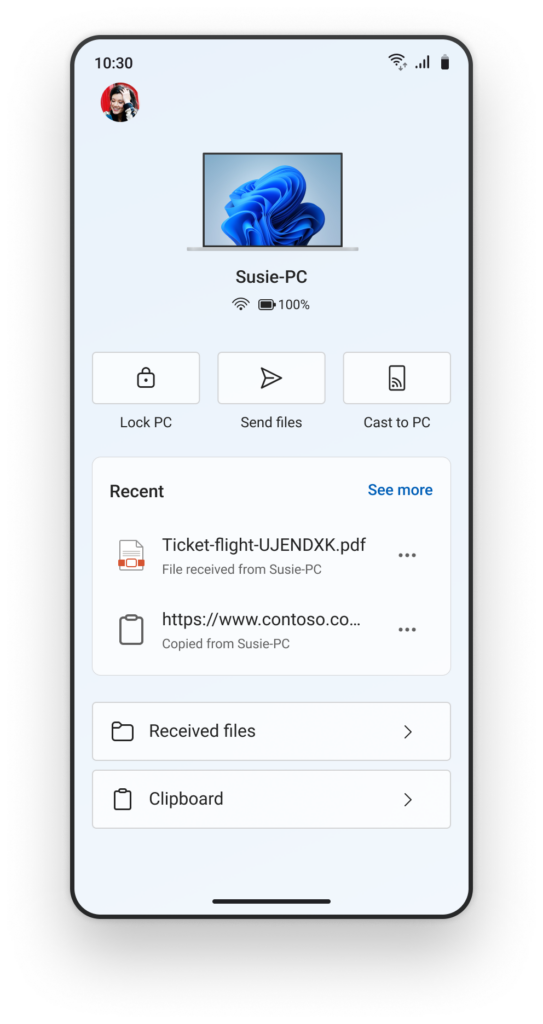
The refreshed Link to Windows experience on an Android phone. - Send files to your PC from within Link to Windows.
More intuitive onboarding for getting started
We’re updating the onboarding experience that lets you set up Link to Windows directly from your Android device — no PC required to get started. This helps you discover the value of connected experiences right away, with contextual permission prompts and a simplified setup with clear instructions on what to do next when you get to your PC. These features are designed to give you more control and flexibility, especially when you’re away from your desk.How to try out the refreshed Link to Windows experience on your Android phone
Here is how Windows Insiders can try out the new refreshed Link to Windows experience for their Android phone today:- Make sure you’re running the latest Windows Insider Preview build on your PC from any Insider Channel and Phone Link version is 1.25062.83.0 or higher.
- Opt-in to the Link to Windows Beta from the Play Store.
Try new Android apps before their official release - Google Play Help
To get user feedback, some developers make new apps or features available before their official release. You can try these apps or features when you join early access or beta programs. Early access &a support.google.com
- Update the Link to Windows app from the Play Store and ensure the version is 1.25071.155 or higher.
- Pair your Android phone to your PC from Link to Windows on your phone and Phone Link on your PC.
Link Android Mobile Device to Microsoft Account on Windows 11 PC
This tutorial will show you how to add (link) Android phone mobile device to your Microsoft account to manage on a Windows 11 PC. Now you can link and manage your mobile devices directly from your PC. This link between your Android device and PC provides instant access to your mobile device...
www.elevenforum.com
Link Samsung Android Phone to Windows 11 PC
This tutorial will show you how to link a Samsung Android phone to the Phone Link app on your Windows 10 or Windows 11 PC with your Microsoft account. The Phone Link app on your Windows PC let's you get instant access to everything you love on your phone, right from your PC. Link your Android...
www.elevenforum.com
- Finally, go to Windows Settings > Bluetooth & devices > Mobile devices > Manage devices and ensure you are logged in with the same Microsoft account as Link to Windows and see your Android phone listed and enabled.
Sign in or Sign out of Manage Mobile Devices in Windows 11
This tutorial will show you how to sign in or sign out of Manage Mobile Devices with your Microsoft account in Windows 11. If you turn on Allow this PC to access your mobile devices, you will be able to link and manage your mobile devices directly from your PC. This link between your Android...
www.elevenforum.com
Give feedback
Be sure to give us feedback and let us know what you think as you try out the refreshed Link to Windows experience:- Directly from Link to Windows on your Android phone via Phone > Give Feedback > Link to Windows.
- Or by using Feedback Hub and submitting feedback under Devices and Drivers > Linked devices.
Phone Link & Cross-Device Experiences Team
Source:

Previewing a refreshed Link to Windows experience for Android phones
Hello Windows Insiders, We’re excited to begin rolling out an update for the Link to Windows app that includes a refreshed experience for Windows Insiders. This update brings a modernized design, smarter onboarding, and new ways t
 blogs.windows.com
Last edited: