Microsoft Store apps error code 0x80073CFE


BogdanCristianS

New member
Local time
1:54 PM
Posts
9
OS
Windows 11
Hello,
I had a problem with Windows 11 image after updating to KB5067036 preview. I didnt managed to fix it and i used SupportAssist Recovery from Dell and reinstalled a clean copy of Windows with a backup of user and app data. Now my computer its running 26200.6899 25H2 26200.6899. I needed to install Microsoft Teams, but when i tried to start/install it gived me error code 0x80073CFE. Tried sfc /scannow, dism /Online /Cleanup-Image /RestoreHealth, wsreset, re-register Microsoft Store, but without success. I have searched the error code and find the method of Ramesh to find the corrupted directories, but i dont know what i can do forward. I attach the results of logs here.
The commands that i executed om powershell admin session are:

get-appxpackage | out-file c:\apps.txt

GCI -Path "C:\Program Files\WindowsApps" -Recurse | Where {$_.Length -eq 0} | out-file c:\corrupt.txt

Get-AppxLog -All | out-file C:\Installation.log

Maybe someone can guide me. Thank you! Logs - Google Drive
 
Windows Build/Version
26200.6899

My Computer

System One

  • OS
    Windows 11
    Computer type
    PC/Desktop
Hello,
I had a problem with Windows 11 image after updating to KB5067036 preview. I didnt managed to fix it and i used SupportAssist Recovery from Dell and reinstalled a clean copy of Windows with a backup of user and app data. Now my computer its running 26200.6899 25H2 26200.6899. I needed to install Microsoft Teams, but when i tried to start/install it gived me error code 0x80073CFE. Tried sfc /scannow, dism /Online /Cleanup-Image /RestoreHealth, wsreset, re-register Microsoft Store, but without success. I have searched the error code and find the method of Ramesh to find the corrupted directories, but i dont know what i can do forward. I attach the results of logs here.
The commands that i executed om powershell admin session are:

get-appxpackage | out-file c:\apps.txt

GCI -Path "C:\Program Files\WindowsApps" -Recurse | Where {$_.Length -eq 0} | out-file c:\corrupt.txt

Get-AppxLog -All | out-file C:\Installation.log

Maybe someone can guide me. Thank you! Logs - Google Drive
Hey @BogdanCristianS ,
When you attempt to install something else from the store, do you get the same error code?
How about getting it from here?

When you hit download, it will give you an executable to run.
 

My Computers

System One System Two

  • OS
    All Branches but Release
    Computer type
    Laptop
    Manufacturer/Model
    Acer Nitro ANV15-51
    CPU
    AMD Ryzen 7 7735HS 3200-4500 Mhz 8 cores x 2
    Motherboard
    Sportage_RBH
    Memory
    32 GB DDR5
    Graphics Card(s)
    Radeon Graphic / NVIDIA GeForce RTX 4060 8 GB GDDR6
    Sound Card
    AMD/Realtek(R) Audio
    Monitor(s) Displays
    Integrated Monitor (15.3"vis)
    Screen Resolution
    FHD 1920X1080 16:9 144Hz
    Hard Drives
    KINGSTON OM8SEP4512Q-AA 1TB
    Western Digital 256GB
    PSU
    19V DC 6.32 A 120 W
    Cooling
    Dual Fans
    Mouse
    MS Bluetooth
    Internet Speed
    Fiber 1GB Cox -us & 1GB Orange-fr
    Browser
    Edge Canary- Firefox Nightly-Chrome Dev-Chrome Dev
    Antivirus
    Windows Defender
  • Operating System
    Windows 11 Beta
    Computer type
    Laptop
    Manufacturer/Model
    Asus X751BP
    CPU
    AMD A9-9420
    Memory
    8 GB of DDR4
    Graphics card(s)
    AMD Radeon R5
    Screen Resolution
    1600x900
    Hard Drives
    Seagate 1 TB
@OAT
Yes, i tried installing two different apps and i got the same error code
I forgot to mention that
Thank you!
 

My Computer

System One

  • OS
    Windows 11
    Computer type
    PC/Desktop
@OAT
Yes, i tried installing two different apps and i got the same error code
I forgot to mention that
Thank you!
So this issue seems to lie with the MS Store, not with Teams.
I think you could have 2 scenarios here:

1- Your user profile is corrupted ,to test that:
Use from the command prompt :
Code:
net user administrator /active:yes
Log out and go back in as administrator and see if the Store works.

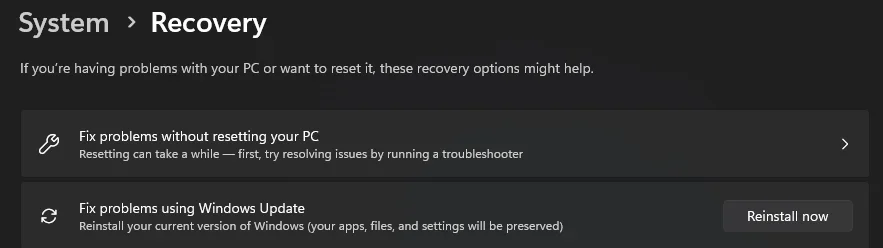
2- A problem with your Windows image, if so a Fix Problems using windows update is advised.
(settings>system>Recovery)

Screenshot 2025-11-03 211044.webp
 

My Computers

System One System Two

  • OS
    All Branches but Release
    Computer type
    Laptop
    Manufacturer/Model
    Acer Nitro ANV15-51
    CPU
    AMD Ryzen 7 7735HS 3200-4500 Mhz 8 cores x 2
    Motherboard
    Sportage_RBH
    Memory
    32 GB DDR5
    Graphics Card(s)
    Radeon Graphic / NVIDIA GeForce RTX 4060 8 GB GDDR6
    Sound Card
    AMD/Realtek(R) Audio
    Monitor(s) Displays
    Integrated Monitor (15.3"vis)
    Screen Resolution
    FHD 1920X1080 16:9 144Hz
    Hard Drives
    KINGSTON OM8SEP4512Q-AA 1TB
    Western Digital 256GB
    PSU
    19V DC 6.32 A 120 W
    Cooling
    Dual Fans
    Mouse
    MS Bluetooth
    Internet Speed
    Fiber 1GB Cox -us & 1GB Orange-fr
    Browser
    Edge Canary- Firefox Nightly-Chrome Dev-Chrome Dev
    Antivirus
    Windows Defender
  • Operating System
    Windows 11 Beta
    Computer type
    Laptop
    Manufacturer/Model
    Asus X751BP
    CPU
    AMD A9-9420
    Memory
    8 GB of DDR4
    Graphics card(s)
    AMD Radeon R5
    Screen Resolution
    1600x900
    Hard Drives
    Seagate 1 TB
if its store related, try this:

use revo to uninstall the store
use this winaero link to download the store package (yes i know its older but still works and will just update after installing, launching and checking for app updates)


then after it updates, try to reinstall whatever store apps you needed
 

My Computer

System One

  • OS
    Windows 11 Pro
@OAT
First advice i will test it tomorrow and let you know the result
Second advice, i think the image it's ok, i runned dism /Online /Cleanup-Image/RestoreHealth and the results are fine, also i made a clean installation.

@dacrone
I didnt know i can uninstall the store, i will try this tomorrow morning.
Thank you to both!
 

My Computer

System One

  • OS
    Windows 11
    Computer type
    PC/Desktop
  • Like
Reactions: OAT
@OAT
Once I ran the command, realized that I actually have the admin user but not the administrator user. Probably after I ran dell recovery, it took over the old accounts I had from the backup it made on the usb memory. I ran the command and logged in to the new Administrator account, surprise, Microsoft Store does not exist.
I tried to run
Get-AppXPackage Microsoft.WindowsStore | Foreach {Add-AppxPackage -DisableDevelopmentMode -Register “$($_.InstallLocation)\AppXManifest.xml”}
but it returned the result SQLITE_E_CORRUPT_INDEX
How could I install Microsoft Store again?
Thank you!
 

My Computer

System One

  • OS
    Windows 11
    Computer type
    PC/Desktop
@OAT
Once I ran the command, realized that I actually have the admin user but not the administrator user. Probably after I ran dell recovery, it took over the old accounts I had from the backup it made on the usb memory. I ran the command and logged in to the new Administrator account, surprise, Microsoft Store does not exist.
I tried to run
Get-AppXPackage Microsoft.WindowsStore | Foreach {Add-AppxPackage -DisableDevelopmentMode -Register “$($_.InstallLocation)\AppXManifest.xml”}
but it returned the result SQLITE_E_CORRUPT_INDEX
How could I install Microsoft Store again?
Thank you!
@BogdanCristianS

Your installation seems corrupt as the error indicates.
Please use option 2 in my previous post.
Keep in mind it will take some time.
 

My Computers

System One System Two

  • OS
    All Branches but Release
    Computer type
    Laptop
    Manufacturer/Model
    Acer Nitro ANV15-51
    CPU
    AMD Ryzen 7 7735HS 3200-4500 Mhz 8 cores x 2
    Motherboard
    Sportage_RBH
    Memory
    32 GB DDR5
    Graphics Card(s)
    Radeon Graphic / NVIDIA GeForce RTX 4060 8 GB GDDR6
    Sound Card
    AMD/Realtek(R) Audio
    Monitor(s) Displays
    Integrated Monitor (15.3"vis)
    Screen Resolution
    FHD 1920X1080 16:9 144Hz
    Hard Drives
    KINGSTON OM8SEP4512Q-AA 1TB
    Western Digital 256GB
    PSU
    19V DC 6.32 A 120 W
    Cooling
    Dual Fans
    Mouse
    MS Bluetooth
    Internet Speed
    Fiber 1GB Cox -us & 1GB Orange-fr
    Browser
    Edge Canary- Firefox Nightly-Chrome Dev-Chrome Dev
    Antivirus
    Windows Defender
  • Operating System
    Windows 11 Beta
    Computer type
    Laptop
    Manufacturer/Model
    Asus X751BP
    CPU
    AMD A9-9420
    Memory
    8 GB of DDR4
    Graphics card(s)
    AMD Radeon R5
    Screen Resolution
    1600x900
    Hard Drives
    Seagate 1 TB
@dacrone
Hello, I downloaded the windows 11 store file with the msixbundle ending from Winaero, but I can't open it. I even tried from powershell Add-AppxPackage - Path but it gives an deployment error 0x80073CF9.
I will also try the proposed version of @OAT with windows fix from update
Thank you!
 

My Computer

System One

  • OS
    Windows 11
    Computer type
    PC/Desktop
@OAT
Hi, I installed the repair version of Windows 11 25H2 with WU within administrator local account. The problem persists, on local administrator i dont have Microsoft Store. And in the normal administrator account that i used before i have the Store but when i try to download an app now it gives me a new error : 0x87AF030B.
Can i have any option? Or i need to make again a clean install? Thank you!
 

My Computer

System One

  • OS
    Windows 11
    Computer type
    PC/Desktop
@OAT
Hi, I installed the repair version of Windows 11 25H2 with WU within administrator local account. The problem persists, on local administrator i dont have Microsoft Store. And in the normal administrator account that i used before i have the Store but when i try to download an app now it gives me a new error : 0x87AF030B.
Can i have any option? Or i need to make again a clean install? Thank you!
It seems you are running out of options. I am unsure why you keep mentioning Administrator & Administrator local account.
Disconnect everything that you might have connected with your user account including your phone.
Perform a clean install.
Good luck.
 

My Computers

System One System Two

  • OS
    All Branches but Release
    Computer type
    Laptop
    Manufacturer/Model
    Acer Nitro ANV15-51
    CPU
    AMD Ryzen 7 7735HS 3200-4500 Mhz 8 cores x 2
    Motherboard
    Sportage_RBH
    Memory
    32 GB DDR5
    Graphics Card(s)
    Radeon Graphic / NVIDIA GeForce RTX 4060 8 GB GDDR6
    Sound Card
    AMD/Realtek(R) Audio
    Monitor(s) Displays
    Integrated Monitor (15.3"vis)
    Screen Resolution
    FHD 1920X1080 16:9 144Hz
    Hard Drives
    KINGSTON OM8SEP4512Q-AA 1TB
    Western Digital 256GB
    PSU
    19V DC 6.32 A 120 W
    Cooling
    Dual Fans
    Mouse
    MS Bluetooth
    Internet Speed
    Fiber 1GB Cox -us & 1GB Orange-fr
    Browser
    Edge Canary- Firefox Nightly-Chrome Dev-Chrome Dev
    Antivirus
    Windows Defender
  • Operating System
    Windows 11 Beta
    Computer type
    Laptop
    Manufacturer/Model
    Asus X751BP
    CPU
    AMD A9-9420
    Memory
    8 GB of DDR4
    Graphics card(s)
    AMD Radeon R5
    Screen Resolution
    1600x900
    Hard Drives
    Seagate 1 TB
Back
Top Bottom