
Microsoft Troubleshooting Steps for Blue Screen Errors


 Microsoft Support:

Black or Blue Screen errors (also called bug checks, STOP code errors, kernel errors, or BSOD errors) can occur if a serious problem causes Windows to shut down or restart unexpectedly to protect itself from data loss. You might see a message that says, "Windows has been shut down to prevent damage to your computer" or a similar message.
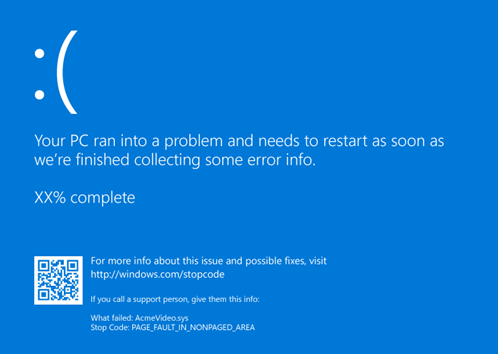
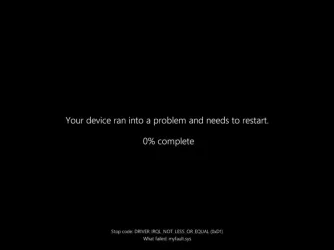
Screenshot of typical Blue Screen Error
Black_Screen_Of_Death.webp

A hardware device, its driver, or software might have caused this error. To help determine the cause, the blue screen error might display a STOP code, such as PAGE_FAULT_IN_NONPAGED_AREA. When it's available, the module name of the code that was being executed is also listed after "What failed:".

Basic Troubleshooting Steps for Blue Screen Errors

  1. Remove any new hardware. If you added new hardware to your PC before the error, shut down your PC, remove the hardware, and try restarting.
  2. Start your PC in safe mode. If you're having trouble restarting, you can start your PC in safe mode. See Start your PC in safe mode in Windows for details. From safe mode, you can try the remaining troubleshooting steps.
  3. Check the Device Manager. Right-click the Start button and select Device Manager. Check to see if any devices are marked with the exclamation point (!). Right-click the device and select Update driver. If updating the driver doesn’t help, try disabling or uninstalling the device.
  4. Check for sufficient free space on the hard drive. The operating system and some applications require sufficient free space to create swap files and perform other functions. Based on the system configuration, the exact requirement varies, but it's a good idea to have 10% to 15% of free space available.
  5. Install the latest Windows Updates. To check for updates, select Start > Settings > Windows Update , then select Check for updates.
  6. Restore Windows. If none of these steps help, try restoring Windows using a system restore point, or one of the other options listed at Recovery options in Windows. Choose the recovery option that most closely matches your scenario.

Advanced Troubleshooting Steps for Blue Screen Errors

  1. Check the Event Viewer. Check the system log in Event Viewer for other error messages that might help pinpoint the device or driver that's causing the error. For more information, see Open Event Viewer. Look for critical errors in the system log that occurred in the same time frame as the blue screen.
  2. Run the Windows Memory Diagnostics tool. In the search box, type Memory, and then select Windows Memory Diagnostic.‌ After running the diagnostic, use the Event Viewer to view the results under the system log. Look for the MemoryDiagnostics-Results entry to view the results.
  3. Memory dump analysis. IT professionals and developers can try performing a memory dump analysis. For details and other advanced troubleshooting steps, see Advanced troubleshooting for stop or blue screen errors.


 Source:

 
Last edited:
Thank you @Brink. Nice to see it all in one spot. I hope folks pay more attention to it than they do to "BSOD posting instructions" thread. Those instructions have to be repeated regularly. :eyeroll:
@zbook has carried the load for BSOD issues for a long time and I have wanted to learn more about analyzing logfiles so I could help him out, but everything I found about how to do that was in Microsoft speak and over my head. I feel that's something I would have to be shown rather than try to understand by reading.
I'm too old to learn now, anyway, and I'm not as sharp as some of the younger ones.
 

My Computers My Computers

  • At a glance

    Windows 11 Pro 25H2 26200.8655i9-10900 10 core 20 threads32 gbnone-Intel UHD Graphics 630
    OS
    Windows 11 Pro 25H2 26200.8655
    Computer type
    PC/Desktop
    Manufacturer/Model
    Dell Optiplex 7080
    CPU
    i9-10900 10 core 20 threads
    Motherboard
    DELL 0J37VM
    Memory
    32 gb
    Graphics Card(s)
    none-Intel UHD Graphics 630
    Sound Card
    Integrated Realtek
    Monitor(s) Displays
    Benq 27
    Screen Resolution
    2560x1440
    Hard Drives
    2x1tb Solidigm m.2 nvme /External drives 512gb Samsung m.2 sata+2tb Kingston m2.nvme
    PSU
    500w
    Case
    MT
    Cooling
    Dell Premium
    Keyboard
    Logitech wired
    Mouse
    Logitech wireless
    Internet Speed
    so slow I'm too embarrassed to tell
    Browser
    #1 Edge #2 Firefox
    Antivirus
    Defender+MWB Premium
  • At a glance

    Windows 11 Pro 24H2 26200.8457AMD Ryzen 7 6800U32 gbintegrated
    Operating System
    Windows 11 Pro 24H2 26200.8457
    Computer type
    PC/Desktop
    Manufacturer/Model
    Beelink Mini PC SER5
    CPU
    AMD Ryzen 7 6800U
    Memory
    32 gb
    Graphics card(s)
    integrated
    Sound Card
    integrated
    Monitor(s) Displays
    Benq 27
    Screen Resolution
    2560x1440
    Hard Drives
    1TB Crucial nvme
    Keyboard
    Logitech wired
    Mouse
    Logitech wireless
    Internet Speed
    still too embarrassed to tell
    Browser
    Firefox
    Antivirus
    Defender
    Other Info
    System 3 is non compliant Dell 9020 i7-4770/24gb ram Win11 PRO 26200.8457
This should be updated to show the newer type of black screen of death image.

I would leave the old one as well next to the new one, as some systems seem to have it and some don't for some reason.
 

My Computers My Computers

  • At a glance

    Windows 11 ProRyzen 7 5700 X3D64 GB DDR4 3600mhz Gskill Ripjaws VRTX 4070 Super , 12GB VRAM Asus EVO Overclock
    OS
    Windows 11 Pro
    Computer type
    PC/Desktop
    Manufacturer/Model
    Custom Built
    CPU
    Ryzen 7 5700 X3D
    Motherboard
    MSI MPG B550 GAMING PLUS
    Memory
    64 GB DDR4 3600mhz Gskill Ripjaws V
    Graphics Card(s)
    RTX 4070 Super , 12GB VRAM Asus EVO Overclock
    Monitor(s) Displays
    Gigabyte M27Q (rev. 2.0) 2560 x 1440 @ 170hz HDR
    Hard Drives
    2TB Samsung nvme ssd
    4TB Western Digital nvme ssd
    PSU
    CORSAIR RMx SHIFT Series™ RM750x 80 PLUS Gold Fully Modular ATX Power Supply
    Case
    CORSAIR 3500X ARGB Mid-Tower ATX PC Case – Black
    Cooling
    ID-COOLING FROSTFLOW X 240 CPU Water Cooler
    Keyboard
    Logitech G213
    Mouse
    Logitech G203
    Internet Speed
    1.2gbps Fiber 😎
  • At a glance

    Chrome OSIntel Pentium Quad Core4GB LPDDR4
    Operating System
    Chrome OS
    Computer type
    Laptop
    Manufacturer/Model
    HP Chromebook
    CPU
    Intel Pentium Quad Core
    Memory
    4GB LPDDR4
    Monitor(s) Displays
    14 Inch HD SVA anti glare micro edge display
    Hard Drives
    64 GB emmc
This should be updated to show the newer type of black screen of death image.

I would leave the old one as well next to the new one, as some systems seem to have it and some don't for some reason.

Done. :shawn:
 

My Computers My Computers

  • At a glance

    Windows 11 Pro for WorkstationsIntel i7-8700K 5 GHz64 GB (4x16GB) G.SKILL TridentZ RGB DDR4 3600...ASUS ROG-STRIX-GTX1080TI-O11G-GAMING (11GB GD...
    OS
    Windows 11 Pro for Workstations
    Computer type
    PC/Desktop
    Manufacturer/Model
    Custom self build
    CPU
    Intel i7-8700K 5 GHz
    Motherboard
    ASUS ROG Maximus XI Formula Z390
    Memory
    64 GB (4x16GB) G.SKILL TridentZ RGB DDR4 3600 MHz (F4-3600C18D-32GTZR)
    Graphics Card(s)
    ASUS ROG-STRIX-GTX1080TI-O11G-GAMING (11GB GDDR5X)
    Sound Card
    Integrated Digital Audio (S/PDIF)
    Monitor(s) Displays
    2 x Samsung Odyssey G75 27"
    Screen Resolution
    2560x1440
    Hard Drives
    1TB Samsung 990 PRO M.2,
    4TB Samsung 990 PRO M.2,
    TerraMaster F8 SSD Plus NAS
    PSU
    Seasonic Prime Titanium 850W
    Case
    Thermaltake Core P3 wall mounted
    Cooling
    Corsair Hydro H115i
    Keyboard
    Amazon Basics Wired Full Keyboard MD005
    Mouse
    Logitech MX Master 4
    Internet Speed
    2 Gbps Download and 100 Mbps Upload
    Browser
    Chrome and Edge
    Antivirus
    Microsoft Defender
    Other Info
    Logitech Z625 speaker system,
    Logitech BRIO 4K Pro webcam,
    HP Color LaserJet Pro MFP M477fdn,
    CyberPower CP1500PFCLCD
    Galaxy S23 Plus phone
  • At a glance

    Windows 11 ProSnapdragon X Elite (12 core) 3.42 GHz16 GB LPDDR5x-7467 MHz
    Operating System
    Windows 11 Pro
    Computer type
    Laptop
    Manufacturer/Model
    Surface Laptop 7 Copilot+ PC
    CPU
    Snapdragon X Elite (12 core) 3.42 GHz
    Memory
    16 GB LPDDR5x-7467 MHz
    Monitor(s) Displays
    15" HDR
    Screen Resolution
    2496 x 1664
    Hard Drives
    1 TB SSD
    Internet Speed
    Wi-Fi 7 and Bluetooth 5.4
    Browser
    Chrome and Edge
    Antivirus
    Microsoft Defender
Back
Top Bottom






