Moving boot nvme drive to different slot


spartanz1080

Well-known member
Member
VIP
Local time
4:34 PM
Posts
113
OS
windows 11
I have a 970 EVO 3.0 nvme installed with windows on my z690 board on the top nvme slot so it’s using 4x CPU lanes but I purchased a 4.0 Western Digital SN850x nvme and I’d like to move that to the top slot to use the CPU lanes for best performance. I do have the option as my motherboard has 4 nvme slots to use another 4.0 slot but it will use 4x pcie chipset lanes but I know that reduces performance but I’m not sure by much.

But if i just move my 970 EVO to another nvme slot can I just select it in boot manager and boot into the OS as normal? Or is it not even a big deal to use the SN850x with chipset 4.0 lanes?
 

My Computer My Computer

At a glance

windows 1113900k64 GB (32x2) G.Skill Ripjaws DRR4 3600 mhz CL 16MSI Gaming Trio RTX 4090
OS
windows 11
Computer type
PC/Desktop
CPU
13900k
Motherboard
MSI Z690 DRR4 Tomahawk Wifi
Memory
64 GB (32x2) G.Skill Ripjaws DRR4 3600 mhz CL 16
Graphics Card(s)
MSI Gaming Trio RTX 4090
Monitor(s) Displays
Samsung 55” QD-OLED S90D 4k TV
Hard Drives
3x nvme sn850x
3x Samsung ssd sata
PSU
Thermaltake GF3 1200 Watt ATX 3 PSU
I have a 970 EVO 3.0 nvme installed with windows on my z690 board on the top nvme slot so it’s using 4x CPU lanes but I purchased a 4.0 Western Digital SN850x nvme and I’d like to move that to the top slot to use the CPU lanes for best performance. I do have the option as my motherboard has 4 nvme slots to use another 4.0 slot but it will use 4x pcie chipset lanes but I know that reduces performance but I’m not sure by much.

But if i just move my 970 EVO to another nvme slot can I just select it in boot manager and boot into the OS as normal? Or is it not even a big deal to use the SN850x with chipset 4.0 lanes?


Those SSDs are ALL fast as all get out.
Unless you're going into some benchmark competition... it doesn't really matter where you put them.
 

My Computers My Computers

  • At a glance

    Win 11 Home ♦♦♦26200.8655 ♦♦♦♦♦♦♦25H2AMD Ryzen 7 3700XG.Skill (F4-3200C14D-16GTZKW)EVGA RTX 2070 (08G-P4-2171-KR)
    OS
    Win 11 Home ♦♦♦26200.8655 ♦♦♦♦♦♦♦25H2
    Computer type
    PC/Desktop
    Manufacturer/Model
    Built by Ghot® [May 2020]
    CPU
    AMD Ryzen 7 3700X
    Motherboard
    Asus Pro WS X570-ACE (BIOS 5302)
    Memory
    G.Skill (F4-3200C14D-16GTZKW)
    Graphics Card(s)
    EVGA RTX 2070 (08G-P4-2171-KR)
    Sound Card
    Realtek ALC1220P / ALC S1220A
    Monitor(s) Displays
    Dell U3011 30"
    Screen Resolution
    2560 x 1600
    Hard Drives
    2x Samsung 860 EVO 500GB,
    WD 4TB Black FZBX - SATA III,
    WD 8TB Black FZBX - SATA III,
    DRW-24B1ST CD/DVD Burner
    PSU
    PC Power & Cooling 750W Quad EPS12V
    Case
    Cooler Master ATCS 840 Tower
    Cooling
    CM Hyper 212 EVO (push/pull)
    Keyboard
    Ducky DK9008 Shine II Blue LED
    Mouse
    Logitech Optical M-100
    Internet Speed
    300/300
    Browser
    Firefox (latest)
    Antivirus
    Bitdefender Total Security
    Other Info
    Speakers: Klipsch Pro Media 2.1
  • At a glance

    Windows XP Pro 32bit w/SP3AMD Athlon 64 X2 5000+ (OC'd @ 3.2Ghz)TWIN2X2048-6400C4DHX (2 x 1GB, DDR2 800)EVGA 256-P2-N758-TR GeForce 8600GT SSC
    Operating System
    Windows XP Pro 32bit w/SP3
    Computer type
    PC/Desktop
    Manufacturer/Model
    Built by Ghot® (not in use)
    CPU
    AMD Athlon 64 X2 5000+ (OC'd @ 3.2Ghz)
    Motherboard
    ASUS M2N32-SLI Deluxe Wireless Edition
    Memory
    TWIN2X2048-6400C4DHX (2 x 1GB, DDR2 800)
    Graphics card(s)
    EVGA 256-P2-N758-TR GeForce 8600GT SSC
    Sound Card
    Onboard
    Monitor(s) Displays
    ViewSonic G90FB Black 19" Professional (CRT)
    Screen Resolution
    up to 2048 x 1536
    Hard Drives
    WD 36GB 10,000rpm Raptor SATA
    Seagate 80GB 7200rpm SATA
    Lite-On LTR-52246S CD/RW
    Lite-On LH-18A1P CD/DVD Burner
    PSU
    PC Power & Cooling Silencer 750 Quad EPS12V
    Case
    Generic Beige case, 80mm fans
    Cooling
    ZALMAN 9500A 92mm CPU Cooler
    Keyboard
    Logitech Classic Keybooard 200
    Mouse
    Logitech Optical M-BT96a
    Internet Speed
    300/300
    Browser
    Firefox 3.x ??
    Antivirus
    Symantec (Norton)
    Other Info
    Still assembled, still runs. Haven't turned it on for 15 years?
But if i just move my 970 EVO to another nvme slot can I just select it in boot manager and boot into the OS as normal?
This shouldn't be a problem.

Or is it not even a big deal to use the SN850x with chipset 4.0 lanes?
Personally I'd put it in the top slot so it can utilize the CPU lanes. You could also clone or restore a image of your current install and make it your boot drive.

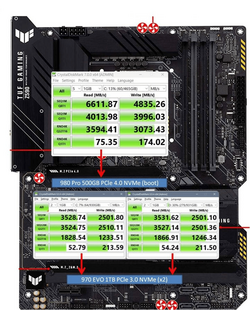
What motherboard do you have? I have a ASUS Z590 that only has one 4.0 slot with a 980 Pro 4.0 NVMe and two 970 EVO's in the bottom two slots.

You can also put in in the bottom 4.0 slot and see how it performs with CrystalDiskMark.

I know this is comparing apples to oranges, but here's what my board does wit the 980 and the 2 970's

1686697635645.png
 

My Computers My Computers

  • At a glance

    Win 11 Pro 25H2 26200.8655Intel® Core™ i7-14700KG.SKILL Ripjaws S5 Series 64GB (2 x 32GB) DDR5ASUS GeForce RTX 4070 Super 12GB
    OS
    Win 11 Pro 25H2 26200.8655
    Computer type
    PC/Desktop
    Manufacturer/Model
    Self Built
    CPU
    Intel® Core™ i7-14700K
    Motherboard
    ASUS TUF Z690-PLUS WIFI BIOS 4505 11/29/25
    Memory
    G.SKILL Ripjaws S5 Series 64GB (2 x 32GB) DDR5
    Graphics Card(s)
    ASUS GeForce RTX 4070 Super 12GB
    Sound Card
    Sound Blaster AE-5 Plus
    Monitor(s) Displays
    ASUS TUF Gaming 27" 2K HDR Gaming
    Screen Resolution
    2560 x 1440
    Hard Drives
    Samsung 990 Pro 1TB NVMe (Win 11 25H2)
    SK hynix P41 500GB NVMe 25H2 DEV/Games
    SK hynix P41 2TB NVMe (x3)
    Crucial P3 Plus 4TB
    PSU
    Corsair RM850x Shift
    Case
    Antec Dark Phantom DP502 FLUX
    Cooling
    Corsair Nautilus 360 RS AIO
    Keyboard
    Logitech MK 320
    Mouse
    Razer Basilisk V3
    Internet Speed
    750Mbs
    Browser
    Firefox
    Antivirus
    Winows Security
    Other Info
    MR 8.1 Home
  • At a glance

    Win 11 Pro 25H2 26200.8655Intel Core i7-11700F64 GB DDR4MSI GeForce RTX 3060 Ventus 2X 12GB
    Operating System
    Win 11 Pro 25H2 26200.8655
    Computer type
    PC/Desktop
    Manufacturer/Model
    Self Built
    CPU
    Intel Core i7-11700F
    Motherboard
    Asus TUF Gaming Z590 Plus WiFi (BIOS 2803)
    Memory
    64 GB DDR4
    Graphics card(s)
    MSI GeForce RTX 3060 Ventus 2X 12GB
    Sound Card
    SoundBlaster Audigy Fx V2
    Monitor(s) Displays
    Samsung F27T350
    Screen Resolution
    1920x1080
    Hard Drives
    Samsung 980 Pro 1TB
    Samsung 970 EVO Plus 2TB
    Samsung 870 EVO 500GB SSD
    PSU
    Corsair HX750
    Case
    Cougar MX330-G Window
    Cooling
    Thermalright Frozen Edge 240 Black AIO
    Internet Speed
    350Mbps
    Browser
    Firefox
    Antivirus
    Windows Security
  • System Three
    Win 11 Pro 25H2 26200.8655
    ASUS PRIME Z370-P II BIOS 3004 7/12/21
    Intel Core i7-8700 CPU @ 3.20GHz
    32GB DDR4 RAM (4x8)
    iGPU Intel UHD Graphics 630
    Mid-Tower Desktop
This shouldn't be a problem.


Personally I'd put it in the top slot so it can utilize the CPU lanes. You could also clone or restore a image of your current install and make it your boot drive.

What motherboard do you have? I have a ASUS Z590 that only has one 4.0 slot with a 980 Pro 4.0 NVMe and two 970 EVO's in the bottom two slots.

You can also put in in the bottom 4.0 slot and see how it performs with CrystalDiskMark.

I know this is comparing apples to oranges, but here's what my board does wit the 980 and the 2 970's

View attachment 62315
It’s z690 MSI Tomahawk Wi-Fi DDR4
And now I’m a little bit confused I have another 512GB Intel 3.0 nvme in the second chipset lane m.2 slot I don’t think that’s an issue if i just move the 970 evo os drive to the 4th pcie 4.0 chipset slot and put the sn850x in top cpu lane slot but I know sata ports can be disabled and my mobo manual is not clear if there are any that will be disabled because I have 3 sata ssds. There is another 3rd nvme pcie 3.0 chipset lane slot so would it make sense to move the Intel from the second slot to the third since it’s not even a 4.0 drive and just leave the second empty. I don’t care too much about making it my boot drive though.
 

My Computer My Computer

At a glance

windows 1113900k64 GB (32x2) G.Skill Ripjaws DRR4 3600 mhz CL 16MSI Gaming Trio RTX 4090
OS
windows 11
Computer type
PC/Desktop
CPU
13900k
Motherboard
MSI Z690 DRR4 Tomahawk Wifi
Memory
64 GB (32x2) G.Skill Ripjaws DRR4 3600 mhz CL 16
Graphics Card(s)
MSI Gaming Trio RTX 4090
Monitor(s) Displays
Samsung 55” QD-OLED S90D 4k TV
Hard Drives
3x nvme sn850x
3x Samsung ssd sata
PSU
Thermaltake GF3 1200 Watt ATX 3 PSU
Back
Top Bottom