MP3 Album Art file location ?


Chuck99

Well-known member
Member
Local time
10:15 AM
Posts
71
OS
Windows 11 Pro 25H2
I have a USB flash drive with MP3 files that displayed album art when played in my old car but does not show the images when played in my new/used car.

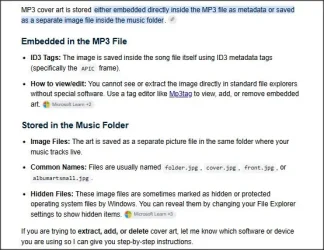
Did some searching & it looks like the artwork may need to be embedded in each mp3 file. It’s been years since I worked with the Mp3tag app but it appears my artwork is stored separately but in the same folder with the mp3 files, at least from what I can figure out..

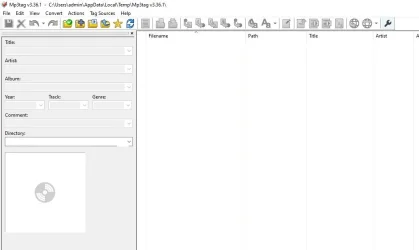
I have duplicate files on my PC & want to use that to hopefully modify my mp3 files. Using the PC I open a music folder using Mp3tag & it shows 17 songs. As I click on each song it displays the proper image.

Then I use File Explorer set to show hidden system files and it lists the 17 songs plus AlbumArtSmall.jpg and Folder.jpg. AlbumArtSmall.jpg shows a 75 x 75 pixel image & Folder.jpg shows the same image with 200 x 200 pixels. FWIW that image is the album art from the last song in the folder.

Where is the album art hidden for the other 16 songs?
 

My Computer My Computer

At a glance

Windows 11 Pro 25H2Intel i5-1450016 GBIntel
OS
Windows 11 Pro 25H2
Computer type
PC/Desktop
Manufacturer/Model
ASRock B760M Pro RS/D4 motherboard
CPU
Intel i5-14500
Motherboard
ASRock
Memory
16 GB
Graphics Card(s)
Intel
Hard Drives
1 TB Samsung M.2 SSD
1 TB WD HDD
There are two possible options - so 'it depends'...

1.webp

If you can determine which format your car player can handle that would help of course.

And you can experiment.. with
a. an mp3 you know has the cover art embedded
b. with a music folder with separate cover art files
 

My Computer My Computer

At a glance

Windows 11 Proi7-8650U16GBIntel UHD 620
OS
Windows 11 Pro
Computer type
Laptop
Manufacturer/Model
Lenovo t480s
CPU
i7-8650U
Memory
16GB
Graphics Card(s)
Intel UHD 620
Screen Resolution
1920x1080
Hard Drives
C SN810 SDCPNRY-512G-1006
Browser
Edge, Firefox
Antivirus
Defender
For all the cars I've owned I use album art embedded in the mp3 file and all works fine. I use Tagscanner to check all the mp3 files and check every track contains the embedded album art jpg file.
 

My Computer My Computer

At a glance

Windows 11 ProCore i7-13700K64 GB Kingston Fury Beast DDR5Gigabyte GeForce RTX 2060 Super Gaming OC 8G
OS
Windows 11 Pro
Computer type
PC/Desktop
Manufacturer/Model
Self build
CPU
Core i7-13700K
Motherboard
Asus TUF Gaming Plus WiFi Z790
Memory
64 GB Kingston Fury Beast DDR5
Graphics Card(s)
Gigabyte GeForce RTX 2060 Super Gaming OC 8G
Sound Card
Realtek S1200A
Monitor(s) Displays
Viewsonic VP2770 & Dell (secondary)
Screen Resolution
2560 x 1440
Hard Drives
Kingston KC3000 2TB NVME SSD & SATA HDDs & SSD
PSU
EVGA SuperNova G2 850W
Case
Nanoxia Deep Silence 1
Cooling
Noctua NH-D14
Keyboard
Microsoft Digital Media Pro
Mouse
Logitech Wireless
Internet Speed
80 Mb / s
Browser
Chrome
Antivirus
Defender, Malwarebytes Free & AdwCleaner
Previously I used Mp3tag software to view or modify the tags, but it's been several years so I have to re-learn it.

So after spending more time & searching it appears my artwork is embedded. The "extra" AlbumArtSmall.jpg and Folder.jpg files are just that, extra. Maybe ended up in the folders when I first started playing around with the artwork. Back then I had to make adjustments in some image sizes in order for them to display in one car.

Now I have a different car & the artwork does not show up. I did post my question on the car forum but so far no replies. This new car forum does not appear to be as "techy" as other car forums I've been on. There is no audio or electronics sub-forum. Hopefully someone there will chime in.
 

My Computer My Computer

At a glance

Windows 11 Pro 25H2Intel i5-1450016 GBIntel
OS
Windows 11 Pro 25H2
Computer type
PC/Desktop
Manufacturer/Model
ASRock B760M Pro RS/D4 motherboard
CPU
Intel i5-14500
Motherboard
ASRock
Memory
16 GB
Graphics Card(s)
Intel
Hard Drives
1 TB Samsung M.2 SSD
1 TB WD HDD
Previously I used Mp3tag software to view or modify the tags, but it's been several years so I have to re-learn it.

Not hard. Besides, I still re-tag things all the time so I've kept up with it.

And you can experiment.. with
a. an mp3 you know has the cover art embedded
b. with a music folder with separate cover art files

You can also have both and see which one works for you. If an the album's in a folder, hit CRTL+A to select them all (music tracks) and then find a cover or picture of the album you can embed all with them through the picture placeholder you see on the lower right by right-mouse clicking in it and selecting your pix then hitting CTRL+S to save them. I do it the same way I would do it through all tag fields.

Capture.webp
 

My Computers My Computers

  • At a glance

    Windows 11 Pro 25H2 build: (26200.7623)32GB
    OS
    Windows 11 Pro 25H2 build: (26200.7623)
    Computer type
    Laptop
    Manufacturer/Model
    Microsoft Surface Pro
    Memory
    32GB
  • At a glance

    Microsoft 25H2 ProIntel Core Ultra 764GBIntel Integrated Graphics
    Operating System
    Microsoft 25H2 Pro
    Computer type
    Laptop
    Manufacturer/Model
    Dell Pro 14 - PC14250
    CPU
    Intel Core Ultra 7
    Memory
    64GB
    Graphics card(s)
    Intel Integrated Graphics
    Hard Drives
    Micron 1TB SSD
What has worked for me without fail is embedding the album art within the MP3's metadata at 600x600 px.

I love Mp3tag. Still use it to this day.
 

My Computers My Computers

  • At a glance

    Win11 Home 64-bit (25H2)Intel Core i7-11800H (UHD Graphics)TIMETEC 32GB DDR4-3200 (2 x 16GB)NVIDIA GeForce RTX 3070 (8GB GDDR6)
    OS
    Win11 Home 64-bit (25H2)
    Computer type
    Laptop
    Manufacturer/Model
    HP OMEN 16-b0146TX (2021)
    CPU
    Intel Core i7-11800H (UHD Graphics)
    Motherboard
    HP 88F4
    Memory
    TIMETEC 32GB DDR4-3200 (2 x 16GB)
    Graphics Card(s)
    NVIDIA GeForce RTX 3070 (8GB GDDR6)
    Monitor(s) Displays
    16.1" IPS 144Hz
    Screen Resolution
    1920 x 1080 (FHD)
    Hard Drives
    SAMSUNG 1TB Gen4 NVMe M.2 SSD
  • At a glance

    Win11 Home 64-bit (25H2)AMD Ryzen 7 4800H (Vega 7)SAMSUNG 16GB DDR4-3200 (2 x 8GB)NVIDIA GeForce GTX 1650 Ti (4GB GDDR6)
    Operating System
    Win11 Home 64-bit (25H2)
    Computer type
    Laptop
    Manufacturer/Model
    HP OMEN 15-en0012ax (2020)
    CPU
    AMD Ryzen 7 4800H (Vega 7)
    Motherboard
    HP 8788
    Memory
    SAMSUNG 16GB DDR4-3200 (2 x 8GB)
    Graphics card(s)
    NVIDIA GeForce GTX 1650 Ti (4GB GDDR6)
    Monitor(s) Displays
    15.6" IPS 60Hz
    Screen Resolution
    1920 x 1080 (FHD)
    Hard Drives
    SAMSUNG 512GB Gen3 NVMe M.2 SSD
  • Beelink MINI S13 (N150)
    Beelink SER5 MAX 5800H (Vega 8)
    Beelink SEi13 Pro (i9-13900HK)
    GMKtec M7 6850H (680M)
    GMKtec AD-GP1 eGPU (RX 7600M XT)
Back
Top Bottom