MS generic webcam driver from 2006 > awful quality


Judiver

Judiver
Member
Local time
8:56 AM
Posts
55
Location
France
OS
Windows11 Home
Hi forum,

After many more attempts since my last post here trying to install W11, I finally succeeded. Hurrah!!! Hurrah??? Well, maybe...

For the friendly people here who spent time trying to help me, I do owe the solution to my problem. I had been trying with 5-10GB more than the announced free disk space mentioned by Microsoft to enable an install of W11, but it always broke off (sometimes at 95% install). What worked was freeing up my disk space to more than double what MS mentioned. Call it the luck of a layman, who doesn't accept failure... (I am no IT-geek!).

My current problem (Acer A517-51G):
I only sporadically used my (integrated) webcam before, but I will need it regularly now. And the quality is just AWFUL! Nothing is sharp, at no matter what distance (I won't even mention what it does with artificial light, even with 2 lamps behind the screen...). It quite resembles what this user is saying: Web cam driver on Acer Aspire 7 A715-71G missing - Acer Community

I found out that W11 (installed in July 2025) seems to make my webcam work on a generic driver dating back to 21 June 2006!
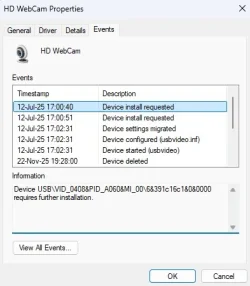
Device mgr, informs me: Manufacturer: Microsoft. Device installed 12-Jul-2025. Information: "Device USB\VID_0408&PID_A060&MI_00\6&391c16c1&0&0000 requires further installation."
I found out that my webcam must be from Quanta Computer Inc. But I could find no driver anywhere.
I did find this (don't know if it's helpful): Quanta Computer, Inc. HD Webcam - h-node.org
I did install OBS (in an attempt to get rid of the flickering/lag when using blurring or a virtual camera). But since the camera itself isn't working to its optimum, OBS gives the same non-focused image.

Is there any way I can make this webcam work the way it was intended? A driver update from Quanta/MS, a substitute driver, some app?

Thank you in advance for your suggestions!

Judiver
 
Windows Build/Version
Windows 11 Home 25H2
Last edited:

My Computer

System One

  • OS
    Windows11 Home
    Computer type
    Laptop
    Manufacturer/Model
    Acer Aspire 5 A517-51G-85RS
    CPU
    i7-8550U @1.80GHz 1.99GHz
    Motherboard
    Dragonite_KL, version V2.03
    Memory
    8GB
    Graphics Card(s)
    NVIDIA GeForce MX150
    Sound Card
    Realtek High Definition Audio (SST)
    Monitor(s) Displays
    17.3" IPS
    Screen Resolution
    1920x1080 (Full HD)
    Hard Drives
    SSD 256GB
    5400rpm HDD
    Keyboard
    qwerty
    Browser
    Firefox
@Judiver

The first thing I would do is "disable" drivers included in Windows Updates...

This will prevent a Microsoft driver from overwriting and corrupting your installed drivers.
Those MS drivers will still be available under Drivers or Optional Updates, if you ever need them.


Then go to the ACER website and find your camera driver and install it.
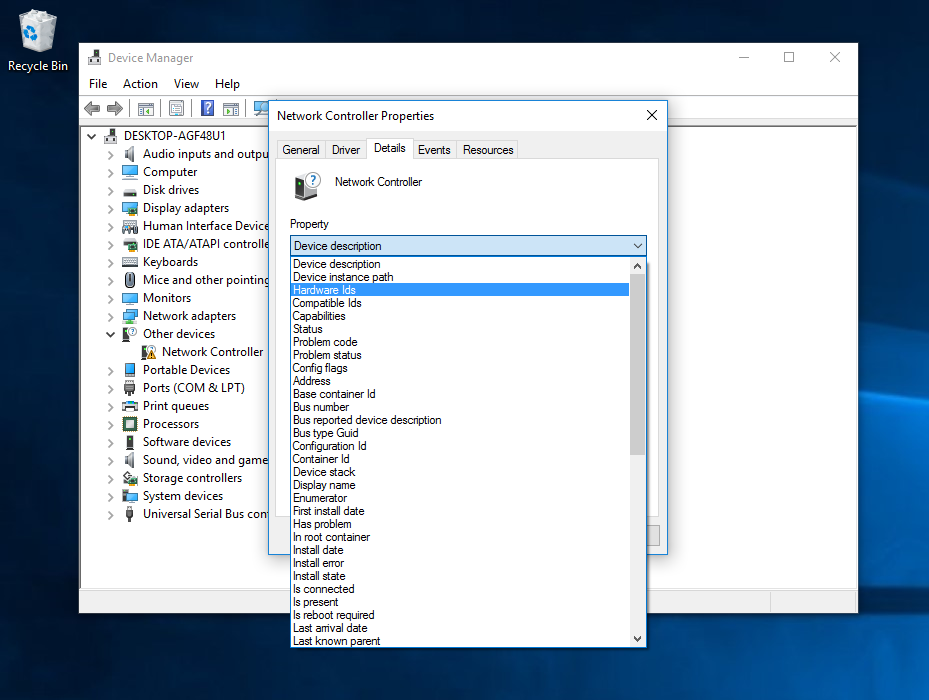
If it's not available at the Acer website, you can try using the Hardware ID(s) for your webcam...

They can be found in Device Manager, like so...

Image1.webp


This may help...


And this...


I'm not sure, but I believe @Try3 (if available), can help with finding a driver using the Hardware ID.


Then, once all your drivers are happy, "backup" your device drivers...

 
Last edited:

My Computers

System One System Two

  • OS
    Win 11 Home ♦♦♦26200.8655 ♦♦♦♦♦♦♦25H2
    Computer type
    PC/Desktop
    Manufacturer/Model
    Built by Ghot® [May 2020]
    CPU
    AMD Ryzen 7 3700X
    Motherboard
    Asus Pro WS X570-ACE (BIOS 5302)
    Memory
    G.Skill (F4-3200C14D-16GTZKW)
    Graphics Card(s)
    EVGA RTX 2070 (08G-P4-2171-KR)
    Sound Card
    Realtek ALC1220P / ALC S1220A
    Monitor(s) Displays
    Dell U3011 30"
    Screen Resolution
    2560 x 1600
    Hard Drives
    2x Samsung 860 EVO 500GB,
    WD 4TB Black FZBX - SATA III,
    WD 8TB Black FZBX - SATA III,
    DRW-24B1ST CD/DVD Burner
    PSU
    PC Power & Cooling 750W Quad EPS12V
    Case
    Cooler Master ATCS 840 Tower
    Cooling
    CM Hyper 212 EVO (push/pull)
    Keyboard
    Ducky DK9008 Shine II Blue LED
    Mouse
    Logitech Optical M-100
    Internet Speed
    300/300
    Browser
    Firefox (latest)
    Antivirus
    Bitdefender Total Security
    Other Info
    Speakers: Klipsch Pro Media 2.1
  • Operating System
    Windows XP Pro 32bit w/SP3
    Computer type
    PC/Desktop
    Manufacturer/Model
    Built by Ghot® (not in use)
    CPU
    AMD Athlon 64 X2 5000+ (OC'd @ 3.2Ghz)
    Motherboard
    ASUS M2N32-SLI Deluxe Wireless Edition
    Memory
    TWIN2X2048-6400C4DHX (2 x 1GB, DDR2 800)
    Graphics card(s)
    EVGA 256-P2-N758-TR GeForce 8600GT SSC
    Sound Card
    Onboard
    Monitor(s) Displays
    ViewSonic G90FB Black 19" Professional (CRT)
    Screen Resolution
    up to 2048 x 1536
    Hard Drives
    WD 36GB 10,000rpm Raptor SATA
    Seagate 80GB 7200rpm SATA
    Lite-On LTR-52246S CD/RW
    Lite-On LH-18A1P CD/DVD Burner
    PSU
    PC Power & Cooling Silencer 750 Quad EPS12V
    Case
    Generic Beige case, 80mm fans
    Cooling
    ZALMAN 9500A 92mm CPU Cooler
    Keyboard
    Logitech Classic Keybooard 200
    Mouse
    Logitech Optical M-BT96a
    Internet Speed
    300/300
    Browser
    Firefox 3.x ??
    Antivirus
    Symantec (Norton)
    Other Info
    Still assembled, still runs. Haven't turned it on for 15 years?
Go to Acer support site and download camera driver. If there is not one ask for it or where to get it.

Run "dxdiag" and output to a text file, scroll down to find Video Capture Devices, that should give the Manufacture, Hardware ID (you already have that), Driver provider, Driver version.

Appears to Microsoft with a Microsoft driver.

Quanta maybe the manufacturer, but badged apparently to various manufacturers.

The driver date will indeed be 21/06/2006 which is a generic one, there are reasons for that which I have forgotten.

You could try looking in the Microsoft Update Catalog, I cannot find that specific hardware ID.

720p 0.9 Mp camera is not going to give a good image by todays standards. Cheap as chips simple camera.

Doing a so-called clean install loses some system information that was there in the original install, this is particularly relevant to Laptops.

Device mgr, informs me: Manufacturer: Microsoft. Device installed 12-Jul-2025. Information: "Device USB\VID_0408&PID_A060&MI_00\6&391c16c1&0&0000 requires further installation."
That is the first line you see in the Events Tab in the Device Manager, just a request. It's the later ones down the list that matter.
 

My Computer

System One

  • OS
    Windows 11

My Computers

System One System Two

  • OS
    All Branches but Release
    Computer type
    Laptop
    Manufacturer/Model
    Acer Nitro ANV15-51
    CPU
    AMD Ryzen 7 7735HS 3200-4500 Mhz 8 cores x 2
    Motherboard
    Sportage_RBH
    Memory
    32 GB DDR5
    Graphics Card(s)
    Radeon Graphic / NVIDIA GeForce RTX 4060 8 GB GDDR6
    Sound Card
    AMD/Realtek(R) Audio
    Monitor(s) Displays
    Integrated Monitor (15.3"vis)
    Screen Resolution
    FHD 1920X1080 16:9 144Hz
    Hard Drives
    KINGSTON OM8SEP4512Q-AA 1TB
    Western Digital 256GB
    PSU
    19V DC 6.32 A 120 W
    Cooling
    Dual Fans
    Mouse
    MS Bluetooth
    Internet Speed
    Fiber 1GB Cox -us & 1GB Orange-fr
    Browser
    Edge Canary- Firefox Nightly-Chrome Dev-Chrome Dev

    Antivirus
    Windows Defender
  • Operating System
    Windows 11 Beta
    Computer type
    Laptop
    Manufacturer/Model
    Asus X751BP
    CPU
    AMD A9-9420
    Memory
    8 GB of DDR4
    Graphics card(s)
    AMD Radeon R5
    Screen Resolution
    1600x900
    Hard Drives
    Seagate 1 TB
Hi Ghot, Helmut and OAT,

Thank you for your reactions.

The Acer site was my first place to try to find a driver. But there is no separate driver for a webcam there, as OAT found out too. I rang Acer today. The lady informed me that there are no ACER drivers. It is Intel, plug&play. She told me to install the Intel Driver & Support Assistant and look for I/O and chipset. The Intel assistant didn't find any updates for my system. But it could be in the exclusions? I am sure sure where to look/what to look for.

@Ghot
I made the reg change. I keep a list of those, and it is not the first registry change that I have on my machine that comes from this forum!
I also found Hunt's site yesterday. Find unknown device information and drivers | Device Hunt.
Do I need to send a direct message to Try3 for his/her help?

@Helmut
I run the dxdiag, but I am not sure if I should include an image of that here (for security reasons, it states "fingerprint"...).
I've learnt in the meantime that 720p is not top quality. My laptop isn't, and it is from 2019. Things must have evolved rapidly in this area during Covid19... But 720p is not that bad if just for videoconferencing. The image of my webcam is just not focussed and there is flickering. That could never have been what it was when this product came out of the factory. Especially the mention that my webcam "requires further installation" already points to the fact that the device might be working, but not like it should be.

I include some print screens. I deleted the webcam on 22 Nov to try a new reinstall.


I looked at the Microsoft Update Catalog. It found these: Microsoft Update Catalog
A further searching brought me to this page: October 28, 2025—KB5067036 (OS Builds 26200.7019 and 26100.7019) Preview - Microsoft Support
I don't see anything about webcams here.
It is strange it is listed as a USB device, whereas it is an integrated webcam. And yeah, "clean" was a bit too clean... W11 rubbed the vernish off.

@ OAT
This info about the date is interesting. So it is a deliberately "prehistoric" phony date. Well, in my humble vision "it does not all work out", because if there is no specific driver, MS apparently picks it one its thinks is best, overriding the original which was more specific designed to pilote my hardware.

I don't know where to go from here. I am not sure in what kind of software the original drivers were included and if it would be wise/without risk to go back to an older set (including drivers for other -not specifically mentioned- hardware). That being said, ACER never updated any of the drivers. The newest driver there is from 2019, the year I bought my laptop... Like for instance downloading one of these (from Acer, for my SNID):


Thanks again,
Judiver
 

Attachments

  • Dev mgr - events.webp
    Dev mgr - events.webp
    20 KB · Views: 1
  • Dev mgr - driver version.webp
    Dev mgr - driver version.webp
    7.7 KB · Views: 1
  • Acer IO and chipset.webp
    Acer IO and chipset.webp
    9.4 KB · Views: 1

My Computer

System One

  • OS
    Windows11 Home
    Computer type
    Laptop
    Manufacturer/Model
    Acer Aspire 5 A517-51G-85RS
    CPU
    i7-8550U @1.80GHz 1.99GHz
    Motherboard
    Dragonite_KL, version V2.03
    Memory
    8GB
    Graphics Card(s)
    NVIDIA GeForce MX150
    Sound Card
    Realtek High Definition Audio (SST)
    Monitor(s) Displays
    17.3" IPS
    Screen Resolution
    1920x1080 (Full HD)
    Hard Drives
    SSD 256GB
    5400rpm HDD
    Keyboard
    qwerty
    Browser
    Firefox
Do I need to send a direct message to Try3 for his/her help?


No, he'll see that I mentioned him.
He may have holiday things going on?
 

My Computers

System One System Two

  • OS
    Win 11 Home ♦♦♦26200.8655 ♦♦♦♦♦♦♦25H2
    Computer type
    PC/Desktop
    Manufacturer/Model
    Built by Ghot® [May 2020]
    CPU
    AMD Ryzen 7 3700X
    Motherboard
    Asus Pro WS X570-ACE (BIOS 5302)
    Memory
    G.Skill (F4-3200C14D-16GTZKW)
    Graphics Card(s)
    EVGA RTX 2070 (08G-P4-2171-KR)
    Sound Card
    Realtek ALC1220P / ALC S1220A
    Monitor(s) Displays
    Dell U3011 30"
    Screen Resolution
    2560 x 1600
    Hard Drives
    2x Samsung 860 EVO 500GB,
    WD 4TB Black FZBX - SATA III,
    WD 8TB Black FZBX - SATA III,
    DRW-24B1ST CD/DVD Burner
    PSU
    PC Power & Cooling 750W Quad EPS12V
    Case
    Cooler Master ATCS 840 Tower
    Cooling
    CM Hyper 212 EVO (push/pull)
    Keyboard
    Ducky DK9008 Shine II Blue LED
    Mouse
    Logitech Optical M-100
    Internet Speed
    300/300
    Browser
    Firefox (latest)
    Antivirus
    Bitdefender Total Security
    Other Info
    Speakers: Klipsch Pro Media 2.1
  • Operating System
    Windows XP Pro 32bit w/SP3
    Computer type
    PC/Desktop
    Manufacturer/Model
    Built by Ghot® (not in use)
    CPU
    AMD Athlon 64 X2 5000+ (OC'd @ 3.2Ghz)
    Motherboard
    ASUS M2N32-SLI Deluxe Wireless Edition
    Memory
    TWIN2X2048-6400C4DHX (2 x 1GB, DDR2 800)
    Graphics card(s)
    EVGA 256-P2-N758-TR GeForce 8600GT SSC
    Sound Card
    Onboard
    Monitor(s) Displays
    ViewSonic G90FB Black 19" Professional (CRT)
    Screen Resolution
    up to 2048 x 1536
    Hard Drives
    WD 36GB 10,000rpm Raptor SATA
    Seagate 80GB 7200rpm SATA
    Lite-On LTR-52246S CD/RW
    Lite-On LH-18A1P CD/DVD Burner
    PSU
    PC Power & Cooling Silencer 750 Quad EPS12V
    Case
    Generic Beige case, 80mm fans
    Cooling
    ZALMAN 9500A 92mm CPU Cooler
    Keyboard
    Logitech Classic Keybooard 200
    Mouse
    Logitech Optical M-BT96a
    Internet Speed
    300/300
    Browser
    Firefox 3.x ??
    Antivirus
    Symantec (Norton)
    Other Info
    Still assembled, still runs. Haven't turned it on for 15 years?
Hi Ghot, Helmut and OAT,

Thank you for your reactions.
Hi,
Your Aspire laptop was made available for sale in 2017, meaning it was built before that.
I understand it might still feel newish to you but cameras have improved substantially in what seems to be a short time.
Have you considered a USB add-on?
 

My Computers

System One System Two

  • OS
    All Branches but Release
    Computer type
    Laptop
    Manufacturer/Model
    Acer Nitro ANV15-51
    CPU
    AMD Ryzen 7 7735HS 3200-4500 Mhz 8 cores x 2
    Motherboard
    Sportage_RBH
    Memory
    32 GB DDR5
    Graphics Card(s)
    Radeon Graphic / NVIDIA GeForce RTX 4060 8 GB GDDR6
    Sound Card
    AMD/Realtek(R) Audio
    Monitor(s) Displays
    Integrated Monitor (15.3"vis)
    Screen Resolution
    FHD 1920X1080 16:9 144Hz
    Hard Drives
    KINGSTON OM8SEP4512Q-AA 1TB
    Western Digital 256GB
    PSU
    19V DC 6.32 A 120 W
    Cooling
    Dual Fans
    Mouse
    MS Bluetooth
    Internet Speed
    Fiber 1GB Cox -us & 1GB Orange-fr
    Browser
    Edge Canary- Firefox Nightly-Chrome Dev-Chrome Dev
    Antivirus
    Windows Defender
  • Operating System
    Windows 11 Beta
    Computer type
    Laptop
    Manufacturer/Model
    Asus X751BP
    CPU
    AMD A9-9420
    Memory
    8 GB of DDR4
    Graphics card(s)
    AMD Radeon R5
    Screen Resolution
    1600x900
    Hard Drives
    Seagate 1 TB
I found out that W11 (installed in July 2025) seems to make my webcam work on a generic driver dating back to 21 June 2006!
All Microsoft drivers are dated 21 June 2006, for a very good reason.....

The dates on all Windows drivers are set to June 21, 2006. The version number increases over time, but the timestamp stays put....

....Suppose that the timestamp on the driver matched the build release date. And suppose you had a custom driver provided by the manufacturer. When you installed a new build, the driver provided by Windows will have a newer timestamp than the one provided by the manufacturer. Result: When you install a new build, all your manufacturer-provided drivers get replaced by the Windows drivers. Oops.

Intentionally backdating the drivers avoids this problem....

And why that particular date? Zac Bowden explained on Reddit.

Zac said:
(MS Dev here) There's a very good reason for that, and it has nothing to do with the age of the driver or anything.

Every driver we ship has the Vista RTM date, regardless of when it was last updated (we update the version number, which is the next tiebreaker if the date is the same). Since only drivers as far back as Vista are compatible with new versions of Windows, every driver should have a date newer than Vista RTM, preserving the driver you installed as the best ranked driver.
 
Last edited:

My Computers

System One System Two

  • OS
    Windows 11 Home
    Computer type
    Laptop
    Manufacturer/Model
    Acer Aspire 3 A315-23-R9VY
    CPU
    AMD Athlon Silver 3050U
    Memory
    8GB
    Graphics Card(s)
    Radeon Graphics
    Monitor(s) Displays
    laptop screen
    Screen Resolution
    1366x768 native resolution, up to 2560x1440 with Radeon Virtual Super Resolution
    Hard Drives
    1TB Samsung EVO 870 SSD (from April 2026: 250GB EVO 850)
    Internet Speed
    150 Mbps
    Browser
    Edge, Firefox
    Antivirus
    Defender
    Other Info
    fully 'Windows 11 ready' laptop. Windows 10 C: partition migrated from my old unsupported 'main machine' then upgraded to 11. A test migration ran Insider builds for 2 months. When 11 was released on 5th October 2021 it was re-imaged back to 10 and was offered the upgrade in Windows Update on 20th October. Windows Update offered the 22H2 Feature Update on 20th September 2022. It got the 23H2 Feature Update on 4th November 2023 through Windows Update, 24H2 on 3rd October 2024 through Windows Update by setting the Target Release Version for 24H2, and 25H2 on 30th September 2025 through Windows Update by setting the Target Release Version for 25H2.

    UPDATE - 11 April 2026: due to mechanical deterioration this PC has been retired from active duty. The OS with all software and files has been migrated to my System Seven below to carry on as my general purpose 'main machine'.

    My SYSTEM THREE is a Dell Latitude 5410, i7-10610U, 32GB RAM, 512GB NVMe ssd, supported device running Windows 11 Pro.

    My SYSTEM FOUR is a 2-in-1 convertible Lenovo Yoga 11e 20DA, Celeron N2930, 8GB RAM, 256GB ssd. Unsupported device: currently running Win10 Pro, plus Win11 Pro RTM and Insider Dev, Beta, and RP 24H2 as native boot vhdx.

    My SYSTEM FIVE is a Dell Latitude 3190 2-in-1, Pentium Silver N5030, 8GB RAM, 1TB NVMe ssd, supported device running Windows 11 Pro, plus Insider Beta, Dev, and Canary builds (and a few others) as a native boot .vhdx.

    My SYSTEM SIX is a Dell Latitude 5550, Core Ultra 7 165H, 64GB RAM, 1TB NVMe SSD, supported device, Windows 11 Pro 24H2, Hyper-V host machine. Updated to 25H2 on 30th September 2025.

    My SYSTEM SEVEN is a Lenovo Thinkpad T580, Intel Core i7-8650U, 16GB RAM, 512GB NVMe SSD + 2nd 512GB NVMe SSD, a supported device for Windows 11. This is my current general purpose 'main machine'. The installed Windows 11 Home from my System One has been migrated to this machine.
  • Operating System
    Windows 11 Pro
    Computer type
    Laptop
    Manufacturer/Model
    Dell Latitude E4310
    CPU
    Intel® Core™ i5-520M
    Motherboard
    0T6M8G
    Memory
    8GB
    Graphics card(s)
    (integrated graphics) Intel HD Graphics
    Screen Resolution
    1366x768
    Hard Drives
    500GB Crucial MX500 SSD
    Browser
    Firefox, Edge
    Antivirus
    Defender
    Other Info
    unsupported machine: Legacy bios, MBR, TPM 1.2, upgraded from W10 to W11 using W10/W11 hybrid install media workaround. In-place upgrade to 22H2 using ISO and a workaround. Feature Update to 23H2 by manually installing the Enablement Package. In-place upgrade to 24H2 using hybrid 23H2/24H2 install media. Upgraded to 25H2 by Enablement Package. Also running Insider Dev, and Canary builds and Windows 10 as native boot .vhdx.

    My SYSTEM THREE is a Dell Latitude 5410, i7-10610U, 32GB RAM, 512GB NVMe ssd, supported device running Windows 11 Pro.

    My SYSTEM FOUR is a 2-in-1 convertible Lenovo Yoga 11e 20DA, Celeron N2930, 8GB RAM, 256GB ssd. Unsupported device: currently running Win10 Pro, plus Win11 Pro RTM and Insider Dev, Beta, and RP 24H2 as native boot vhdx.

    My SYSTEM FIVE is a Dell Latitude 3190 2-in-1, Pentium Silver N5030, 8GB RAM, 1TB NVMe ssd, supported device running Windows 11 Pro, plus Insider Beta, Dev, and Canary builds (and a few others) as a native boot .vhdx.

    My SYSTEM SIX is a Dell Latitude 5550, Core Ultra 7 165H, 64GB RAM, 1TB NVMe SSD, supported device, Windows 11 Pro 24H2, Hyper-V host machine. Updated to 25H2 on 30th September 2025.

    My SYSTEM SEVEN is a Lenovo Thinkpad T580, Intel Core i7-8650U, 16GB RAM, 512GB NVMe SSD + 2nd 512GB NVMe SSD, a supported device for Windows 11. This is my current general purpose 'main machine'. The installed Windows 11 Home from my System One has been migrated to this machine.
Though usually the camera driver is separate, it's also possible that Acer included the camera driver in their chipset driver package and Microsoft saw the old camera driver as incompatible so the generic driver was installed.
 

My Computers

System One System Two

  • OS
    Windows 11 Pro 25H2 26200.8655
    Computer type
    PC/Desktop
    Manufacturer/Model
    Dell Optiplex 7080
    CPU
    i9-10900 10 core 20 threads
    Motherboard
    DELL 0J37VM
    Memory
    32 gb
    Graphics Card(s)
    none-Intel UHD Graphics 630
    Sound Card
    Integrated Realtek
    Monitor(s) Displays
    Benq 27
    Screen Resolution
    2560x1440
    Hard Drives
    2x1tb Solidigm m.2 nvme /External drives 512gb Samsung m.2 sata+2tb Kingston m2.nvme
    PSU
    500w
    Case
    MT
    Cooling
    Dell Premium
    Keyboard
    Logitech wired
    Mouse
    Logitech wireless
    Internet Speed
    so slow I'm too embarrassed to tell
    Browser
    #1 Edge #2 Firefox
    Antivirus
    Defender+MWB Premium
  • Operating System
    Windows 11 Pro 24H2 26200.8457
    Computer type
    PC/Desktop
    Manufacturer/Model
    Beelink Mini PC SER5
    CPU
    AMD Ryzen 7 6800U
    Memory
    32 gb
    Graphics card(s)
    integrated
    Sound Card
    integrated
    Monitor(s) Displays
    Benq 27
    Screen Resolution
    2560x1440
    Hard Drives
    1TB Crucial nvme
    Keyboard
    Logitech wired
    Mouse
    Logitech wireless
    Internet Speed
    still too embarrassed to tell
    Browser
    Firefox
    Antivirus
    Defender
    Other Info
    System 3 is non compliant Dell 9020 i7-4770/24gb ram Win11 PRO 26200.8457
Hi Ghot, Bree and Glasskuter,

@Ghot
Yes, I do understand that (built 2017 and webcam development).
But it is a pity now that I prolonged the life of my laptop a bit by installing W11, the webcam doesn't work as it should.
I may have a look at a USB add-on. It always is a trade off: invest in something or buy new pc that avoids separate investments for old equipment.

In any case I don't like the fact that you never have eye contact with a webcam. As I understand it there are now ways to improve that (a bit): webcam with an arm (and tiny camera) in front of your screen, or nearing/faking it by means of AI. But both methods, no doubt, will be a substantial investment. But a new laptop wouldn't have either, so it wouldn't be an investment that gets superfluous that quickly.

@glasskuter
I've been thinking about that possibility (why does MS install a driver?). My laptop has had 0 problems with W11, at least not that I noticed, except for this webcam. I've come across people, however, whose webcam wasn't working after upgrading (black screen), so maybe MS put a remedy in one of their updates by means of a generic driver? I didn't experience any malfunctioning, but there can be a reason for that. When I finally succeeded in installing W11 (I've been trying at several occasion in a period of over a year...) the generic driver might in the meantime have been added to a MS update. So, I may jumped "over" any malfunctioning because of my late W11 install. Just a theory...
 

My Computer

System One

  • OS
    Windows11 Home
    Computer type
    Laptop
    Manufacturer/Model
    Acer Aspire 5 A517-51G-85RS
    CPU
    i7-8550U @1.80GHz 1.99GHz
    Motherboard
    Dragonite_KL, version V2.03
    Memory
    8GB
    Graphics Card(s)
    NVIDIA GeForce MX150
    Sound Card
    Realtek High Definition Audio (SST)
    Monitor(s) Displays
    17.3" IPS
    Screen Resolution
    1920x1080 (Full HD)
    Hard Drives
    SSD 256GB
    5400rpm HDD
    Keyboard
    qwerty
    Browser
    Firefox
I don't like the fact that you never have eye contact with a webcam. As I understand it there are now ways to improve that (a bit): webcam with an arm (and tiny camera) in front of your screen, or nearing/faking it by means of AI. But both methods, no doubt, will be a substantial investment. But a new laptop wouldn't have either....
Any laptop with an NPU and 24H2/25H2 can do that, it's called Windows Studio Effects. I have it on one of my machines, a Dell Latitude 5550 from June 2024.

1764178467833.webp


---edit---

Oh, and the camera's driver is dated 21 June 2006 :ROFLMAO:

1764179842869.webp
 
Last edited:

My Computers

System One System Two

  • OS
    Windows 11 Home
    Computer type
    Laptop
    Manufacturer/Model
    Acer Aspire 3 A315-23-R9VY
    CPU
    AMD Athlon Silver 3050U
    Memory
    8GB
    Graphics Card(s)
    Radeon Graphics
    Monitor(s) Displays
    laptop screen
    Screen Resolution
    1366x768 native resolution, up to 2560x1440 with Radeon Virtual Super Resolution
    Hard Drives
    1TB Samsung EVO 870 SSD (from April 2026: 250GB EVO 850)
    Internet Speed
    150 Mbps
    Browser
    Edge, Firefox
    Antivirus
    Defender
    Other Info
    fully 'Windows 11 ready' laptop. Windows 10 C: partition migrated from my old unsupported 'main machine' then upgraded to 11. A test migration ran Insider builds for 2 months. When 11 was released on 5th October 2021 it was re-imaged back to 10 and was offered the upgrade in Windows Update on 20th October. Windows Update offered the 22H2 Feature Update on 20th September 2022. It got the 23H2 Feature Update on 4th November 2023 through Windows Update, 24H2 on 3rd October 2024 through Windows Update by setting the Target Release Version for 24H2, and 25H2 on 30th September 2025 through Windows Update by setting the Target Release Version for 25H2.

    UPDATE - 11 April 2026: due to mechanical deterioration this PC has been retired from active duty. The OS with all software and files has been migrated to my System Seven below to carry on as my general purpose 'main machine'.

    My SYSTEM THREE is a Dell Latitude 5410, i7-10610U, 32GB RAM, 512GB NVMe ssd, supported device running Windows 11 Pro.

    My SYSTEM FOUR is a 2-in-1 convertible Lenovo Yoga 11e 20DA, Celeron N2930, 8GB RAM, 256GB ssd. Unsupported device: currently running Win10 Pro, plus Win11 Pro RTM and Insider Dev, Beta, and RP 24H2 as native boot vhdx.

    My SYSTEM FIVE is a Dell Latitude 3190 2-in-1, Pentium Silver N5030, 8GB RAM, 1TB NVMe ssd, supported device running Windows 11 Pro, plus Insider Beta, Dev, and Canary builds (and a few others) as a native boot .vhdx.

    My SYSTEM SIX is a Dell Latitude 5550, Core Ultra 7 165H, 64GB RAM, 1TB NVMe SSD, supported device, Windows 11 Pro 24H2, Hyper-V host machine. Updated to 25H2 on 30th September 2025.

    My SYSTEM SEVEN is a Lenovo Thinkpad T580, Intel Core i7-8650U, 16GB RAM, 512GB NVMe SSD + 2nd 512GB NVMe SSD, a supported device for Windows 11. This is my current general purpose 'main machine'. The installed Windows 11 Home from my System One has been migrated to this machine.
  • Operating System
    Windows 11 Pro
    Computer type
    Laptop
    Manufacturer/Model
    Dell Latitude E4310
    CPU
    Intel® Core™ i5-520M
    Motherboard
    0T6M8G
    Memory
    8GB
    Graphics card(s)
    (integrated graphics) Intel HD Graphics
    Screen Resolution
    1366x768
    Hard Drives
    500GB Crucial MX500 SSD
    Browser
    Firefox, Edge
    Antivirus
    Defender
    Other Info
    unsupported machine: Legacy bios, MBR, TPM 1.2, upgraded from W10 to W11 using W10/W11 hybrid install media workaround. In-place upgrade to 22H2 using ISO and a workaround. Feature Update to 23H2 by manually installing the Enablement Package. In-place upgrade to 24H2 using hybrid 23H2/24H2 install media. Upgraded to 25H2 by Enablement Package. Also running Insider Dev, and Canary builds and Windows 10 as native boot .vhdx.

    My SYSTEM THREE is a Dell Latitude 5410, i7-10610U, 32GB RAM, 512GB NVMe ssd, supported device running Windows 11 Pro.

    My SYSTEM FOUR is a 2-in-1 convertible Lenovo Yoga 11e 20DA, Celeron N2930, 8GB RAM, 256GB ssd. Unsupported device: currently running Win10 Pro, plus Win11 Pro RTM and Insider Dev, Beta, and RP 24H2 as native boot vhdx.

    My SYSTEM FIVE is a Dell Latitude 3190 2-in-1, Pentium Silver N5030, 8GB RAM, 1TB NVMe ssd, supported device running Windows 11 Pro, plus Insider Beta, Dev, and Canary builds (and a few others) as a native boot .vhdx.

    My SYSTEM SIX is a Dell Latitude 5550, Core Ultra 7 165H, 64GB RAM, 1TB NVMe SSD, supported device, Windows 11 Pro 24H2, Hyper-V host machine. Updated to 25H2 on 30th September 2025.

    My SYSTEM SEVEN is a Lenovo Thinkpad T580, Intel Core i7-8650U, 16GB RAM, 512GB NVMe SSD + 2nd 512GB NVMe SSD, a supported device for Windows 11. This is my current general purpose 'main machine'. The installed Windows 11 Home from my System One has been migrated to this machine.
You have lost the OEM*.INF file which contains the OEM information and installs drivers required for your camera. You have the generic USBVIDEO.INF

The only way I know of getting back that OEM*.INF file plus driver files is to extract from a Backup image you have made, or from the Manufacturers Recovery Media, the latter very old by now if still available.

The image of my webcam is just not focussed
These Laptop webcams as I say are simple fixed focus, more recent ones may have facial recognition and such things.

maybe MS put a remedy in one of their updates by means of a generic driver?
The generic USBVIDEO driver has been there for decades.

It is strange it is listed as a USB device, whereas it is an integrated webcam.
Not at all, virtually all Laptop webcams are USB.
 

My Computer

System One

  • OS
    Windows 11
Bree, I don't have Windows Studio Effects.
 

My Computer

System One

  • OS
    Windows11 Home
    Computer type
    Laptop
    Manufacturer/Model
    Acer Aspire 5 A517-51G-85RS
    CPU
    i7-8550U @1.80GHz 1.99GHz
    Motherboard
    Dragonite_KL, version V2.03
    Memory
    8GB
    Graphics Card(s)
    NVIDIA GeForce MX150
    Sound Card
    Realtek High Definition Audio (SST)
    Monitor(s) Displays
    17.3" IPS
    Screen Resolution
    1920x1080 (Full HD)
    Hard Drives
    SSD 256GB
    5400rpm HDD
    Keyboard
    qwerty
    Browser
    Firefox
Bree, I don't have Windows Studio Effects.
No, you won't. Your Acer Aspire has an 8th gen Intel Core i7. The first Intel processors with an NPU (required for AI processes like Studio Effects) was the Intel Core Ultra 100 series, launched in late 2023. I was merely illustrating that by now there are quite a few affordable AI-capable laptops, both new and on the second hand market.


My Computers

System One System Two

  • OS
    Windows 11 Home
    Computer type
    Laptop
    Manufacturer/Model
    Acer Aspire 3 A315-23-R9VY
    CPU
    AMD Athlon Silver 3050U
    Memory
    8GB
    Graphics Card(s)
    Radeon Graphics
    Monitor(s) Displays
    laptop screen
    Screen Resolution
    1366x768 native resolution, up to 2560x1440 with Radeon Virtual Super Resolution
    Hard Drives
    1TB Samsung EVO 870 SSD (from April 2026: 250GB EVO 850)
    Internet Speed
    150 Mbps
    Browser
    Edge, Firefox
    Antivirus
    Defender
    Other Info
    fully 'Windows 11 ready' laptop. Windows 10 C: partition migrated from my old unsupported 'main machine' then upgraded to 11. A test migration ran Insider builds for 2 months. When 11 was released on 5th October 2021 it was re-imaged back to 10 and was offered the upgrade in Windows Update on 20th October. Windows Update offered the 22H2 Feature Update on 20th September 2022. It got the 23H2 Feature Update on 4th November 2023 through Windows Update, 24H2 on 3rd October 2024 through Windows Update by setting the Target Release Version for 24H2, and 25H2 on 30th September 2025 through Windows Update by setting the Target Release Version for 25H2.

    UPDATE - 11 April 2026: due to mechanical deterioration this PC has been retired from active duty. The OS with all software and files has been migrated to my System Seven below to carry on as my general purpose 'main machine'.

    My SYSTEM THREE is a Dell Latitude 5410, i7-10610U, 32GB RAM, 512GB NVMe ssd, supported device running Windows 11 Pro.

    My SYSTEM FOUR is a 2-in-1 convertible Lenovo Yoga 11e 20DA, Celeron N2930, 8GB RAM, 256GB ssd. Unsupported device: currently running Win10 Pro, plus Win11 Pro RTM and Insider Dev, Beta, and RP 24H2 as native boot vhdx.

    My SYSTEM FIVE is a Dell Latitude 3190 2-in-1, Pentium Silver N5030, 8GB RAM, 1TB NVMe ssd, supported device running Windows 11 Pro, plus Insider Beta, Dev, and Canary builds (and a few others) as a native boot .vhdx.

    My SYSTEM SIX is a Dell Latitude 5550, Core Ultra 7 165H, 64GB RAM, 1TB NVMe SSD, supported device, Windows 11 Pro 24H2, Hyper-V host machine. Updated to 25H2 on 30th September 2025.

    My SYSTEM SEVEN is a Lenovo Thinkpad T580, Intel Core i7-8650U, 16GB RAM, 512GB NVMe SSD + 2nd 512GB NVMe SSD, a supported device for Windows 11. This is my current general purpose 'main machine'. The installed Windows 11 Home from my System One has been migrated to this machine.
  • Operating System
    Windows 11 Pro
    Computer type
    Laptop
    Manufacturer/Model
    Dell Latitude E4310
    CPU
    Intel® Core™ i5-520M
    Motherboard
    0T6M8G
    Memory
    8GB
    Graphics card(s)
    (integrated graphics) Intel HD Graphics
    Screen Resolution
    1366x768
    Hard Drives
    500GB Crucial MX500 SSD
    Browser
    Firefox, Edge
    Antivirus
    Defender
    Other Info
    unsupported machine: Legacy bios, MBR, TPM 1.2, upgraded from W10 to W11 using W10/W11 hybrid install media workaround. In-place upgrade to 22H2 using ISO and a workaround. Feature Update to 23H2 by manually installing the Enablement Package. In-place upgrade to 24H2 using hybrid 23H2/24H2 install media. Upgraded to 25H2 by Enablement Package. Also running Insider Dev, and Canary builds and Windows 10 as native boot .vhdx.

    My SYSTEM THREE is a Dell Latitude 5410, i7-10610U, 32GB RAM, 512GB NVMe ssd, supported device running Windows 11 Pro.

    My SYSTEM FOUR is a 2-in-1 convertible Lenovo Yoga 11e 20DA, Celeron N2930, 8GB RAM, 256GB ssd. Unsupported device: currently running Win10 Pro, plus Win11 Pro RTM and Insider Dev, Beta, and RP 24H2 as native boot vhdx.

    My SYSTEM FIVE is a Dell Latitude 3190 2-in-1, Pentium Silver N5030, 8GB RAM, 1TB NVMe ssd, supported device running Windows 11 Pro, plus Insider Beta, Dev, and Canary builds (and a few others) as a native boot .vhdx.

    My SYSTEM SIX is a Dell Latitude 5550, Core Ultra 7 165H, 64GB RAM, 1TB NVMe SSD, supported device, Windows 11 Pro 24H2, Hyper-V host machine. Updated to 25H2 on 30th September 2025.

    My SYSTEM SEVEN is a Lenovo Thinkpad T580, Intel Core i7-8650U, 16GB RAM, 512GB NVMe SSD + 2nd 512GB NVMe SSD, a supported device for Windows 11. This is my current general purpose 'main machine'. The installed Windows 11 Home from my System One has been migrated to this machine.
Bree, I don't have Windows Studio Effects.
@Bree stated : Any laptop with an NPU and 24H2/25H2, I don't think your system meets that criteria.
 

My Computers

System One System Two

  • OS
    All Branches but Release
    Computer type
    Laptop
    Manufacturer/Model
    Acer Nitro ANV15-51
    CPU
    AMD Ryzen 7 7735HS 3200-4500 Mhz 8 cores x 2
    Motherboard
    Sportage_RBH
    Memory
    32 GB DDR5
    Graphics Card(s)
    Radeon Graphic / NVIDIA GeForce RTX 4060 8 GB GDDR6
    Sound Card
    AMD/Realtek(R) Audio
    Monitor(s) Displays
    Integrated Monitor (15.3"vis)
    Screen Resolution
    FHD 1920X1080 16:9 144Hz
    Hard Drives
    KINGSTON OM8SEP4512Q-AA 1TB
    Western Digital 256GB
    PSU
    19V DC 6.32 A 120 W
    Cooling
    Dual Fans
    Mouse
    MS Bluetooth
    Internet Speed
    Fiber 1GB Cox -us & 1GB Orange-fr
    Browser
    Edge Canary- Firefox Nightly-Chrome Dev-Chrome Dev
    Antivirus
    Windows Defender
  • Operating System
    Windows 11 Beta
    Computer type
    Laptop
    Manufacturer/Model
    Asus X751BP
    CPU
    AMD A9-9420
    Memory
    8 GB of DDR4
    Graphics card(s)
    AMD Radeon R5
    Screen Resolution
    1600x900
    Hard Drives
    Seagate 1 TB
@Bree
Most likely not. Acer didn't check the requirements for W11 for this laptop. But MS offered the upgrade because it fitted the requirements for W11. But it is very likely that newer features won't work on the old hardware. That is a real pity.

Now that you learnt me that newer pc's have eye contact possibility, virtual background (etc.), that makes buying an external device a bit of an avoidable expense if in a year or so I will replace this laptop.

@Helmut,
I still do have a backup image dated 6 July 2025 (so 6 days before W11 install).
I also have a back-up of my drivers (probably done via dism, export?) of the same date.
I have no idea which of these files would have the webcam info though... and if I do know the file, it would not be for the webcam only.
 

My Computer

System One

  • OS
    Windows11 Home
    Computer type
    Laptop
    Manufacturer/Model
    Acer Aspire 5 A517-51G-85RS
    CPU
    i7-8550U @1.80GHz 1.99GHz
    Motherboard
    Dragonite_KL, version V2.03
    Memory
    8GB
    Graphics Card(s)
    NVIDIA GeForce MX150
    Sound Card
    Realtek High Definition Audio (SST)
    Monitor(s) Displays
    17.3" IPS
    Screen Resolution
    1920x1080 (Full HD)
    Hard Drives
    SSD 256GB
    5400rpm HDD
    Keyboard
    qwerty
    Browser
    Firefox
Now that you learnt me that newer pc's have eye contact possibility, virtual background (etc.), that makes buying an external device a bit of an avoidable expense if in a year or so I will replace this laptop.
There are now three classes of Windows 11 compatible laptops, a standard PC, an AI PC, and a Copilot+ PC. The functions Windows makes available depend on which class of PC it's installed on.

To be an 'AI PC' it must have an NPU. If that is capable of 40+MIPS then it is a 'Copilot+ AI PC', less than that it is 'just' an AI PC. No NPU, it's just a PC. Certain features depend on it being an AI PC, while features like Recall require it to be Copilot+.

Windows 24H2/25H2 can install and run on any of them. What you get depends on the class of PC......

An AI PC (even if below Copilot+ specs) has some extra functions if an NPU is present, Windows Studio Effects for example....

....They're just missing on a PC without an NPU, that's all. Everything else in 24H2/25H2 works on any PC.

...Core Ultra 9 185H has an NPU, making it an AI PC, one step below being a Copilot+ PC. It can do some AI functions, but not the full set. For Copilot+ you need an NPU with 40+ MIPS. The Core Ultra 2**V series has that, the Core Ultra 1** series NPU is 11 MIPS.

To be a Copilot+PC it requires an NPU capable of more than 40 TOPS.

The only processors that meet those specs are the Arm-based Snapdragon Elite X+, AMD Ryzen AI 300 series, and Intel Core Ultra 200V series.
 

My Computers

System One System Two

  • OS
    Windows 11 Home
    Computer type
    Laptop
    Manufacturer/Model
    Acer Aspire 3 A315-23-R9VY
    CPU
    AMD Athlon Silver 3050U
    Memory
    8GB
    Graphics Card(s)
    Radeon Graphics
    Monitor(s) Displays
    laptop screen
    Screen Resolution
    1366x768 native resolution, up to 2560x1440 with Radeon Virtual Super Resolution
    Hard Drives
    1TB Samsung EVO 870 SSD (from April 2026: 250GB EVO 850)
    Internet Speed
    150 Mbps
    Browser
    Edge, Firefox
    Antivirus
    Defender
    Other Info
    fully 'Windows 11 ready' laptop. Windows 10 C: partition migrated from my old unsupported 'main machine' then upgraded to 11. A test migration ran Insider builds for 2 months. When 11 was released on 5th October 2021 it was re-imaged back to 10 and was offered the upgrade in Windows Update on 20th October. Windows Update offered the 22H2 Feature Update on 20th September 2022. It got the 23H2 Feature Update on 4th November 2023 through Windows Update, 24H2 on 3rd October 2024 through Windows Update by setting the Target Release Version for 24H2, and 25H2 on 30th September 2025 through Windows Update by setting the Target Release Version for 25H2.

    UPDATE - 11 April 2026: due to mechanical deterioration this PC has been retired from active duty. The OS with all software and files has been migrated to my System Seven below to carry on as my general purpose 'main machine'.

    My SYSTEM THREE is a Dell Latitude 5410, i7-10610U, 32GB RAM, 512GB NVMe ssd, supported device running Windows 11 Pro.

    My SYSTEM FOUR is a 2-in-1 convertible Lenovo Yoga 11e 20DA, Celeron N2930, 8GB RAM, 256GB ssd. Unsupported device: currently running Win10 Pro, plus Win11 Pro RTM and Insider Dev, Beta, and RP 24H2 as native boot vhdx.

    My SYSTEM FIVE is a Dell Latitude 3190 2-in-1, Pentium Silver N5030, 8GB RAM, 1TB NVMe ssd, supported device running Windows 11 Pro, plus Insider Beta, Dev, and Canary builds (and a few others) as a native boot .vhdx.

    My SYSTEM SIX is a Dell Latitude 5550, Core Ultra 7 165H, 64GB RAM, 1TB NVMe SSD, supported device, Windows 11 Pro 24H2, Hyper-V host machine. Updated to 25H2 on 30th September 2025.

    My SYSTEM SEVEN is a Lenovo Thinkpad T580, Intel Core i7-8650U, 16GB RAM, 512GB NVMe SSD + 2nd 512GB NVMe SSD, a supported device for Windows 11. This is my current general purpose 'main machine'. The installed Windows 11 Home from my System One has been migrated to this machine.
  • Operating System
    Windows 11 Pro
    Computer type
    Laptop
    Manufacturer/Model
    Dell Latitude E4310
    CPU
    Intel® Core™ i5-520M
    Motherboard
    0T6M8G
    Memory
    8GB
    Graphics card(s)
    (integrated graphics) Intel HD Graphics
    Screen Resolution
    1366x768
    Hard Drives
    500GB Crucial MX500 SSD
    Browser
    Firefox, Edge
    Antivirus
    Defender
    Other Info
    unsupported machine: Legacy bios, MBR, TPM 1.2, upgraded from W10 to W11 using W10/W11 hybrid install media workaround. In-place upgrade to 22H2 using ISO and a workaround. Feature Update to 23H2 by manually installing the Enablement Package. In-place upgrade to 24H2 using hybrid 23H2/24H2 install media. Upgraded to 25H2 by Enablement Package. Also running Insider Dev, and Canary builds and Windows 10 as native boot .vhdx.

    My SYSTEM THREE is a Dell Latitude 5410, i7-10610U, 32GB RAM, 512GB NVMe ssd, supported device running Windows 11 Pro.

    My SYSTEM FOUR is a 2-in-1 convertible Lenovo Yoga 11e 20DA, Celeron N2930, 8GB RAM, 256GB ssd. Unsupported device: currently running Win10 Pro, plus Win11 Pro RTM and Insider Dev, Beta, and RP 24H2 as native boot vhdx.

    My SYSTEM FIVE is a Dell Latitude 3190 2-in-1, Pentium Silver N5030, 8GB RAM, 1TB NVMe ssd, supported device running Windows 11 Pro, plus Insider Beta, Dev, and Canary builds (and a few others) as a native boot .vhdx.

    My SYSTEM SIX is a Dell Latitude 5550, Core Ultra 7 165H, 64GB RAM, 1TB NVMe SSD, supported device, Windows 11 Pro 24H2, Hyper-V host machine. Updated to 25H2 on 30th September 2025.

    My SYSTEM SEVEN is a Lenovo Thinkpad T580, Intel Core i7-8650U, 16GB RAM, 512GB NVMe SSD + 2nd 512GB NVMe SSD, a supported device for Windows 11. This is my current general purpose 'main machine'. The installed Windows 11 Home from my System One has been migrated to this machine.
Recap:
As said, in the past I've been very rarely using my webcam. So maybe the quality always has been awful? And maybe this 21-Jun-2006 driver always has been there? But if that were the case, the "Device USB\VID_0408&PID_A060&MI_00\6&391c16c1&0&0000 requires further installation" is strange.

I have a back-up of my drivers from just before upgrading to W11, but I don't know what of that to (re)install (the chipset?). There apparently never has been an original separate driver and I thus will be forced to reinstall other old drivers with it also. I could risk that other things won't work properly. Also, it is not said that the webcam then would be better, of even working... This 21-Jun-2006 driver could 1) simply always have been there 2) have been put there with the upgrade to W11 because the old one wouldn't work with W11, or 3) there because there was no driver listed...

So, options:
1. Accept the bad quality of my webcam and look for eye contact software that will work on my machine, possibly/hopefully also improving some quality although limited by the current image that my webcam produces.
2. Look for a separate webcam to put on my old laptop. And if I want eye contact, then it will not be the cheapest webcam that is out there.
3. Buy new pc, which will be a considerable expense especially if I want the same optional stuff (mini 17" screen, extra 1TB space etc.) plus good webcam.

Nah, none of these options please me. I am not happy!

Everyone who reacted: thanks for trying to help.
I always learn stuff here, so even without a solution that pleases me, your help never is in vain!
 

My Computer

System One

  • OS
    Windows11 Home
    Computer type
    Laptop
    Manufacturer/Model
    Acer Aspire 5 A517-51G-85RS
    CPU
    i7-8550U @1.80GHz 1.99GHz
    Motherboard
    Dragonite_KL, version V2.03
    Memory
    8GB
    Graphics Card(s)
    NVIDIA GeForce MX150
    Sound Card
    Realtek High Definition Audio (SST)
    Monitor(s) Displays
    17.3" IPS
    Screen Resolution
    1920x1080 (Full HD)
    Hard Drives
    SSD 256GB
    5400rpm HDD
    Keyboard
    qwerty
    Browser
    Firefox
The lesson to be learned is do not do a so-called clean install on your Laptop particularly with limited experience.
 

My Computer

System One

  • OS
    Windows 11
Helmut,

I have a better lesson: If you don't try, you don't learn.
You, or anybody here, wouldn't have gained any experience if you hadn't tried anything.

W11 was proposed, my system met all the requirements, but it didn't work. Acer was no help: they told me it wasn't tested for W11.
It leaves a simple user with a machine that stays on W10, with soon no more security updates.
I've been very careful with this upgrade, learning a lot along the way.
I have a back-up of the drivers and an image backup, both from just before the upgrade. But I don't see how they are useful. No separate driver.

I don't even think it was a clean install, now that I think of it (I tried so many things, for over more than a year). But I did have a windows.old file which I deleted a month ago or so, because all seemed to be working fine since July. It just took up space and I wouldn't go back to W10 anyway. So it most likely was not a clean install after all.

I, therefore, don't see what I could have done differently, and why my actions should be the lesson you speak of. You are being quite harsh. In fact you are saying: you have limited experience, do not touch anything, don't try, don't learn.
 

My Computer

System One

  • OS
    Windows11 Home
    Computer type
    Laptop
    Manufacturer/Model
    Acer Aspire 5 A517-51G-85RS
    CPU
    i7-8550U @1.80GHz 1.99GHz
    Motherboard
    Dragonite_KL, version V2.03
    Memory
    8GB
    Graphics Card(s)
    NVIDIA GeForce MX150
    Sound Card
    Realtek High Definition Audio (SST)
    Monitor(s) Displays
    17.3" IPS
    Screen Resolution
    1920x1080 (Full HD)
    Hard Drives
    SSD 256GB
    5400rpm HDD
    Keyboard
    qwerty
    Browser
    Firefox
Back
Top Bottom