JavaScript is disabled. For a better experience, please enable JavaScript in your browser before proceeding.
You are using an out of date browser. It may not display this or other websites correctly.
You should upgrade or use an
alternative browser .
My Macrium Backup Time Is Fast!
Well-known member
Member
VIP
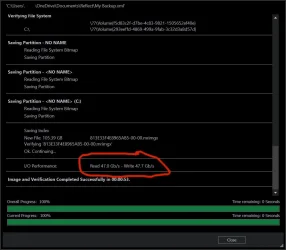
I've never had a 'fast' computer in my life. I'm not believing these backup times!
105GB Full backup took .53 seconds, Read/Write @ 47GB/s second.
How's yours doing?!
Windows 11 Pro 25H2 (26200.9550) Intel® Core™ i9-13900KS 3.20GHz 128GB DDR5-5200 Kingston Fury Beast RGB Zotac Trinity NVIDIA® GeForce® RTX 4090 24GB ... Windows 11 Pro 25H2 (26200.9550) PC/Desktop CLX Intel Battlebox Ultimate (RA) Intel® Core™ i9-13900KS 3.20GHz ASUS ROG Maximus Z790 Hero WIFI - ATX 128GB DDR5-5200 Kingston Fury Beast RGB Zotac Trinity NVIDIA® GeForce® RTX 4090 24GB GDDR6X Realtek USB Audio Dell G3223Q 32" 4K Ultra HD 3840x2160 @144hz 2TB x 2 Samsung 990 Pro 2280 NVMe M.2 SSD's 1200W Corsair HX Ser HX1200 80+ Platinum Lian Li / Der Bauer 011DXL ROG Phanteks Glacier One 360 RGB AIO LC Logitech K330 Wireless Logitech M310 Wireless 1GB Fiber : 945/57 Brave Defender - HitmanPro.Alert Macrium Reflect X
iPad Air Tablet Apple
Well-known member
Power User
VIP
Hi, just wondering- where are you saving your image file? What hardware is involved? Seems to suggest you're saving it on an internal disk- nVME SSD perhaps?
Last edited: Apr 7, 2026
Windows 11 Pro i7-8650U 16GB Intel UHD 620 Windows 11 Pro Laptop Lenovo t480s i7-8650U 16GB Intel UHD 620 1920x1080 C SN810 SDCPNRY-512G-1006 Edge, Firefox Defender
Best I've had is 1 min 50 secs with destination drive fast M2 external reading approx 220 GB , now 340 GB.
Windows 11 Pro 25 H2 / Windows 3.11 Emulator Pentium I9 14900K 64 GB Corsair Dominator DDR5 Sapphire Radeon Pure RX 9060 XT , 16 GB , ARG... Windows 11 Pro 25 H2 / Windows 3.11 Emulator PC/Desktop Self build Dec 2023 Pentium I9 14900K Asus Rog Z790 E Wifi 7 64 GB Corsair Dominator DDR5 Sapphire Radeon Pure RX 9060 XT , 16 GB , ARGB Lighting ,. Realtek Codec ALC 4080 internal + Creative Soundblaster X3 External , when former sometimes a problem 32" Toshiba PC / TV , Corsair Xeneon Edge 14.5" screen Res : 2560 x 720 2560 x 1440 4 x Corsair MP 600 Pro 500GB M2 drives ( Main ), + Samsung M2 USB 500GB +Corsair M2 1TB Ext USB+ Hitachi Sata Drive 1TB , 2 x DVD-RW Corsair 1000 w NZXT Phantom 240 , 5 fans built in system Silentium PC Spartan 5 Max Seenda Luminous 1) Aston Martin DB9 Car , 2) McLaren Yellow P2 car , 3) Seenda Wireless luminous 950 mbps , Norton Private ,Edge , Opera , Firefox , Brave, . Norton 360 , 10 User + Norton Anti Track , Norton Identity ( latter 2 giveaways ) Asus GT BE 98 Wifi 7 Router
Windows 11 25H2 Laptop Microsoft Surface Go 8GB 128 GB and 256 GB Micro SD 950 mbps
Well-known member
Power User
VIP
I've never had a 'fast' computer in my life. I'm not believing these backup times!
105GB Full backup took .53 seconds, Read/Write @ 47GB/s second.
How's yours doing?!
View attachment 168039
Don't get too excited
... that's 47-gigabits/sec not gigaBYTES/sec. That looks like the speed of a PCiE v4-based NvME storage device with a decent CPU behind the processing. But it looks pretty good!
Windows 10, Linux MINT (V-guests 7, 11, ZorinOS) Intel Core i7-10700 32gB (DDR4) Intel UHD Graphics 630 Windows 10, Linux MINT (V-guests 7, 11, ZorinOS) PC/Desktop HP Z2 G5 Workstation Intel Core i7-10700 HP Model# 8751 32gB (DDR4) Intel UHD Graphics 630 Realtek basic audio 32" (Viewsonic) UHD 3840 x 2160 2-NvME (mainboard), 1-NvME (PCIe), 1-SATA3 SSD
Well-known member
Pro User
VIP
that's 47-gigabits/sec not gigaBYTES/sec.
You can change Macrium to show bytes instead of bits in advanced setting > Advanced backup Setting.
Change
Report transfer rates in from bits to bytes.
34 seconds for a 100.6GB drive that makes a 60+- GB image.
Windows 11 25H2 12th Gen i9 -12900K 64GB Intel UHD Graphics Windows 11 25H2 PC/Desktop Dell 12th Gen i9 -12900K 64GB Intel UHD Graphics Dual Dell U2717D 2560x1440 2TB Lexar SSD, 2TB Crucial SSD, 2TB Kingston SSD
Well-known member
Member
VIP
Thread Starter
Hi, just wondering- where are you saving your image file? What hardware is involved? Seems to suggest you're saving it on an internal disk- nVME SSD perhaps?
Yes, saving to internal M2 nvme. Computer listed in system specs.
Yes, I can browse the image just fine, it mounts it right up. I mean just double-clicking the image.
Windows 11 Pro 25H2 (26200.9550) Intel® Core™ i9-13900KS 3.20GHz 128GB DDR5-5200 Kingston Fury Beast RGB Zotac Trinity NVIDIA® GeForce® RTX 4090 24GB ... Windows 11 Pro 25H2 (26200.9550) PC/Desktop CLX Intel Battlebox Ultimate (RA) Intel® Core™ i9-13900KS 3.20GHz ASUS ROG Maximus Z790 Hero WIFI - ATX 128GB DDR5-5200 Kingston Fury Beast RGB Zotac Trinity NVIDIA® GeForce® RTX 4090 24GB GDDR6X Realtek USB Audio Dell G3223Q 32" 4K Ultra HD 3840x2160 @144hz 2TB x 2 Samsung 990 Pro 2280 NVMe M.2 SSD's 1200W Corsair HX Ser HX1200 80+ Platinum Lian Li / Der Bauer 011DXL ROG Phanteks Glacier One 360 RGB AIO LC Logitech K330 Wireless Logitech M310 Wireless 1GB Fiber : 945/57 Brave Defender - HitmanPro.Alert Macrium Reflect X
iPad Air Tablet Apple
Well-known member
Member
VIP
Thread Starter
You can change Macrium to show bytes instead of bits in advanced setting > Advanced backup Setting.Report transfer rates in from bits to bytes.
Thanks, will do!
Windows 11 Pro 25H2 (26200.9550) Intel® Core™ i9-13900KS 3.20GHz 128GB DDR5-5200 Kingston Fury Beast RGB Zotac Trinity NVIDIA® GeForce® RTX 4090 24GB ... Windows 11 Pro 25H2 (26200.9550) PC/Desktop CLX Intel Battlebox Ultimate (RA) Intel® Core™ i9-13900KS 3.20GHz ASUS ROG Maximus Z790 Hero WIFI - ATX 128GB DDR5-5200 Kingston Fury Beast RGB Zotac Trinity NVIDIA® GeForce® RTX 4090 24GB GDDR6X Realtek USB Audio Dell G3223Q 32" 4K Ultra HD 3840x2160 @144hz 2TB x 2 Samsung 990 Pro 2280 NVMe M.2 SSD's 1200W Corsair HX Ser HX1200 80+ Platinum Lian Li / Der Bauer 011DXL ROG Phanteks Glacier One 360 RGB AIO LC Logitech K330 Wireless Logitech M310 Wireless 1GB Fiber : 945/57 Brave Defender - HitmanPro.Alert Macrium Reflect X
iPad Air Tablet Apple
Well-known member
Power User
VIP
Nice plug for Macrium, if only we all had those components in our PC's.
Windows XP (Stable, iconic) 7/8.1/10/ Tiny11 ... Intel i7 4790K 32GB DDR3 1600 MHz ATI Radeon HD 7770 2GB GDDR5 Windows XP (Stable, iconic) 7/8.1/10/ Tiny11 25H2 PC/Desktop Alienware PC Intel i7 4790K ASROCK Z97 EXTREME4 32GB DDR3 1600 MHz ATI Radeon HD 7770 2GB GDDR5 Onboard SAMSUNG UE57 Series 28-Inch 4K UHD SAMSUNG 860 EVO 250 gigabyte SSD EVGA 850 watt Alienware Area 51 Black Tower Case HyperX - Alloy Elite 2 Mechanical Gaming Keyboard. Microsoft Wireless 1.2 GHz Chrome..Edge..Firefox
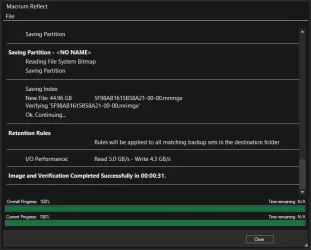
Note units are GB/s not Gb/s
Macrium V10
Time is for a full system + recovery partition + EFI partition (75GB+) followed by a macrium read verification pass
nvme to nvme (PCI-E 4)
Medium compression
256 bit encryption (SHA256)
Total time 31 seconds
Pretty impressive Macrium! You now get the compression and encryption for free since they started using the AES etc CPU instructions
Last edited: Apr 7, 2026
Windows 11 Pro Intel Core i9 14900K 5800/4500 P/E 96GB (2x48) G.skill Ripjaws 6800 Asus ROG Strix 4070 Ti OC Windows 11 Pro PC/Desktop DIY Photoshop/Audio/Game/tinker Intel Core i9 14900K 5800/4500 P/E Asus ROG Maximus Z790 Dark Hero 96GB (2x48) G.skill Ripjaws 6800 Asus ROG Strix 4070 Ti OC B&W 606 S3 speakers; Audiolabs 7000a integrated amp; RSL 10S Mk2 sub Eizo CG2730 ColorEdge, ViewSonic VP2768 2560 x 1440 x 2 nvme: 4TB WDC SN850X, 1TB SN850, 2TB SK-Hynix P41 850W Seasonic Vertex PX-850 FD North XL Mesh, Black Walnut EK Nucleus black 360 AIO w/Phanteks T30 fans; 2 Noctua NF-A14 Chromax ; T30 for memory Keychron Q3 Max TKL w/GMK Redsuns Red Samuri keycaps Logitech G305 wireless gaming 575 Mb/s down | 25 Mb/s up Firefox Defender, Macrium Reflect X Phangkey Amaterasu V2 Desk Mat
Laptop Apple M1 2560x1600 Firefox




 ... that's 47-gigabits/sec not gigaBYTES/sec. That looks like the speed of a PCiE v4-based NvME storage device with a decent CPU behind the processing. But it looks pretty good!


 Apple 13" Macbook Pro 2020 (m1)





