- Local time
- 1:40 AM
- Posts
- 420
- OS
- Win 7,8.1,10,11, Mint, Kde Plasma, Debian
I have tested my new setup on my HP EliteBook and Dell Inspiron for two weeks now and everything is working out just fine. Both laptops are portable and either could fit nicely in my backpack.
The Windows 10 Pro that I have tested is the 2019 version 21H2 and the OS Build is 19044.1288.
First off, I installed the OS using MCT offline. Next up, I used the available tools to uninstall and disable the programs that I didn't want running. These included Edge, Edge Update, Edge WebView, Bing, Copilot and OneDrive.
Please note that one cannot uninstall Edge or OneDrive without consequences if one has bought one's laptop outside the EU. For starters, your VMware Workstation Pro will not function as uninstalling either will also uninstall several vcRuntimeMinimum_amd64 files needed to run VMware.
Only after configuring Windows and tweaking the registry did I go online to register Windows. Then I immediately went offline to uninstall the programs I did not need.
Since Microsoft has made it impossible to uninstall certain programs, the next best option is disabling them, especially Edge. I am a die-hard Firefox fan.
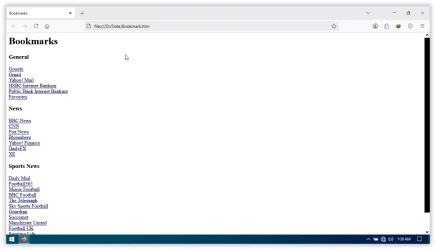
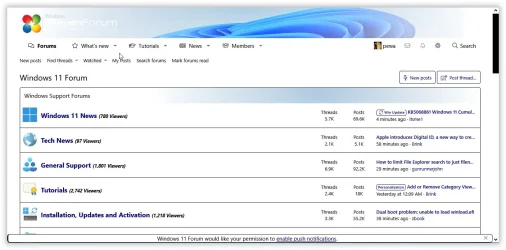
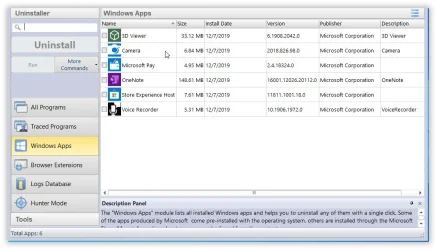
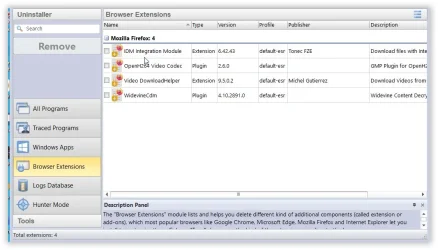
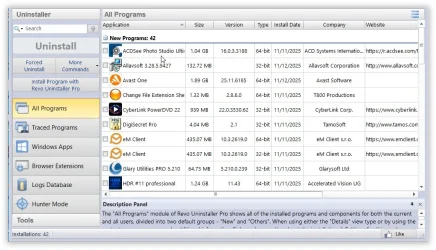
Among the tools I used is Revo Uninstaller. These are the programs that I didn't uninstall. The rest were banned from my pc. You will need the 3D Viewer as some Linux distros running on your virtual machine use the host's 3D Viewer.
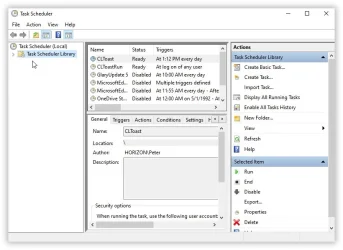
Check out my Task Scheduler after two weeks of heavy internet surfing. Not once did Windows update, and Edge, Bing, Copilot and OneDrive have literally disappeared into thin air.
I also spent hours tweaking my registry and adding lots of new entries, thus preventing Windows from ever running Edge, Bing, Copilot and OneDrive. All in, I removed close to 4 GB of flotsam from Windows 10 Pro. It could have been 5 GB had I not installed the new HDR Project 11. But this photo enhancer is just too good to pass up.
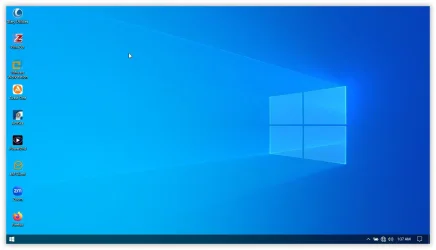
I am pretty pleased with my new setup as my Windows 10 Pro is stable, responsive, sleeker and a lot faster that the previous versions I have used. Not exaggerating, it reminds me more of LitePC (a tool that stripped away several features of Windows 98, thus making it lightning fast). If you were to click on a file or folder and snap your finger at the same time, it would open way quicker than the latter.
As this is a 2019 version, I am unable to make the taskbar completely transparent by adding the 'TaskbarAcrylicOpacity' entry in the registry. It did not work. Instead I made it a bit more transparent by adding the 'UseOLEDTaskbarTransparency' entry to the registry.
There is just one drawback when you have so heavily tinkered with the OS. If you use Internet Download Manager, there will be two files missing from the program directory. They are IDMIECC.dll and IDMIECC64.dll. That's a small price to pay to get a sleeker and faster Windows. Just copy these two files somewhere like your D:\ Drive or external disk, then copy them to the program directory when needed. All in, there are 76 files in the IDM directory.
- C:\Program Files (x86)\Internet Download Manager -
Anyway, this setup is for my own consumption only. Others can do their own thing. You know stick with Windows 10, update to Windows 11 or whatever.
Thank you for following this thread. It should now end.
Have a splendid weekend everybody!
The Windows 10 Pro that I have tested is the 2019 version 21H2 and the OS Build is 19044.1288.
First off, I installed the OS using MCT offline. Next up, I used the available tools to uninstall and disable the programs that I didn't want running. These included Edge, Edge Update, Edge WebView, Bing, Copilot and OneDrive.
Please note that one cannot uninstall Edge or OneDrive without consequences if one has bought one's laptop outside the EU. For starters, your VMware Workstation Pro will not function as uninstalling either will also uninstall several vcRuntimeMinimum_amd64 files needed to run VMware.
Only after configuring Windows and tweaking the registry did I go online to register Windows. Then I immediately went offline to uninstall the programs I did not need.
Since Microsoft has made it impossible to uninstall certain programs, the next best option is disabling them, especially Edge. I am a die-hard Firefox fan.
Among the tools I used is Revo Uninstaller. These are the programs that I didn't uninstall. The rest were banned from my pc. You will need the 3D Viewer as some Linux distros running on your virtual machine use the host's 3D Viewer.
Check out my Task Scheduler after two weeks of heavy internet surfing. Not once did Windows update, and Edge, Bing, Copilot and OneDrive have literally disappeared into thin air.
I also spent hours tweaking my registry and adding lots of new entries, thus preventing Windows from ever running Edge, Bing, Copilot and OneDrive. All in, I removed close to 4 GB of flotsam from Windows 10 Pro. It could have been 5 GB had I not installed the new HDR Project 11. But this photo enhancer is just too good to pass up.
I am pretty pleased with my new setup as my Windows 10 Pro is stable, responsive, sleeker and a lot faster that the previous versions I have used. Not exaggerating, it reminds me more of LitePC (a tool that stripped away several features of Windows 98, thus making it lightning fast). If you were to click on a file or folder and snap your finger at the same time, it would open way quicker than the latter.
As this is a 2019 version, I am unable to make the taskbar completely transparent by adding the 'TaskbarAcrylicOpacity' entry in the registry. It did not work. Instead I made it a bit more transparent by adding the 'UseOLEDTaskbarTransparency' entry to the registry.
There is just one drawback when you have so heavily tinkered with the OS. If you use Internet Download Manager, there will be two files missing from the program directory. They are IDMIECC.dll and IDMIECC64.dll. That's a small price to pay to get a sleeker and faster Windows. Just copy these two files somewhere like your D:\ Drive or external disk, then copy them to the program directory when needed. All in, there are 76 files in the IDM directory.
- C:\Program Files (x86)\Internet Download Manager -
Anyway, this setup is for my own consumption only. Others can do their own thing. You know stick with Windows 10, update to Windows 11 or whatever.
Thank you for following this thread. It should now end.
Have a splendid weekend everybody!
Last edited:
My Computer
At a glance
Win 7,8.1,10,11, Mint, Kde Plasma, DebianIntel(R) Core(TM) i7-6500U CPU @ 2.50GHz16 GBIntel(R) HD Graphics 520/Nvidia GeForce 930M
- OS
- Win 7,8.1,10,11, Mint, Kde Plasma, Debian
- Computer type
- Laptop
- Manufacturer/Model
- Dell
- CPU
- Intel(R) Core(TM) i7-6500U CPU @ 2.50GHz
- Memory
- 16 GB
- Graphics Card(s)
- Intel(R) HD Graphics 520/Nvidia GeForce 930M
- Sound Card
- Intel(R) Display Audio/RealtekAudio
- Monitor(s) Displays
- Generic Pnp Monitor
- Screen Resolution
- 1366 X 768
- Hard Drives
- ST2000LM024-1EJ164
- Keyboard
- Eng (US)
- Mouse
- Sanwa Supply
- Browser
- Firefox
- Antivirus
- Avast One
- Other Info
- Too many laptops with different system specifications.