JavaScript is disabled. For a better experience, please enable JavaScript in your browser before proceeding.
You are using an out of date browser. It may not display this or other websites correctly.
You should upgrade or use an
alternative browser .
Need assistance with my monitors- 2 Samsung J32J59X can't access all settings
According to
31.5" Samsung U32J590 - Specifications the screens are 10 bit depth and can go up to 135kHz
I have two of these monitors attached to my GeForce RTZ 3060Ti
I have one HDMI cable going from the card to a Greathek 4 port Dual Display KVM. I then have a DP cable going to an HDMI converter to the KVM
Windows shows Display 1 as being 8-bit Depth with RGB in SDR at 3840 X 2160 @ 690 Hz
Windows shows Display 2 as being 8-bit Depth with RGB in SDR at 3840 X 2160 @ 690 Hz
The Amazon entry for my KVM is at
https://www.amazon.com/gp/product/B088WGKFZH/ref=ppx_yo_dt_b_search_asin_title?ie=UTF8&psc=1
How can I get better video output to the screen?
Windows Build/Version
22H2 Build 22621.3155
Multiple i7 11700K 48GB GeForce RTX 3060 Ti 8 GB Multiple PC/Desktop Home Built i7 11700K MSI Z590 PRO WIFI (MS-7d09) 48GB GeForce RTX 3060 Ti 8 GB Built in sound Samsiung U32J59x (2) 3480 X 2160 60 Hz 2TB M.2 Not sure Not sure Not sure Logitech Logitech 1gb Fiber (Optimum) Chrome Windows Defenter
Well-known member
Pro User
VIP
Your DisplaySpecifications link gives a maximum refresh rate of 75Hz. Samsung says 60Hz. I can't explain the discrepancy.
Windows 11 26300.9278 Amd Threadripper 7970X 128GB (4 X 32) G.Skill DDR5 6400 (RDIMM) Gigabyte RTX 4090 OC Windows 11 26300.9278 PC/Desktop homebuilt Amd Threadripper 7970X Gigabyte TRX50 Aero D Rev. 1.0 128GB (4 X 32) G.Skill DDR5 6400 (RDIMM) Gigabyte RTX 4090 OC none (USB to speakers), Realtek Innocn 32" OLED 3840 X 2160 @ 60Hz Crucial T700 2TB M.2 NVME SSD BeQuiet! Straight Power 12 1500W Lian Li 011 Dynamic Evo XL SilverStone Technology XE360-TR5, with 3 Phanteks T30 fans Cherry KC 500 MX LP (mechanical) Logitech M500s (wired) 2000/250 Mbps (down/up) xFinity gateway
windows 11 26300.9278 Intel I9-13900K 64GB G.Skill DDR5-6000 Gigabyte RTX 3090 ti windows 11 26300.9278 PC/Desktop homebuilt Intel I9-13900K Asus RoG Strix Z690-E 64GB G.Skill DDR5-6000 Gigabyte RTX 3090 ti built in Realtek Philips 27E1N8900 27" OLED 3840 X 2160 @60Hz WDC SN850 1TB eVGA SuperNOVA 1300 GT Lian Li 011 Dynamic Evo Corsair iCUE H150i ELITE CAPELLIX Liquid CPU Cooler Cherry Streaming (wired) Logitech M500s (wired)
I would ditch the KVM and connect the monitors directly to the graphics card. Seems an unnecessary piece of equipment to me.
Windows 11 build 26200.8973 / WSL 2 running U... Intel i7-1355U 16GB Intel Iris XE Windows 11 build 26200.8973 / WSL 2 running Ubuntu Laptop Dell Inspiron 14 5430 Intel i7-1355U Dell 0GMW80 16GB Intel Iris XE Realtek Dell 14", LG 32" Curved Wide screen monitor and LG Ultrawide 26" 1920 x 1200 @ 60Hz, 1920 x 1080 @ 100Hz and 2560 x 1080 @ 60Hz Samsung 990 Pro 1TB NVME Gen 4 M.2 SSD Dell Dell Dell Dell KM3322W Dell Trackpad or Dell KM3322W 900mb down / 400mb up FTTP Edge 151.0.4129.59 Windows Defender Windows 365
Windows 11 Core i5 - 1035G4 8GB Intel Iris Plus Windows 11 Tablet Microsoft Surface Pro 7 Core i5 - 1035G4 Microsoft 8GB Intel Iris Plus Surface touch 2736 x 1824 128GB Microsoft Microsoft Keyboard None Microsoft Surface Keyboard Microsoft Arc Intellimouse 900mb / 400mb FTTP Edge Windows Defender
I would ditch the KVM and connect the monitors directly to the graphics card. Seems an unnecessary piece of equipment to me.
I need the KVM because I have multiple systems. I work from home twice a week and need to connect my work system to the monitors, keyboard, and mouse. I also do work on friends systems that I plug into the KVM.
Multiple i7 11700K 48GB GeForce RTX 3060 Ti 8 GB Multiple PC/Desktop Home Built i7 11700K MSI Z590 PRO WIFI (MS-7d09) 48GB GeForce RTX 3060 Ti 8 GB Built in sound Samsiung U32J59x (2) 3480 X 2160 60 Hz 2TB M.2 Not sure Not sure Not sure Logitech Logitech 1gb Fiber (Optimum) Chrome Windows Defenter
Well-known member
Pro User
VIP
I need the KVM because I have multiple systems. I work from home twice a week and need to connect my work system to the monitors, keyboard, and mouse. I also do work on friends systems that I plug into the KVM.
You'll have to invest in a KVM that supports HDMI 2.0 or better. DP 1.2 or better as well.
Windows 11 26300.9278 Amd Threadripper 7970X 128GB (4 X 32) G.Skill DDR5 6400 (RDIMM) Gigabyte RTX 4090 OC Windows 11 26300.9278 PC/Desktop homebuilt Amd Threadripper 7970X Gigabyte TRX50 Aero D Rev. 1.0 128GB (4 X 32) G.Skill DDR5 6400 (RDIMM) Gigabyte RTX 4090 OC none (USB to speakers), Realtek Innocn 32" OLED 3840 X 2160 @ 60Hz Crucial T700 2TB M.2 NVME SSD BeQuiet! Straight Power 12 1500W Lian Li 011 Dynamic Evo XL SilverStone Technology XE360-TR5, with 3 Phanteks T30 fans Cherry KC 500 MX LP (mechanical) Logitech M500s (wired) 2000/250 Mbps (down/up) xFinity gateway
windows 11 26300.9278 Intel I9-13900K 64GB G.Skill DDR5-6000 Gigabyte RTX 3090 ti windows 11 26300.9278 PC/Desktop homebuilt Intel I9-13900K Asus RoG Strix Z690-E 64GB G.Skill DDR5-6000 Gigabyte RTX 3090 ti built in Realtek Philips 27E1N8900 27" OLED 3840 X 2160 @60Hz WDC SN850 1TB eVGA SuperNOVA 1300 GT Lian Li 011 Dynamic Evo Corsair iCUE H150i ELITE CAPELLIX Liquid CPU Cooler Cherry Streaming (wired) Logitech M500s (wired)
Thank you
@bobkn Can you recommend one that has support for dual monitors and is 4 ports
Multiple i7 11700K 48GB GeForce RTX 3060 Ti 8 GB Multiple PC/Desktop Home Built i7 11700K MSI Z590 PRO WIFI (MS-7d09) 48GB GeForce RTX 3060 Ti 8 GB Built in sound Samsiung U32J59x (2) 3480 X 2160 60 Hz 2TB M.2 Not sure Not sure Not sure Logitech Logitech 1gb Fiber (Optimum) Chrome Windows Defenter
Well-known member
Member
VIP
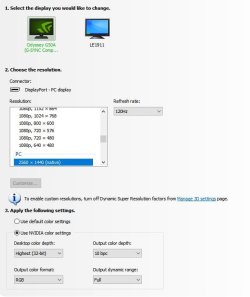
Lower your refresh rate in the nvidia control panal, apply it, then go back and switch it from 8 bit to 10 bit and apply it.
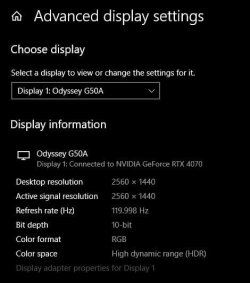
I just moved to HDR and discovered there's a physical data transfer rate limit to the DP 1.2 cable. If I raise the refresh rate above 120 @ 2560 x 1440 it automatically drops to 8 bit with dithering on both my RTX 3060Ti and RTX 4070, both using the same monitor.
I'm using 2k native, seems your using 4k native? I don't think you can use the same refresh rate. You may need to lower it to 60 for 4k. I do know you need it low enough to be able to use 10 bit color gamut.
Tinker with it and let us know what settings you end up with.
Windroid 11 Pro / Win 10 Pro Intel Core i9-14900K Raptor Lake Refreshed 6.... 32GB (2x16) GSKILL Trident Z5 RGB Series (Int... MSI Gaming GeForce RTX 4070 12GB Windroid 11 Pro / Win 10 Pro PC/Desktop MSI Intel Core i9-14900K Raptor Lake Refreshed 6.0 GHZ MSI MAG Z790 Tomahawk WiFi 32GB (2x16) GSKILL Trident Z5 RGB Series (Intel XMP 3.0) DDR5 RAM 6700MT/s MSI Gaming GeForce RTX 4070 12GB Onboard Realtek® ALC4080 Codec Monitor #1 Samsung Odyssey G50A WQHD G-Sync HDR10 Monitor #2 HP LA1911 2560x1440 and 1280x1024 Samsung 980 PRO SSD 1TB PCIe 4.0 NVMe Gen 4 Gaming M.2 (145GB Win11/100GB Win10/685GB More Games) Rosewill Hive-750S Cooler Master Elite 430 Mid Tower Cooler Master ML240L V2 Liquid CPU cooler + 3x120mm in + Isolated PSU Standard upward flow Microsoft Natural Elite White PS/2 (with usb adapter) Microsoft D67-00001 Trackball Optical Mouse (rebuilt with ceramic bearings) 450Mb/s hard wired FF, Mullvad, Tor Win Def Razer Tartarus V2 Gaming Keypad
Windows 11 Pro Intel Core i9-14900K Raptor Lake Refreshed 6.... 32GB (2x16) GSKILL Trident Z5 RGB Series (Int... MSI Gaming GeForce RTX 3060Ti 8GB Windows 11 Pro PC/Desktop MSI Intel Core i9-14900K Raptor Lake Refreshed 6.0 GHz FCLGA1700 (Gen 14) MSI MAG Z790 Tomahawk WiFi 32GB (2x16) GSKILL Trident Z5 RGB Series (Intel XMP 3.0) DDR5 RAM 6700MT/s MSI Gaming GeForce RTX 3060Ti 8GB Onboard Realtek® ALC4080 Codec Monitor #1 Samsung Odyssey G50A WQHD G-Sync HDR10 Monitor #2 Samsung TU7000 55" TV 2560x1440 and 3840x2160 Samsung 980 PRO SSD 1TB PCIe 4.0 NVMe Gen 4 Gaming M.2 (System) Rosewill Hive-750S Cooler Master N400 NSE-400-KKN2 Mid-Tower Cooler Master ML240L V2 Liquid CPU cooler + 3x120mm in + 2x120mm + Isolated PSU Reverse flow front exhaust Logitech MK345 Wireless MSI G20 Elite and Logitech MK345 Wireless 450Mb/s hard wired FF Win Def Razer Tartarus Gaming Keypad
Thank you. In control panel Screen 1 and Screen two both show 4K by 2K 280 X 2160 (native) and 60Hz
Multiple i7 11700K 48GB GeForce RTX 3060 Ti 8 GB Multiple PC/Desktop Home Built i7 11700K MSI Z590 PRO WIFI (MS-7d09) 48GB GeForce RTX 3060 Ti 8 GB Built in sound Samsiung U32J59x (2) 3480 X 2160 60 Hz 2TB M.2 Not sure Not sure Not sure Logitech Logitech 1gb Fiber (Optimum) Chrome Windows Defenter
Well-known member
Member
VIP
Thank you. In control panel Screen 1 and Screen two both show 4K by 2K 280 X 2160 (native) and 60Hz
Were you able to switch it to 10 bit color?
Once you do you can confirm it by going into the advanced graphics setting in the windows display settings. I'm still on 10 for a few more weeks so I don't know exactly what that looks like on 11.
I'm also using G-Sync so I use the Nvidia control panel to limit my FPS to just below my refresh rate then disable V-Sync in all my games.
Windroid 11 Pro / Win 10 Pro Intel Core i9-14900K Raptor Lake Refreshed 6.... 32GB (2x16) GSKILL Trident Z5 RGB Series (Int... MSI Gaming GeForce RTX 4070 12GB Windroid 11 Pro / Win 10 Pro PC/Desktop MSI Intel Core i9-14900K Raptor Lake Refreshed 6.0 GHZ MSI MAG Z790 Tomahawk WiFi 32GB (2x16) GSKILL Trident Z5 RGB Series (Intel XMP 3.0) DDR5 RAM 6700MT/s MSI Gaming GeForce RTX 4070 12GB Onboard Realtek® ALC4080 Codec Monitor #1 Samsung Odyssey G50A WQHD G-Sync HDR10 Monitor #2 HP LA1911 2560x1440 and 1280x1024 Samsung 980 PRO SSD 1TB PCIe 4.0 NVMe Gen 4 Gaming M.2 (145GB Win11/100GB Win10/685GB More Games) Rosewill Hive-750S Cooler Master Elite 430 Mid Tower Cooler Master ML240L V2 Liquid CPU cooler + 3x120mm in + Isolated PSU Standard upward flow Microsoft Natural Elite White PS/2 (with usb adapter) Microsoft D67-00001 Trackball Optical Mouse (rebuilt with ceramic bearings) 450Mb/s hard wired FF, Mullvad, Tor Win Def Razer Tartarus V2 Gaming Keypad
Windows 11 Pro Intel Core i9-14900K Raptor Lake Refreshed 6.... 32GB (2x16) GSKILL Trident Z5 RGB Series (Int... MSI Gaming GeForce RTX 3060Ti 8GB Windows 11 Pro PC/Desktop MSI Intel Core i9-14900K Raptor Lake Refreshed 6.0 GHz FCLGA1700 (Gen 14) MSI MAG Z790 Tomahawk WiFi 32GB (2x16) GSKILL Trident Z5 RGB Series (Intel XMP 3.0) DDR5 RAM 6700MT/s MSI Gaming GeForce RTX 3060Ti 8GB Onboard Realtek® ALC4080 Codec Monitor #1 Samsung Odyssey G50A WQHD G-Sync HDR10 Monitor #2 Samsung TU7000 55" TV 2560x1440 and 3840x2160 Samsung 980 PRO SSD 1TB PCIe 4.0 NVMe Gen 4 Gaming M.2 (System) Rosewill Hive-750S Cooler Master N400 NSE-400-KKN2 Mid-Tower Cooler Master ML240L V2 Liquid CPU cooler + 3x120mm in + 2x120mm + Isolated PSU Reverse flow front exhaust Logitech MK345 Wireless MSI G20 Elite and Logitech MK345 Wireless 450Mb/s hard wired FF Win Def Razer Tartarus Gaming Keypad
Well-known member
Pro User
VIP
Thank you
@bobkn Can you recommend one that has support for dual monitors and is 4 ports
Sorry, but I don't use a KVM switch.
Windows 11 26300.9278 Amd Threadripper 7970X 128GB (4 X 32) G.Skill DDR5 6400 (RDIMM) Gigabyte RTX 4090 OC Windows 11 26300.9278 PC/Desktop homebuilt Amd Threadripper 7970X Gigabyte TRX50 Aero D Rev. 1.0 128GB (4 X 32) G.Skill DDR5 6400 (RDIMM) Gigabyte RTX 4090 OC none (USB to speakers), Realtek Innocn 32" OLED 3840 X 2160 @ 60Hz Crucial T700 2TB M.2 NVME SSD BeQuiet! Straight Power 12 1500W Lian Li 011 Dynamic Evo XL SilverStone Technology XE360-TR5, with 3 Phanteks T30 fans Cherry KC 500 MX LP (mechanical) Logitech M500s (wired) 2000/250 Mbps (down/up) xFinity gateway
windows 11 26300.9278 Intel I9-13900K 64GB G.Skill DDR5-6000 Gigabyte RTX 3090 ti windows 11 26300.9278 PC/Desktop homebuilt Intel I9-13900K Asus RoG Strix Z690-E 64GB G.Skill DDR5-6000 Gigabyte RTX 3090 ti built in Realtek Philips 27E1N8900 27" OLED 3840 X 2160 @60Hz WDC SN850 1TB eVGA SuperNOVA 1300 GT Lian Li 011 Dynamic Evo Corsair iCUE H150i ELITE CAPELLIX Liquid CPU Cooler Cherry Streaming (wired) Logitech M500s (wired)