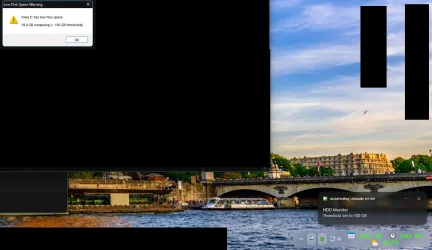
Need HD getting full alert


Thanks Got - very informative!
 

My Computers My Computers

  • At a glance

    WIN 11 PROIntel(R) Core(TM) i5-14400 2.50 Ghz,32 Gigs
    OS
    WIN 11 PRO
    Computer type
    PC/Desktop
    Manufacturer/Model
    Custom built - WIN 11 PRO 64-bit ,
    CPU
    Intel(R) Core(TM) i5-14400 2.50 Ghz,
    Motherboard
    ACER Z790 motherboard
    Memory
    32 Gigs
    Hard Drives
    256 gig M2 SSD boot HD, 3 internal HD's, 2 USB
  • At a glance

    Win 10 PROHaswell CPU 4790k @ 4.4GHz,16 Gigs
    Operating System
    Win 10 PRO
    Computer type
    PC/Desktop
    Manufacturer/Model
    CUSTOM
    CPU
    Haswell CPU 4790k @ 4.4GHz,
    Motherboard
    AsRock Z97 motherboard,
    Memory
    16 Gigs
    Hard Drives
    OS drive 250GB SSD,
Sorry. Saw that post but was out of town and on mobile so couldn’t do anything then. I’ll work on it this weekend and post back to the original thread when I have an updated script.
 

My Computer My Computer

At a glance

Windows 11 Pro
OS
Windows 11 Pro
Thanks dacrone, no hurry. Actually if there was only 1 threshold at 100 gigs, that would do it for me.
 

My Computers My Computers

  • At a glance

    WIN 11 PROIntel(R) Core(TM) i5-14400 2.50 Ghz,32 Gigs
    OS
    WIN 11 PRO
    Computer type
    PC/Desktop
    Manufacturer/Model
    Custom built - WIN 11 PRO 64-bit ,
    CPU
    Intel(R) Core(TM) i5-14400 2.50 Ghz,
    Motherboard
    ACER Z790 motherboard
    Memory
    32 Gigs
    Hard Drives
    256 gig M2 SSD boot HD, 3 internal HD's, 2 USB
  • At a glance

    Win 10 PROHaswell CPU 4790k @ 4.4GHz,16 Gigs
    Operating System
    Win 10 PRO
    Computer type
    PC/Desktop
    Manufacturer/Model
    CUSTOM
    CPU
    Haswell CPU 4790k @ 4.4GHz,
    Motherboard
    AsRock Z97 motherboard,
    Memory
    16 Gigs
    Hard Drives
    OS drive 250GB SSD,
dacrone, one of my HD's that is monitored is about 54 gigs. I have all my HD's set for a 100 gig threshold. The alert is not coming on. How can I fix this?
1785269172968.webp

100 GB threshold is now functioning correctly. also - when adding drives, you need to add : (ie - E: ). thought it was more proper.
 

Attachments

My Computer My Computer

At a glance

Windows 11 Pro
OS
Windows 11 Pro
Works perfectly. 2 HDs are low. I assume the low notice will stay visible until I close it and assume it comes on when windows starts. Right?

thanks so much
 

My Computers My Computers

  • At a glance

    WIN 11 PROIntel(R) Core(TM) i5-14400 2.50 Ghz,32 Gigs
    OS
    WIN 11 PRO
    Computer type
    PC/Desktop
    Manufacturer/Model
    Custom built - WIN 11 PRO 64-bit ,
    CPU
    Intel(R) Core(TM) i5-14400 2.50 Ghz,
    Motherboard
    ACER Z790 motherboard
    Memory
    32 Gigs
    Hard Drives
    256 gig M2 SSD boot HD, 3 internal HD's, 2 USB
  • At a glance

    Win 10 PROHaswell CPU 4790k @ 4.4GHz,16 Gigs
    Operating System
    Win 10 PRO
    Computer type
    PC/Desktop
    Manufacturer/Model
    CUSTOM
    CPU
    Haswell CPU 4790k @ 4.4GHz,
    Motherboard
    AsRock Z97 motherboard,
    Memory
    16 Gigs
    Hard Drives
    OS drive 250GB SSD,
Works perfectly. 2 HDs are low. I assume the low notice will stay visible until I close it and assume it comes on when windows starts. Right?

thanks so much
Yep
 

My Computer My Computer

At a glance

Windows 11 Pro
OS
Windows 11 Pro
Back
Top Bottom