
Need help with getting a cable


357mag

Member
Local time
3:06 PM
Posts
62
OS
Windows 11 Pro Version 24H2 Build 26100.3775
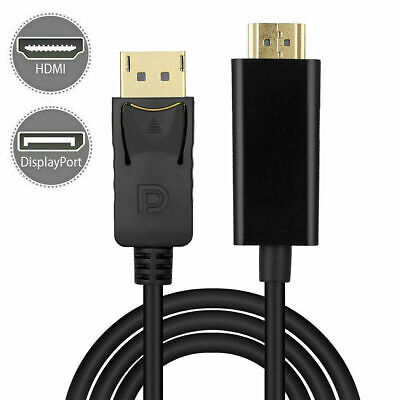
I am going to need an HDMI to Display Port cable to hook up my Desktop Computer to my monitor. I kinda understand part of the cable's description, then I kinda don't. It says Display Port to HDMI Cable Adapter Converter Audio Video PC HDTV 1080p.

I understand the Display Port to HDMI Cable part.

I don't understand the Adapter Converter Audio Video part.

Is this the correct cable for me?
 

My Computer

System One

  • OS
    Windows 11 Pro Version 24H2 Build 26100.3775
    Computer type
    Laptop
    Manufacturer/Model
    ASUS Vivobook F1605V
It's an adapter converter because when you go from DisplayPort to DVI/HDMI, there's additional processing involved to convert the signals, unless the DisplayPort is dual-mode (DP++).

Note that the cable you linked goes from DP to HDMI, not the other way, so if your monitor is not HDMI, it's the wrong cable.
 

My Computer

System One

  • OS
    Windows 11 Pro 25H2
    Computer type
    PC/Desktop
    Manufacturer/Model
    Intel NUC12WSHi7
    CPU
    12th Gen Core i7-1260P
    Motherboard
    NUC12WSBi7
    Memory
    64 GB Micron PC4-25600
    Graphics Card(s)
    Intel Iris Xe Graphics
    Sound Card
    on-board Realtek HD Audio
    Monitor(s) Displays
    Dell U3219Q
    Screen Resolution
    3840 x 2160
    Hard Drives
    Samsung SSD 990 PRO 1TB
    Crucial MX500 2 TB
    Antivirus
    Microsoft Defender
I forgot to ask also if I could just hook up a regular HDMI to HDMI cable from my monitor to my computer and get my picture that way.
 

My Computer

System One

  • OS
    Windows 11 Pro Version 24H2 Build 26100.3775
    Computer type
    Laptop
    Manufacturer/Model
    ASUS Vivobook F1605V
My monitor is HDMI.
 

My Computer

System One

  • OS
    Windows 11 Pro Version 24H2 Build 26100.3775
    Computer type
    Laptop
    Manufacturer/Model
    ASUS Vivobook F1605V
I forgot to ask also if I could just hook up a regular HDMI to HDMI cable from my monitor to my computer and get my picture that way.
Well we don't know which ports you have on either end. Is there an HDMI out on your PC? Then yes, you can hook to the HDMI in port on the monitor.
 

My Computer

System One

  • OS
    Windows 11 Pro 25H2
    Computer type
    PC/Desktop
    Manufacturer/Model
    Intel NUC12WSHi7
    CPU
    12th Gen Core i7-1260P
    Motherboard
    NUC12WSBi7
    Memory
    64 GB Micron PC4-25600
    Graphics Card(s)
    Intel Iris Xe Graphics
    Sound Card
    on-board Realtek HD Audio
    Monitor(s) Displays
    Dell U3219Q
    Screen Resolution
    3840 x 2160
    Hard Drives
    Samsung SSD 990 PRO 1TB
    Crucial MX500 2 TB
    Antivirus
    Microsoft Defender
Yes the computer I will be getting will have an HDMI port next to the Display Port.
 

My Computer

System One

  • OS
    Windows 11 Pro Version 24H2 Build 26100.3775
    Computer type
    Laptop
    Manufacturer/Model
    ASUS Vivobook F1605V
So yes, you can go HDMI to HDMI, from the PC to the monitor.
 

My Computer

System One

  • OS
    Windows 11 Pro 25H2
    Computer type
    PC/Desktop
    Manufacturer/Model
    Intel NUC12WSHi7
    CPU
    12th Gen Core i7-1260P
    Motherboard
    NUC12WSBi7
    Memory
    64 GB Micron PC4-25600
    Graphics Card(s)
    Intel Iris Xe Graphics
    Sound Card
    on-board Realtek HD Audio
    Monitor(s) Displays
    Dell U3219Q
    Screen Resolution
    3840 x 2160
    Hard Drives
    Samsung SSD 990 PRO 1TB
    Crucial MX500 2 TB
    Antivirus
    Microsoft Defender
Okay, Thank You.
 

My Computer

System One

  • OS
    Windows 11 Pro Version 24H2 Build 26100.3775
    Computer type
    Laptop
    Manufacturer/Model
    ASUS Vivobook F1605V
Back
Top Bottom




