Need help with Microsoft Excel problem


I have several versions of Office. Here is what I did with Office 2010.

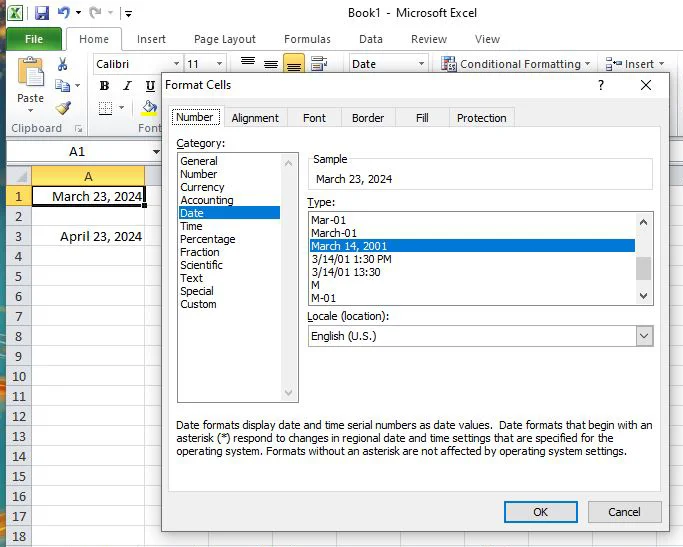
Right-click on cell A1 and select Format Cells.
Select Date
Select desired format. In my case it was "March 14, 2001"
The cell should now be formatted correctly.

Select cell A3 and hit F4-key. That will format it the same as cell A1.
date1.webp

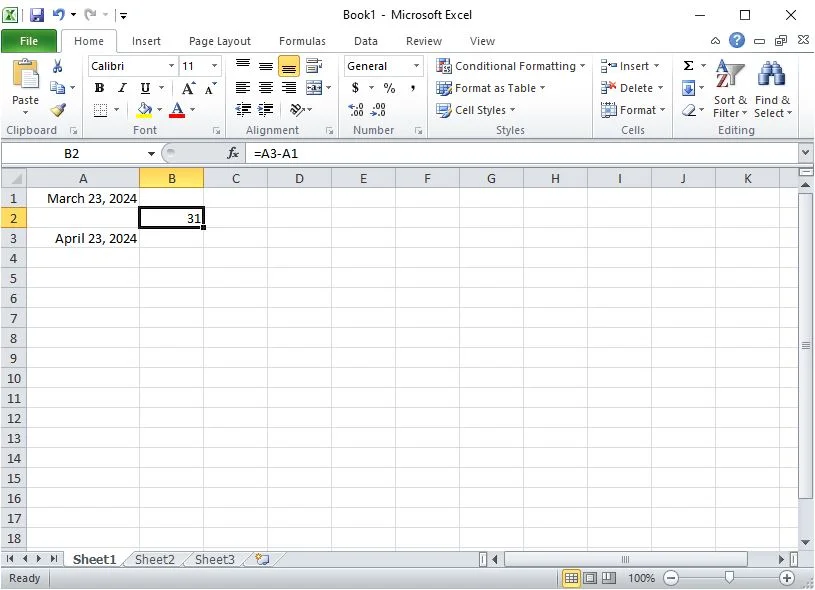
The formula in cell B2 should now work
date2.webp
 

My Computers My Computers

  • At a glance

    Windows 11 Pro 25H2 (26200.6901)AMD Ryzen 7 6800H with Radeon 680M GPU (486MB...Crucial DDR5-4800 (2400MHz) 32GB (2 x 16GB)NVIDIA RTX 3060 Laptop (6GB RAM)
    OS
    Windows 11 Pro 25H2 (26200.6901)
    Computer type
    Laptop
    Manufacturer/Model
    ASUS TUF Gaming A15 (2022)
    CPU
    AMD Ryzen 7 6800H with Radeon 680M GPU (486MB RAM)
    Memory
    Crucial DDR5-4800 (2400MHz) 32GB (2 x 16GB)
    Graphics Card(s)
    NVIDIA RTX 3060 Laptop (6GB RAM)
    Sound Card
    n/a
    Monitor(s) Displays
    15.6-inch
    Screen Resolution
    1920x1080 300Hz
    Hard Drives
    2 x Samsung 990 Evo Plus (2TB M.2 NVME SSD)
    PSU
    n/a
    Mouse
    Wireless Mouse M510
    Internet Speed
    2100Mbps/300Mbps
    Browser
    Firefox
    Antivirus
    Malwarebytes
  • At a glance

    Windows 11 Pro 25H2 (26200.8246)AMD Ryzen 7 5700X3DG.SKILL Flare X 32GB (2x16GB) DDR4ASUS ROG-STRIX-RTX3060TI-08G-V2-GAMING (RTX 3...
    Operating System
    Windows 11 Pro 25H2 (26200.8246)
    Computer type
    PC/Desktop
    Manufacturer/Model
    Custom build
    CPU
    AMD Ryzen 7 5700X3D
    Motherboard
    ASUS ROG Strix B550-F Gaming WiFi II
    Memory
    G.SKILL Flare X 32GB (2x16GB) DDR4
    Graphics card(s)
    ASUS ROG-STRIX-RTX3060TI-08G-V2-GAMING (RTX 3060-Ti, 8GB RAM)
    Monitor(s) Displays
    Samsung G50D IPS 27"
    Screen Resolution
    1440p/180Hz
    Hard Drives
    SAMSUNG 990 EVO Plus (2TB] M.2 NVME SSD
    SAMSUNG 990 EVO Plus (4TB) M.2 NVME SSD
    PSU
    Corsair RM750x (750 watts)
    Case
    Cooler Master MasterCase 5
    Cooling
    Scythe Mugen 6
    Keyboard
    Logitech K520 (MK540 keyboard/mouse combo)
    Mouse
    Logitech M310 (MK540 keyboard/mouse combo)
    Internet Speed
    2100 Mbps down / 300 Mbps up
    Browser
    Firefox, Edge, Chrome
    Antivirus
    Malwarebytes (Premium)
    Other Info
    ASUS Blu-ray Burner BW-16D1HT (SATA) || Western Digital Easystore 20TB USB 3.0 external hard drive used with Acronis True Image 2025 backup software || HP OfficeJet Pro 6975 Printer/Scanner
  • Like
Reactions: LSF
got the test file, Denis. Thank you. Initial result is that the file opened in Excel without a problem, and reads just as you said. I appreciate the time and effort you've extended while trying to help.

Dinner calls (in a loud voice that sounds exactly like my wife), but I will try to get my files to react similarly to yours, later tonight.

Cipri, thanks for the heads up about SoftMaker FreeOffice 2024. Do you know what other Microsoft programs are supported by this suite (i.e., Word, Power Point, etc.)? Are there any compatibility issues with Microsoft Office 2003 (which is what I'm currently using) that you are aware of? I'm certainly going to try it out once I'm convinced that it won't screw up my current setup.

I'll get back to all of you later.
 

My Computer My Computer

At a glance

Window 11 Pro, v.10.0.26200AMD6431,862 MB
OS
Window 11 Pro, v.10.0.26200
Computer type
PC/Desktop
Manufacturer/Model
Custom Built,
CPU
AMD64
Motherboard
Gigabyte Technology/B650 GAMING X AX V2
Memory
31,862 MB
OK, I give up!
I've tried most of your suggestions, noe of which seem to work.
I've decided to attach the actual entire file that I'm have the problem with, in the hope that you might find what I'm obviously overlooking. *

I started this file to track ink usage (between cartridge changes) for one of my printers. Columns are self explanatory. There are 2 columns for each ink color, one for the date the new cartridge was installed, and one for the number of days elapsed the previous cartridge was installed.

As you can see, the program was working as it should (or as I think it should), right up until my most recent cartridge change (which I've highlighted in red).
Formatting for all the cartride color columns are the same, and formatting for all the elapsed time columns are the same, so there's no reason that I can identify for the sudden change in behavior.
Also, if you look at the fx window for the last date entry, you'll notice that it's different than it is for all the other entries.

I hope that you can find out what's causing this problem, and thank you all for taking your time to help.

* OOPS! My computer will not allow me to attach a file with an .XLS extension (and, probably, any executable file). I tried changing the extension t .X_S, but it nixed that, too. Can you tell me how to change this restriction so that I can actually attach the file?


My Computer My Computer

At a glance

Window 11 Pro, v.10.0.26200AMD6431,862 MB
OS
Window 11 Pro, v.10.0.26200
Computer type
PC/Desktop
Manufacturer/Model
Custom Built,
CPU
AMD64
Motherboard
Gigabyte Technology/B650 GAMING X AX V2
Memory
31,862 MB
* OOPS! My computer will not allow me to attach a file with an .XLS extension
No, it's the forum that won't let you attach an .xls. Only a limited number of file types are allowed to be uploaded, image files, text files, and .zip archive files.

Right-click on the file, select Compress to... > ZIP File. This will compress your .xls file and put it into a .zip file with the same name as your spreadsheet. You'll be able to attach the .zip file.

1787185741995.webp
 

My Computers My Computers

  • At a glance

    Windows 11 HomeAMD Athlon Silver 3050U8GBRadeon Graphics
    OS
    Windows 11 Home
    Computer type
    Laptop
    Manufacturer/Model
    Acer Aspire 3 A315-23-R9VY
    CPU
    AMD Athlon Silver 3050U
    Memory
    8GB
    Graphics Card(s)
    Radeon Graphics
    Monitor(s) Displays
    laptop screen
    Screen Resolution
    1366x768 native resolution, up to 2560x1440 with Radeon Virtual Super Resolution
    Hard Drives
    1TB Samsung EVO 870 SSD (from April 2026: 250GB EVO 850)
    Internet Speed
    150 Mbps
    Browser
    Edge, Firefox
    Antivirus
    Defender
    Other Info
    UPDATE - 11 April 2026: due to lid hinges starting to break up this laptop has been retired from active duty. The OS with all software and files has been migrated to my System Seven in 'Other systems' to carry on as my general purpose 'main machine'.

    I've now clean installed 25H2 and used Garlin's scripts to update Secure Boot to CA 2023 and revoke the PCA 2011 certificates. It's new role is to test secure boot issues.

    Info for 2021-2026:
    fully 'Windows 11 ready' laptop. Windows 10 C: partition migrated from my old unsupported 'main machine' then upgraded to 11. A test migration ran Insider builds for 2 months. When 11 was released on 5th October 2021 it was re-imaged back to 10 and was offered the upgrade in Windows Update on 20th October. Windows Update offered the 22H2 Feature Update on 20th September 2022. It got the 23H2 Feature Update on 4th November 2023 through Windows Update, 24H2 on 3rd October 2024 through Windows Update by setting the Target Release Version for 24H2, and 25H2 on 30th September 2025 through Windows Update by setting the Target Release Version for 25H2.
  • At a glance

    Windows 11 ProIntel® Core™ i5-520M8GB(integrated graphics) Intel HD Graphics
    Operating System
    Windows 11 Pro
    Computer type
    Laptop
    Manufacturer/Model
    Dell Latitude E4310
    CPU
    Intel® Core™ i5-520M
    Motherboard
    0T6M8G
    Memory
    8GB
    Graphics card(s)
    (integrated graphics) Intel HD Graphics
    Screen Resolution
    1366x768
    Hard Drives
    500GB Crucial MX500 SSD
    Browser
    Firefox, Edge
    Antivirus
    Defender
    Other Info
    unsupported machine: Legacy bios, MBR, TPM 1.2, upgraded from W10 to W11 using W10/W11 hybrid install media workaround.

    In-place upgrade to 22H2 using ISO and a workaround.
    Feature Update to 23H2 by manually installing the Enablement Package.
    In-place upgrade to 24H2 using hybrid 23H2/24H2 install media.
    Upgraded to 25H2 by Enablement Package.

    Also running Insider Experimental 263xx and 29xxx builds and Windows 10 as native boot .vhdx.
  • My SYSTEM THREE is a Dell Latitude 5410, i7-10610U, 32GB RAM, 512GB NVMe ssd, supported device running Windows 11 Pro.

    My SYSTEM FOUR was a 2-in-1 convertible Lenovo Yoga 11e (1st gen) type 20DA, Celeron N2930, 8GB RAM, 256GB ssd. Unsupported device. This has now been sold. It has been replaced by my System Eight.

    My SYSTEM FIVE is a Dell Latitude 3190 2-in-1, Pentium Silver N5030, 8GB RAM, 1TB NVMe ssd, supported device running Windows 11 Pro, plus Insider Beta, Experimental 263xx and 29xxx builds (and a few others) as a native boot .vhdx.

    My SYSTEM SIX is a Dell Latitude 5550, Core Ultra 7 165H, 64GB RAM, 1TB NVMe SSD, supported device, Windows 11 Pro, Hyper-V host machine. Updated to 25H2 on 30th September 2025.

    My SYSTEM SEVEN is a Lenovo Thinkpad T580, 1920x1080 touchscreen, Intel Core i7-8650U, 16GB RAM, 512GB NVMe SSD + 2nd 512GB NVMe SSD, a supported device for Windows 11. This is my current general purpose 'main machine'. The installed Windows 11 Home from my System One has been migrated to this machine. As its new home has an existing digital licence for Pro I've been able to upgrade the migrated OS from Home to Pro.

    My SYSTEM EIGHT is a 2-in-1 convertible Lenovo Yoga 11e (5th gen) type 20LN, Celeron N4120, 8GB RAM, 512GB NVMe ssd, a supported device for Windows 11. Currently running Windows 11 Pro, plus Insider Beta, Experimental 263xx and 29xxx builds as native boot vhdx.
  • Like
Reactions: LSF
Thanks, Bree.

I'm attaching the Zip file now.
 

Attachments

My Computer My Computer

At a glance

Window 11 Pro, v.10.0.26200AMD6431,862 MB
OS
Window 11 Pro, v.10.0.26200
Computer type
PC/Desktop
Manufacturer/Model
Custom Built,
CPU
AMD64
Motherboard
Gigabyte Technology/B650 GAMING X AX V2
Memory
31,862 MB
Cipri, thanks for the heads up about SoftMaker FreeOffice 2024. Do you know what other Microsoft programs are supported by this suite (i.e., Word, Power Point, etc.)? Are there any compatibility issues with Microsoft Office 2003 (which is what I'm currently using) that you are aware of? I'm certainly going to try it out once I'm convinced that it won't screw up my current setup.
Microsoft programs supported by this suite are Word, Power Point and Excel . There are not any compatibility issues with Microsoft Office 2003 that I am aware of.

You need to give them an email for they to send you an activate number.
 

My Computer My Computer

At a glance

Windows 11 ProAPU A8 76004GB
OS
Windows 11 Pro
Computer type
PC/Desktop
Manufacturer/Model
MSI
CPU
APU A8 7600
Motherboard
MSI
Memory
4GB
  • Like
Reactions: LSF
I installed the following on my computer with Windows 7 Pro:
  • Office Student and Teacher 2003
  • Office 2003 Service Pack 3
  • Compatibility Pack for Word, Excel, and PowerPoint 2007 Formats
I opened your Excel file, "Excel Issue (Actual File).xls", and got the same results:

Microsoft Excel 2003..webp

I just happened to also have Office 2010 starter installed also. It had no problem with your file:

Microsoft Excel Starter.webp
 

My Computers My Computers

  • At a glance

    Windows 11 Pro 25H2 (26200.6901)AMD Ryzen 7 6800H with Radeon 680M GPU (486MB...Crucial DDR5-4800 (2400MHz) 32GB (2 x 16GB)NVIDIA RTX 3060 Laptop (6GB RAM)
    OS
    Windows 11 Pro 25H2 (26200.6901)
    Computer type
    Laptop
    Manufacturer/Model
    ASUS TUF Gaming A15 (2022)
    CPU
    AMD Ryzen 7 6800H with Radeon 680M GPU (486MB RAM)
    Memory
    Crucial DDR5-4800 (2400MHz) 32GB (2 x 16GB)
    Graphics Card(s)
    NVIDIA RTX 3060 Laptop (6GB RAM)
    Sound Card
    n/a
    Monitor(s) Displays
    15.6-inch
    Screen Resolution
    1920x1080 300Hz
    Hard Drives
    2 x Samsung 990 Evo Plus (2TB M.2 NVME SSD)
    PSU
    n/a
    Mouse
    Wireless Mouse M510
    Internet Speed
    2100Mbps/300Mbps
    Browser
    Firefox
    Antivirus
    Malwarebytes
  • At a glance

    Windows 11 Pro 25H2 (26200.8246)AMD Ryzen 7 5700X3DG.SKILL Flare X 32GB (2x16GB) DDR4ASUS ROG-STRIX-RTX3060TI-08G-V2-GAMING (RTX 3...
    Operating System
    Windows 11 Pro 25H2 (26200.8246)
    Computer type
    PC/Desktop
    Manufacturer/Model
    Custom build
    CPU
    AMD Ryzen 7 5700X3D
    Motherboard
    ASUS ROG Strix B550-F Gaming WiFi II
    Memory
    G.SKILL Flare X 32GB (2x16GB) DDR4
    Graphics card(s)
    ASUS ROG-STRIX-RTX3060TI-08G-V2-GAMING (RTX 3060-Ti, 8GB RAM)
    Monitor(s) Displays
    Samsung G50D IPS 27"
    Screen Resolution
    1440p/180Hz
    Hard Drives
    SAMSUNG 990 EVO Plus (2TB] M.2 NVME SSD
    SAMSUNG 990 EVO Plus (4TB) M.2 NVME SSD
    PSU
    Corsair RM750x (750 watts)
    Case
    Cooler Master MasterCase 5
    Cooling
    Scythe Mugen 6
    Keyboard
    Logitech K520 (MK540 keyboard/mouse combo)
    Mouse
    Logitech M310 (MK540 keyboard/mouse combo)
    Internet Speed
    2100 Mbps down / 300 Mbps up
    Browser
    Firefox, Edge, Chrome
    Antivirus
    Malwarebytes (Premium)
    Other Info
    ASUS Blu-ray Burner BW-16D1HT (SATA) || Western Digital Easystore 20TB USB 3.0 external hard drive used with Acronis True Image 2025 backup software || HP OfficeJet Pro 6975 Printer/Scanner
  • Like
Reactions: LSF
I've decided to attach the actual entire file that I'm have the problem with
My Excel 2007 reads it all OK.
lsf2.webp

My cell A12 is formatted as a date.
if you look at the fx window for the last date entry, you'll notice that it's different than it is for all the other entries
In your Excel 2003, what is shown in the formula bar when A12 is selected? It looks like it is pasted in as text in mine [the equivalents in A10, A8, ... all appear to be typed in as dates in their formula bars.
lsf3.webp
One of the others:-
lsf4.webp
[I believe my Excel2007 is recognising the content as being intended as a date & automatically treating it as such - just like that Planmaker application that somebody else used.]


By the way, there are several alternatives to MSOffice. None of them have an equivalent of MSOffice Outlook.
LibreOffice is pretty similar to old versions of MSOffice - see their sample screenshots.
LibreOffice - LibreOffice.Org
LibreOffice Portable - LibreOffice.Org
LibreOffice grew out of OpenOffice and is now said to be the better supported & more frequently updated one.
LibreOffice vs OpenOffice - LibreOffice.Org
about LibreOffice [Bree #2] - TenForums
LibreOffice vs OpenOffice [RickC #30] - TenForums


Denis
 
Last edited:

My Computer My Computer

At a glance

Windows 11 Home x64 Version 25H2 Build 26200....
OS
Windows 11 Home x64 Version 25H2 Build 26200.9168
Update: I solved your problem. It was staring right at me.

I looked at Cell A12. There was a little green arrow indicating an error.

fixed1.webp

The date text in that cell, "8-Aug-26", had a 2-digit year. It seems that Excel 2003 expects a 4-digit year. Note all of the other cells have 4-digit years.

There are two ways to fix that error. Either
  1. Change the year to 4 digits, or
  2. Right-click on Cell A12 and select "Convert XX to 20XX"
Here I right-clicked on the cell and fixed it.

fixed2.webp

The formula in Cell B11 now works

fixed3.webp

The problem is with Excel 2003. Excel 2007 and newer don't have this problem. I can understand why Excel 2003 wanted a 4-digit year.
For example, for the text "8-Aug-26". Is the year 1926 or 2026? It appears that Excel 2007 and newer assume the year is 2026.
 
Last edited:

My Computers My Computers

  • At a glance

    Windows 11 Pro 25H2 (26200.6901)AMD Ryzen 7 6800H with Radeon 680M GPU (486MB...Crucial DDR5-4800 (2400MHz) 32GB (2 x 16GB)NVIDIA RTX 3060 Laptop (6GB RAM)
    OS
    Windows 11 Pro 25H2 (26200.6901)
    Computer type
    Laptop
    Manufacturer/Model
    ASUS TUF Gaming A15 (2022)
    CPU
    AMD Ryzen 7 6800H with Radeon 680M GPU (486MB RAM)
    Memory
    Crucial DDR5-4800 (2400MHz) 32GB (2 x 16GB)
    Graphics Card(s)
    NVIDIA RTX 3060 Laptop (6GB RAM)
    Sound Card
    n/a
    Monitor(s) Displays
    15.6-inch
    Screen Resolution
    1920x1080 300Hz
    Hard Drives
    2 x Samsung 990 Evo Plus (2TB M.2 NVME SSD)
    PSU
    n/a
    Mouse
    Wireless Mouse M510
    Internet Speed
    2100Mbps/300Mbps
    Browser
    Firefox
    Antivirus
    Malwarebytes
  • At a glance

    Windows 11 Pro 25H2 (26200.8246)AMD Ryzen 7 5700X3DG.SKILL Flare X 32GB (2x16GB) DDR4ASUS ROG-STRIX-RTX3060TI-08G-V2-GAMING (RTX 3...
    Operating System
    Windows 11 Pro 25H2 (26200.8246)
    Computer type
    PC/Desktop
    Manufacturer/Model
    Custom build
    CPU
    AMD Ryzen 7 5700X3D
    Motherboard
    ASUS ROG Strix B550-F Gaming WiFi II
    Memory
    G.SKILL Flare X 32GB (2x16GB) DDR4
    Graphics card(s)
    ASUS ROG-STRIX-RTX3060TI-08G-V2-GAMING (RTX 3060-Ti, 8GB RAM)
    Monitor(s) Displays
    Samsung G50D IPS 27"
    Screen Resolution
    1440p/180Hz
    Hard Drives
    SAMSUNG 990 EVO Plus (2TB] M.2 NVME SSD
    SAMSUNG 990 EVO Plus (4TB) M.2 NVME SSD
    PSU
    Corsair RM750x (750 watts)
    Case
    Cooler Master MasterCase 5
    Cooling
    Scythe Mugen 6
    Keyboard
    Logitech K520 (MK540 keyboard/mouse combo)
    Mouse
    Logitech M310 (MK540 keyboard/mouse combo)
    Internet Speed
    2100 Mbps down / 300 Mbps up
    Browser
    Firefox, Edge, Chrome
    Antivirus
    Malwarebytes (Premium)
    Other Info
    ASUS Blu-ray Burner BW-16D1HT (SATA) || Western Digital Easystore 20TB USB 3.0 external hard drive used with Acronis True Image 2025 backup software || HP OfficeJet Pro 6975 Printer/Scanner
Cipri, thanks for he info. I might give SoftMaker FreeOffice 2024 a try, but I'd still like to understand exactly why Win11 has problems with the latest entry, but doesn't with the earlier entries. The earlier entries (through 22 April) still look like they work. I'm not exactly sure of the date when I switched to my new computer with Win 11 Pro from my old computer with Win 7 Pro, but either way, the entries worked as expected. You have shown that the new entries didn't work for you with Win 7. I guess I should try the file on my Win 7 computer to see what happens. Switching to Win 11 might be what's causing the problem.

MisterEd, the earlier entries may have been generated by either Win 7 or Win 11 (depending upon when I actually set up my new Win 11 computer). Both computers were set up with Office 2003 using Excel 2003. I'm not sure which OS I was using at the time these earlier entries were added. In any case, they
obviously worked on either computer prior to April of this year. Since I'm not going to invest in a later version of Microsoft office at this point, and SoftMaker FreeOffice 2024 looks like it might be a viable alternative, I'd still like to understand what changed. As I said above, my next step is to go back to my Win 7 computer and see if the problem still exists. It's a learning experience.
 

My Computer My Computer

At a glance

Window 11 Pro, v.10.0.26200AMD6431,862 MB
OS
Window 11 Pro, v.10.0.26200
Computer type
PC/Desktop
Manufacturer/Model
Custom Built,
CPU
AMD64
Motherboard
Gigabyte Technology/B650 GAMING X AX V2
Memory
31,862 MB
Please read my last post.
I think you created the entry in your A12 by pasting text.


Denis
 

My Computer My Computer

At a glance

Windows 11 Home x64 Version 25H2 Build 26200....
OS
Windows 11 Home x64 Version 25H2 Build 26200.9168
MisterEd, you suggested

"The date text in that cell, "8-Aug-26", had a 2-digit year. It seems that Excel 2003 expects a 4-digit year. Note all of the other cells have 4-digit years.
There are two ways to fix that error. Either
1.Change the year to 4 digits, or
2.Right-click on Cell A12 and select "Convert XX to 20XX"
I tried that and it didn't work.
Note that all the dates cells prior to A12 only show 4 digit years in the fx box, not in the cells themselves. Therefore, when I enter the date in A12 in the same format as those cells above it, why does the fx box show a different format then it does for all the earlier cells?
 

My Computer My Computer

At a glance

Window 11 Pro, v.10.0.26200AMD6431,862 MB
OS
Window 11 Pro, v.10.0.26200
Computer type
PC/Desktop
Manufacturer/Model
Custom Built,
CPU
AMD64
Motherboard
Gigabyte Technology/B650 GAMING X AX V2
Memory
31,862 MB
Note that all the dates cells prior to A12 only show 4 digit years in the fx box, not in the cells themselves
Sorry, that's the wrong way around.
What is in the formula bar [the "fx box"] is what is in the cells themselves.
What you see when you look at the cells themselves is a display of that content and is subject to whatever formatting has been applied.

I suggest you copy & paste cell A10 onto cell A12 [so that it is forced into the same format as the others] and then re-type the desired A12 entry, 8/8/2026
I do not know the threshold for applications assuming a two-digit date is in the 1900s or the 2000s. For my Excel 2007, it's a date during 2029.


Denis
 
Last edited:

My Computer My Computer

At a glance

Windows 11 Home x64 Version 25H2 Build 26200....
OS
Windows 11 Home x64 Version 25H2 Build 26200.9168
Fx stands for Formulas not Special effects.


Denis
 

My Computer My Computer

At a glance

Windows 11 Home x64 Version 25H2 Build 26200....
OS
Windows 11 Home x64 Version 25H2 Build 26200.9168
Bree - I can see you're still looking at this thread. I've just added to my post #33, "I do not know the threshold for applications assuming a two-digit date is in the 1900s or the 2000s. For my Excel 2007, it's a date during 2029.".


Denis
 

My Computer My Computer

At a glance

Windows 11 Home x64 Version 25H2 Build 26200....
OS
Windows 11 Home x64 Version 25H2 Build 26200.9168
The problem is with Excel 2003. Excel 2007 and newer don't have this problem. I can understand why Excel 2003 wanted a 4-digit year.
For example, for the text "8-Aug-26". Is the year 1926 or 2026? It appears that Excel 2007 and newer assume the year is 2026.
In Excel 2007 and above the error is indicated by the little green triangle at the top left of the cell when you click on it. A drop-down list of options appears.....

I'd still like to understand what changed.
....this green error indicator is Excel's 'background error checking' at work. In Office 2007 and above this is enabled by default, and also seems to interpret the 2-digit date correctly (while still warning that there's an error).

In Office 2003 background error checking is off by default (presumably because it would have been slow on contemporary processors) but you can enable it.....

Screenshot 2026-08-20 103807.webp

The difference between 2003 and 2007 onwards is that 2003 waits for you to choose between 19xx and 20xx years, while later versions automatically assume it's 20xx.

Screenshot 2026-08-20 105806.webp
 

My Computers My Computers

  • At a glance

    Windows 11 HomeAMD Athlon Silver 3050U8GBRadeon Graphics
    OS
    Windows 11 Home
    Computer type
    Laptop
    Manufacturer/Model
    Acer Aspire 3 A315-23-R9VY
    CPU
    AMD Athlon Silver 3050U
    Memory
    8GB
    Graphics Card(s)
    Radeon Graphics
    Monitor(s) Displays
    laptop screen
    Screen Resolution
    1366x768 native resolution, up to 2560x1440 with Radeon Virtual Super Resolution
    Hard Drives
    1TB Samsung EVO 870 SSD (from April 2026: 250GB EVO 850)
    Internet Speed
    150 Mbps
    Browser
    Edge, Firefox
    Antivirus
    Defender
    Other Info
    UPDATE - 11 April 2026: due to lid hinges starting to break up this laptop has been retired from active duty. The OS with all software and files has been migrated to my System Seven in 'Other systems' to carry on as my general purpose 'main machine'.

    I've now clean installed 25H2 and used Garlin's scripts to update Secure Boot to CA 2023 and revoke the PCA 2011 certificates. It's new role is to test secure boot issues.

    Info for 2021-2026:
    fully 'Windows 11 ready' laptop. Windows 10 C: partition migrated from my old unsupported 'main machine' then upgraded to 11. A test migration ran Insider builds for 2 months. When 11 was released on 5th October 2021 it was re-imaged back to 10 and was offered the upgrade in Windows Update on 20th October. Windows Update offered the 22H2 Feature Update on 20th September 2022. It got the 23H2 Feature Update on 4th November 2023 through Windows Update, 24H2 on 3rd October 2024 through Windows Update by setting the Target Release Version for 24H2, and 25H2 on 30th September 2025 through Windows Update by setting the Target Release Version for 25H2.
  • At a glance

    Windows 11 ProIntel® Core™ i5-520M8GB(integrated graphics) Intel HD Graphics
    Operating System
    Windows 11 Pro
    Computer type
    Laptop
    Manufacturer/Model
    Dell Latitude E4310
    CPU
    Intel® Core™ i5-520M
    Motherboard
    0T6M8G
    Memory
    8GB
    Graphics card(s)
    (integrated graphics) Intel HD Graphics
    Screen Resolution
    1366x768
    Hard Drives
    500GB Crucial MX500 SSD
    Browser
    Firefox, Edge
    Antivirus
    Defender
    Other Info
    unsupported machine: Legacy bios, MBR, TPM 1.2, upgraded from W10 to W11 using W10/W11 hybrid install media workaround.

    In-place upgrade to 22H2 using ISO and a workaround.
    Feature Update to 23H2 by manually installing the Enablement Package.
    In-place upgrade to 24H2 using hybrid 23H2/24H2 install media.
    Upgraded to 25H2 by Enablement Package.

    Also running Insider Experimental 263xx and 29xxx builds and Windows 10 as native boot .vhdx.
  • My SYSTEM THREE is a Dell Latitude 5410, i7-10610U, 32GB RAM, 512GB NVMe ssd, supported device running Windows 11 Pro.

    My SYSTEM FOUR was a 2-in-1 convertible Lenovo Yoga 11e (1st gen) type 20DA, Celeron N2930, 8GB RAM, 256GB ssd. Unsupported device. This has now been sold. It has been replaced by my System Eight.

    My SYSTEM FIVE is a Dell Latitude 3190 2-in-1, Pentium Silver N5030, 8GB RAM, 1TB NVMe ssd, supported device running Windows 11 Pro, plus Insider Beta, Experimental 263xx and 29xxx builds (and a few others) as a native boot .vhdx.

    My SYSTEM SIX is a Dell Latitude 5550, Core Ultra 7 165H, 64GB RAM, 1TB NVMe SSD, supported device, Windows 11 Pro, Hyper-V host machine. Updated to 25H2 on 30th September 2025.

    My SYSTEM SEVEN is a Lenovo Thinkpad T580, 1920x1080 touchscreen, Intel Core i7-8650U, 16GB RAM, 512GB NVMe SSD + 2nd 512GB NVMe SSD, a supported device for Windows 11. This is my current general purpose 'main machine'. The installed Windows 11 Home from my System One has been migrated to this machine. As its new home has an existing digital licence for Pro I've been able to upgrade the migrated OS from Home to Pro.

    My SYSTEM EIGHT is a 2-in-1 convertible Lenovo Yoga 11e (5th gen) type 20LN, Celeron N4120, 8GB RAM, 512GB NVMe ssd, a supported device for Windows 11. Currently running Windows 11 Pro, plus Insider Beta, Experimental 263xx and 29xxx builds as native boot vhdx.
Bree - I can see you're still looking at this thread. I've just added to my post #33, "I do not know the threshold for applications assuming a two-digit date is in the 1900s or the 2000s. For my Excel 2007, it's a date during 2029.".
Yes, I was busy checking out how it behaves on my Office 2003 machine (not the fastest PC in my stable :D).
Yes, it's somewhere in 2029 for Excel 2003 too, with background error checking on it will automatically convert the cell to 1929 without asking.
 

My Computers My Computers

  • At a glance

    Windows 11 HomeAMD Athlon Silver 3050U8GBRadeon Graphics
    OS
    Windows 11 Home
    Computer type
    Laptop
    Manufacturer/Model
    Acer Aspire 3 A315-23-R9VY
    CPU
    AMD Athlon Silver 3050U
    Memory
    8GB
    Graphics Card(s)
    Radeon Graphics
    Monitor(s) Displays
    laptop screen
    Screen Resolution
    1366x768 native resolution, up to 2560x1440 with Radeon Virtual Super Resolution
    Hard Drives
    1TB Samsung EVO 870 SSD (from April 2026: 250GB EVO 850)
    Internet Speed
    150 Mbps
    Browser
    Edge, Firefox
    Antivirus
    Defender
    Other Info
    UPDATE - 11 April 2026: due to lid hinges starting to break up this laptop has been retired from active duty. The OS with all software and files has been migrated to my System Seven in 'Other systems' to carry on as my general purpose 'main machine'.

    I've now clean installed 25H2 and used Garlin's scripts to update Secure Boot to CA 2023 and revoke the PCA 2011 certificates. It's new role is to test secure boot issues.

    Info for 2021-2026:
    fully 'Windows 11 ready' laptop. Windows 10 C: partition migrated from my old unsupported 'main machine' then upgraded to 11. A test migration ran Insider builds for 2 months. When 11 was released on 5th October 2021 it was re-imaged back to 10 and was offered the upgrade in Windows Update on 20th October. Windows Update offered the 22H2 Feature Update on 20th September 2022. It got the 23H2 Feature Update on 4th November 2023 through Windows Update, 24H2 on 3rd October 2024 through Windows Update by setting the Target Release Version for 24H2, and 25H2 on 30th September 2025 through Windows Update by setting the Target Release Version for 25H2.
  • At a glance

    Windows 11 ProIntel® Core™ i5-520M8GB(integrated graphics) Intel HD Graphics
    Operating System
    Windows 11 Pro
    Computer type
    Laptop
    Manufacturer/Model
    Dell Latitude E4310
    CPU
    Intel® Core™ i5-520M
    Motherboard
    0T6M8G
    Memory
    8GB
    Graphics card(s)
    (integrated graphics) Intel HD Graphics
    Screen Resolution
    1366x768
    Hard Drives
    500GB Crucial MX500 SSD
    Browser
    Firefox, Edge
    Antivirus
    Defender
    Other Info
    unsupported machine: Legacy bios, MBR, TPM 1.2, upgraded from W10 to W11 using W10/W11 hybrid install media workaround.

    In-place upgrade to 22H2 using ISO and a workaround.
    Feature Update to 23H2 by manually installing the Enablement Package.
    In-place upgrade to 24H2 using hybrid 23H2/24H2 install media.
    Upgraded to 25H2 by Enablement Package.

    Also running Insider Experimental 263xx and 29xxx builds and Windows 10 as native boot .vhdx.
  • My SYSTEM THREE is a Dell Latitude 5410, i7-10610U, 32GB RAM, 512GB NVMe ssd, supported device running Windows 11 Pro.

    My SYSTEM FOUR was a 2-in-1 convertible Lenovo Yoga 11e (1st gen) type 20DA, Celeron N2930, 8GB RAM, 256GB ssd. Unsupported device. This has now been sold. It has been replaced by my System Eight.

    My SYSTEM FIVE is a Dell Latitude 3190 2-in-1, Pentium Silver N5030, 8GB RAM, 1TB NVMe ssd, supported device running Windows 11 Pro, plus Insider Beta, Experimental 263xx and 29xxx builds (and a few others) as a native boot .vhdx.

    My SYSTEM SIX is a Dell Latitude 5550, Core Ultra 7 165H, 64GB RAM, 1TB NVMe SSD, supported device, Windows 11 Pro, Hyper-V host machine. Updated to 25H2 on 30th September 2025.

    My SYSTEM SEVEN is a Lenovo Thinkpad T580, 1920x1080 touchscreen, Intel Core i7-8650U, 16GB RAM, 512GB NVMe SSD + 2nd 512GB NVMe SSD, a supported device for Windows 11. This is my current general purpose 'main machine'. The installed Windows 11 Home from my System One has been migrated to this machine. As its new home has an existing digital licence for Pro I've been able to upgrade the migrated OS from Home to Pro.

    My SYSTEM EIGHT is a 2-in-1 convertible Lenovo Yoga 11e (5th gen) type 20LN, Celeron N4120, 8GB RAM, 512GB NVMe ssd, a supported device for Windows 11. Currently running Windows 11 Pro, plus Insider Beta, Experimental 263xx and 29xxx builds as native boot vhdx.

Latest Support Threads

Back
Top Bottom