XBOX Game Dev Blog:
Announced at GDC 2026, Advanced Shader Delivery (ASD) is a new Windows 11 DirectX12 technology to help games load faster. Graphics on Windows have advanced to a level of realism that the physics of how games start up need to evolve as well. Currently only available for games played in the XBOX App on PC.
Gaming on Windows has evolved in many directions, including high-level shaders; an arcane revolution bridging the language gap between the art and science of game graphics. As graphics continue to improve, so does the number of shaders a game compiles - and how those shaders are loaded during startup and gameplay needs to evolve with them. Hence the need to optimize games for faster load times and smoother gameplay.
The solution? Introducing Advanced Shader Delivery (ASD).
Longer load times do not just slow down the player’s experience. They can impact iteration time during a crucial last mile of development. They can shorten battery life on handhelds and laptops. They can be particularly challenging for lower end hardware where compiling shaders during gameplay during gameplay has a higher demand on CPU, GPU, memory, and IO.

(Reference from Advanced Shader Delivery expands Public Preview with AMD - DirectX Developer Blog)
Alexandre Cardoso with SiGMa (Silicon Graphics and Media) has detailed ASD in a new specification on their GitHub page to explain how Windows has solved for long loading times through innovating a new method, using State Object Databases (SODBs) to effectively reduce to zero the long in-game shader compile times. It’s important to note that this pays off every time you launch the game where any change could potentially force shader recompilation.
DirectX-Graphics-Samples/Samples/Desktop/D3D12AdvancedShaderDelivery/readme.md at master · microsoft/DirectX-Graphics-Samples
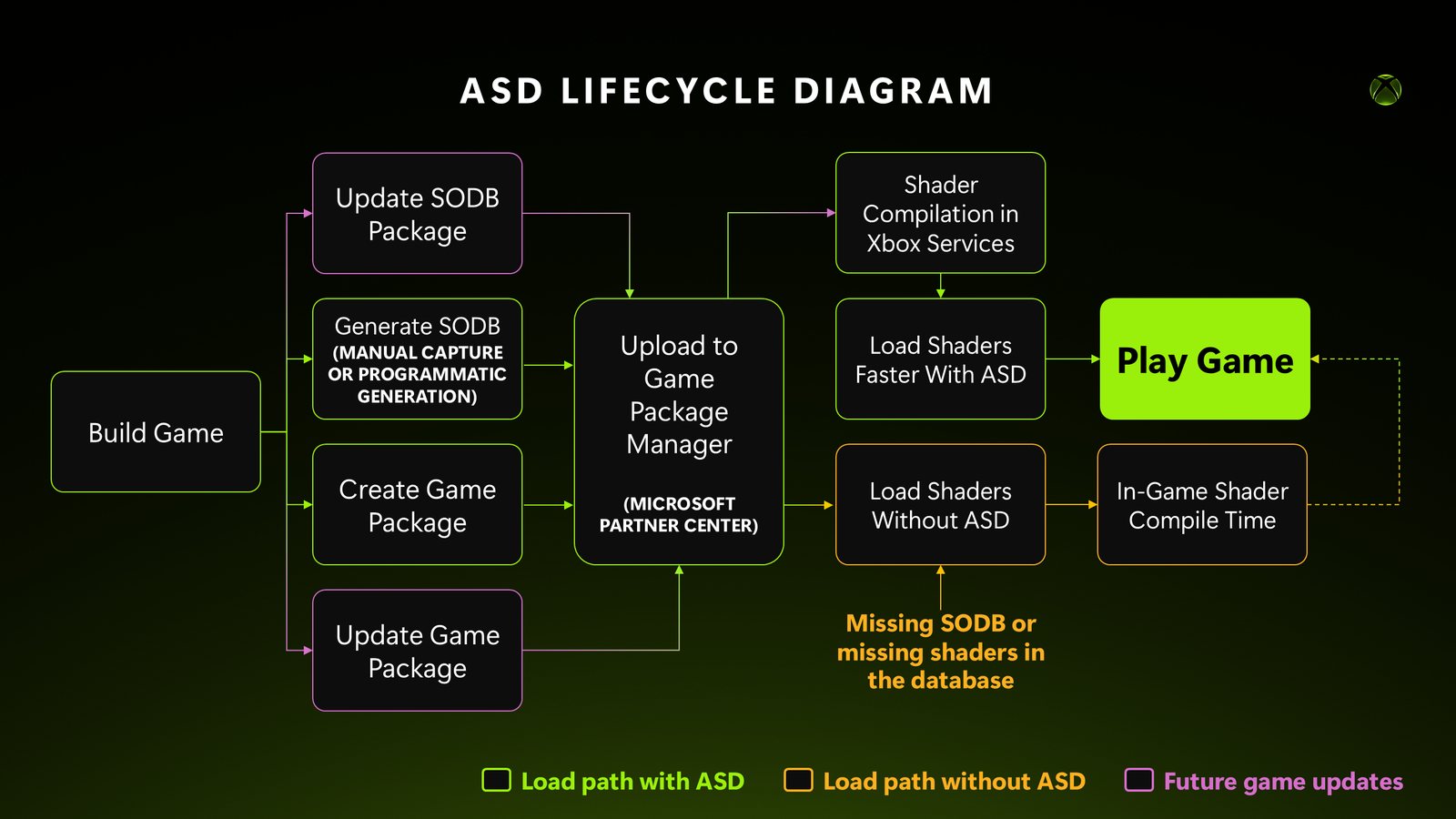
As of this announcement ASD is fully available to all game developers building XBOX Games on PC w/ DirectX12. Here is a quick diagram of the workflow to get you started on the path to load your game, faster.
Note: Requires using the new XBOX Game Package Manager updated in April 2026.
First, creating SODB packages is easy.
The documentation outlines the D3DCONFIG steps to create packages manually or programmatically. A new interface in the XBOX Game Package Manager allows you to upload packages side by side.
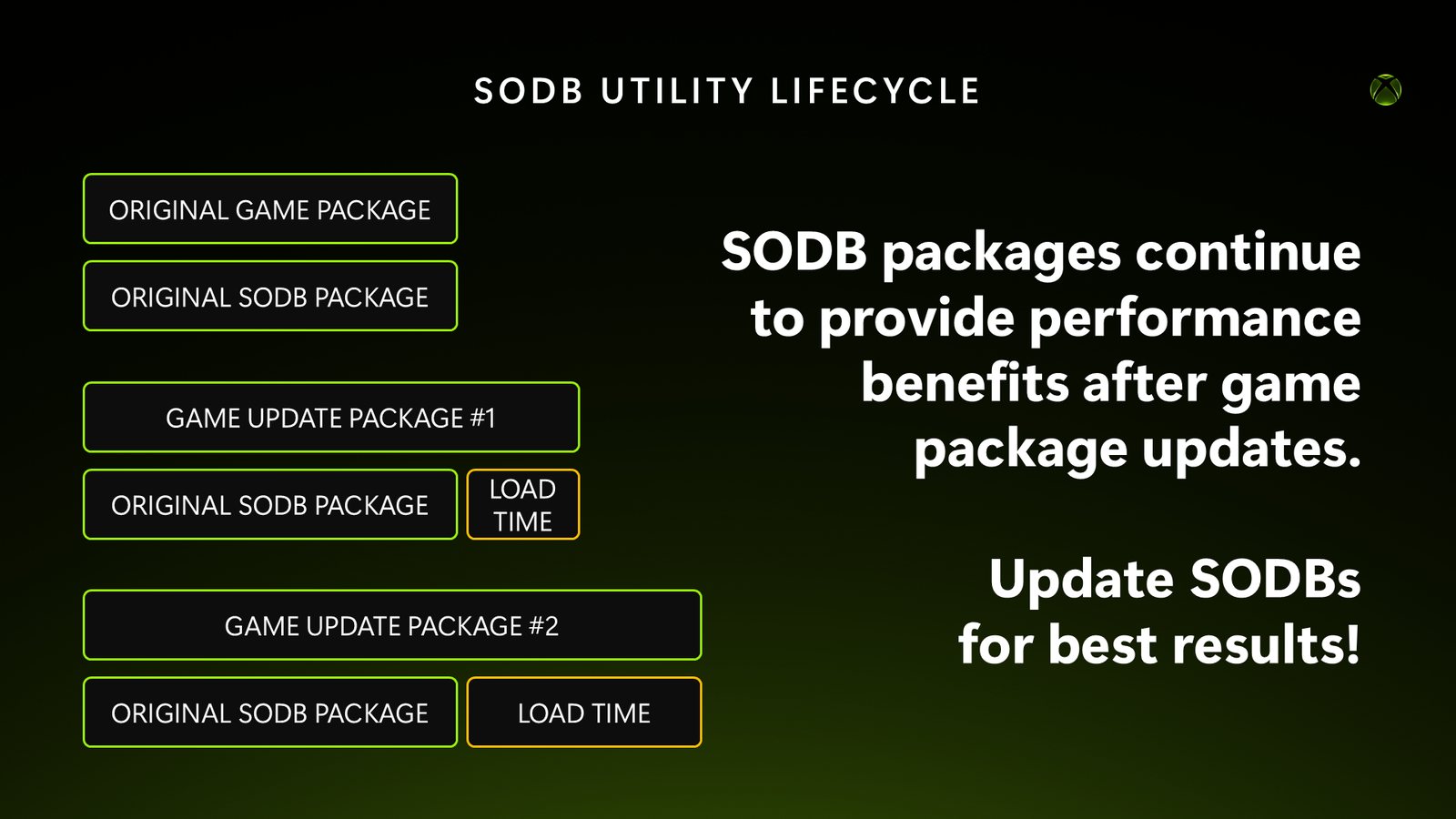
Last, SODB packages are flexible.
When the first game packages and SODB packages are created together, you get the full benefit of precompiled shaders. Much of the magic behind the scenes compiles the SODB into shaders and compiles the SODB into shaders and handles smartly matching the right shader shader package, to the right graphics hardware family for the target system.
However, as your game updates and the package versions drift apart, you may see in-game shader compile times introduced that can be addressed simply by uploading a new SODB package to match; it’s not all-or-nothing depending on the rate of change.
Dozens of games have already been shipping for months with ASD support in the XBOX App on PC as part of a limited preview program. If your game was a part of this program, you will be contacted by your XBOX Partner Manager about the timeframe and method to transition to self-service over the coming months to ensure you know when to start uploading packages to align with your game updates.
Developer Resources
- News | Advanced Shader Delivery: what's new at GDC 2026
- Docs | Application Identity spec
- Docs | StateObjectDatabase
- Sample | D3D12StateObjectDatabase sample
- Tools | D3D12CacheListener
- Tools | Package Uploader
Source:
Prepare your game for Advanced Shader Delivery (ASD)
Announced at GDC 2026, Advanced Shader Delivery (ASD) is a new Windows 11 DirectX12 technology to help games load faster. Graphics on Windows have advanced to a level of realism that the physics of how games start up need to evolve as well. Currently only available for games played in the XBOX...
developer.microsoft.com