Solved New Alienware Laptop Won't Print on Both Sides


bob17821

Well-known member
Local time
9:17 AM
Posts
89
OS
Windows 11 25H2 26200.7462
Hi,

I have a new Alienware Laptop (16X Aurora). When I first tried to print a recipe I could not find the option to print to both sides. Got the latest drivers from the Brothers web site and it still doesn't offer that option. From a Lenovo tower machine I can print the same document on both sides. Any insight here on what could be wrong. BTW I have tried to ask Dell if they have any ideas but what a nightmare. (The dialog said someone would get in touch, but when I try to find the status of my report they seem to have never heard of it.)

Thanks, Bob
 

My Computers

System One System Two

  • OS
    Windows 11 25H2 26200.7462
    Computer type
    Laptop
    Manufacturer/Model
    Alienware 16X Aurora
    Memory
    32GB
    Graphics Card(s)
    NVIDIA GeForce RTX5060
    Screen Resolution
    4K
  • Operating System
    Win11
    Computer type
    PC/Desktop
    Manufacturer/Model
    Lenovo Legion
    CPU
    Intel Core i7-12700
    Motherboard
    No Idea
    Memory
    16GB
    Graphics card(s)
    GEFORCE RTX 3060Ti
    Monitor(s) Displays
    Samsung
    Screen Resolution
    4K
Make sure in settings>bluetooth & devices>printers & scanners>let windows manage my default printer is toggled off.

I have a Brother and double sided print is controlled from settings>bluetooth & devices>printers & scanners>select your printer>printing preferences
MyBrother.webp
 

My Computers

System One System Two

  • OS
    Windows 11 Pro 25H2
    Computer type
    PC/Desktop
    Manufacturer/Model
    Dell Optiplex 7080
    CPU
    i9-10900 10 core 20 threads
    Motherboard
    DELL 0J37VM
    Memory
    32 gb
    Graphics Card(s)
    none-Intel UHD Graphics 630
    Sound Card
    Integrated Realtek
    Monitor(s) Displays
    Benq 27
    Screen Resolution
    2560x1440
    Hard Drives
    2x1tb Solidigm m.2 nvme /External drives 512gb Samsung m.2 sata+2tb Kingston m2.nvme
    PSU
    500w
    Case
    MT
    Cooling
    Dell Premium
    Keyboard
    Logitech wired
    Mouse
    Logitech wireless
    Internet Speed
    so slow I'm too embarrassed to tell
    Browser
    #1 Edge #2 Firefox
    Antivirus
    Defender+MWB Premium
  • Operating System
    Windows 11 Pro 24H2 26200.8457
    Computer type
    PC/Desktop
    Manufacturer/Model
    Beelink Mini PC SER5
    CPU
    AMD Ryzen 7 6800U
    Memory
    32 gb
    Graphics card(s)
    integrated
    Sound Card
    integrated
    Monitor(s) Displays
    Benq 27
    Screen Resolution
    2560x1440
    Hard Drives
    1TB Crucial nvme
    Keyboard
    Logitech wired
    Mouse
    Logitech wireless
    Internet Speed
    still too embarrassed to tell
    Browser
    Firefox
    Antivirus
    Defender
    Other Info
    System 3 is non compliant Dell 9020 i7-4770/24gb ram Win11 PRO 26200.8457
Thanks very much Mama Glass, you've gotten me headed in the right direction and I have discovered that the Aurora knows about two Brother printers. The Lenovo knows about only one. I can't do it this morning but as soon as possible I will try both printers on the Aurora and, hopefully, only one of them will work. I'll let you know. Thanks again, Bob
 

Attachments

  • Lenovo Prt.webp
    Lenovo Prt.webp
    3.7 KB · Views: 1
  • Aurora PrtS.webp
    Aurora PrtS.webp
    7.1 KB · Views: 1

My Computers

System One System Two

  • OS
    Windows 11 25H2 26200.7462
    Computer type
    Laptop
    Manufacturer/Model
    Alienware 16X Aurora
    Memory
    32GB
    Graphics Card(s)
    NVIDIA GeForce RTX5060
    Screen Resolution
    4K
  • Operating System
    Win11
    Computer type
    PC/Desktop
    Manufacturer/Model
    Lenovo Legion
    CPU
    Intel Core i7-12700
    Motherboard
    No Idea
    Memory
    16GB
    Graphics card(s)
    GEFORCE RTX 3060Ti
    Monitor(s) Displays
    Samsung
    Screen Resolution
    4K
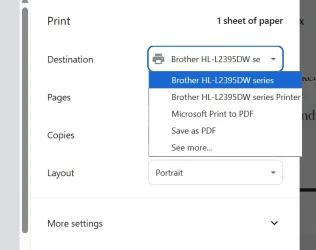
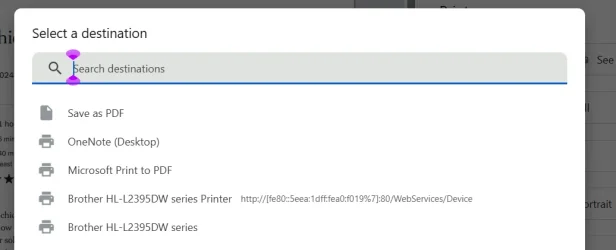
Mama Glass, Your insight has led to the solution. In the Print dialog I see only a list of printer choices with truncated descriptions. But if I I go to "See more" then I see more complete descriptions. I have now idea where the "WebServices/Devices" printer came from, but when I select it I do not see a choice to print on both sices. If I choose the other one I do. So ... my problem is solved. THANKS! Without your help I would have spent many, many hours on this.

THANKS VERY MUCH! Bob
 

Attachments

  • Truncated Prt Choices2.webp
    Truncated Prt Choices2.webp
    18.9 KB · Views: 0
  • Untruncated Prt descriptions.webp
    Untruncated Prt descriptions.webp
    15.9 KB · Views: 0

My Computers

System One System Two

  • OS
    Windows 11 25H2 26200.7462
    Computer type
    Laptop
    Manufacturer/Model
    Alienware 16X Aurora
    Memory
    32GB
    Graphics Card(s)
    NVIDIA GeForce RTX5060
    Screen Resolution
    4K
  • Operating System
    Win11
    Computer type
    PC/Desktop
    Manufacturer/Model
    Lenovo Legion
    CPU
    Intel Core i7-12700
    Motherboard
    No Idea
    Memory
    16GB
    Graphics card(s)
    GEFORCE RTX 3060Ti
    Monitor(s) Displays
    Samsung
    Screen Resolution
    4K
Back
Top Bottom