
New HP laptop cannot find camera...


Florio

Well-known member
Local time
10:11 AM
Posts
39
OS
Windows 11
I very recently purchased an HP Envy 17.3 inch Laptop PC 17-da0000nl. I initially had a few problems getting the camera to work when using desktop Messenger, but got it running in the end. The other day, I went to host a Zoom meeting only to find that the camera was no longer working, and could not even be found. When checking on Device Manager, both the HP SMP camera and the HP IR camera had Code 45 (device not connected). I got in touch with HP online (chat service based in India!!), and I was advised to do a Windows reset. I did this with the result that the two cameras were no longer even listed under Device Manager. I was then told to run a factory reset, which I did last night. The cameras are still missing. I cannot contact HP online again until Tuesday, and am in any case very sceptical regarding any further advice from their technical assistance. I thought someone here might be able to help me.

My Windows 11 version is 25H2.

Thanks to whoever can lend a hand.
 
Last edited:

My Computer My Computer

At a glance

Windows 11
OS
Windows 11
Computer type
Laptop
Manufacturer/Model
HP Pavilion
Mouse
HP wireless rechargeable
Browser
Firefox
Antivirus
Iobit Malware Fighter (with BitDefender engine)

My Computers My Computers

  • At a glance

    Win 11 ProAMD Ryzen™ 7 7730U24GB Dual-Channel DDR4 @ 1596MHz (22-22-22-52)512MB ATI AMD Radeon Graphics (ASUStek Comput...
    OS
    Win 11 Pro
    Computer type
    Laptop
    Manufacturer/Model
    ASUS Vivobook
    CPU
    AMD Ryzen™ 7 7730U
    Motherboard
    M1605YA
    Memory
    24GB Dual-Channel DDR4 @ 1596MHz (22-22-22-52)
    Graphics Card(s)
    512MB ATI AMD Radeon Graphics (ASUStek Computer Inc)
    Monitor(s) Displays
    Generic PnP Monitor (1920x1200@60Hz) - P1 PLUS (1920x1080@59Hz)
    Screen Resolution
    1920 X 1200
    Hard Drives
    953GB Western Digital WD
    PSU
    45 Watts
    Mouse
    Lenovo Bluetooth.
    Internet Speed
    500 Mbps
    Browser
    Edge
    Antivirus
    Defender
  • At a glance

    Windows 11AMD Ryzen 7 5800H / 3.2 GHz32 GB DDR4 SDRAM 3200 MHzNVIDIA GeForce RTX 3060 6 GB GDDR6 SDRAM
    Operating System
    Windows 11
    Computer type
    Laptop
    Manufacturer/Model
    ACER NITRO
    CPU
    AMD Ryzen 7 5800H / 3.2 GHz
    Motherboard
    CZ Scala_CAS (FP6)
    Memory
    32 GB DDR4 SDRAM 3200 MHz
    Graphics card(s)
    NVIDIA GeForce RTX 3060 6 GB GDDR6 SDRAM
    Sound Card
    Realtek Audio. NVIDIA High Definition Audio
    Monitor(s) Displays
    15.6" LED backlight 1920 x 1080 (Full HD) 144 Hz
    Screen Resolution
    1920 x 1080 (Full HD)
    Hard Drives
    Samsung 970 Evo Plus 2TB NVMe M.2
    PSU
    180 Watt, 19.5 V
    Mouse
    Lenovo Bluetooth
    Internet Speed
    500 Mbps
    Browser
    Edge
    Antivirus
    Defender
In windows 11 in settings check privacy and look for mic and camera. Make sure they have access. How dose the camera connect to the pc? In device manager have you tried using Windows default drivers or are they windows drivers by default. In device manager if ypu disable device then re enable do you still get the same?
 

My Computer My Computer

At a glance

Windows 11 ProIntel i7 9700k OC 5.0ghz32gb Gskill 3200mhz OC 3600mhzNvidia RTX 4070 Super FE
OS
Windows 11 Pro
Computer type
PC/Desktop
Manufacturer/Model
Self built
CPU
Intel i7 9700k OC 5.0ghz
Motherboard
Gigabyte Z390 Master, Rev1.0, F13c Custom Bios
Memory
32gb Gskill 3200mhz OC 3600mhz
Graphics Card(s)
Nvidia RTX 4070 Super FE
Sound Card
Onboard ESS Saber
Monitor(s) Displays
QHD LG 27" 165hz, OC 180hz, Asus 27" 144hz
Screen Resolution
2k
Hard Drives
Nvme SSD Samsung 990 Pro 2TB, 970 echo plus 1tb + 970 echo 256gb.
PSU
EVGA SuperNova platinum 800w
Case
NZXT H500 sweat box, modified.
Cooling
NZXT Kraken x63.
Keyboard
Logitech G810
Mouse
Logitech G403
Internet Speed
1.1gb down 110mb up
Thanks Fabler2, unfortunately no drivers are listed for the camera.
 

My Computer My Computer

At a glance

Windows 11
OS
Windows 11
Computer type
Laptop
Manufacturer/Model
HP Pavilion
Mouse
HP wireless rechargeable
Browser
Firefox
Antivirus
Iobit Malware Fighter (with BitDefender engine)
In windows 11 in settings check privacy and look for mic and camera. Make sure they have access. How dose the camera connect to the pc? In device manager have you tried using Windows default drivers or are they windows drivers by default. In device manager if ypu disable device then re enable do you still get the same?
I've done all of this, TrebleTA. The drivers were HP drivers, but now they are no longer listed in Device Manager (after a windows reinstall and a factory reset).
 

My Computer My Computer

At a glance

Windows 11
OS
Windows 11
Computer type
Laptop
Manufacturer/Model
HP Pavilion
Mouse
HP wireless rechargeable
Browser
Firefox
Antivirus
Iobit Malware Fighter (with BitDefender engine)
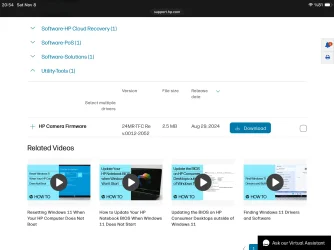
Hi

You have an HP camera firmware under Utility tools section for your model laptop. You may get positive results if you update the camera firmware.

Hope this helps.
IMG_1842.webp
 

My Computers My Computers

  • At a glance

    Windows 11 Pro build 26200.8524Intel i7-4790Teams DDR3-1600 4x4 GBMSI Nvidia GeForce GTX 1050Ti
    OS
    Windows 11 Pro build 26200.8524
    Computer type
    PC/Desktop
    Manufacturer/Model
    Home Built
    CPU
    Intel i7-4790
    Motherboard
    Asus H97 Pro Gamer with add-on TPM1.2 module
    Memory
    Teams DDR3-1600 4x4 GB
    Graphics Card(s)
    MSI Nvidia GeForce GTX 1050Ti
    Sound Card
    Realtek ALC1150
    Monitor(s) Displays
    Dell P2425D
    Screen Resolution
    2560 by 1440 pixels
    Hard Drives
    Corsair NVMe M.2 Core XT 1000 GB (Windows 11 v.25H2); Samsung SATA Evo 870 500 GB (Windows 11 v.25H2);
    PSU
    Corsair HX850
    Case
    Gigabyte Solo 210
    Cooling
    Zalman CNPS7X Tower
    Keyboard
    Microsoft AIO Wireless (includes touchpad)
    Mouse
    HP S1000 Plus Wireless
    Internet Speed
    500 Mb fiber optic
    Browser
    Chrome; MS Edge
    Antivirus
    Windows Defender
  • At a glance

    MacOS 12 MontereyIntel Core i58 GBIntel integrated
    Operating System
    MacOS 12 Monterey
    Computer type
    Laptop
    Manufacturer/Model
    Apple Macbook Air
    CPU
    Intel Core i5
    Memory
    8 GB
    Graphics card(s)
    Intel integrated
    Screen Resolution
    1440 by 900 pixels
    Hard Drives
    128 GB
    Keyboard
    Built-in
    Mouse
    Microsoft Wireless
    Internet Speed
    802.11 ac
    Browser
    Chrome; Safari
    Antivirus
    N/A
Thanks suatcini54. I tried to install that driver yesterday, but got the message “N/A No valid camera”.
 

My Computer My Computer

At a glance

Windows 11
OS
Windows 11
Computer type
Laptop
Manufacturer/Model
HP Pavilion
Mouse
HP wireless rechargeable
Browser
Firefox
Antivirus
Iobit Malware Fighter (with BitDefender engine)
To me it sounds like your camera is defective. You might have to get the laptop repaired or replaced.
 

My Computers My Computers

  • At a glance

    Windows 11 Pro 25H2Intel Core i7-10700K16GB (8GB PC4-19200 DDR4 SDRAM x2)NVIDIA GeForce GTX 1050 TI
    OS
    Windows 11 Pro 25H2
    Computer type
    PC/Desktop
    Manufacturer/Model
    PowerSpec B746
    CPU
    Intel Core i7-10700K
    Motherboard
    ASRock Z490 Phantom Gaming 4/ax
    Memory
    16GB (8GB PC4-19200 DDR4 SDRAM x2)
    Graphics Card(s)
    NVIDIA GeForce GTX 1050 TI
    Sound Card
    Realtek Audio
    Monitor(s) Displays
    #1. LG ULTRAWIDE 34" #2. AOC Q32G2WG3 32"
    Screen Resolution
    #1. 3440 X 1440 #2. 1920 x 1080
    Hard Drives
    NVMe WDC WDS100T2B0C-00PXH0 1TB
    Samsung SSD 860 EVO 1TB
    PSU
    750 Watts (62.5A)
    Case
    PowerSpec/Lian Li ATX 205
    Keyboard
    Logitech K270
    Mouse
    Logitech M185
    Browser
    Microsoft Edge and Firefox
    Antivirus
    Webroot SecureAnywhere CE 26.1
  • At a glance

    Windows 11 Canary ChannelIntel Core i5-8400 CPU @ 2.80GHz16 MB DDR 4-2666
    Operating System
    Windows 11 Canary Channel
    Computer type
    PC/Desktop
    Manufacturer/Model
    PowerSpec G156
    CPU
    Intel Core i5-8400 CPU @ 2.80GHz
    Motherboard
    AsusTeK Prime B360M-A
    Memory
    16 MB DDR 4-2666
    Monitor(s) Displays
    23" Speptre HDMI 75Hz
    Screen Resolution
    1920x1080
    Hard Drives
    Samsung 970 EVO 500GB NVMe
    Keyboard
    Logitek K270
    Mouse
    Logitek M185
    Browser
    Firefox, Edge and Edge Canary
    Antivirus
    Windows Defender
This is a recurring theme with some HP or Dell built-in webcams. If you wipe the system, the correct drivers are never reloaded. And it's not obvious where one gets the right drivers to restore (if you didn't export them with pnputil).

Lots of online complaints...
 

My Computer My Computer

At a glance

Windows 7
OS
Windows 7
Thanks for that, garlin. I didn't realise other people had had the same problem. Do you happen to know what course of action they were adivised to take? You're definitely right about not knowing where to get the correct drivers; the HP drivers page is almost useless. I'm curious as to what HP assistance will say when I explain that the two different resets I've carried out (on their instructions) were inconclusive.
 

My Computer My Computer

At a glance

Windows 11
OS
Windows 11
Computer type
Laptop
Manufacturer/Model
HP Pavilion
Mouse
HP wireless rechargeable
Browser
Firefox
Antivirus
Iobit Malware Fighter (with BitDefender engine)
At first I wasn't aware of the [well-hidden] shutter that closes the camera lens, but I soon discovered it. It wasn't the cause of my problems.
 

My Computer My Computer

At a glance

Windows 11
OS
Windows 11
Computer type
Laptop
Manufacturer/Model
HP Pavilion
Mouse
HP wireless rechargeable
Browser
Firefox
Antivirus
Iobit Malware Fighter (with BitDefender engine)

To me it sounds like your camera is defective. You might have to get the laptop repaired or replaced.
Well, I've only had if for a few weeks, and so it's under warranty. But I don't know where I'll have to take it to get it repaired / replaced! It's hard to find an actual HP centre now (everything is conducted online!)
 

My Computer My Computer

At a glance

Windows 11
OS
Windows 11
Computer type
Laptop
Manufacturer/Model
HP Pavilion
Mouse
HP wireless rechargeable
Browser
Firefox
Antivirus
Iobit Malware Fighter (with BitDefender engine)
I suppose that the one time you need Windows Update to find a needed driver it doesn't work.
Worth checking WU and check Advanced options, Optional updates.

Edit,
Try HP Support Assistant. It should be installed otherwise it's here,


My Computers My Computers

  • At a glance

    Win 11 ProAMD Ryzen™ 7 7730U24GB Dual-Channel DDR4 @ 1596MHz (22-22-22-52)512MB ATI AMD Radeon Graphics (ASUStek Comput...
    OS
    Win 11 Pro
    Computer type
    Laptop
    Manufacturer/Model
    ASUS Vivobook
    CPU
    AMD Ryzen™ 7 7730U
    Motherboard
    M1605YA
    Memory
    24GB Dual-Channel DDR4 @ 1596MHz (22-22-22-52)
    Graphics Card(s)
    512MB ATI AMD Radeon Graphics (ASUStek Computer Inc)
    Monitor(s) Displays
    Generic PnP Monitor (1920x1200@60Hz) - P1 PLUS (1920x1080@59Hz)
    Screen Resolution
    1920 X 1200
    Hard Drives
    953GB Western Digital WD
    PSU
    45 Watts
    Mouse
    Lenovo Bluetooth.
    Internet Speed
    500 Mbps
    Browser
    Edge
    Antivirus
    Defender
  • At a glance

    Windows 11AMD Ryzen 7 5800H / 3.2 GHz32 GB DDR4 SDRAM 3200 MHzNVIDIA GeForce RTX 3060 6 GB GDDR6 SDRAM
    Operating System
    Windows 11
    Computer type
    Laptop
    Manufacturer/Model
    ACER NITRO
    CPU
    AMD Ryzen 7 5800H / 3.2 GHz
    Motherboard
    CZ Scala_CAS (FP6)
    Memory
    32 GB DDR4 SDRAM 3200 MHz
    Graphics card(s)
    NVIDIA GeForce RTX 3060 6 GB GDDR6 SDRAM
    Sound Card
    Realtek Audio. NVIDIA High Definition Audio
    Monitor(s) Displays
    15.6" LED backlight 1920 x 1080 (Full HD) 144 Hz
    Screen Resolution
    1920 x 1080 (Full HD)
    Hard Drives
    Samsung 970 Evo Plus 2TB NVMe M.2
    PSU
    180 Watt, 19.5 V
    Mouse
    Lenovo Bluetooth
    Internet Speed
    500 Mbps
    Browser
    Edge
    Antivirus
    Defender
I suppose that the one time you need Windows Update to find a needed driver it doesn't work.
Worth checking WU and check Advanced options, Optional updates.
Exactly!! Been there, done that. The only optional update was for .NET Framework
 

My Computer My Computer

At a glance

Windows 11
OS
Windows 11
Computer type
Laptop
Manufacturer/Model
HP Pavilion
Mouse
HP wireless rechargeable
Browser
Firefox
Antivirus
Iobit Malware Fighter (with BitDefender engine)
please try a live Linux distro which boots from a USB stick
and doesn't install anything to your computer.

you can use Rufus to burn the live distro to USB
Ubuntu is a good choice for this test.

then you can check to see if the camara is working in the live distro
if the camara is not detected in the live distro then that will confirm the camara is faulty.

Ubuntu download

Rufus download

best of luck Steve ..
 

My Computers My Computers

  • At a glance

    Windows 11 HomeRyzen 7 5825u64GB DDR4 3200Ryzen 7 5825u
    OS
    Windows 11 Home
    Computer type
    PC/Desktop
    Manufacturer/Model
    HP 24" AiO
    CPU
    Ryzen 7 5825u
    Motherboard
    HP
    Memory
    64GB DDR4 3200
    Graphics Card(s)
    Ryzen 7 5825u
    Sound Card
    RealTek
    Monitor(s) Displays
    24" HP AiO
    Screen Resolution
    1920 x 1080 @60 Hz
    Hard Drives
    1TB WD Blue SN580 M2 SSD Partitioned.
    2x 1TB USB HDD External Backup/Storage.
    PSU
    90W external power brick
    Case
    24" All in One
    Cooling
    Default Air Cooling
    Keyboard
    HP WiFi UK extended
    Mouse
    HP WiFi 3 Button
    Internet Speed
    1GB full fibre
    Browser
    Edge & Firefox
    Antivirus
    AVG Internet Security/Windows Defender
    Other Info
    Mainly Open Source Software
  • At a glance

    Ubuntu 22.04.5 LTSi5 7200u16GB DDR4Intel
    Operating System
    Ubuntu 22.04.5 LTS
    Computer type
    Laptop
    Manufacturer/Model
    Dell 13" Latitude 2017
    CPU
    i5 7200u
    Motherboard
    Dell
    Memory
    16GB DDR4
    Graphics card(s)
    Intel
    Sound Card
    Intel
    Monitor(s) Displays
    13" Dell Laptop
    Hard Drives
    250GB Crucial 2.5" SSD
    Mouse
    Generic WiFi 3 button
    Internet Speed
    WiFi only
    Browser
    Firefox
    Antivirus
    ClamAV TK
    Other Info
    Mainly Open Source Software
If you just got the labtop you have 28days to return where you got it from.
There is a bit of software that if you do get hp drivers bk, you can then back them up.
 

My Computer My Computer

At a glance

Windows 11 ProIntel i7 9700k OC 5.0ghz32gb Gskill 3200mhz OC 3600mhzNvidia RTX 4070 Super FE
OS
Windows 11 Pro
Computer type
PC/Desktop
Manufacturer/Model
Self built
CPU
Intel i7 9700k OC 5.0ghz
Motherboard
Gigabyte Z390 Master, Rev1.0, F13c Custom Bios
Memory
32gb Gskill 3200mhz OC 3600mhz
Graphics Card(s)
Nvidia RTX 4070 Super FE
Sound Card
Onboard ESS Saber
Monitor(s) Displays
QHD LG 27" 165hz, OC 180hz, Asus 27" 144hz
Screen Resolution
2k
Hard Drives
Nvme SSD Samsung 990 Pro 2TB, 970 echo plus 1tb + 970 echo 256gb.
PSU
EVGA SuperNova platinum 800w
Case
NZXT H500 sweat box, modified.
Cooling
NZXT Kraken x63.
Keyboard
Logitech G810
Mouse
Logitech G403
Internet Speed
1.1gb down 110mb up
Well, I've only had if for a few weeks, and so it's under warranty. But I don't know where I'll have to take it to get it repaired / replaced! It's hard to find an actual HP centre now (everything is conducted online!)
I would check were you bought it. They should know what you need to do. They may offer you the option of them replacing it for you.
 

My Computers My Computers

  • At a glance

    Windows 11 Pro 25H2Intel Core i7-10700K16GB (8GB PC4-19200 DDR4 SDRAM x2)NVIDIA GeForce GTX 1050 TI
    OS
    Windows 11 Pro 25H2
    Computer type
    PC/Desktop
    Manufacturer/Model
    PowerSpec B746
    CPU
    Intel Core i7-10700K
    Motherboard
    ASRock Z490 Phantom Gaming 4/ax
    Memory
    16GB (8GB PC4-19200 DDR4 SDRAM x2)
    Graphics Card(s)
    NVIDIA GeForce GTX 1050 TI
    Sound Card
    Realtek Audio
    Monitor(s) Displays
    #1. LG ULTRAWIDE 34" #2. AOC Q32G2WG3 32"
    Screen Resolution
    #1. 3440 X 1440 #2. 1920 x 1080
    Hard Drives
    NVMe WDC WDS100T2B0C-00PXH0 1TB
    Samsung SSD 860 EVO 1TB
    PSU
    750 Watts (62.5A)
    Case
    PowerSpec/Lian Li ATX 205
    Keyboard
    Logitech K270
    Mouse
    Logitech M185
    Browser
    Microsoft Edge and Firefox
    Antivirus
    Webroot SecureAnywhere CE 26.1
  • At a glance

    Windows 11 Canary ChannelIntel Core i5-8400 CPU @ 2.80GHz16 MB DDR 4-2666
    Operating System
    Windows 11 Canary Channel
    Computer type
    PC/Desktop
    Manufacturer/Model
    PowerSpec G156
    CPU
    Intel Core i5-8400 CPU @ 2.80GHz
    Motherboard
    AsusTeK Prime B360M-A
    Memory
    16 MB DDR 4-2666
    Monitor(s) Displays
    23" Speptre HDMI 75Hz
    Screen Resolution
    1920x1080
    Hard Drives
    Samsung 970 EVO 500GB NVMe
    Keyboard
    Logitek K270
    Mouse
    Logitek M185
    Browser
    Firefox, Edge and Edge Canary
    Antivirus
    Windows Defender
IMG_1845.webpYou may try this: Download sp153178.exe from HP. This softpack includes HP HD camera drivers from Sunplus and Realtek.

You may try installing this. If your HP camera is not listed in this softpack, nothing is installed. But I think you cannot install any driver because you camera does not appear in Device Manager, as you said in the beginning of your post.
 

My Computers My Computers

  • At a glance

    Windows 11 Pro build 26200.8524Intel i7-4790Teams DDR3-1600 4x4 GBMSI Nvidia GeForce GTX 1050Ti
    OS
    Windows 11 Pro build 26200.8524
    Computer type
    PC/Desktop
    Manufacturer/Model
    Home Built
    CPU
    Intel i7-4790
    Motherboard
    Asus H97 Pro Gamer with add-on TPM1.2 module
    Memory
    Teams DDR3-1600 4x4 GB
    Graphics Card(s)
    MSI Nvidia GeForce GTX 1050Ti
    Sound Card
    Realtek ALC1150
    Monitor(s) Displays
    Dell P2425D
    Screen Resolution
    2560 by 1440 pixels
    Hard Drives
    Corsair NVMe M.2 Core XT 1000 GB (Windows 11 v.25H2); Samsung SATA Evo 870 500 GB (Windows 11 v.25H2);
    PSU
    Corsair HX850
    Case
    Gigabyte Solo 210
    Cooling
    Zalman CNPS7X Tower
    Keyboard
    Microsoft AIO Wireless (includes touchpad)
    Mouse
    HP S1000 Plus Wireless
    Internet Speed
    500 Mb fiber optic
    Browser
    Chrome; MS Edge
    Antivirus
    Windows Defender
  • At a glance

    MacOS 12 MontereyIntel Core i58 GBIntel integrated
    Operating System
    MacOS 12 Monterey
    Computer type
    Laptop
    Manufacturer/Model
    Apple Macbook Air
    CPU
    Intel Core i5
    Memory
    8 GB
    Graphics card(s)
    Intel integrated
    Screen Resolution
    1440 by 900 pixels
    Hard Drives
    128 GB
    Keyboard
    Built-in
    Mouse
    Microsoft Wireless
    Internet Speed
    802.11 ac
    Browser
    Chrome; Safari
    Antivirus
    N/A
View attachment 152201You may try this: Download sp153178.exe from HP. This softpack includes HP HD camera drivers from Sunplus and Realtek.

You may try installing this. If your HP camera is not listed in this softpack, nothing is installed. But I think you cannot install any driver because you camera does not appear in Device Manager, as you said in the beginning of your post.
Thanks very much. I'll give this a try, as I have nothing to lose. Although this may be the driver I tried to download the other day without success.
 

My Computer My Computer

At a glance

Windows 11
OS
Windows 11
Computer type
Laptop
Manufacturer/Model
HP Pavilion
Mouse
HP wireless rechargeable
Browser
Firefox
Antivirus
Iobit Malware Fighter (with BitDefender engine)

Latest Support Threads

Back
Top Bottom




