New performance and safety features are coming to Google Chrome


 Google Blog:

This week, we’re rolling out new security and performance features in Chrome — just in time for any last-minute gift browsing.

A more personalized and proactive Safety Check

Safety Check for Chrome on desktop will now run automatically in the background. You'll get proactively alerted if passwords saved in Chrome have been compromised, any of your extensions are potentially harmful, you’re not using the latest version of Chrome, or site permissions need your attention. These alerts will appear in the three-dot menu in Chrome so you can take action.

We’re also extending Safety Check to revoke sites' permissions — like access to your location or microphone — if you haven't visited them in a long time. And Safety Check will now flag if you’re getting a lot of notifications from sites you don’t engage with that much, so you can easily disable them.
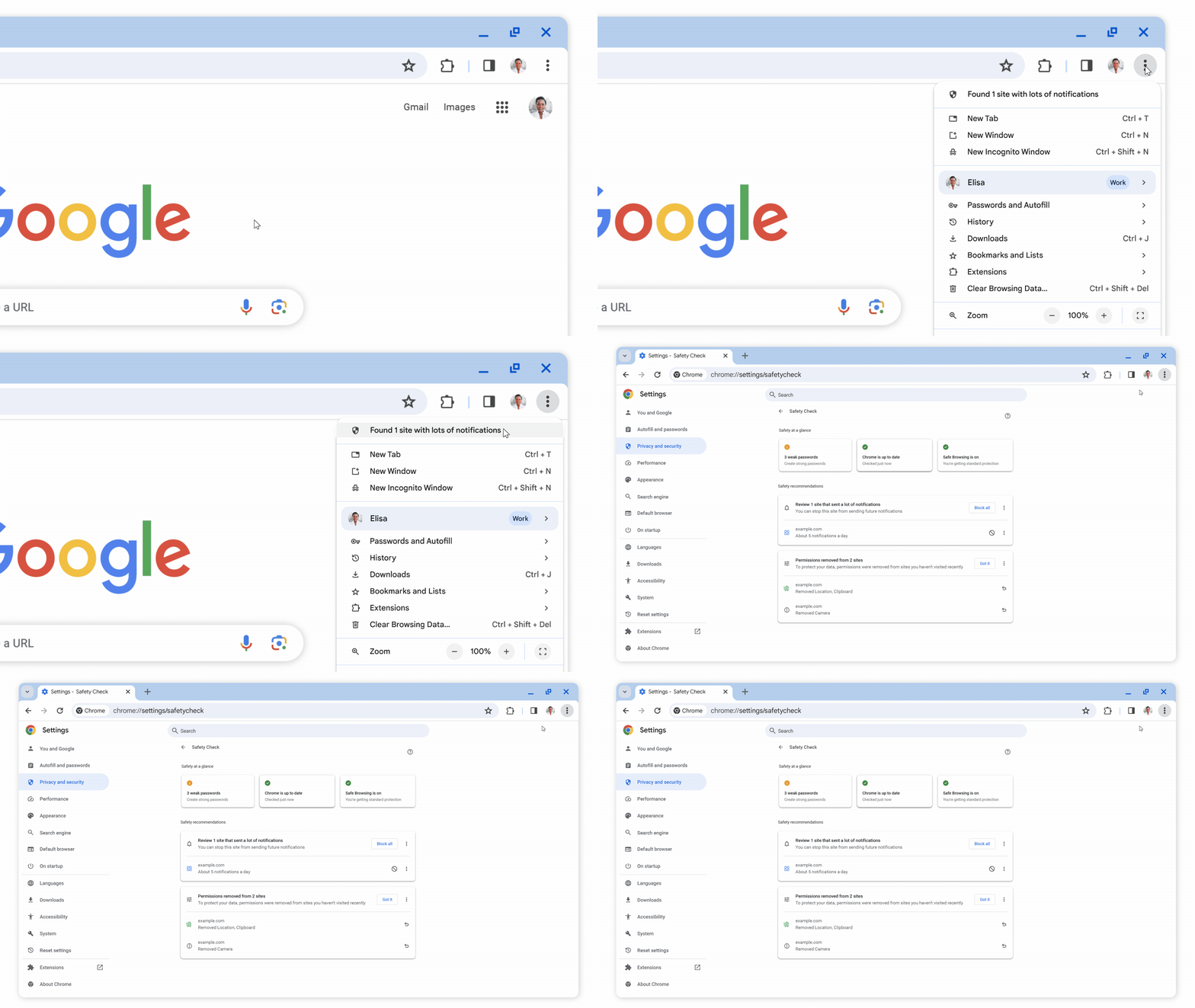
Animation of the three-dot menu in Chrome where Chrome alerts the user that it found a site that’s sending too many notifications. When selected, the new Safety Check page opens up for the user to take action.


Smarter performance controls

Last year, we introduced performance controls like Memory Saver mode to help Chrome on desktop run even smoother. We recently added more details about your tabs’ memory usage when you hover over them in Memory Saver mode, including the potential memory saved when they go inactive. And we’ve made it easier to specify sites that should always remain active.

To set up Memory Saver mode, head to the Performance section in your settings and toggle Memory Saver on.
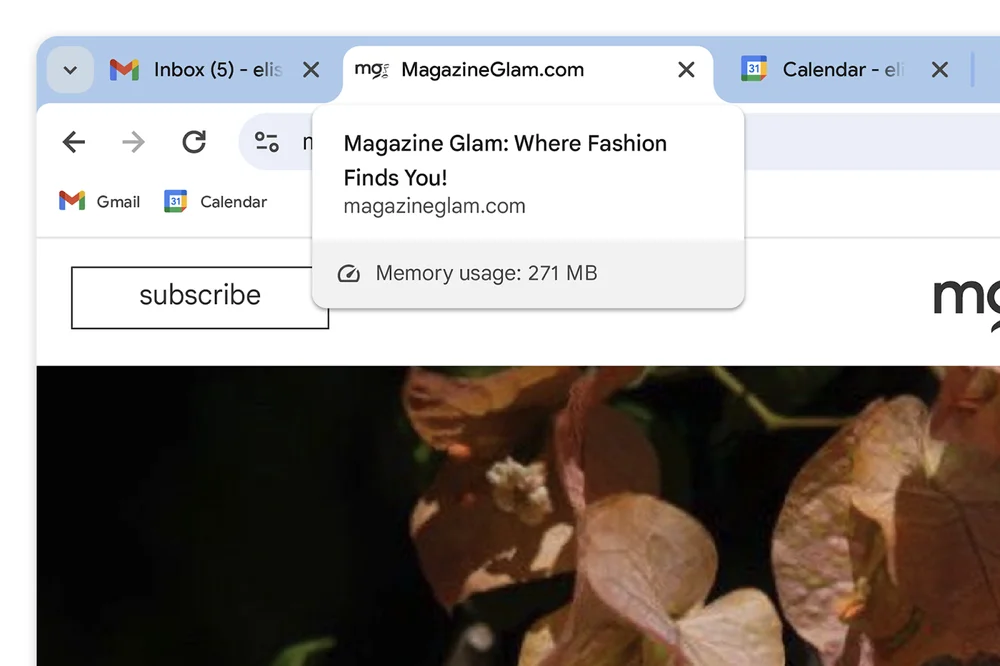
Close-up of a Chrome tab “MagazineGlam.com” the shows the total memory usage of the website


Saved tab groups

Tab groups are a useful way to declutter and organize your tabs in Chrome, especially if you’re browsing for, say, presents from different sites. Rolling out over the next few weeks in Chrome on desktop, you’ll be able to save tab groups so you can access them on other desktop devices and easily pick your projects back up.
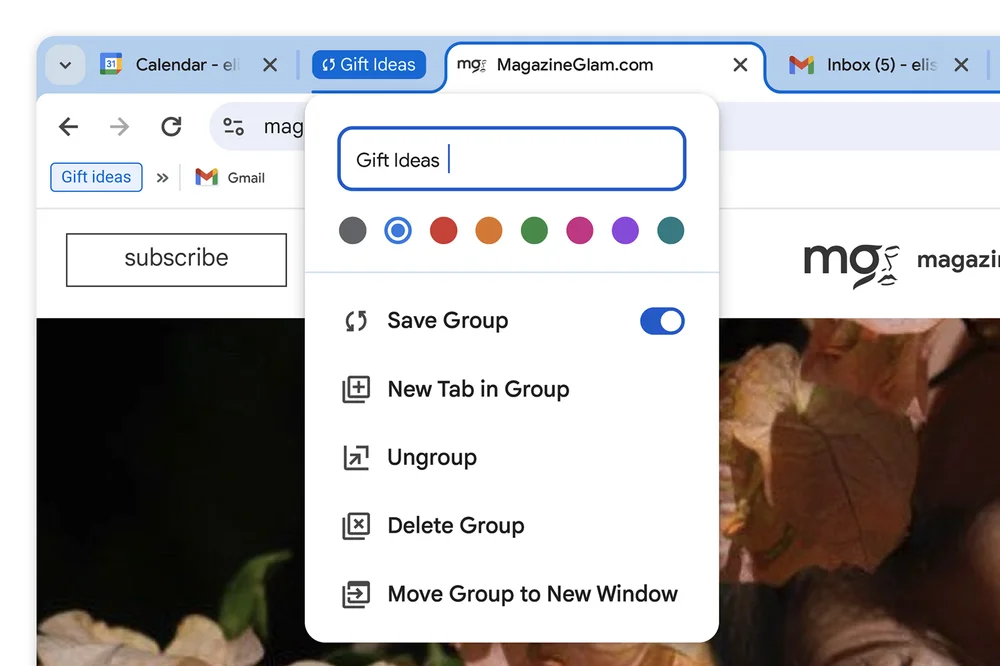
Close-up of a “Gift Ideas” tab group in Chrome with the “Save Group” toggle on, so it can be accessed on another device.


We’ll be bringing smarter and more helpful features to Chrome early next year powered by our new AI model Gemini. Stay tuned for more updates!


 Source:
 
Last edited:
That site notification feature will be a blessing for users who are getting notified from bad websites trying to use notification to infect systems, giving them an easy way of turning that off.
 

My Computers My Computers

  • At a glance

    Windows 11 ProRyzen 7 5700 X3D64 GB DDR4 3600mhz Gskill Ripjaws VRTX 4070 Super , 12GB VRAM Asus EVO Overclock
    OS
    Windows 11 Pro
    Computer type
    PC/Desktop
    Manufacturer/Model
    Custom Built
    CPU
    Ryzen 7 5700 X3D
    Motherboard
    MSI MPG B550 GAMING PLUS
    Memory
    64 GB DDR4 3600mhz Gskill Ripjaws V
    Graphics Card(s)
    RTX 4070 Super , 12GB VRAM Asus EVO Overclock
    Monitor(s) Displays
    Gigabyte M27Q (rev. 2.0) 2560 x 1440 @ 170hz HDR
    Hard Drives
    2TB Samsung nvme ssd
    4TB Western Digital nvme ssd
    PSU
    CORSAIR RMx SHIFT Series™ RM750x 80 PLUS Gold Fully Modular ATX Power Supply
    Case
    CORSAIR 3500X ARGB Mid-Tower ATX PC Case – Black
    Cooling
    ID-COOLING FROSTFLOW X 240 CPU Water Cooler
    Keyboard
    Logitech G213
    Mouse
    Logitech G203
    Internet Speed
    1.2gbps Fiber 😎
  • At a glance

    Chrome OSIntel Pentium Quad Core4GB LPDDR4
    Operating System
    Chrome OS
    Computer type
    Laptop
    Manufacturer/Model
    HP Chromebook
    CPU
    Intel Pentium Quad Core
    Memory
    4GB LPDDR4
    Monitor(s) Displays
    14 Inch HD SVA anti glare micro edge display
    Hard Drives
    64 GB emmc
You'll get proactively alerted if passwords saved in Chrome have been compromised
Just how bad it must be to let google algorithm have access to your passwords.
 

My Computer My Computer

At a glance

Windows 11 Pro 23H2Intel i3 8100 @3.6Ghz1 x 16GB DDR4 @2400 MHzNvidia GeForce GT 1030 2GB SDDR4
OS
Windows 11 Pro 23H2
Computer type
PC/Desktop
Manufacturer/Model
MSI / MS-7B29
CPU
Intel i3 8100 @3.6Ghz
Motherboard
H310M PRO-VDH (MS-7B29)
Memory
1 x 16GB DDR4 @2400 MHz
Graphics Card(s)
Nvidia GeForce GT 1030 2GB SDDR4
Sound Card
Realtek VEN_10EC&DEV_0887 / NVIDIA VEN_10DE&DEV_0081
Monitor(s) Displays
Acer V226HQL
Screen Resolution
1920 x 1080
Hard Drives
SSD 500 GB Crucial MX500 / HDD 1 TB TOSHIBA DT01ACA100
PSU
ATX, details unknown
Case
Everest 551B
Cooling
details unknown
Keyboard
Mechanical Gaming Hydra R7 - Rampage
Mouse
Logitech G703
Internet Speed
Down: 28Mbps / Up: 19Mbps
Browser
Microsoft Edge
Antivirus
Microsoft Defender Antivirus
Other Info
Bluetooth: TP Link 5.0 Nano USB adapter UB500
WLAN: D-Link 150 Pico USB adapter, N standard
Web camera: Logitech C270 HD 720p @30fps
Microphone: Trust MICO, model 23790
Just how bad it must be to let google algorithm have access to your passwords.
This is ok, as long as you don't let them save your email password, banking, or anything really important, I have no problem with them saving my forum passwords. Also, anything really important, I use the 2-step method.
 

My Computer My Computer

At a glance

Windows XP (Stable, iconic) 7/8.1/10/ Tiny11 ...Intel i7 4790K32GB DDR3 1600 MHzATI Radeon HD 7770 2GB GDDR5
OS
Windows XP (Stable, iconic) 7/8.1/10/ Tiny11 25H2
Computer type
PC/Desktop
Manufacturer/Model
Alienware PC
CPU
Intel i7 4790K
Motherboard
ASROCK Z97 EXTREME4
Memory
32GB DDR3 1600 MHz
Graphics Card(s)
ATI Radeon HD 7770 2GB GDDR5
Sound Card
Onboard
Monitor(s) Displays
SAMSUNG UE57 Series 28-Inch 4K UHD
Hard Drives
SAMSUNG 860 EVO 250 gigabyte SSD
PSU
EVGA 850 watt
Case
Alienware Area 51 Black Tower Case
Keyboard
HyperX - Alloy Elite 2 Mechanical Gaming Keyboard.
Mouse
Microsoft Wireless
Internet Speed
1.2 GHz
Browser
Chrome..Edge..Firefox
Back
Top Bottom