Microsoft 365 Insider Blog:
Hey, Microsoft 365 Insiders! My name is Jake Armstrong, and I’m a Product Manager on the Excel team. I’m excited to announce the availability of regex modes for XLOOKUP and XMATCH, as mentioned in this earlier post.
NOTE: These new function modes are preview functionality. Their results may change substantially before being broadly released, based on your feedback. We do not recommend using these functions in important workbooks until they are generally available.
New regex modes for XLOOKUP and XMATCH
Now you can take advantage of regex within the existing XLOOKUP and XMATCH functions, by using the new [match_mode] = 3 and a regex pattern as the lookup_value.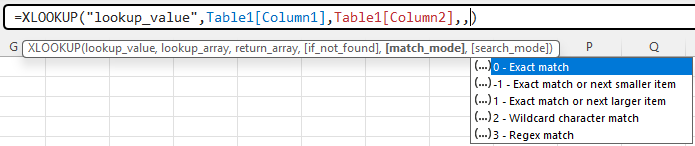
This will allow XLOOKUP and XMATCH to match against parts of text in a cell, or by any other pattern of text that can be described with regex.
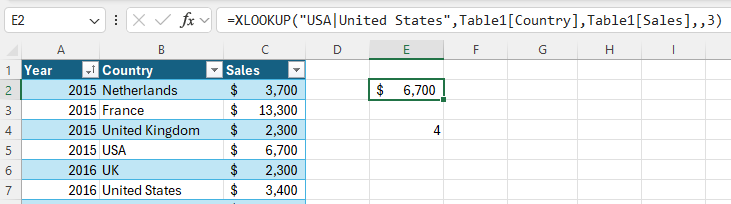
For example, let’s say we have some messy data, which has USA is listed as “USA” and “United States”, and we’d like to match against whichever comes first.
We’ll use XLOOKUP with “USA|United States” as lookup_value and match_mode = 3.
=XLOOKUP(lookup_value,lookup_array,return_array,if_not_found,match_mode,search_mode)
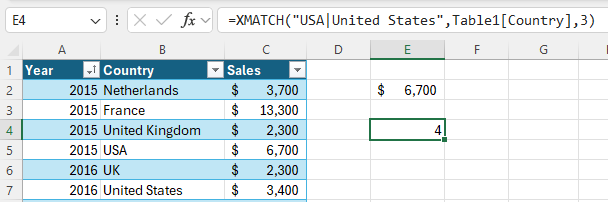
You can instead use XMATCH to return the position of the match.
=XMATCH(lookup_value,lookup_array,match_mode,search_mode)
Tips and tricks
- When writing regex patterns, you can use symbols called ‘tokens’ that match with a variety of characters. Here are some useful tokens to get you started:
- “[0-9]”: any numerical digit
- “[a-z]”: a character in the range of a to z
- “.”: any character
- “a”: the “a” character
- “a*”: zero or more “a”
- “a+”: one or more “a”
- Try asking Bing Copilot for regex patterns!
Availability
These functions are rolling out to Beta Channel users running:- Windows: Version 2408 (Build 17931.20000)
- Mac: Version 16.89 (Build 24080715)
Don’t have it yet? It’s probably us, not you.
Features are released over some time to ensure things are working smoothly. We highlight features that you may not have because they’re slowly releasing to larger numbers of Insiders. Sometimes we remove elements to further improve them based on your feedback. Though this is rare, we also reserve the option to pull a feature entirely out of the product, even if you, as an Insider, have had the opportunity to try it.Feedback
We want to hear from you! Please click Help > Feedback to submit your thoughts about these new functions. Source:

New regex modes for XLOOKUP and XMATCH
Allow XLOOKUP and XMATCH to match against parts of text in a cell, or by any other pattern of text that can be described with regex.