New version of UltraUXThemePatcher with W11 Insider Support


paradoxum

Sublimed
Member
Local time
11:56 AM
Posts
187
OS
Windows 11 [22H2] [22621.2428]
Just noticed; Homepage M. Hoefs - UltraUXThemePatcher

Changes 4.3.4 (2022-05-18)

  • Support for Windows 11 Insider Releases (incl. 25115 and later)
I uninstalled ThemePatcher and put some unsigned themes in after reverting to stock windows theme, installed it, it works and applies the themes, exactly like ThemePatcher, still the same issues with context menus everywhere though.
 

My Computer My Computer

At a glance

Windows 11 [22H2] [22621.2428]Intel Core i9-14900K 3.2 GHz 24-Core ProcessorG.Skill Trident Z5 RGB 32 GB (2 x 16 GB) DDR5...AMD Radeon RX 6950 XT
OS
Windows 11 [22H2] [22621.2428]
Computer type
PC/Desktop
Manufacturer/Model
Culture-Virus v7.0
CPU
Intel Core i9-14900K 3.2 GHz 24-Core Processor
Motherboard
Asus ROG MAXIMUS Z790 APEX ENCORE ATX LGA1700 Motherboard
Memory
G.Skill Trident Z5 RGB 32 GB (2 x 16 GB) DDR5-7200 CL34 Memory
Graphics Card(s)
AMD Radeon RX 6950 XT
Monitor(s) Displays
AOC CQ27G2U/BK
Screen Resolution
2560x1440
Hard Drives
M.2 1: Samsung SSD 990 PRO 2TB
M.2 2: Samsung SSD 970 EVO Plus 2TB
PSU
Corsair RM1000X SHIFT
Case
Phanteks NV9
Cooling
Custom Water / Direct-Die Cooling
Keyboard
Corsair K95 RGB PLATINUM XT Wired Gaming Keyboard
Mouse
ROCCAT LEADR Optical
Internet Speed
500mb Direct Fiber
Browser
Chrome
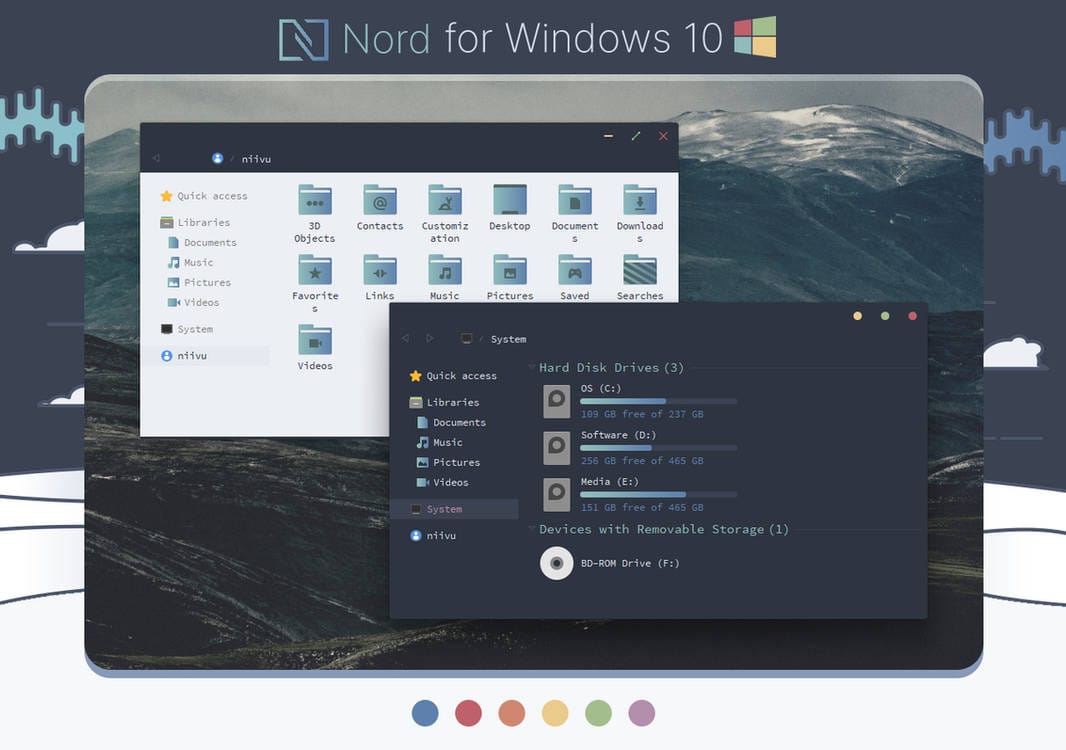
Does anyone know how you edit themes like this?

I can only find programs and info on creating 'basic' windows 10 themes.

Specifically, the only thing wrong with this theme in Win11 Insider is that right-click context menus for systray icons (seems to be mostly older programs, but some newer ones are broke too, probably whatever way they chose to handle the menu etc) is broken, as well as sometimes the right-click context menu in text-entry fields for copy/paste etc, which is very annoying because you can't see it at all.

So basically I want to try and remove the theming from the theme that themes the context menu, and leave the rest intact, because I know I won't be able to get it working properly, but disabling it would be fine just so it's functional.

Thanks
 

My Computer My Computer

At a glance

Windows 11 [22H2] [22621.2428]Intel Core i9-14900K 3.2 GHz 24-Core ProcessorG.Skill Trident Z5 RGB 32 GB (2 x 16 GB) DDR5...AMD Radeon RX 6950 XT
OS
Windows 11 [22H2] [22621.2428]
Computer type
PC/Desktop
Manufacturer/Model
Culture-Virus v7.0
CPU
Intel Core i9-14900K 3.2 GHz 24-Core Processor
Motherboard
Asus ROG MAXIMUS Z790 APEX ENCORE ATX LGA1700 Motherboard
Memory
G.Skill Trident Z5 RGB 32 GB (2 x 16 GB) DDR5-7200 CL34 Memory
Graphics Card(s)
AMD Radeon RX 6950 XT
Monitor(s) Displays
AOC CQ27G2U/BK
Screen Resolution
2560x1440
Hard Drives
M.2 1: Samsung SSD 990 PRO 2TB
M.2 2: Samsung SSD 970 EVO Plus 2TB
PSU
Corsair RM1000X SHIFT
Case
Phanteks NV9
Cooling
Custom Water / Direct-Die Cooling
Keyboard
Corsair K95 RGB PLATINUM XT Wired Gaming Keyboard
Mouse
ROCCAT LEADR Optical
Internet Speed
500mb Direct Fiber
Browser
Chrome
I have the same problem as you and I wish I could solve it. If we deleted all the styles from the context menu, would Windows 11 use the default values of airplane.msstyle?
 

My Computer My Computer

At a glance

Windows 11i5-8265U12 GBNVIDIA GeForce MX150 2GB
OS
Windows 11
Computer type
Laptop
Manufacturer/Model
ASUS Vivobook S15
CPU
i5-8265U
Memory
12 GB
Graphics Card(s)
NVIDIA GeForce MX150 2GB
Antivirus
NOD32
I have the same problem as you and I wish I could solve it. If we deleted all the styles from the context menu, would Windows 11 use the default values of airplane.msstyle?

That's exactly what I am hoping, but again I have no idea how to modify that stuff and I can not find ANY info anywhere on how to do it, just the 'dumb' themes.
 

My Computer My Computer

At a glance

Windows 11 [22H2] [22621.2428]Intel Core i9-14900K 3.2 GHz 24-Core ProcessorG.Skill Trident Z5 RGB 32 GB (2 x 16 GB) DDR5...AMD Radeon RX 6950 XT
OS
Windows 11 [22H2] [22621.2428]
Computer type
PC/Desktop
Manufacturer/Model
Culture-Virus v7.0
CPU
Intel Core i9-14900K 3.2 GHz 24-Core Processor
Motherboard
Asus ROG MAXIMUS Z790 APEX ENCORE ATX LGA1700 Motherboard
Memory
G.Skill Trident Z5 RGB 32 GB (2 x 16 GB) DDR5-7200 CL34 Memory
Graphics Card(s)
AMD Radeon RX 6950 XT
Monitor(s) Displays
AOC CQ27G2U/BK
Screen Resolution
2560x1440
Hard Drives
M.2 1: Samsung SSD 990 PRO 2TB
M.2 2: Samsung SSD 970 EVO Plus 2TB
PSU
Corsair RM1000X SHIFT
Case
Phanteks NV9
Cooling
Custom Water / Direct-Die Cooling
Keyboard
Corsair K95 RGB PLATINUM XT Wired Gaming Keyboard
Mouse
ROCCAT LEADR Optical
Internet Speed
500mb Direct Fiber
Browser
Chrome
.../but disabling it would be fine just so it's functional.

Well, if it should work, don't hesitate to report this issue to niivu.

He seems a busy guy, and lately pined a message concerning the amount of requests and not always useful messages he got.
But I'm sure he agrees when the request is valuable.

I wrote him for quick advice, and also to acknowledge him that his icons were for sale for 5$ on skinpacks.com without even mentioning him.
The following day, the pages concerned turned out into "404 Ooops !" - Pretty cool.

Apparently, UltraUXThemePatcher has a forum, but it's in German.
There's maybe some info in the GitHub issue section.

Apologies if I'm not much helpful about that, as I'm at the moment only studying how to patch icons.
The only closest subject I found about it is on virtualcustoms.net by 7tsp creators.
 
Last edited:

My Computers My Computers

  • At a glance

    Windows 10 & 11 LTSC 3xBoot 1809 21H2 24H2Intel Core i5-2550K8 GBNVIDIA GeForce GTS 450
    OS
    Windows 10 & 11 LTSC 3xBoot 1809 21H2 24H2
    Computer type
    PC/Desktop
    Manufacturer/Model
    Self-made 2013
    CPU
    Intel Core i5-2550K
    Motherboard
    Intel DH67CL
    Memory
    8 GB
    Graphics Card(s)
    NVIDIA GeForce GTS 450
    Sound Card
    EmuPMX
    Monitor(s) Displays
    16/9 Samsung + 4/3 iiyama
    Screen Resolution
    1360 x 768 + 1024 x 768
    Hard Drives
    Main SSD: Samsung 250 Gb
    Secondary HDDs: Western Digital
    (Purple 4 Tb + Blue 2 Tb) x2
    + Green 0.5 Tb
    Case
    Antec
    Keyboard
    Dell
    Mouse
    Advance
    Browser
    Brave
    Antivirus
    Windows Security
    Other Info
    + Portable Cleanup Utilities :

    AdwCleaner
    ZHP Cleaner (+Diag)
    Kaspersky Virus Removal Tool
    CCleaner
  • At a glance

    Windows 11 Home
    Operating System
    Windows 11 Home
    Computer type
    Laptop
    Manufacturer/Model
    HP
    Other Info
    Using W11 OS on customers' computers more and more often, and sometimes on my mum's new laptop.
Well, if it should work, don't hesitate to report this issue to niivu.

He seems a busy guy, and lately pined a message concerning the amount of requests and not always useful messages he got.
But I'm sure he agrees when the request is valuable.

I wrote him for quick advice, and also to acknowledge him that his icons were for sale for 5$ on skinpacks.com without even mentioning him.
The following day, the pages concerned turned out into "404 Ooops !" - Pretty cool.

Apologies if I'm not much helpful about that, as I'm at the moment only studying how to patch icons.
The only closest subject I found about it is on virtualcustoms.net by 7tsp creators.

No it's fine any help is appreciated. Pretty cool that he sorted that though. The thing is I'm not sure if this issue is the theme patcher, or the themes being designed for windows 10, and simply the functions and such do not match in windows 11 which is causing the bugs - because the patcher works as it should just like ThemePatcher, it lets you run unsigned themes - I doubt the method by which it lets them run would cause this (I've tried every variation in ThemePatcher and it's still the same).

Basically I think the theme itself needs to be updated. I found this tool GitHub - nptr/msstyleEditor: an editor for windows visual styles

But uhm...
1655181877686.png
No idea where the settings for systray /folder context menu items is, I was going to copy the settings from the stock aero theme. can't find any info via google either.
 

My Computer My Computer

At a glance

Windows 11 [22H2] [22621.2428]Intel Core i9-14900K 3.2 GHz 24-Core ProcessorG.Skill Trident Z5 RGB 32 GB (2 x 16 GB) DDR5...AMD Radeon RX 6950 XT
OS
Windows 11 [22H2] [22621.2428]
Computer type
PC/Desktop
Manufacturer/Model
Culture-Virus v7.0
CPU
Intel Core i9-14900K 3.2 GHz 24-Core Processor
Motherboard
Asus ROG MAXIMUS Z790 APEX ENCORE ATX LGA1700 Motherboard
Memory
G.Skill Trident Z5 RGB 32 GB (2 x 16 GB) DDR5-7200 CL34 Memory
Graphics Card(s)
AMD Radeon RX 6950 XT
Monitor(s) Displays
AOC CQ27G2U/BK
Screen Resolution
2560x1440
Hard Drives
M.2 1: Samsung SSD 990 PRO 2TB
M.2 2: Samsung SSD 970 EVO Plus 2TB
PSU
Corsair RM1000X SHIFT
Case
Phanteks NV9
Cooling
Custom Water / Direct-Die Cooling
Keyboard
Corsair K95 RGB PLATINUM XT Wired Gaming Keyboard
Mouse
ROCCAT LEADR Optical
Internet Speed
500mb Direct Fiber
Browser
Chrome

My Computers My Computers

  • At a glance

    Windows 10 & 11 LTSC 3xBoot 1809 21H2 24H2Intel Core i5-2550K8 GBNVIDIA GeForce GTS 450
    OS
    Windows 10 & 11 LTSC 3xBoot 1809 21H2 24H2
    Computer type
    PC/Desktop
    Manufacturer/Model
    Self-made 2013
    CPU
    Intel Core i5-2550K
    Motherboard
    Intel DH67CL
    Memory
    8 GB
    Graphics Card(s)
    NVIDIA GeForce GTS 450
    Sound Card
    EmuPMX
    Monitor(s) Displays
    16/9 Samsung + 4/3 iiyama
    Screen Resolution
    1360 x 768 + 1024 x 768
    Hard Drives
    Main SSD: Samsung 250 Gb
    Secondary HDDs: Western Digital
    (Purple 4 Tb + Blue 2 Tb) x2
    + Green 0.5 Tb
    Case
    Antec
    Keyboard
    Dell
    Mouse
    Advance
    Browser
    Brave
    Antivirus
    Windows Security
    Other Info
    + Portable Cleanup Utilities :

    AdwCleaner
    ZHP Cleaner (+Diag)
    Kaspersky Virus Removal Tool
    CCleaner
  • At a glance

    Windows 11 Home
    Operating System
    Windows 11 Home
    Computer type
    Laptop
    Manufacturer/Model
    HP
    Other Info
    Using W11 OS on customers' computers more and more often, and sometimes on my mum's new laptop.
No it's fine any help is appreciated. Pretty cool that he sorted that though. The thing is I'm not sure if this issue is the theme patcher, or the themes being designed for windows 10, and simply the functions and such do not match in windows 11 which is causing the bugs - because the patcher works as it should just like ThemePatcher, it lets you run unsigned themes - I doubt the method by which it lets them run would cause this (I've tried every variation in ThemePatcher and it's still the same).

Basically I think the theme itself needs to be updated. I found this tool GitHub - nptr/msstyleEditor: an editor for windows visual styles

But uhm...
View attachment 31379
No idea where the settings for systray /folder context menu items is, I was going to copy the settings from the stock aero theme. can't find any info via google either.
The context menu is in menu> ...> popupitem
 

My Computer My Computer

At a glance

Windows 11i5-8265U12 GBNVIDIA GeForce MX150 2GB
OS
Windows 11
Computer type
Laptop
Manufacturer/Model
ASUS Vivobook S15
CPU
i5-8265U
Memory
12 GB
Graphics Card(s)
NVIDIA GeForce MX150 2GB
Antivirus
NOD32

My Computer My Computer

At a glance

Windows 11 [22H2] [22621.2428]Intel Core i9-14900K 3.2 GHz 24-Core ProcessorG.Skill Trident Z5 RGB 32 GB (2 x 16 GB) DDR5...AMD Radeon RX 6950 XT
OS
Windows 11 [22H2] [22621.2428]
Computer type
PC/Desktop
Manufacturer/Model
Culture-Virus v7.0
CPU
Intel Core i9-14900K 3.2 GHz 24-Core Processor
Motherboard
Asus ROG MAXIMUS Z790 APEX ENCORE ATX LGA1700 Motherboard
Memory
G.Skill Trident Z5 RGB 32 GB (2 x 16 GB) DDR5-7200 CL34 Memory
Graphics Card(s)
AMD Radeon RX 6950 XT
Monitor(s) Displays
AOC CQ27G2U/BK
Screen Resolution
2560x1440
Hard Drives
M.2 1: Samsung SSD 990 PRO 2TB
M.2 2: Samsung SSD 970 EVO Plus 2TB
PSU
Corsair RM1000X SHIFT
Case
Phanteks NV9
Cooling
Custom Water / Direct-Die Cooling
Keyboard
Corsair K95 RGB PLATINUM XT Wired Gaming Keyboard
Mouse
ROCCAT LEADR Optical
Internet Speed
500mb Direct Fiber
Browser
Chrome
i found the problem I posted it on boromyr question tread. HERE
 

My Computer My Computer

At a glance

Custom Windows 11 Pro The Phoenix Lite OS Neo...Core i3 3220 Overclocked (circuit level hardw...8Gb DDR3 made by some random manufacturer mos...Intel HD 3000 dual display Integrated (using ...
OS
Custom Windows 11 Pro The Phoenix Lite OS Neon Gamer Edition
Computer type
PC/Desktop
Manufacturer/Model
(Modified) Dell Optiplex 3010 SFF
CPU
Core i3 3220 Overclocked (circuit level hardware hack)
Motherboard
OEM
Memory
8Gb DDR3 made by some random manufacturer most likely Samsung
Graphics Card(s)
Intel HD 3000 dual display Integrated (using an unsigned driver by choice)
Sound Card
OEM
Monitor(s) Displays
Genaric 20in HDTV as Main and HP 2009m LCD Monitor as second
Screen Resolution
1920x1080 main and 1024x1816 (Vertical with custom Resolution) for second
Hard Drives
120Gb Kingston SATA SSD, 1Tb Toshiba SATA HDD and 4Tb Western Digital usb storage
PSU
gesundheit
Case
A Small one
Cooling
I don't know some fan it spins
Keyboard
Run of the mill wireless Logitech
Mouse
Razer - Naga Classic Edition 19 Button Programable w\LED Effects
Internet Speed
don't know but i seen it pull 7Ms so fast I guess
Browser
Brave Beta
Antivirus
No we dont do that. I find that antivirus and antimalware software is more damaging and evasive than most of the thing they remove.
Other Info
Do not fear the registry, for contains all of the answers.

Latest Support Threads

Back
Top Bottom