Github:
Like a famously-hibernating animal coming out of a long sleep, Terminal Preview is back to eat a bunch of berries visit your machine with all of its new peculiarities.
We took a whole quarter off to focus on 1.23's stability, so this release might seem lighter than usual. That's only because we backported hundreds of changes to the now-stable 1.23!
We've changed how icons work, and now we let fragment authors include pixel shaders and stuff. It's a pretty cool release, so buckle up:
Features
- Command Palette will now be displayed (and searchable!) in both your native language and English (assuming your native UI language is not already English) (#19166) (#19130) (#19165) (#19148) (#19131)
- Icons, background images, and pixel shader paths can now refer to files relative to your settings file, whether you are a user or a fragment author. Learn more about distributing media resources with a fragment extension! (#19143) (#19223)
- Settings has a new Extensions page, where you can see (and disable!) the sources for all your profiles, color schemes and extra actions (#18559) (#18997)
- Terminal will now try to automatically detect hosts you may SSH to often (using your ssh_config) and generate a folder of quick-access SSH profiles (#18814) (#19239)
- The matchProfiles new tab menu entry now supports regular expressions (so you can match .*\.WSL, for example!) (#18654) (#18914)
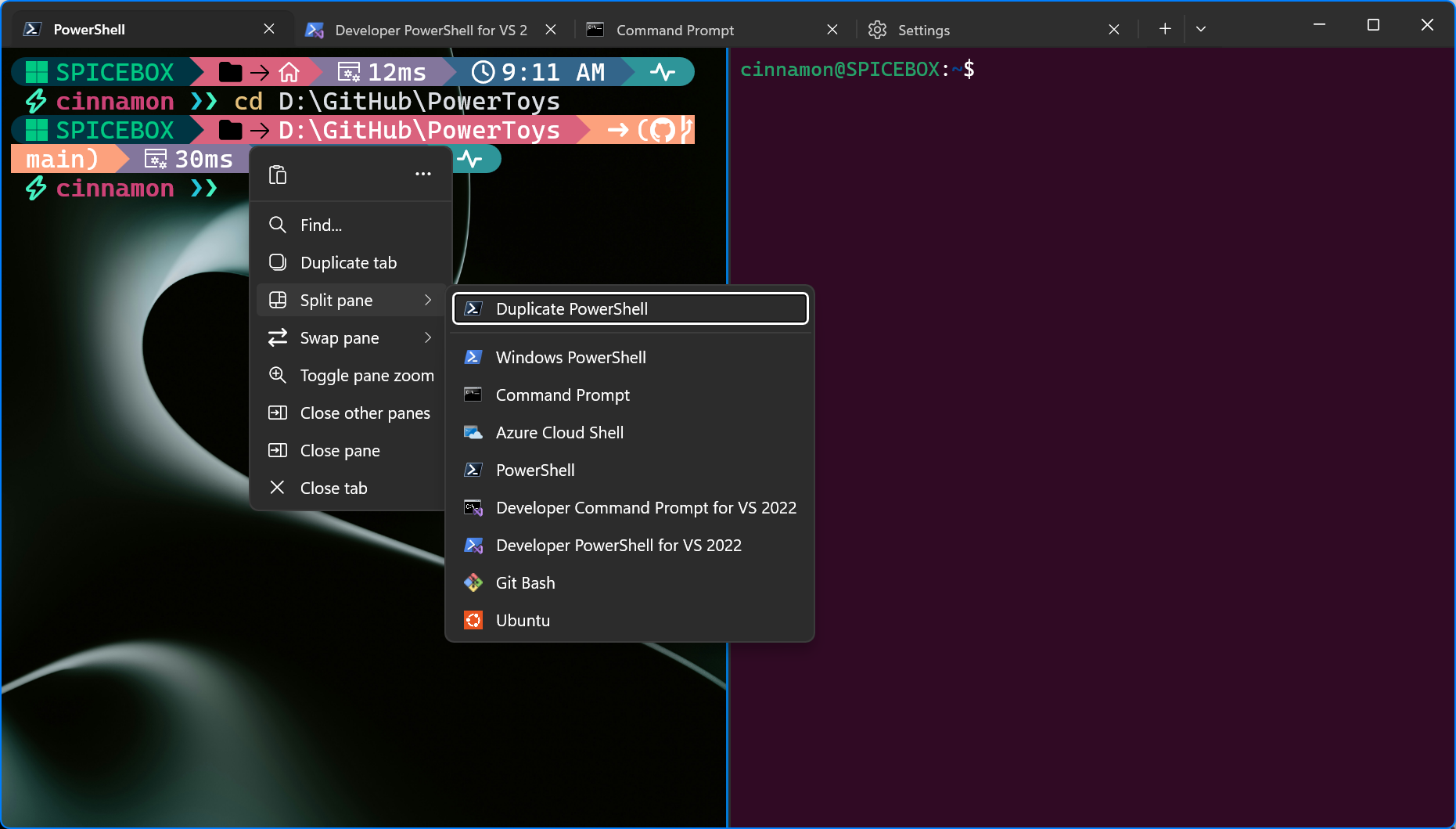
- The right-click context menu now affords you quick access to splitting, moving, zooming and closing panes! (#18126) (thanks @dm17ryk!)
- We now support DEC private mode 2026, Synchronized Output! This gives screen-buffered applications a chance to complete rendering a frame before we display it on the screen (#18826) (#18833)
- We've added another core color scheme, Dimidium, based on the CAM16 color model (#18563) (thanks @dofuuz!)
- You can now disable the Ctrl and Ctrl+Shift mouse wheel shortcuts to change the font size (zoom) and opacity of the terminal (#19127) (#19151) (thanks @paulinek13!)
Changes
- Bracketed pastes (via DEC private mode 2004) will no longer have trailing newlines removed; in addition, we have expanded the "multi-line paste warning" setting to allow you to enable it in more cases (#19067)
- Hovering over color scheme entries (and other previewable things) in the command palette will now also preview them (#18518) (thanks @eleadufresne!)
- If your system is using "high contrast" mode, Terminal will now automatically turn on perceptual color nudging (unless you have disabled it completely) (#17346)
- We've tightened up the settings UI and about dialog to make them more consistent and--dare we say?--more polished (#19001) (#19164) (#18993) (thanks @niels9001!)
- When you have session restoration enabled, we will now routinely save window layouts (not contents) to make sure Terminal comes back looking roughly the same in case of a crash (#18898)
- When you have snippet loading enabled, Terminal will now read .wt.json files from parent directories to the one you are in (as determined by OSC 9;9) (#18904)
- You can now configure an additional path translation mode, MinGW (mingw in JSON), which will map paths like C:\foo to C:/foo (#18759) (thanks @abutcher-gh!)
- The defaults profile will no longer remember values for the unsupported keys name, guid, source or commandline (#19225)
- We have added quick access and highly destructive "delete all my settings" and "delete all my cached info" buttons to the Settings UI (#18907)
Bug Fixes
- Sixels: color handling during scrolling should now behave more faithfully to the VT330 and VT340, filling with the active background color rather than the original one (in background select modes 0 and 2) (#18260) (thanks @j4james!)
- Tab icons, close on exit state and the bell settings will once again be reloaded when the settings file changes (#19217)
- Terminal will no longer occasionally miss hard line breaks in full-screen applications such as tmux (#18899)
- We accidentally left some duplicate data in the default settings file; it is no longer duplicated (#18527) (thanks @joca-bt!)
- We will no longer try to render bidirection text isolates LRI, RLI, FSI and PDI (#18942) (thanks @adalinesimonian!)
- WSL profiles containing local overrides for the PATH environment variable will no longer destroy the PATH inside WSL (#19211)
- Terminal will now actually spawn all processes in windows and tabs created consecutively from the same wt invocation (#19220)
- The "Default Terminal" selector will no longer be misaligned in some cases (#19072) (thanks @HO-COOH!)
- Turning "Use active terminal title as application title" (JSON showTerminalTitleInTitlebar) on and off will no longer result in your window titles becoming stuck (#19212)
- Terminal's launch size now takes into account any custom cell width and height you may have specified (#18862) (thanks @j4james!)
Performance and Reliability
- Buffers with a lot of scroll bar marks should be handled faster (#19242)
- Dragging invalid paths onto Terminal (actually, ones with incorrectly-constructed DataObjects) will no longer send your session into outer space (#19026) (thanks @jamespack!)
- Terminal will now attempt to delegate foreground priority to processes in the active tab (on some versions of Windows 11) (#19192)
- The experimental "reposition cursor on click" will no longer cause "snap on input" to, well, snap, as though input has been put in (#19182) (thanks @MengAiDev!)
- We have resolved a crash in context menu handling across multiple windows (#18854)
- Updating the title millions of times per second will no longer deadlock the UI (also, we improved our implementation of function debouncing across the board) (#19210)
Windows Console and WPF Control changes (pending release)
- conhost: selection and color search will no longer come up one character short (#19259)
- conhost: we will now cnap on input and output more reliably in WSL and PowerShell (#19247) (#17453)
- conhost: when Win32 Input Mode is enabled, we will request that it be disabled as part of PTY teardown (#19229)
- conhost: the console now supports OSC 52 (Manipulate Selection Data) to write to the clipboard (#18949) (thanks @j4james!)
- wpf: the WPF control no longer builds for .NET 6 and .NET Framework 4.8, opting instead for 8 and 4.7.2 (#19199)
Binary files inside the unpackaged distribution archive bear the version number 1.24.250825002-preview.
Asset Hashes
Since GitHub has started offering asset hashes on its own, this section will be removed from all future releases. Source and downloads:
Release Windows Terminal Preview v1.24.2372.0 · microsoft/terminal
Like a famously-hibernating animal coming out of a long sleep, Terminal Preview is back to eat a bunch of berries visit your machine with all of its new peculiarities. We took a whole quarter off t...
 github.com
Windows Terminal Preview 1.24 Release
We’re back with another Terminal release for you! This development cycle, we focused on overall quality of life improvements and bug fixes. We are also updating Windows Terminal stable to version 1.23, which will include all of the features from this previous blog post. Some notable features to...
 devblogs.microsoft.com
Microsoft Store:
Windows Terminal Preview - Free download and install on Windows | Microsoft Store
This is the preview build of the Windows Terminal, which contains the latest features as they are developed. The Windows Terminal is a modern, fast, efficient, powerful, and productive terminal application for users of command-line tools and shells like Command Prompt, PowerShell, and WSL. Its...
apps.microsoft.com
See also:

Check Windows Terminal Version in Windows 11
This tutorial will show you how to check the current version of Windows Terminal in Windows 10 and Windows 11. Windows Terminal is a modern host application for the command-line shells you already love, like Command Prompt, PowerShell, and bash (via Windows Subsystem for Linux (WSL)). Its main...
 www.elevenforum.com
Last edited: