Solved News and interests icon on taskbar moved after KB5041587


denvilledon

Well-known member
Member
Local time
11:14 AM
Posts
43
OS
Winsows 11 Pro
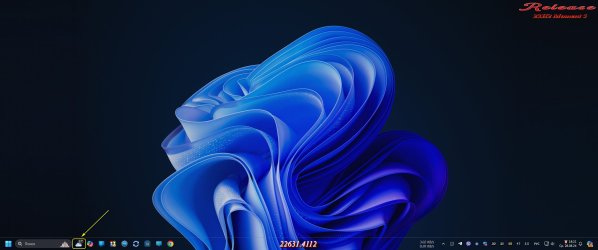
After installing KB5041587 which brought system to 23H2 22631.4112 the news and intrest icon (weather) on the task bar moved to right side of the taskbar. In settings I have the taskbar alighment set to left. All the other ICONS are on the left side except the news and intrest icon. If I change it to center the ICONS move to the center except the news and intrest which moves to the left side.. I would like it back to all the icons on the task bar on the left side. taskbar.jpg

 

My Computer My Computer

At a glance

Winsows 11 Pro11th Gen Intel(R) Core(TM) i7-1195G7 @ 2.90GHz16.00 GBIntel Tiger Lake-UP3 - GT2 Integrated Graphic...
OS
Winsows 11 Pro
Computer type
Laptop
Manufacturer/Model
HP HP Pavilion Laptop 15-eg1xxx
CPU
11th Gen Intel(R) Core(TM) i7-1195G7 @ 2.90GHz
Motherboard
HP 898C Intel Tiger Lake-UP3 PCH-LP
Memory
16.00 GB
Graphics Card(s)
Intel Tiger Lake-UP3 - GT2 Integrated Graphics [Hewlett-Packard
Sound Card
Intel Tiger Lake-U/Y PCH-LP - cAVS (Audio, Voice, Speech)
Monitor(s) Displays
L2251x Wide
Hard Drives
SAMSUNG MZVLQ1T0HBLB-00BH1
WDC WD20NMVW-11EDZS7
Hello, :alien:

Starting with Windows 11 build 22635.3420 (Beta) and build 26120.1542 (Dev), Microsoft is beginning to roll out a new position for the Widgets entry-point on left-aligned taskbars. The taskbar entry-point will move to the left of the systems tray and will be wider so you can see richer content from Widgets on your taskbar. When you launch the Widgets board, it will fly out from the right side instead of the left side.

Hopefully, they'll add an option to select which side you want it on instead.


My Computers My Computers

  • At a glance

    Windows 11 Pro for WorkstationsIntel i7-8700K 5 GHz64 GB (4x16GB) G.SKILL TridentZ RGB DDR4 3600...ASUS ROG-STRIX-GTX1080TI-O11G-GAMING (11GB GD...
    OS
    Windows 11 Pro for Workstations
    Computer type
    PC/Desktop
    Manufacturer/Model
    Custom self build
    CPU
    Intel i7-8700K 5 GHz
    Motherboard
    ASUS ROG Maximus XI Formula Z390
    Memory
    64 GB (4x16GB) G.SKILL TridentZ RGB DDR4 3600 MHz (F4-3600C18D-32GTZR)
    Graphics Card(s)
    ASUS ROG-STRIX-GTX1080TI-O11G-GAMING (11GB GDDR5X)
    Sound Card
    Integrated Digital Audio (S/PDIF)
    Monitor(s) Displays
    2 x Samsung Odyssey G75 27"
    Screen Resolution
    2560x1440
    Hard Drives
    1TB Samsung 990 PRO M.2,
    4TB Samsung 990 PRO M.2,
    TerraMaster F8 SSD Plus NAS
    PSU
    Seasonic Prime Titanium 850W
    Case
    Thermaltake Core P3 wall mounted
    Cooling
    Corsair Hydro H115i
    Keyboard
    Amazon Basics Wired Full Keyboard MD005
    Mouse
    Logitech MX Master 4
    Internet Speed
    2 Gbps Download and 100 Mbps Upload
    Browser
    Chrome and Edge
    Antivirus
    Microsoft Defender
    Other Info
    Logitech Z625 speaker system,
    Logitech BRIO 4K Pro webcam,
    HP Color LaserJet Pro MFP M477fdn,
    CyberPower CP1500PFCLCD
    Galaxy S23 Plus phone
  • At a glance

    Windows 11 ProSnapdragon X Elite (12 core) 3.42 GHz16 GB LPDDR5x-7467 MHz
    Operating System
    Windows 11 Pro
    Computer type
    Laptop
    Manufacturer/Model
    Surface Laptop 7 Copilot+ PC
    CPU
    Snapdragon X Elite (12 core) 3.42 GHz
    Memory
    16 GB LPDDR5x-7467 MHz
    Monitor(s) Displays
    15" HDR
    Screen Resolution
    2496 x 1664
    Hard Drives
    1 TB SSD
    Internet Speed
    Wi-Fi 7 and Bluetooth 5.4
    Browser
    Chrome and Edge
    Antivirus
    Microsoft Defender
After installing KB5041587 which brought system to 23H2 22631.4112 the news and intrest icon (weather) on the task bar moved to right side of the taskbar.
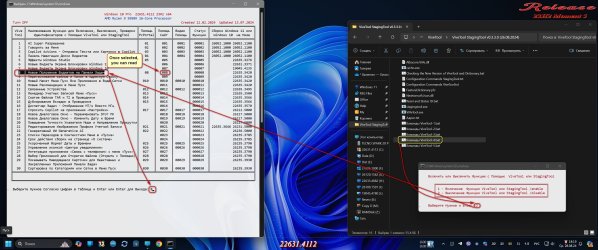
If there is a desire to get everything back, apply ViveTool vivetool /enable /id:48660958,48468527,48468541 identifiers.

Виджет-1.jpgВиджет-4.jpg
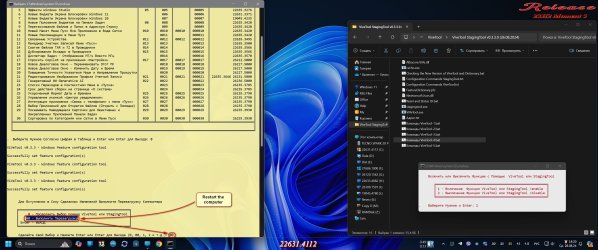
Or apply the ready bat file - ViveTool StagingTool v0.3.3.0 (26.08.2024).zip
Applying the file:
Виджет-2.jpgВиджет-3.jpg
 

My Computer My Computer

At a glance

Windows 11 Stable, Beta, Dev, CanaryAMD Ryzen 9 PRO 5950X128 GbIntel(R) Arc(TM) A380 Graphics (2 ГБ)
OS
Windows 11 Stable, Beta, Dev, Canary
Computer type
PC/Desktop
Manufacturer/Model
Micro-Star International Co., Ltd. MS-7D54
CPU
AMD Ryzen 9 PRO 5950X
Motherboard
MSI MAG X570S Tomahawk Max WiFi (MS-7D54) (2 PCI-E x1, 2 PCI-E x16, 2 M.2, 4 DDR4 DIMM, Audio, Video, 2.5GbE LAN, WiFi)
Memory
128 Gb
Graphics Card(s)
Intel(R) Arc(TM) A380 Graphics (2 ГБ)
Sound Card
Устройство с поддержкой High Definition Audio
Monitor(s) Displays
HP X34 [34" LCD] (6CM1300J5J) {2021}
Screen Resolution
3440x1440
Hard Drives
KINGSTON SFYRD2000G (2000 ГБ, PCI-E 4.0 x4)
PSU
Be Quiet! Dark Rock Pro 4
Case
Cooler Master HAF XB EVO
Internet Speed
1000 Mb/s
Browser
Chrome
Antivirus
Windows Defender
It appears to me that enough users didn't like the Win11 version and made it like Win10 version. A question will arise, will the Taskbar also be moveable like in Win10?
 

My Computers My Computers

  • At a glance

    Win11 Pro RTM Version 24H2 Build 26100.4202Intel Core i5 11th Gen. 2.40GHz12GB
    OS
    Win11 Pro RTM Version 24H2 Build 26100.4202
    Computer type
    Laptop
    Manufacturer/Model
    Dell Vostro 3400
    CPU
    Intel Core i5 11th Gen. 2.40GHz
    Memory
    12GB
    Hard Drives
    256GB SSD NVMe M.2
  • At a glance

    Win11 Pro RTM Version 24H2 Build 26100.4202Intel Core i5 10th Gen. 2.90GHz16GBOnboard, no VGA, using a DisplayPort-to-VGA a...
    Operating System
    Win11 Pro RTM Version 24H2 Build 26100.4202
    Computer type
    PC/Desktop
    Manufacturer/Model
    Dell Vostro 5890
    CPU
    Intel Core i5 10th Gen. 2.90GHz
    Memory
    16GB
    Graphics card(s)
    Onboard, no VGA, using a DisplayPort-to-VGA adapter
    Monitor(s) Displays
    24" Dell
    Hard Drives
    512GB SSD NVMe, 4TB Seagate HDD
    Browser
    Firefox, Edge
    Antivirus
    Windows Defender/Microsoft Security
Dronix, I guess if I don't like it I could just disable them with vivetool? Here are the settings now
[48660958]
Priority : ImageDefault (0)
State : Enabled (2)
Type : Override (0)

[48468527]
Priority : ImageOverride (15)
State : Enabled (2)
Type : Override (0)

[48468541]
Priority : ImageOverride (15)
State : Enabled (2)
Type : Override (0)
 

My Computer My Computer

At a glance

Winsows 11 Pro11th Gen Intel(R) Core(TM) i7-1195G7 @ 2.90GHz16.00 GBIntel Tiger Lake-UP3 - GT2 Integrated Graphic...
OS
Winsows 11 Pro
Computer type
Laptop
Manufacturer/Model
HP HP Pavilion Laptop 15-eg1xxx
CPU
11th Gen Intel(R) Core(TM) i7-1195G7 @ 2.90GHz
Motherboard
HP 898C Intel Tiger Lake-UP3 PCH-LP
Memory
16.00 GB
Graphics Card(s)
Intel Tiger Lake-UP3 - GT2 Integrated Graphics [Hewlett-Packard
Sound Card
Intel Tiger Lake-U/Y PCH-LP - cAVS (Audio, Voice, Speech)
Monitor(s) Displays
L2251x Wide
Hard Drives
SAMSUNG MZVLQ1T0HBLB-00BH1
WDC WD20NMVW-11EDZS7
I guess if I don't like it I could just disable them with vivetool?

Maybe I am misunderstanding your intention, but why can’t you just right click on the Taskbar, select Taskbar settings and toggle Widgets to off?
I did, it doesn’t show.
 

My Computers My Computers

  • At a glance

    Windows 11 Pro 25H2 Build 26200.9168Intel(R) Core(TM) i7-4770K CPU @ 3.50GHz32.0 GB of I forget and the box is in storage.Gigabyte nVidia GeForce GTX 1660 Super OC 6GB
    OS
    Windows 11 Pro 25H2 Build 26200.9168
    Computer type
    PC/Desktop
    Manufacturer/Model
    Sin-built 2013
    CPU
    Intel(R) Core(TM) i7-4770K CPU @ 3.50GHz
    Motherboard
    ASUS ROG Maximus VI Formula
    Memory
    32.0 GB of I forget and the box is in storage.
    Graphics Card(s)
    Gigabyte nVidia GeForce GTX 1660 Super OC 6GB
    Sound Card
    ROG SupremeFX Formula 8-Channel High Definition Audio
    Monitor(s) Displays
    5 x LG 25MS500-B - 1 x 24MK430H-B - 1 x Wacom Pro 22" Touch Screen Tablet
    Screen Resolution
    All over the place
    Hard Drives
    Too many to list. OS on Samsung 1TB 870 QVO SATA
    PSU
    Silverstone 1500
    Case
    NZXT Phantom 820 Full-Tower Case
    Cooling
    Noctua NH-D15 Elite Class Dual Tower CPU Cooler / 6 x EziDIY 120mm / 2 x Corsair 140mm somethings / 1 x 140mm Thermaltake something / 2 x 200mm Corsair.
    Keyboard
    Corsair K95 / Logitech diNovo Edge Wireless
    Mouse
    Logitech: G402 / G502 / Mx Masters / Mx Air Cordless
    Internet Speed
    2000/500Mbps
    Browser
    All sorts
    Antivirus
    Kaspersky Premium
    Other Info
    ㅤㅤㅤㅤㅤㅤㅤㅤㅤㅤㅤㅤㅤㅤㅤㅤㅤㅤㅤㅤㅤㅤㅤㅤㅤㅤㅤㅤㅤㅤㅤㅤㅤㅤㅤㅤㅤㅤㅤㅤ⠀⠀⠀⠀⠀⠀⠀⠀⠀⠀
    TP-Link BE9300 WiFi 7 Bluetooth 5.4 (Archer TBE550E)
    TP-Link TX201 V1 2.5GB Lan

    Grandstream HT812 - VoIP
    ASUS DSL-AX82U - Mesh
    ASUS RT-AC68U - Mesh
    ASUS RT-BE88U Router

    Brother MFC-L2880DW Printer

    I’m on a horse.
  • At a glance

    Windows 11 Pro 25H2 Build 26200.9168 (Wifes)13th Generation Intel® Core™ i5-1340P Process...16GB LPDDR5-52001x Intel® Iris® Xe Graphics
    Operating System
    Windows 11 Pro 25H2 Build 26200.9168 (Wifes)
    Computer type
    Laptop
    Manufacturer/Model
    LENOVO Yoga 7 14IRL8 - Type 82YL
    CPU
    13th Generation Intel® Core™ i5-1340P Processor(Core™ i5-1340P)
    Memory
    16GB LPDDR5-5200
    Graphics card(s)
    1x Intel® Iris® Xe Graphics
    Sound Card
    Optimized with Dolby Atmos®
    Screen Resolution
    QHD 2880 x 1800 OLED
    Hard Drives
    M.2 512 GB SSD PCIe
    Mouse
    Logiteck MX Master 3S
    Internet Speed
    2000/500
    Antivirus
    Defender / Malwarebytes
    Other Info
    …still on a horse.


    Wireless Network: Wi-Fi 6E 2x2 AX; Bluetooth® 5.1 or above
    Ports: 1x 1 Novo button; 2 in 1 Audio Combo jack; Micro SD Card Reader; HDMI 1.4b; 2 x USB Type-C (TBT4)
    USB 3.2 Gen 2 DP 1.4a
    PD 3.0); 1 x USB 3.2 Gen1 Type A
    Camera
    1x 1080P FHD IR/RGB Hybrid with Privacy Shutter and Dual Array Microphone
    Graphics
    1x Intel® Iris® Xe Graphics
    Monitor
    14" WUXGA
    Form Factor
    Convertible Notebook
  • Windows 11 Pro 25H2 Build 26200.9168 (Wifes)

    Yoga 7 2-in-1 14IML9 - Type 83DJ

    Processor: Intel® Core™ Ultra 7 155H Processor(Core™ Ultra 7 155H)

    Memory: 32GB LPD5X-7467

    Hard Drive: 1 TB SSD PCIe

    Wireless Network: 1x Wi-Fi 6E 2x2 AX; Bluetooth® 5.1 or above

    Ports: 1 x HDMI 2.1 TMDS; 1 x Novo Button; 1 x Combo Audio Jack
    2 x USB-C (USB 4.0)
    1 x USB-A 3.2 Gen 1

    Camera: 1080P FHD IR Hybrid with Dual Microphone

    Graphics: Intel® Arc™ Graphics

    Monitor: 14" 2.8K

    ...Where's my horse?

My Computers My Computers

  • At a glance

    Windows 11 Pro 25H2 Build 26200.9168Intel(R) Core(TM) i7-4770K CPU @ 3.50GHz32.0 GB of I forget and the box is in storage.Gigabyte nVidia GeForce GTX 1660 Super OC 6GB
    OS
    Windows 11 Pro 25H2 Build 26200.9168
    Computer type
    PC/Desktop
    Manufacturer/Model
    Sin-built 2013
    CPU
    Intel(R) Core(TM) i7-4770K CPU @ 3.50GHz
    Motherboard
    ASUS ROG Maximus VI Formula
    Memory
    32.0 GB of I forget and the box is in storage.
    Graphics Card(s)
    Gigabyte nVidia GeForce GTX 1660 Super OC 6GB
    Sound Card
    ROG SupremeFX Formula 8-Channel High Definition Audio
    Monitor(s) Displays
    5 x LG 25MS500-B - 1 x 24MK430H-B - 1 x Wacom Pro 22" Touch Screen Tablet
    Screen Resolution
    All over the place
    Hard Drives
    Too many to list. OS on Samsung 1TB 870 QVO SATA
    PSU
    Silverstone 1500
    Case
    NZXT Phantom 820 Full-Tower Case
    Cooling
    Noctua NH-D15 Elite Class Dual Tower CPU Cooler / 6 x EziDIY 120mm / 2 x Corsair 140mm somethings / 1 x 140mm Thermaltake something / 2 x 200mm Corsair.
    Keyboard
    Corsair K95 / Logitech diNovo Edge Wireless
    Mouse
    Logitech: G402 / G502 / Mx Masters / Mx Air Cordless
    Internet Speed
    2000/500Mbps
    Browser
    All sorts
    Antivirus
    Kaspersky Premium
    Other Info
    ㅤㅤㅤㅤㅤㅤㅤㅤㅤㅤㅤㅤㅤㅤㅤㅤㅤㅤㅤㅤㅤㅤㅤㅤㅤㅤㅤㅤㅤㅤㅤㅤㅤㅤㅤㅤㅤㅤㅤㅤ⠀⠀⠀⠀⠀⠀⠀⠀⠀⠀
    TP-Link BE9300 WiFi 7 Bluetooth 5.4 (Archer TBE550E)
    TP-Link TX201 V1 2.5GB Lan

    Grandstream HT812 - VoIP
    ASUS DSL-AX82U - Mesh
    ASUS RT-AC68U - Mesh
    ASUS RT-BE88U Router

    Brother MFC-L2880DW Printer

    I’m on a horse.
  • At a glance

    Windows 11 Pro 25H2 Build 26200.9168 (Wifes)13th Generation Intel® Core™ i5-1340P Process...16GB LPDDR5-52001x Intel® Iris® Xe Graphics
    Operating System
    Windows 11 Pro 25H2 Build 26200.9168 (Wifes)
    Computer type
    Laptop
    Manufacturer/Model
    LENOVO Yoga 7 14IRL8 - Type 82YL
    CPU
    13th Generation Intel® Core™ i5-1340P Processor(Core™ i5-1340P)
    Memory
    16GB LPDDR5-5200
    Graphics card(s)
    1x Intel® Iris® Xe Graphics
    Sound Card
    Optimized with Dolby Atmos®
    Screen Resolution
    QHD 2880 x 1800 OLED
    Hard Drives
    M.2 512 GB SSD PCIe
    Mouse
    Logiteck MX Master 3S
    Internet Speed
    2000/500
    Antivirus
    Defender / Malwarebytes
    Other Info
    …still on a horse.


    Wireless Network: Wi-Fi 6E 2x2 AX; Bluetooth® 5.1 or above
    Ports: 1x 1 Novo button; 2 in 1 Audio Combo jack; Micro SD Card Reader; HDMI 1.4b; 2 x USB Type-C (TBT4)
    USB 3.2 Gen 2 DP 1.4a
    PD 3.0); 1 x USB 3.2 Gen1 Type A
    Camera
    1x 1080P FHD IR/RGB Hybrid with Privacy Shutter and Dual Array Microphone
    Graphics
    1x Intel® Iris® Xe Graphics
    Monitor
    14" WUXGA
    Form Factor
    Convertible Notebook
  • Windows 11 Pro 25H2 Build 26200.9168 (Wifes)

    Yoga 7 2-in-1 14IML9 - Type 83DJ

    Processor: Intel® Core™ Ultra 7 155H Processor(Core™ Ultra 7 155H)

    Memory: 32GB LPD5X-7467

    Hard Drive: 1 TB SSD PCIe

    Wireless Network: 1x Wi-Fi 6E 2x2 AX; Bluetooth® 5.1 or above

    Ports: 1 x HDMI 2.1 TMDS; 1 x Novo Button; 1 x Combo Audio Jack
    2 x USB-C (USB 4.0)
    1 x USB-A 3.2 Gen 1

    Camera: 1080P FHD IR Hybrid with Dual Microphone

    Graphics: Intel® Arc™ Graphics

    Monitor: 14" 2.8K

    ...Where's my horse?
Dronix, I guess if I don't like it I could just disable them with vivetool?
Yes. Apply the move vivetool /disable /id command:48660958.4468527.448468541 to delete IDs or alternately
through the Reset and Status ID file.bat from the archive to fully assemble the ViveTool ID one at a time.
Or by applying the ViveTool-4 command file.bat, items 1, 8, 00 just reset the ViveToll IDs to the default position.
 

My Computer My Computer

At a glance

Windows 11 Stable, Beta, Dev, CanaryAMD Ryzen 9 PRO 5950X128 GbIntel(R) Arc(TM) A380 Graphics (2 ГБ)
OS
Windows 11 Stable, Beta, Dev, Canary
Computer type
PC/Desktop
Manufacturer/Model
Micro-Star International Co., Ltd. MS-7D54
CPU
AMD Ryzen 9 PRO 5950X
Motherboard
MSI MAG X570S Tomahawk Max WiFi (MS-7D54) (2 PCI-E x1, 2 PCI-E x16, 2 M.2, 4 DDR4 DIMM, Audio, Video, 2.5GbE LAN, WiFi)
Memory
128 Gb
Graphics Card(s)
Intel(R) Arc(TM) A380 Graphics (2 ГБ)
Sound Card
Устройство с поддержкой High Definition Audio
Monitor(s) Displays
HP X34 [34" LCD] (6CM1300J5J) {2021}
Screen Resolution
3440x1440
Hard Drives
KINGSTON SFYRD2000G (2000 ГБ, PCI-E 4.0 x4)
PSU
Be Quiet! Dark Rock Pro 4
Case
Cooler Master HAF XB EVO
Internet Speed
1000 Mb/s
Browser
Chrome
Antivirus
Windows Defender
I'm on the most recent update and no I am not even in the Dev Preview Channel at all...

Edition Windows 11 Pro
Version 23H2
Installed on ‎5/‎24/‎2024
OS build 22631.4112
Experience Windows Feature Experience Pack 1000.22700.1034.0

I've had this awful experience as well, and I also use StartAllBack, and they also released a new version and it also forces the widgets onto the right side without having any option to change back to left WITH compact mode and not the huge widget. At first, I noticed when I clicked my widgets it started opening on the right side instead but once I updated startallback it also looked like this.

Applying:
vivetool /disable /id:48660958,48468527,48468541 worked like a charm though after a restart.

Thanks guys so much!!!!

Edit: Want to reiterate this works fine if you want to move your widgets button to left and you AREN'T using StartAllBack as well.
 
Last edited:

My Computer My Computer

At a glance

Windows 11i5-12600kTridgent Z RGB DDR4 32GB 3600mhzEVGA RTX 3060 XC (12GB)
OS
Windows 11
Computer type
PC/Desktop
Manufacturer/Model
Built with my barehands from scratch I made the parts myself too believ it or NOT.
CPU
i5-12600k
Motherboard
MSI Pro Z690-A
Memory
Tridgent Z RGB DDR4 32GB 3600mhz
Graphics Card(s)
EVGA RTX 3060 XC (12GB)
Monitor(s) Displays
Acer V281K - IPS Panel 4k display with 3 or 4ms resposne time? Who cares I don't play CS. ;)
Screen Resolution
3840x2160
Hard Drives
Plenty of NVMe's because why not and one 8tb 7200RPM HDD for Storage
PSU
Corsair RM850x
Case
Thermaltake Nordic 10 GT
Cooling
I chuck icecubes in my PC here and there that seems to do the trick for now
Keyboard
Logitech G815
Mouse
Logitech G735
Internet Speed
500MBps Down and 200MBps up
Browser
Firefox / Chrome
Antivirus
Windows Defender and Malwarebytes rarely. Don't use AVG, etc it's for noobs
Other Info
If you're reading may god be with you because he surely ain't here
How do i move it back to the right?

Windows 11 24H2 26100.1876 i had it on the right with my taskbar to the left. i update windows and now is back to the left.
i dont want it there.

I try .\vivetool /disable or enable /id:48660958,48468527,48468541 but nothing works.
any ideas?>
 

My Computer My Computer

At a glance

windows 11
OS
windows 11
Computer type
PC/Desktop

My Computer My Computer

At a glance

Windows 11 Stable, Beta, Dev, CanaryAMD Ryzen 9 PRO 5950X128 GbIntel(R) Arc(TM) A380 Graphics (2 ГБ)
OS
Windows 11 Stable, Beta, Dev, Canary
Computer type
PC/Desktop
Manufacturer/Model
Micro-Star International Co., Ltd. MS-7D54
CPU
AMD Ryzen 9 PRO 5950X
Motherboard
MSI MAG X570S Tomahawk Max WiFi (MS-7D54) (2 PCI-E x1, 2 PCI-E x16, 2 M.2, 4 DDR4 DIMM, Audio, Video, 2.5GbE LAN, WiFi)
Memory
128 Gb
Graphics Card(s)
Intel(R) Arc(TM) A380 Graphics (2 ГБ)
Sound Card
Устройство с поддержкой High Definition Audio
Monitor(s) Displays
HP X34 [34" LCD] (6CM1300J5J) {2021}
Screen Resolution
3440x1440
Hard Drives
KINGSTON SFYRD2000G (2000 ГБ, PCI-E 4.0 x4)
PSU
Be Quiet! Dark Rock Pro 4
Case
Cooler Master HAF XB EVO
Internet Speed
1000 Mb/s
Browser
Chrome
Antivirus
Windows Defender
Back
Top Bottom