

- Local time
- 12:52 PM
- Posts
- 4,017
- OS
- Windows 11 Home 25H2
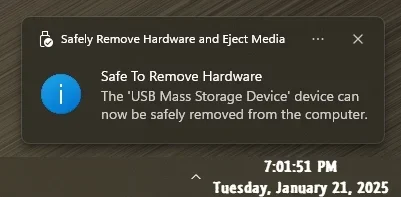
So on my main laptop, I don't get the notification any more when going to remove a usb stick after clicking on it. It doesn't come up with it's safe to remove your device (or whatever it says). With some usb sticks I can tell it's disconnected as the light goes out, so it is working, just not telling me when it's safe to remove. Also the bar with the option to click the usb stick to remove it - stays up and doesn't pop back down again, unless I click the arrow.
It works on all my other machines so just wondering why not on this one any more. Other than the fact I have a lot of files on it. Not that many programs on but have Capture One Pro and Powerdirector on there if that makes any difference.
It works on all my other machines so just wondering why not on this one any more. Other than the fact I have a lot of files on it. Not that many programs on but have Capture One Pro and Powerdirector on there if that makes any difference.
My Computers
-
At a glance
Windows 11 Home 25H2Core i5-1035G132gb- OS
- Windows 11 Home 25H2
- Computer type
- Laptop
- Manufacturer/Model
- HP Pavilion 14-ce3606sa
- CPU
- Core i5-1035G1
- Memory
- 32gb
- Hard Drives
- Samsung 870 evo sata ssd
- Cooling
- Could be better
- Internet Speed
- 50 mbps Starlink
- Browser
- Firefox
- Other Info
- Originally came installed with a 500gb H10 Optane ssd
-
At a glance
Windows 11 HomeIntel Core i5-1035G116gb- Operating System
- Windows 11 Home
- Computer type
- Laptop
- Manufacturer/Model
- HP Pavilion ce3606sa
- CPU
- Intel Core i5-1035G1
- Memory
- 16gb
- Hard Drives
- Hynix Gold P31 2TB
- Internet Speed
- 200mbps Starlink
- Browser
- Firefox
- Antivirus
- Defender

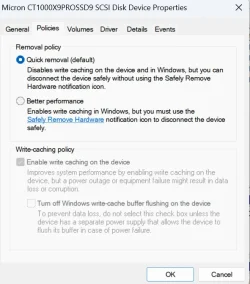


 I've only just found "optional drivers" today - the nested settings are not that easy to find things.






