- Local time
- 2:00 AM
- Posts
- 201
- OS
- Windows 11 Pro Version 26H2 (OS Build 26300.9711)
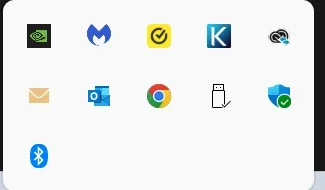
I recently purchased a new Dell ECT1250, Intel Ultra 7 265 (20 cores) processor, 32GB ram, and 2TB SSD, with Win 11 Pro 25H2 (OS Build 26200.7171) as a second computer, to replace a family Win10 Pro, i5 computer. I am setting it up before the changeover. I am trying to get the latest version of Google Chrome into the hidden system tray, so it will retain my sign-in to the Norton 360 AV program, even if I accidentally close Google Chrome. I have followed instructions on the 'net for placing Google Chrome into the startup menu, but to no avail. Meanwhile MS Edge is in the system tray. I have tried removing Edge, and that doesn't work either. Is there something I am missing? I am running the same version of Win 11 Pro on my main i9 computer, and I do have Chrome in the hidden system tray. Thanks.
- Windows Build/Version
- Win 11 Pro 25H2 (OS Build 26200.7171)
My Computers
-
At a glance
Windows 11 Pro Version 26H2 (OS Build 26300.9...i9 12th Generation64GBPNY 3060 12GB- OS
- Windows 11 Pro Version 26H2 (OS Build 26300.9711)
- Computer type
- PC/Desktop
- Manufacturer/Model
- Dell 8950
- CPU
- i9 12th Generation
- Memory
- 64GB
- Graphics Card(s)
- PNY 3060 12GB
- Monitor(s) Displays
- NEC EA27IU
- Screen Resolution
- 3840X2160
- Hard Drives
- SSD internal, external drives
- Cooling
- Advanced Air Cooling
- Keyboard
- Microsoft
- Mouse
- Logitech
- Internet Speed
- High-Speed
- Browser
- MS Edge
- Antivirus
- Norton 360
-
At a glance
Win 11 Pro 25H2 (OS Build 26200.9711)Intel Ultra 7 265 (20 cores) processor32GB DDR5 RamBuilt-in Intel UHD Graphics- Operating System
- Win 11 Pro 25H2 (OS Build 26200.9711)
- Computer type
- PC/Desktop
- Manufacturer/Model
- Dell Tower ECT1250
- CPU
- Intel Ultra 7 265 (20 cores) processor
- Memory
- 32GB DDR5 Ram
- Graphics card(s)
- Built-in Intel UHD Graphics
- Sound Card
- Built-in
- Screen Resolution
- 1920X1080
- Hard Drives
- 2TB internal SSD
- Case
- Tower