Notepad++ Hijacked by State-Sponsored Hackers Update


 Notepad Plus News:

2026-02-02

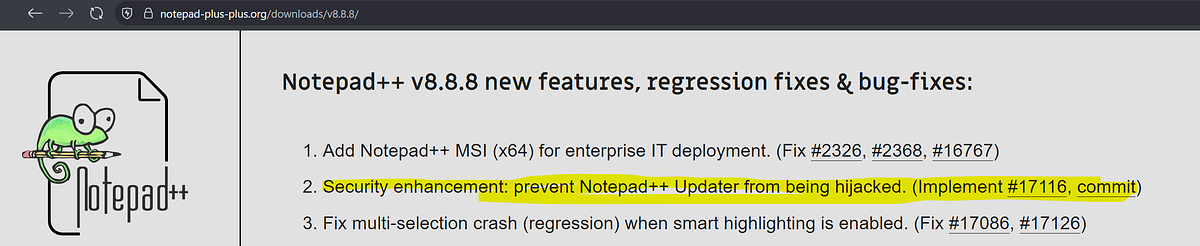
Following the security disclosure published in the v8.8.9 announcement Notepad++ v8.8.9 release: Vulnerability-fix | Notepad++ the investigation has continued in collaboration with external experts and with the full involvement of my (now former) shared hosting provider.

According to the analysis provided by the security experts, the attack involved infrastructure-level compromise that allowed malicious actors to intercept and redirect update traffic destined for notepad-plus-plus.org. The exact technical mechanism remains under investigation, though the compromise occured at the hosting provider level rather than through vulnerabilities in Notepad++ code itself. Traffic from certain targeted users was selectively redirected to attacker-controlled served malicious update manifests.

The incident began from June 2025. Multiple independaent security researchers have assessed that the threat acotor is likely a Chinese state-sponsored group, which would explain the highly selective targeting obseved during the campaign.

An incident-response (IR) plan was proposed by the security expert, and I facilitated direct communication between the hosting provider and the IR team. After the IR team engaged with the provider and reviewed the situation, I received the following detailed statement from the provider:

Dear Customer,

We want to further update you following the previous communication with us about your server compromise and further investigation with your incident response team.

We discovered the suspicious events in our logs, which indicate that the server (where your application https://notepad-plus-plus.org/update/getDownloadUrl.php was hosted until the 1st of December, 2025) could have been compromised.

As a precautionary measure, we immediately transferred all clients’ web hosting subscriptions from this server to a new server and continued our further investigation.

Here are the key finding points:

1. The shared hosting server in question was compromised until the 2nd of September, 2025. On this particular date, the server had scheduled maintenance where the kernel and firmware were updated. After this date, we could not identify any similar patterns in logs, and this indicates that bad actors have lost access to the server. We also find no evidence of similar patterns on any other shared hosting servers.

2. Even though the bad actors have lost access to the server from the 2nd of September, 2025, they maintained the credentials of our internal services existing on that server until the 2nd of December, which could have allowed the malicious actors to redirect some of the traffic going to https://notepad-plus-plus.org/getDownloadUrl.php to their own servers and return the updates download URL with compromised updates.

3. Based on our logs, we see no other clients hosted on this particular server being targeted. The bad actors specifically searched for Notepad++ domain with the goal to intercept the traffic to your website, as they might know the then-existing Notepad++ vulnerabilities related to insufficient update verification controls.

4. After concluding our research, the investigated security findings were no longer observed in the web hosting systems from the 2nd of December, 2025, and onwards, as:

* We have fixed vulnerabilities, which could have been used to target Notepad++. In particular, we do have logs indicating that the bad actor tried to re-exploit one of the fixed vulnerabilities; however, the attempt did not succeed after the fix was implemented.
* We have rotated all the credentials that bad actors could have obtained until the 2nd of September, 2025.
* We have checked the logs for similar patterns in all web hosting servers and couldn’t find any evidence of systems being compromised, exploited in a similar way, or data breached.

While we have rotated all the secrets on our end, below you will find the preventive actions you should take to maximize your security. However, if below actions have been done after the 2nd of December, 2025, no actions are needed from your side.

* Change credentials for SSH, FTP/SFTP, and MySQL database.
* Review administrator accounts for your WordPress sites (if you have any), change their passwords, and remove unnecessary users.
* Update your WordPress sites (if you have any) plugins, themes, and core version, and turn on automatic updates, if applicable.

We appreciate your cooperation and understanding. Please let us know in case you have any questions.

TL;DR
According to the former hosting provider, the shared hosting server was compromised until September 2, 2025. Even after losing server access, attackers maintained credentials to internal services until December 2, 2025, which allowed them to continue redirecting Notepad++ update traffic to malicious servers. The attackers specifically targeted Notepad++ domain with the goal of exploiting insufficient update verification controls that existed in older versions of Notepad++. All remediation and security hardening were completed by the provider by December 2, 2025, successfully blocking further attacker activity.

Note on timelines: The security expert’s analysis indicates the attack ceased on November 10, 2025, while the hosting provider’s statement shows potential attacker access until December 2, 2025. Based on both assessment, I estimate the overall compromise period spanned from June through December 2, 2025, when all attacker access was definitively terminated.

To address this severe security issue, the Notepad++ website has been migrated to a new hosting provider with significantly stronger security practices. Within Notepad++ itself, WinGup (the updater) was enhanced in v8.8.9 to verify both the certificate and the signature of the downloaded installer. Additionally, the XML returned by the update server is now signed (XMLDSig), and the certificate & signature verification will be enforced starting with upcoming v8.9.2, expected in about one month.

I deeply apologize to all users affected by this hijacking. I recommand downloading v8.9.1 (which includes the relevant security enhancement) and running the installer to update your Notepad++ manually.

With these changes and reinforcements, I believe the situation has been fully resolved. Fingers crossed.


 Source:


My Computers

System One System Two

  • OS
    Windows 11 Pro
    Computer type
    PC/Desktop
    Manufacturer/Model
    ASUS ROG Strix
  • Operating System
    Windows 11 Pro
    Computer type
    Laptop
    Manufacturer/Model
    ASUS VivoBook

My Computers

System One System Two

  • OS
    Windows11 Pro 26200.8655
    Computer type
    PC/Desktop
    Manufacturer/Model
    Dell Alienware Aurora R16
    CPU
    Intel Core i9 14900F (24 -Core, 68 MB Total Cache)
    Motherboard
    Dell Alienware
    Memory
    32GB DDR5
    Graphics Card(s)
    RTX 4080 Super w/581.95
    Sound Card
    Realtec
    Monitor(s) Displays
    Corsair XENEON 32QHD165
    Screen Resolution
    2560 X 1440
    Hard Drives
    1-2TB Samsung 990 Pro PCIe NVMe M2 SSD
    1-4TB Samsung 990 Pro PCIe NVMe M2 SSD
    PSU
    1000 Watt Platinum Dell
    Case
    Alienware
    Cooling
    Liquid Closed Loop
    Keyboard
    Corsair Strafe RGB
    Mouse
    Logitech MK270 Wireless
    Internet Speed
    100Gb's Down-20 Up
    Browser
    Firefox 152.0
    Antivirus
    Defender
    Other Info
    Very Quiet And Fast
    CyberPower UPS CP1500PFCLCD
  • Operating System
    PClinuxOS Mate (2025.7)
    Computer type
    PC/Desktop
    Manufacturer/Model
    Intel
    CPU
    13th Gen Inter(R) Core(TM) i3-1315U
    Motherboard
    Intel
    Memory
    64 GB DDR4 @3200 MHz.
    Graphics card(s)
    Internal
    Sound Card
    None
    Monitor(s) Displays
    Dell 2419HGCF
    Screen Resolution
    1920 X 1080
    Hard Drives
    SAMSUNG 980 PRO SSD 2TB, PCIe 4.0 M.2 2280
    PSU
    Chicony 30 Watt
    Case
    Small
    Keyboard
    Dell
    Mouse
    Razor
    Internet Speed
    1GB
    Browser
    Slimjet
Any safety measures to do to make sure my system isn't infected? .. I've had notepad++ for quite some time and I update it every time with winget.
 

My Computer

System One

  • OS
    Windows 11 Pro x64 25H2
    Computer type
    PC/Desktop
    CPU
    i9 14900k
    Motherboard
    MSI Z790 Gaming Plus WiFi-AMZ Gaming Motherboard
    Memory
    G.SKILL Ripjaws S5 Series DDR5 64gb 6400MT/s
    Graphics Card(s)
    NVIDIA Geforce RTX 5070 Ti OC 16gb
    Sound Card
    HyperX Cloud 3 Wireless Headset , Astro A50 Gen 5 Wireless Gaming Headset
    Monitor(s) Displays
    Acer Prediator x34 X5 QD-OLED Ultrawide 240hz, Portable Monitor 1920x1080p 60hz
    Screen Resolution
    3440x1440p , 1920x1080p
    Hard Drives
    Crucial P3 Plus 500gb NVMe M.2
    WD Black SN750 NVMe SSD 1TB
    WD Black SN7100 NVMe SSD 2TB
    Crucial MX500 1TB
    PSU
    Corsair RMx Series RM1000x ATX 3.1 PCIe 5.1
    Case
    MSI MAG PANO 100L PZ
    Cooling
    ID-COOLING FX360 Pro Liquid CPU Cooler
    Keyboard
    CORSAIR - K70 PRO TKL RGB Hall Effect Gaming Keyboard
    Mouse
    Glorious Model O 2 Pro Wireless Gaming Mouse
    Internet Speed
    https://www.speedtest.net/result/19091168380.png
    Browser
    Firefox
    Antivirus
    Windows Security
I've been updating it using UniGetUI. I don't know if that makes any difference. My last update was about a week ago.
 

My Computers

System One System Two

  • OS
    Windows 11 Pro 25H2 build: (26200.7623)
    Computer type
    Laptop
    Manufacturer/Model
    Microsoft Surface Pro
    Memory
    32GB
  • Operating System
    Microsoft 25H2 Pro
    Computer type
    Laptop
    Manufacturer/Model
    Dell Pro 14 - PC14250
    CPU
    Intel Core Ultra 7
    Memory
    64GB
    Graphics card(s)
    Intel Integrated Graphics
    Hard Drives
    Micron 1TB SSD
The developer of the popular open source text editor Notepad++ has confirmed that hackers hijacked the software to deliver malicious updates to users over the course of several months in 2025.

Think I would just remove that software app all together, at least for the time being.
 

My Computers

System One System Two

  • OS
    Windows 11 25H2
    Computer type
    Laptop
    Manufacturer/Model
    Alienware 18 Area-51
    CPU
    Intel Core Ultra 9 275HX (24-Core)
    Motherboard
    Alienware
    Memory
    64GB DDR5 6400MT/s
    Graphics Card(s)
    NVIDIA GeForce RTX 5080 and Intel UHD Graphics
    Sound Card
    Onboard, Realtek high-performance Audio chips (ALC3329 & ALC1708))
    Monitor(s) Displays
    300HZ 18-inch QHD 500 nit Comfort View+
    Screen Resolution
    2560 x 1600
    Hard Drives
    2TB NVMe M.2 PCIe Gen 5 SSD
    Case
    Magnesium Alloy
    Cooling
    Advanced Cryo-Tech Quad-Fan Cooling system & large vapor chamber
    Keyboard
    Cherry MX ultra low profile mechanical keyboard with per key AlienFX RGB lighting
    Mouse
    Logitech MX Master 4
    Browser
    Vivaldi (main), Firefox, Chrome, Edge
    Antivirus
    MS Defender and Malwarebytes Free
  • Operating System
    Windows 11 25H2
    Computer type
    Laptop
    Manufacturer/Model
    Microsoft Surface Laptop 7
    CPU
    Qualcomm Snapdragon X Elite (12 Core) ARM based CPU
    Motherboard
    Microsoft Corp.
    Memory
    16GB LPDDR5
    Graphics card(s)
    Qualcomm Adreno X1-85
    Sound Card
    Omnisonic speakers with Dolby Atmos spatial sound
    Monitor(s) Displays
    120 Hz 13.8-inch 600 nit PixelSense Flow touchscreen
    Screen Resolution
    2304x1536
    Hard Drives
    1TB NVMe Gen 4 SSD
    Case
    Anodized Aluminum
    Cooling
    Traditional active cooling fan system
    Keyboard
    Mechanical QWERTY, backlit when in use
    Mouse
    Logitech MX Master 4 and Surface Arc Mouse
    Browser
    Vivaldi (main), Firefox, Chrome, Edge
    Antivirus
    MS Defender and Malwarebytes Free
I recently updated to version 8.9.1 via PatcyMyPc, will this cause any problems? Should I uninstall the app? :/
 

My Computer

System One

  • OS
    Windows 11 Home - 26200.8246 - 25H2
    Computer type
    Laptop
    Manufacturer/Model
    Huawei Matebook D15 Ryzen 5500U 8GB / 512 SSD, Windows 11 Home Single Language
    CPU
    Ryzen 5500U
    Keyboard
    Logitech K380, G15
    Mouse
    Logi m350, Everest SM-620, Logitech G9, Lecoo WS210
    Browser
    Chrome (Desktop), Vivaldi (Mobile)
    Antivirus
    Windows Security, (Alternative Eset)
Most of the recommendations I'm reading about are saying:
• fully uninstall, (Revo), your current version,
• perform a system scan,
• clean install the latest version downloaded only from the authors site.

A major security breach was confirmed on February 2, 2026, revealing that the Notepad++ update infrastructure was hijacked by a suspected Chinese state-sponsored hacking group (Lotus Blossom) between June 2025 and December 2025.

Key Details of the Incident:
The Hijack: Attackers compromised the software's hosting infrastructure, not its source code. They intercepted update traffic and redirected some users to malicious servers.
Targeted Impact: The attack was highly selective, primarily targeting telecommunications and financial organizations. While millions of users have the app, only a small number of victims actually received the malicious "backdoored" updates.
Resolution: The vulnerability was patched in December 2025 with the release of version 8.8.9. The developer has since migrated to a new, more secure hosting provider and hardened the update process with digital signature verification.

Recommended Actions:
Uninstall: Completely remove your current version of Notepad++ to clear any potentially compromised files.
Clean Reinstall: Manually download the latest secure version (v8.9.1 or later) from the official Notepad++ website.
Security Scan: If you updated the app through its built-in updater during the compromise window (June–Dec 2025), run a full system scan using a tool like Malwarebytes or another reputable security suite.
 
Last edited:

My Computers

System One System Two

  • OS
    Windows 11 Pro
    Computer type
    PC/Desktop
    Manufacturer/Model
    ASUS ROG Strix
  • Operating System
    Windows 11 Pro
    Computer type
    Laptop
    Manufacturer/Model
    ASUS VivoBook
Is windows security enough for a scan? I don't really like using 3rd party anti virus malware software.
 

My Computer

System One

  • OS
    Windows 11 Pro x64 25H2
    Computer type
    PC/Desktop
    CPU
    i9 14900k
    Motherboard
    MSI Z790 Gaming Plus WiFi-AMZ Gaming Motherboard
    Memory
    G.SKILL Ripjaws S5 Series DDR5 64gb 6400MT/s
    Graphics Card(s)
    NVIDIA Geforce RTX 5070 Ti OC 16gb
    Sound Card
    HyperX Cloud 3 Wireless Headset , Astro A50 Gen 5 Wireless Gaming Headset
    Monitor(s) Displays
    Acer Prediator x34 X5 QD-OLED Ultrawide 240hz, Portable Monitor 1920x1080p 60hz
    Screen Resolution
    3440x1440p , 1920x1080p
    Hard Drives
    Crucial P3 Plus 500gb NVMe M.2
    WD Black SN750 NVMe SSD 1TB
    WD Black SN7100 NVMe SSD 2TB
    Crucial MX500 1TB
    PSU
    Corsair RMx Series RM1000x ATX 3.1 PCIe 5.1
    Case
    MSI MAG PANO 100L PZ
    Cooling
    ID-COOLING FX360 Pro Liquid CPU Cooler
    Keyboard
    CORSAIR - K70 PRO TKL RGB Hall Effect Gaming Keyboard
    Mouse
    Glorious Model O 2 Pro Wireless Gaming Mouse
    Internet Speed
    https://www.speedtest.net/result/19091168380.png
    Browser
    Firefox
    Antivirus
    Windows Security

My Computers

System One System Two

  • OS
    Windows 11 Pro
    Computer type
    PC/Desktop
    Manufacturer/Model
    ASUS ROG Strix
  • Operating System
    Windows 11 Pro
    Computer type
    Laptop
    Manufacturer/Model
    ASUS VivoBook
Odd, there's nothing in the changelog about security enhancements!

As mentioned in above article - this vulnerability was already fixed/cover in a previous version 8.8.9...

Following the security disclosure published in the v8.8.9 announcement Notepad++ v8.8.9 release: Vulnerability-fix | Notepad++ the investigation has continued in collaboration with external experts and with the full involvement of my (now former) shared hosting provider.

The app’s servers were compromised from June through December 2025. Since then 2x more versions were released:

Notepad++ v8.9 release: security enhancements


Notepad++ v8.9.1 release

 
Last edited:

My Computer

System One

  • OS
    WinDOS 25H2
    Computer type
    Laptop
    CPU
    Intel & AMD
    Memory
    SO-DIMM SK Hynix 15.8 GB Dual-Channel DDR4-2666 (2 x 8 GB) 1329MHz (19-19-19-43)
    Graphics Card(s)
    nVidia RTX 2060 6GB Mobile GPU (TU106M)
    Sound Card
    Onbord Realtek ALC1220
    Screen Resolution
    1920 x 1080
    Hard Drives
    1x Samsung PM981 NVMe PCIe M.2 512GB / 1x Seagate Expansion ST1000LM035 1TB
Thankfully, I always disabled the automatic updater, didn't use plugins, and only ever installed the portable .zip version after checking SHA256 and running AV on it. When installing from .zip, I have to be careful to exclude config.xml and shortcuts.xml from the extraction so they don't override MY customizations. I don't know why he includes those files. Anyway, I installed 8.9.1 today, and this time I excluded the whole "updater" folder from the extraction (and deleted the existing one from my installation folder). Turns out this is fine, and the UI adapts to its absence, removing updater-related items from the "?" menu and also Preferences->MISC. That's some pretty nice attention to detail.
 

My Computer

System One

  • OS
    Windows 11
Thankfully, I always disabled the automatic updater

This. The problem was with the updater (WinGup). If you use the portable version or install without the updater, you’re fine.

If you’re not in East Asia and in certain industries, you’re probably fine.

winget uses the full installer executable, not the updater, so that’s fine. Anything relying on winget would be fine.

Don did the right thing by being transparent about this as they knew things, but this doesn’t warrant panic.
 

My Computer

System One

  • OS
    Windows 11 Pro 25H2
    Computer type
    PC/Desktop
    Manufacturer/Model
    Intel NUC12WSHi7
    CPU
    12th Gen Core i7-1260P
    Motherboard
    NUC12WSBi7
    Memory
    64 GB Micron PC4-25600
    Graphics Card(s)
    Intel Iris Xe Graphics
    Sound Card
    on-board Realtek HD Audio
    Monitor(s) Displays
    Dell U3219Q
    Screen Resolution
    3840 x 2160
    Hard Drives
    Samsung SSD 990 PRO 1TB
    Crucial MX500 2 TB
    Antivirus
    Microsoft Defender
There is also this article from 2-Dec-2025, but hard to tell if it is related to the latest incident.
"Victims - I’ve only talked to a small number of victims. They are orgs with interests in East Asia. Activity appears very targeted. Victims report hands on keyboard recon activity, with activity starting around two months ago."

Also, based on the latest details emerging from Rapid7 ( The Chrysalis Backdoor: A Deep Dive into Lotus Blossom’s toolkit ), someone has produced this script to (only) quickly glance through the IoC's mentioned in the rapid7 article.


My Computer

System One

  • OS
    Win 11 25H2
    Computer type
    PC/Desktop
    Manufacturer/Model
    custom
    CPU
    intel i7-8700
    Motherboard
    Asus Z370 TUF Gaming
    Memory
    32Gb
    Graphics Card(s)
    Intel iGPU
    Sound Card
    Realtek
    Hard Drives
    Samsung
    PSU
    Corsair
    Cooling
    Fans
@das10 Yes, same issue/incident.
 

My Computer

System One

  • OS
    Windows 11 Pro 25H2
    Computer type
    PC/Desktop
    Manufacturer/Model
    Intel NUC12WSHi7
    CPU
    12th Gen Core i7-1260P
    Motherboard
    NUC12WSBi7
    Memory
    64 GB Micron PC4-25600
    Graphics Card(s)
    Intel Iris Xe Graphics
    Sound Card
    on-board Realtek HD Audio
    Monitor(s) Displays
    Dell U3219Q
    Screen Resolution
    3840 x 2160
    Hard Drives
    Samsung SSD 990 PRO 1TB
    Crucial MX500 2 TB
    Antivirus
    Microsoft Defender

Notepad++ 8.9.2

Changelog:
  • Security enhancement: Make updater check interity & authenticity of server-returned XML (XMLDsig). (Implement #17441)
  • Security enhancement: Fix untrusted search path vulnerability by launching explorer.exe (Fix CVE-2026-25926)
  • Security enhancement: Make auto-updater (WinGUp) even more secured. (Remove unsecured options, remove dll dependency, launch only signed program for plugin management)
  • Fix a plugin installation crash due to incorrect processing catch. (Fix #issue)
  • Add redact selection feature - Default: █, Modifier (Shift + Click): ●. (Fix #17363)
  • Fix context menu shortcut localization not aligning to the right regression. (Fix #17467)
 

My Computer

System One

  • OS
    Windows 11 Pro
    Computer type
    PC/Desktop
    Manufacturer/Model
    Custom Build
    CPU
    Intel Core i9 12900KF
    Motherboard
    ASUS ROG Maximus Z690 Hero
    Memory
    Corsair 64GB DDR5 Vengeance C40 5200Mhz
    Graphics Card(s)
    ASUS GeForce RTX 3090 ROG Strix OC 24GB
    Sound Card
    OnBoard
    Monitor(s) Displays
    Acer Predator XB323UGP 32" QHD G-SYNC-C 144Hz 1MS IPS LED
    Screen Resolution
    2560 x 1440
    Hard Drives
    1x Samsung 980 Pro Series Gen4 250GB M.2 NVMe
    1x Samsung 980 Pro Series Gen4 500GB M.2 NVMe
    2x Samsung 980 Pro Series Gen4 2TB M.2 NVMe
    PSU
    Corsair AX1200i 1200W 80PLUS Titanium Modular
    Case
    Corsair 4000D Black Case w/ Tempered Glass Side Panel
    Cooling
    Noctua NH-U12A Chromax Black CPU Cooler, 4x Noctua 120mm Fans
    Keyboard
    Logitech MK545
    Mouse
    Logitech MX Master 3
    Internet Speed
    Fixed Wireless 150mbps/75mbps
    Browser
    Firefox
    Antivirus
    Kaspersky
    Other Info
    Thrustmaster TS-PC RACER
    Fanatec CSL Elite Pedals with the Load Cell Kit
    Yamaha Amp with Bose Speakers

Notepad++ 8.9.3​

Regression fixes, bug-fixes & new improvements:**​

  1. Regression fix: a crash in User Defined Language. (Fix #17520)
  2. Regression fix: installing (or removing) plugin re-opens Notepad++ with permanent admin privilege (Fix #17540)
  3. Regression-fix: wrongly added parenthesis for some multi-bytes characters. (Fix #17521, #17802)
  4. Regression-fix: incorrect function list text display for non-UTF8 documents. (Fix #17847)
  5. Regression-fix: ProjectPanel Workspace text localization issue. (Fix community report)
  6. Regression-fix: Change History margin not enabled by default. (Fix comment repport)
  7. Regression-fix: Notepad++ update & plugin download fail behind corporate MITM proxies. (Fix community report)
  8. Security enhancement: Update cURL to v8.19.0 in auto-updater (WinGUp) to fix cURL security issue (CVE-2025-14819). (Fix #17869)
  9. Improve performance by migrating the XML parser from TinyXML to pugixml. (Fix #16175)
  10. Update Scintilla to 5.6.0 & Lexilla to 5.4.7. (Implement #17562)
  11. Fix the issue where printing caused Notepad++ to crash. (Fix #6126, #12645, community report #1, community report #2, community report #3)
  12. Fix Find in Files failing to search file content on disk. (Fix #16177, #17070)
  13. Add disableNppAutoUpdate.xml to disable auto-update when WinGUp (GUP.exe) is present. (Implement #17836)
  14. Fix a memory leak on exit. (Fix #17817)
  15. Fix installed auto-completion files not overwritten after update. (Fix #14749)
  16. Add model capacity of shortcuts.xml & contexMenu.xml for administration. (Fix #17872)
  17. Add an option to disable selected text drag-and-drop. (Fix #2571, #11335)
  18. Fix wrong theme-writing path for non-ProgramFiles installations. (Fix comment repport)
  19. Enhancement: prevent XML config files from being overwritten when updating portable package (copy/paste). (Fix #9755, #14279, #15120)
  20. Fix incomplete Find dialg tab translation when 1st opêned from Project Panels. (Fix community report)
  21. Fix Notepad++ spawning a new Windows Explorer process in Task Manager. (Fix comment repport)
  22. Add Function List & Autocompletion for D language. (Fix #17349)
 

My Computer

System One

  • OS
    Windows 11 Pro
    Computer type
    PC/Desktop
    Manufacturer/Model
    Custom Build
    CPU
    Intel Core i9 12900KF
    Motherboard
    ASUS ROG Maximus Z690 Hero
    Memory
    Corsair 64GB DDR5 Vengeance C40 5200Mhz
    Graphics Card(s)
    ASUS GeForce RTX 3090 ROG Strix OC 24GB
    Sound Card
    OnBoard
    Monitor(s) Displays
    Acer Predator XB323UGP 32" QHD G-SYNC-C 144Hz 1MS IPS LED
    Screen Resolution
    2560 x 1440
    Hard Drives
    1x Samsung 980 Pro Series Gen4 250GB M.2 NVMe
    1x Samsung 980 Pro Series Gen4 500GB M.2 NVMe
    2x Samsung 980 Pro Series Gen4 2TB M.2 NVMe
    PSU
    Corsair AX1200i 1200W 80PLUS Titanium Modular
    Case
    Corsair 4000D Black Case w/ Tempered Glass Side Panel
    Cooling
    Noctua NH-U12A Chromax Black CPU Cooler, 4x Noctua 120mm Fans
    Keyboard
    Logitech MK545
    Mouse
    Logitech MX Master 3
    Internet Speed
    Fixed Wireless 150mbps/75mbps
    Browser
    Firefox
    Antivirus
    Kaspersky
    Other Info
    Thrustmaster TS-PC RACER
    Fanatec CSL Elite Pedals with the Load Cell Kit
    Yamaha Amp with Bose Speakers

My Computers

System One System Two

  • OS
    Windows 11 Pro
    Computer type
    PC/Desktop
    Manufacturer/Model
    ASUS ROG Strix
  • Operating System
    Windows 11 Pro
    Computer type
    Laptop
    Manufacturer/Model
    ASUS VivoBook

My Computer

System One

  • OS
    Windows 11 Pro
    Computer type
    PC/Desktop
    Manufacturer/Model
    Custom Build
    CPU
    Intel Core i9 12900KF
    Motherboard
    ASUS ROG Maximus Z690 Hero
    Memory
    Corsair 64GB DDR5 Vengeance C40 5200Mhz
    Graphics Card(s)
    ASUS GeForce RTX 3090 ROG Strix OC 24GB
    Sound Card
    OnBoard
    Monitor(s) Displays
    Acer Predator XB323UGP 32" QHD G-SYNC-C 144Hz 1MS IPS LED
    Screen Resolution
    2560 x 1440
    Hard Drives
    1x Samsung 980 Pro Series Gen4 250GB M.2 NVMe
    1x Samsung 980 Pro Series Gen4 500GB M.2 NVMe
    2x Samsung 980 Pro Series Gen4 2TB M.2 NVMe
    PSU
    Corsair AX1200i 1200W 80PLUS Titanium Modular
    Case
    Corsair 4000D Black Case w/ Tempered Glass Side Panel
    Cooling
    Noctua NH-U12A Chromax Black CPU Cooler, 4x Noctua 120mm Fans
    Keyboard
    Logitech MK545
    Mouse
    Logitech MX Master 3
    Internet Speed
    Fixed Wireless 150mbps/75mbps
    Browser
    Firefox
    Antivirus
    Kaspersky
    Other Info
    Thrustmaster TS-PC RACER
    Fanatec CSL Elite Pedals with the Load Cell Kit
    Yamaha Amp with Bose Speakers
Back
Top Bottom