NuWinX


dacrone

Well-known member
Guru
VIP
Local time
12:03 PM
Posts
4,625
OS
Windows 11 Pro
working on building a completely new WinX menu from AHK. what it can do now:
1760148793436.webp

runs in tray
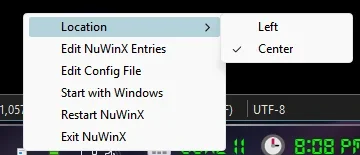
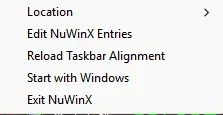
> right click menu shows above
> location can be set to Left or Center (to match where your start button layout is)
> if you change the taskbar from Left to Center layout or vice versa while script is running, use the Reload menu option to apply taskbar change.
> make it run at startup - when selected a second time it will remove it from startup
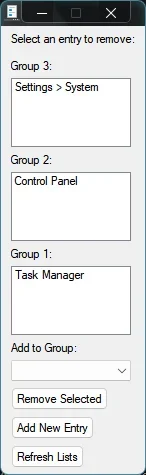
> you can edit the entries and add/remove any files (essentially you can use a .ps1 or .bat or .ahk to run anything you want that is not already a script or exe)
1760148972186.webp

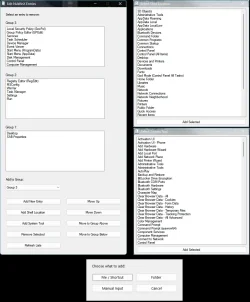
can add to group of choosing. after adding or removing, may need to Refresh List to update changes.

* right now it is triggered with Win+X keys

** still to come:
* Dark Mode
* Right Click Start Button to launch too
* Ability to reorder items in groups
 
Last edited:

My Computer

System One

  • OS
    Windows 11 Pro
left this project some time ago but decided to come back to it and improve it (drastically haha).

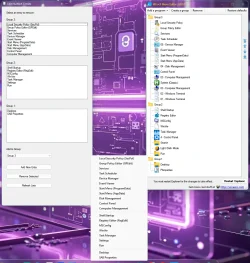
NuWinX on the left, Winaero editor on the right. Almost complete, just a few more cosmetic tweaks and i will re-release it. will be able to directly edit the config.ini for manual addition or removal of entries as well. i'm adding a rename function and the reorder/move to other group function as well (to closely mimic the old winaero winx editor).

1781151094577.webp
 

My Computer

System One

  • OS
    Windows 11 Pro
working on building a completely new WinX menu from AHK. what it can do now:

A good Win+X menu editor is useful.

Apart from Winaero Win+X Menu Editor, Yamicsoft make a good Win+X menu editor, but it's not free. Yours should be handy when it's finished. :-)
 

My Computers

System One System Two

  • OS
    Windows 11 Pro
    Computer type
    PC/Desktop
    Manufacturer/Model
    Stigg's Build
    CPU
    Intel Core i9-10900X
    Motherboard
    GIGABYTE X299X DESIGNARE 10G
    Memory
    Corsair 64 GB (4 x 16 GB) CMW64GX4M4C3000C15 Vengeance RGB Pro 3000Mhz DDR4
    Graphics Card(s)
    GIGABYTE GeForce GTX 1660 Super Mini ITX 6 GB OC
    Sound Card
    Realtek ALC1220
    Monitor(s) Displays
    Samsung 27" FHD LED FreeSync Gaming Monitor (LS27F350FHEXXY)
    Screen Resolution
    1920 x 1080
    Hard Drives
    Samsung 970 Pro Series 1TB M.2 2280 NVMe SSD
    Western Digital Red Pro WD8003FFBX-68B9AN0 8 TB, 7200 RPM, SATA-III
    Western Digital Red Pro WD8003FFBX-68B9AN0 8 TB, 7200 RPM, SATA-III
    PSU
    Corsair HX1200 1200W 80 Plus Platinum
    Case
    Fractal Design Define 7 Black Solid Case
    Cooling
    Noctua NH-D15 Chromax Black
    Keyboard
    Razer Ornata V2
    Mouse
    Razer DeathAdder Essential
    Internet Speed
    FTTN 100Mbps / 40Mbps
    Browser
    Mozilla Firefox
    Antivirus
    N/A
    Other Info
    Logitech BRIO 4k Ultra HD USB-C Webcam
  • Operating System
    Windows 10 Pro
    Computer type
    Laptop
    Manufacturer/Model
    ASUS ROG Zephyrus M GM501GS
    CPU
    Core i7-8750H
    Motherboard
    Zephyrus M GM501GS
    Memory
    SK Hynix 32 GB (2 x 16 GB) HMA82GS6CJR8N-VK 16 GB DDR4-2666 DDR4 SDRAM
    Graphics card(s)
    NVIDIA GeForce GTX 1070
    Sound Card
    Realtek ALC294
    Monitor(s) Displays
    AU Optronics B156HAN07.1 [15.6" LCD]
    Screen Resolution
    1920 x 1080
    Hard Drives
    Samsung MZVKW512HMJP-00000 512 GB, PCI-E 3.0 x4
    Samsung SSD 860 QVO 4TB 4 TB, SATA-III
    PSU
    N/A
    Case
    N/A
    Cooling
    N/A
    Keyboard
    PC/AT Enhanced PS2 Keyboard (101/102-Key)
    Mouse
    Razer DeathAdder Essential
    Internet Speed
    FTTN 100Mbps / 40Mbps
    Browser
    Mozilla Firefox
    Antivirus
    N/A
    Other Info
    USB2.0 HD UVC Webcam
A good Win+X menu editor is useful.

Apart from Winaero Win+X Menu Editor, Yamicsoft make a good Win+X menu editor, but it's not free. Yours should be handy when it's finished. :-)
1781208781787.webp

want to beta test it? i ran through it all semi-quick (my testing, not the code). i have added shell locations, system tools (some cname and some msc), the ability to add files / shortcuts, Folders or manually type a path/command to execute. you can now shift them between groups and rearrange the items in each group. i'd like some feedback on what else should be implemented (that majority of users would find useful).

still to come - direct editing of .ini for faster add/remove via bypassing gui (not hard to implement, just forgot today...
- will add more CNAME, URI, and CLSIDs to the lists
- right click start button to launch script menu too (right now its only win+x)

*as this generates it's own script menu and does not edit the real winx menu, there is no restart of explorer required.
 

Attachments

My Computer

System One

  • OS
    Windows 11 Pro
added:

edit ini directly
indicator for winx menu alignment

1781226711888.webp

original attachment has been updated.
 

My Computer

System One

  • OS
    Windows 11 Pro
Back
Top Bottom