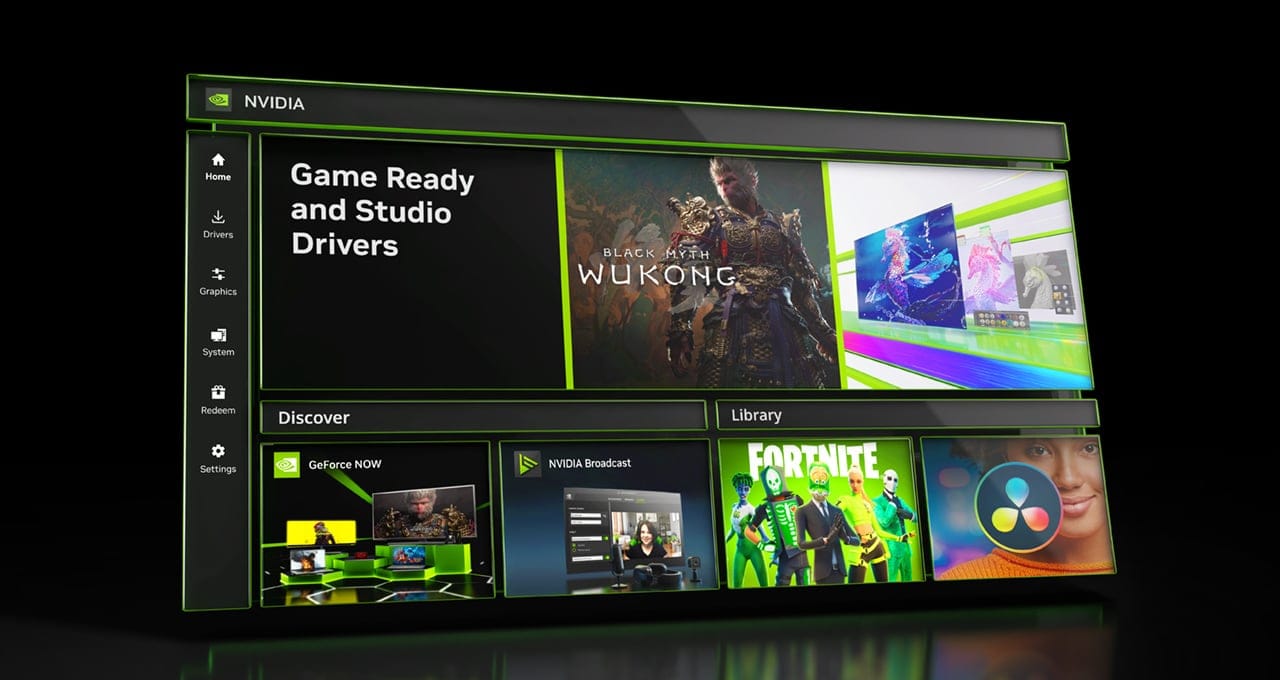
NVIDIA App Officially Released


 NVIDIA GeForce News:

NVIDIA app is the essential companion for users with NVIDIA GPUs in their PCs and laptops. Whether you're a gaming enthusiast or a content creator, NVIDIA app simplifies the process of keeping your PC updated with the latest GeForce Game Ready and NVIDIA Studio drivers, and enables quick discovery and installation of NVIDIA applications like GeForce NOW and NVIDIA Broadcast.

Featuring a unified GPU control center, NVIDIA app allows fine-tuning of game, program, and driver settings from a single place, while introducing a redesigned in-game overlay for convenient access to powerful gameplay recording tools, performance monitoring overlays, and game enhancing filters, including innovative new AI-powered filters for RTX users.

The NVIDIA app incorporates many of the top features from GeForce Experience and RTX Experience, includes an optional login to redeem bundles and rewards, and introduces new RTX capabilities to elevate your gaming and creative experiences.

Following the release of several betas this year, we’re officially releasing NVIDIA app today. Download the new NVIDIA app here.


NVIDIA app is designed to be fast and responsive. When compared to GeForce Experience, it installs in half the time, offers a modernized UI that is 50% more responsive, and includes numerous features via easily navigated sub-sections:
  • Home: Access every element of NVIDIA app with a few clicks, load and configure your most recently used programs, view the latest NVIDIA announcements, and download other NVIDIA applications
  • NVIDIA Overlay: Redesigned and enhanced, now boasting 4K 120 FPS AV1 video capture, AI-powered RTX game filters, a new Gallery to sort and view your videos and screenshots, and a highly customizable statistic overlay for viewing hardware stats on the desktop and during gameplay
  • Drivers: Redesigned with bullet points to call out “what’s new” and “what’s fixed,” single carousel to access driver-related articles on games and technologies, and ability to rollback to previous drivers.
  • Graphics: Optimal Playable Settings and relevant NVIDIA Control Panel options are now accessible in a unified interface.
  • System: Configure your displays, enable G-SYNC, enhance local and streamed videos with our AI-powered Video Super Resolution and High Dynamic Range features, tune your GPU's performance for faster frame rates, and view rig details
  • Redeem: Claim GeForce Rewards for your favorite games and apps, including our newly-launched GeForce Reward for the game THRONE AND LIBERTY
  • Settings: Change NVIDIA app's language, adjust app options, configure notifications, and more.
Continue reading for a full tour of NVIDIA app and its many features.


 Read more:

 
Does it finally uninstall NVIDIA Control Panel?

EDIT: Ah not yet
 

My Computer My Computer

At a glance

Windows 11 ProAMD Ryzen™ 9 7950XG.SKILL Trident Z5 Neo RGB 64GB (2 x 32GB)MSI GeForce RTX™ 4090 SUPRIM LIQUID X 24G
OS
Windows 11 Pro
Computer type
PC/Desktop
CPU
AMD Ryzen™ 9 7950X
Motherboard
Asus ROG Crosshair X670E Extreme
Memory
G.SKILL Trident Z5 Neo RGB 64GB (2 x 32GB)
Graphics Card(s)
MSI GeForce RTX™ 4090 SUPRIM LIQUID X 24G
Monitor(s) Displays
Asus ROG Swift PG32UQX, Dell G3223Q
Screen Resolution
3840 x 2160
Hard Drives
Samsung 990 PRO PCIe 4.0 SSD 2TB
PSU
MSI MPG A1000G PCIE5 1000 Watt 80 Plus Gold ATX
Case
Fractal Design Meshify 2 Black
Cooling
ARCTIC Liquid Freezer II 360 A-RGB
Keyboard
Logitech MX Keys S
Mouse
Logitech MX Master 3S
“Essential”? I would doubt it. I’m sure some people will find it useful though.
 

My Computers My Computers

  • At a glance

    Windows 11 Pro 25H2 Build 26200.9168Intel(R) Core(TM) i7-4770K CPU @ 3.50GHz32.0 GB of I forget and the box is in storage.Gigabyte nVidia GeForce GTX 1660 Super OC 6GB
    OS
    Windows 11 Pro 25H2 Build 26200.9168
    Computer type
    PC/Desktop
    Manufacturer/Model
    Sin-built 2013
    CPU
    Intel(R) Core(TM) i7-4770K CPU @ 3.50GHz
    Motherboard
    ASUS ROG Maximus VI Formula
    Memory
    32.0 GB of I forget and the box is in storage.
    Graphics Card(s)
    Gigabyte nVidia GeForce GTX 1660 Super OC 6GB
    Sound Card
    ROG SupremeFX Formula 8-Channel High Definition Audio
    Monitor(s) Displays
    5 x LG 25MS500-B - 1 x 24MK430H-B - 1 x Wacom Pro 22" Touch Screen Tablet
    Screen Resolution
    All over the place
    Hard Drives
    Too many to list. OS on Samsung 1TB 870 QVO SATA
    PSU
    Silverstone 1500
    Case
    NZXT Phantom 820 Full-Tower Case
    Cooling
    Noctua NH-D15 Elite Class Dual Tower CPU Cooler / 6 x EziDIY 120mm / 2 x Corsair 140mm somethings / 1 x 140mm Thermaltake something / 2 x 200mm Corsair.
    Keyboard
    Corsair K95 / Logitech diNovo Edge Wireless
    Mouse
    Logitech: G402 / G502 / Mx Masters / Mx Air Cordless
    Internet Speed
    2000/500Mbps
    Browser
    All sorts
    Antivirus
    Kaspersky Premium
    Other Info
    ㅤㅤㅤㅤㅤㅤㅤㅤㅤㅤㅤㅤㅤㅤㅤㅤㅤㅤㅤㅤㅤㅤㅤㅤㅤㅤㅤㅤㅤㅤㅤㅤㅤㅤㅤㅤㅤㅤㅤㅤ⠀⠀⠀⠀⠀⠀⠀⠀⠀⠀
    TP-Link BE9300 WiFi 7 Bluetooth 5.4 (Archer TBE550E)
    TP-Link TX201 V1 2.5GB Lan

    Grandstream HT812 - VoIP
    ASUS DSL-AX82U - Mesh
    ASUS RT-AC68U - Mesh
    ASUS RT-BE88U Router

    Brother MFC-L2880DW Printer

    I’m on a horse.
  • At a glance

    Windows 11 Pro 25H2 Build 26200.9168 (Wifes)13th Generation Intel® Core™ i5-1340P Process...16GB LPDDR5-52001x Intel® Iris® Xe Graphics
    Operating System
    Windows 11 Pro 25H2 Build 26200.9168 (Wifes)
    Computer type
    Laptop
    Manufacturer/Model
    LENOVO Yoga 7 14IRL8 - Type 82YL
    CPU
    13th Generation Intel® Core™ i5-1340P Processor(Core™ i5-1340P)
    Memory
    16GB LPDDR5-5200
    Graphics card(s)
    1x Intel® Iris® Xe Graphics
    Sound Card
    Optimized with Dolby Atmos®
    Screen Resolution
    QHD 2880 x 1800 OLED
    Hard Drives
    M.2 512 GB SSD PCIe
    Mouse
    Logiteck MX Master 3S
    Internet Speed
    2000/500
    Antivirus
    Defender / Malwarebytes
    Other Info
    …still on a horse.


    Wireless Network: Wi-Fi 6E 2x2 AX; Bluetooth® 5.1 or above
    Ports: 1x 1 Novo button; 2 in 1 Audio Combo jack; Micro SD Card Reader; HDMI 1.4b; 2 x USB Type-C (TBT4)
    USB 3.2 Gen 2 DP 1.4a
    PD 3.0); 1 x USB 3.2 Gen1 Type A
    Camera
    1x 1080P FHD IR/RGB Hybrid with Privacy Shutter and Dual Array Microphone
    Graphics
    1x Intel® Iris® Xe Graphics
    Monitor
    14" WUXGA
    Form Factor
    Convertible Notebook
  • Windows 11 Pro 25H2 Build 26200.9168 (Wifes)

    Yoga 7 2-in-1 14IML9 - Type 83DJ

    Processor: Intel® Core™ Ultra 7 155H Processor(Core™ Ultra 7 155H)

    Memory: 32GB LPD5X-7467

    Hard Drive: 1 TB SSD PCIe

    Wireless Network: 1x Wi-Fi 6E 2x2 AX; Bluetooth® 5.1 or above

    Ports: 1 x HDMI 2.1 TMDS; 1 x Novo Button; 1 x Combo Audio Jack
    2 x USB-C (USB 4.0)
    1 x USB-A 3.2 Gen 1

    Camera: 1080P FHD IR Hybrid with Dual Microphone

    Graphics: Intel® Arc™ Graphics

    Monitor: 14" 2.8K

    ...Where's my horse?
Does it finally uninstall NVIDIA Control Panel?

EDIT: Ah not yet

From Tech Powerup:

I asked NVIDIA about their plans for the various control panel products and they answered that NVIDIA App will be included in the default driver package download this month, as soon as it's out of Beta. It will also replace GeForce Experience: "you can only have NVIDIA App or GFE, and NVIDIA App is now our recommendation" When asked about the legacy control panel, NVIDIA responsed that "Control Panel will continue to be a separate app as we continue to port features" but also that the App will "eventually" replace it.
 

My Computers My Computers

  • At a glance

    Windows 11 LTSC 24H2 (26100.4484)Ryzen 7 5800H32GB (RipJaws DDR4 3200)GeForce RTX 3060
    OS
    Windows 11 LTSC 24H2 (26100.4484)
    Computer type
    Laptop
    Manufacturer/Model
    Lenovo Legion 5 (17ach6h)
    CPU
    Ryzen 7 5800H
    Memory
    32GB (RipJaws DDR4 3200)
    Graphics Card(s)
    GeForce RTX 3060
    Monitor(s) Displays
    Philips 34" Ultrawide (343e2e)
    Screen Resolution
    2560x1080
    Hard Drives
    1TB OEM Samsung NVMe M.2
    1TB Samsung 970 EVO NVMe M.2
    8TB WD Black HDD
    PSU
    300W brick
    Cooling
    Paste replaced with PTM7950
    Keyboard
    Cooler Master (SK-630)
    Mouse
    EVGA X20
    Internet Speed
    500 Mbps
    Browser
    Firefox
    Antivirus
    Windows Defender
  • At a glance

    Windows 11 LTSC 24H2 (26100.4484)Core I7 7700HQ16GB DDR4GeForce GTX 1070
    Operating System
    Windows 11 LTSC 24H2 (26100.4484)
    Computer type
    Laptop
    Manufacturer/Model
    Asus ROG Strix (GL502VSK)
    CPU
    Core I7 7700HQ
    Memory
    16GB DDR4
    Graphics card(s)
    GeForce GTX 1070
    Monitor(s) Displays
    15.6" 60Hz IPS
    Screen Resolution
    1920x1080
    Hard Drives
    256GB OEM Samsung M.2 NVMe
    2TB Team Group EX2 SATA III
    Cooling
    Paste replaced with PTM7950
    Internet Speed
    500 Mbps
    Browser
    Firefox
    Antivirus
    Windows Defender

Latest Support Threads

Back
Top Bottom