

- Local time
- 3:41 AM
- Posts
- 236
- OS
- Windows 11 Pro X64 Version 25H2 Build 26200.8973
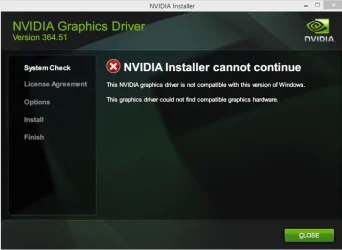
NVIDIA Installer cannot continue
Error Code: OxE6000000
Details:
Your system configuration is not supported by this installer A list of supported hardware and OS can be found found here
I have a GTX 690
version 11.0.8.299
not installing with graphics driver installer or Nvidia app
the attached image is not the version I need
582.66
Error Code: OxE6000000
Details:
Your system configuration is not supported by this installer A list of supported hardware and OS can be found found here
I have a GTX 690
version 11.0.8.299
not installing with graphics driver installer or Nvidia app
the attached image is not the version I need
582.66
Attachments
Last edited:
My Computer
At a glance
Windows 11 Pro X64 Version 25H2 Build 26200.8973Intel(R) Core(TM) i5-8400 CPU @ 2.80GHz24GBNVIDIA GeForce GTX 960
- OS
- Windows 11 Pro X64 Version 25H2 Build 26200.8973
- Computer type
- PC/Desktop
- Manufacturer/Model
- Custom Build
- CPU
- Intel(R) Core(TM) i5-8400 CPU @ 2.80GHz
- Motherboard
- ASROCK B360M Pro4
- Memory
- 24GB
- Graphics Card(s)
- NVIDIA GeForce GTX 960
- Sound Card
- Realtek(R) Audio 6.0.9231.1
- Monitor(s) Displays
- Generic Monitor (Dell S2721HN)
- Screen Resolution
- 1920x1080
- Hard Drives
- CT240BX500SSD1
EDILOCA ES106 500GB
SATA SDD
- Keyboard
- TECKNET Wired Gaming Keyboard Model TK-B002
- Mouse
- Logitech G203 LIGHTSYNC Gaming Mouse
- Browser
- Firefox/Chrome
- Antivirus
- Malwarebytes






