
Nvidia app wont install get error code OxE6000000


alexhob123

Active member
Member
Local time
8:11 PM
Posts
229
OS
Windows 11 Pro X64 Version 25H2 Build 26200.8973
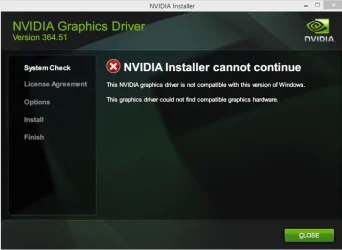
NVIDIA Installer cannot continue

Error Code: OxE6000000

Details:

Your system configuration is not supported by this installer A list of supported hardware and OS can be found found here

I have a GTX 690

version 11.0.8.299

not installing with graphics driver installer or Nvidia app

the attached image is not the version I need
582.66
 

Attachments
  • QQSTJ3W7ynuQJAM2NjoTVLqKF2uo9f8PUzto2rRuOwI.webp
    QQSTJ3W7ynuQJAM2NjoTVLqKF2uo9f8PUzto2rRuOwI.webp
    21.7 KB · Views: 1
Last edited:

My Computer My Computer

At a glance

Windows 11 Pro X64 Version 25H2 Build 26200.8973Intel(R) Core(TM) i5-8400 CPU @ 2.80GHz24GBNVIDIA GeForce GTX 960
OS
Windows 11 Pro X64 Version 25H2 Build 26200.8973
Computer type
PC/Desktop
Manufacturer/Model
Custom Build
CPU
Intel(R) Core(TM) i5-8400 CPU @ 2.80GHz
Motherboard
ASROCK B360M Pro4
Memory
24GB
Graphics Card(s)
NVIDIA GeForce GTX 960
Sound Card
Realtek(R) Audio 6.0.9231.1
Monitor(s) Displays
Generic Monitor (Dell S2721HN)
Screen Resolution
1920x1080
Hard Drives
CT240BX500SSD1
EDILOCA ES106 500GB
SATA SDD
Keyboard
TECKNET Wired Gaming Keyboard Model TK-B002
Mouse
Logitech G203 LIGHTSYNC Gaming Mouse
Browser
Firefox/Chrome
Antivirus
Malwarebytes

My Computers My Computers

  • At a glance

    Windows 11 Pro 25H2 26200.9168i9-10900 10 core 20 threads32 gbnone-Intel UHD Graphics 630
    OS
    Windows 11 Pro 25H2 26200.9168
    Computer type
    PC/Desktop
    Manufacturer/Model
    Dell Optiplex 7080
    CPU
    i9-10900 10 core 20 threads
    Motherboard
    DELL 0J37VM
    Memory
    32 gb
    Graphics Card(s)
    none-Intel UHD Graphics 630
    Sound Card
    Integrated Realtek
    Monitor(s) Displays
    Benq 27
    Screen Resolution
    2560x1440
    Hard Drives
    2x1tb Solidigm m.2 nvme /External drives 512gb Samsung m.2 sata+2tb Kingston m2.nvme
    PSU
    500w
    Case
    MT
    Cooling
    Dell Premium
    Keyboard
    Logitech wired
    Mouse
    Logitech wireless
    Internet Speed
    so slow I'm too embarrassed to tell
    Browser
    #1 Edge #2 Firefox
    Antivirus
    Defender+MWB Premium
  • At a glance

    Windows 11 Pro 24H2 26200.9168AMD Ryzen 7 6800U32 gbintegrated
    Operating System
    Windows 11 Pro 24H2 26200.9168
    Computer type
    PC/Desktop
    Manufacturer/Model
    Beelink Mini PC SER5
    CPU
    AMD Ryzen 7 6800U
    Memory
    32 gb
    Graphics card(s)
    integrated
    Sound Card
    integrated
    Monitor(s) Displays
    Benq 27
    Screen Resolution
    2560x1440
    Hard Drives
    1TB Crucial nvme
    Keyboard
    Logitech wired
    Mouse
    Logitech wireless
    Internet Speed
    still too embarrassed to tell
    Browser
    Firefox
    Antivirus
    Defender
  • System 3 is non compliant Dell 9020 i7-4770/24gb ram Win11 PRO 26200.9168

My Computer My Computer

At a glance

Windows 11 Pro X64 Version 25H2 Build 26200.8973Intel(R) Core(TM) i5-8400 CPU @ 2.80GHz24GBNVIDIA GeForce GTX 960
OS
Windows 11 Pro X64 Version 25H2 Build 26200.8973
Computer type
PC/Desktop
Manufacturer/Model
Custom Build
CPU
Intel(R) Core(TM) i5-8400 CPU @ 2.80GHz
Motherboard
ASROCK B360M Pro4
Memory
24GB
Graphics Card(s)
NVIDIA GeForce GTX 960
Sound Card
Realtek(R) Audio 6.0.9231.1
Monitor(s) Displays
Generic Monitor (Dell S2721HN)
Screen Resolution
1920x1080
Hard Drives
CT240BX500SSD1
EDILOCA ES106 500GB
SATA SDD
Keyboard
TECKNET Wired Gaming Keyboard Model TK-B002
Mouse
Logitech G203 LIGHTSYNC Gaming Mouse
Browser
Firefox/Chrome
Antivirus
Malwarebytes
I would use DDU in safe mode to uninstall the current software and driver. https://www.guru3d.com/download/display-driver-uninstaller-download/
Read the instructions carefully. Make sure BOTH driver AND Nvidea software boxes are checked.
When complete, restart in normal mode and do a clean install of the correct nvidea driver & software package.
 

My Computers My Computers

  • At a glance

    Windows 11 Pro 25H2 26200.9168i9-10900 10 core 20 threads32 gbnone-Intel UHD Graphics 630
    OS
    Windows 11 Pro 25H2 26200.9168
    Computer type
    PC/Desktop
    Manufacturer/Model
    Dell Optiplex 7080
    CPU
    i9-10900 10 core 20 threads
    Motherboard
    DELL 0J37VM
    Memory
    32 gb
    Graphics Card(s)
    none-Intel UHD Graphics 630
    Sound Card
    Integrated Realtek
    Monitor(s) Displays
    Benq 27
    Screen Resolution
    2560x1440
    Hard Drives
    2x1tb Solidigm m.2 nvme /External drives 512gb Samsung m.2 sata+2tb Kingston m2.nvme
    PSU
    500w
    Case
    MT
    Cooling
    Dell Premium
    Keyboard
    Logitech wired
    Mouse
    Logitech wireless
    Internet Speed
    so slow I'm too embarrassed to tell
    Browser
    #1 Edge #2 Firefox
    Antivirus
    Defender+MWB Premium
  • At a glance

    Windows 11 Pro 24H2 26200.9168AMD Ryzen 7 6800U32 gbintegrated
    Operating System
    Windows 11 Pro 24H2 26200.9168
    Computer type
    PC/Desktop
    Manufacturer/Model
    Beelink Mini PC SER5
    CPU
    AMD Ryzen 7 6800U
    Memory
    32 gb
    Graphics card(s)
    integrated
    Sound Card
    integrated
    Monitor(s) Displays
    Benq 27
    Screen Resolution
    2560x1440
    Hard Drives
    1TB Crucial nvme
    Keyboard
    Logitech wired
    Mouse
    Logitech wireless
    Internet Speed
    still too embarrassed to tell
    Browser
    Firefox
    Antivirus
    Defender
  • System 3 is non compliant Dell 9020 i7-4770/24gb ram Win11 PRO 26200.9168

My Computer My Computer

At a glance

Windows 11 Pro X64 Version 25H2 Build 26200.8973Intel(R) Core(TM) i5-8400 CPU @ 2.80GHz24GBNVIDIA GeForce GTX 960
OS
Windows 11 Pro X64 Version 25H2 Build 26200.8973
Computer type
PC/Desktop
Manufacturer/Model
Custom Build
CPU
Intel(R) Core(TM) i5-8400 CPU @ 2.80GHz
Motherboard
ASROCK B360M Pro4
Memory
24GB
Graphics Card(s)
NVIDIA GeForce GTX 960
Sound Card
Realtek(R) Audio 6.0.9231.1
Monitor(s) Displays
Generic Monitor (Dell S2721HN)
Screen Resolution
1920x1080
Hard Drives
CT240BX500SSD1
EDILOCA ES106 500GB
SATA SDD
Keyboard
TECKNET Wired Gaming Keyboard Model TK-B002
Mouse
Logitech G203 LIGHTSYNC Gaming Mouse
Browser
Firefox/Chrome
Antivirus
Malwarebytes
Your screenshot says NVIDIA 364.51 (from 2016).
 

My Computer My Computer

At a glance

Windows 7
OS
Windows 7
Your screenshot says NVIDIA 364.51 (from 2016).
I know don't worry about the version it's just there to show what error I get
 

My Computer My Computer

At a glance

Windows 11 Pro X64 Version 25H2 Build 26200.8973Intel(R) Core(TM) i5-8400 CPU @ 2.80GHz24GBNVIDIA GeForce GTX 960
OS
Windows 11 Pro X64 Version 25H2 Build 26200.8973
Computer type
PC/Desktop
Manufacturer/Model
Custom Build
CPU
Intel(R) Core(TM) i5-8400 CPU @ 2.80GHz
Motherboard
ASROCK B360M Pro4
Memory
24GB
Graphics Card(s)
NVIDIA GeForce GTX 960
Sound Card
Realtek(R) Audio 6.0.9231.1
Monitor(s) Displays
Generic Monitor (Dell S2721HN)
Screen Resolution
1920x1080
Hard Drives
CT240BX500SSD1
EDILOCA ES106 500GB
SATA SDD
Keyboard
TECKNET Wired Gaming Keyboard Model TK-B002
Mouse
Logitech G203 LIGHTSYNC Gaming Mouse
Browser
Firefox/Chrome
Antivirus
Malwarebytes
I have used ddu in safe mode and made sure BOTH driver AND Nvidia software boxes are checked. but nothing seems to be working still get the same error message
 

My Computer My Computer

At a glance

Windows 11 Pro X64 Version 25H2 Build 26200.8973Intel(R) Core(TM) i5-8400 CPU @ 2.80GHz24GBNVIDIA GeForce GTX 960
OS
Windows 11 Pro X64 Version 25H2 Build 26200.8973
Computer type
PC/Desktop
Manufacturer/Model
Custom Build
CPU
Intel(R) Core(TM) i5-8400 CPU @ 2.80GHz
Motherboard
ASROCK B360M Pro4
Memory
24GB
Graphics Card(s)
NVIDIA GeForce GTX 960
Sound Card
Realtek(R) Audio 6.0.9231.1
Monitor(s) Displays
Generic Monitor (Dell S2721HN)
Screen Resolution
1920x1080
Hard Drives
CT240BX500SSD1
EDILOCA ES106 500GB
SATA SDD
Keyboard
TECKNET Wired Gaming Keyboard Model TK-B002
Mouse
Logitech G203 LIGHTSYNC Gaming Mouse
Browser
Firefox/Chrome
Antivirus
Malwarebytes
I have used ddu in safe mode and made sure BOTH driver AND Nvidia software boxes are checked. but nothing seems to be working still get the same error message


See this guys post on reddit... tersicorus


What he posted...
When you reinstalled the last time, did you install just the driver or were you trying to install the app too? Because I was having the exact same issue and kept getting the same error, did everything you did and FINALLY I got a fix. Try going to the Nvidia site and manually searching just your driver and downloading that. During the installation of the driver, it will ask if you want the driver *and* Nvidia app to be downloaded or just the driver, I picked to install both and figured there was no harm in trying and I could just try the installer again with just the driver if it gave me an error again. But both installed perfectly fine and now I have the app again! Hopefully it'll work for you because I was dealing with this for a few days now and ready to pull my hair out
 
Last edited:

My Computers My Computers

  • At a glance

    Win 11 Home ♦♦♦26200.9168 ♦♦♦♦♦♦♦25H2AMD Ryzen 7 3700XG.Skill (F4-3200C14D-16GTZKW)EVGA RTX 2070 (08G-P4-2171-KR)
    OS
    Win 11 Home ♦♦♦26200.9168 ♦♦♦♦♦♦♦25H2
    Computer type
    PC/Desktop
    Manufacturer/Model
    Built by Ghot® [May 2020]
    CPU
    AMD Ryzen 7 3700X
    Motherboard
    Asus Pro WS X570-ACE (BIOS 5302)
    Memory
    G.Skill (F4-3200C14D-16GTZKW)
    Graphics Card(s)
    EVGA RTX 2070 (08G-P4-2171-KR)
    Sound Card
    Realtek ALC1220P / ALC S1220A
    Monitor(s) Displays
    Dell U3011 30"
    Screen Resolution
    2560 x 1600
    Hard Drives
    2x Samsung 860 EVO 500GB,
    WD 4TB Black FZBX - SATA III,
    WD 8TB Black FZBX - SATA III,
    DRW-24B1ST CD/DVD Burner
    PSU
    PC Power & Cooling 750W Quad EPS12V
    Case
    Cooler Master ATCS 840 Tower
    Cooling
    CM Hyper 212 EVO (push/pull)
    Keyboard
    Ducky DK9008 Shine II Blue LED
    Mouse
    Logitech Optical M-100
    Internet Speed
    300/300
    Browser
    Firefox (latest)
    Antivirus
    Bitdefender Total Security
    Other Info
    Speakers: Klipsch Pro Media 2.1
  • At a glance

    Windows XP Pro 32bit w/SP3AMD Athlon 64 X2 5000+ (OC'd @ 3.2Ghz)TWIN2X2048-6400C4DHX (2 x 1GB, DDR2 800)EVGA 256-P2-N758-TR GeForce 8600GT SSC
    Operating System
    Windows XP Pro 32bit w/SP3
    Computer type
    PC/Desktop
    Manufacturer/Model
    Built by Ghot® (not in use)
    CPU
    AMD Athlon 64 X2 5000+ (OC'd @ 3.2Ghz)
    Motherboard
    ASUS M2N32-SLI Deluxe Wireless Edition
    Memory
    TWIN2X2048-6400C4DHX (2 x 1GB, DDR2 800)
    Graphics card(s)
    EVGA 256-P2-N758-TR GeForce 8600GT SSC
    Sound Card
    Onboard
    Monitor(s) Displays
    ViewSonic G90FB Black 19" Professional (CRT)
    Screen Resolution
    up to 2048 x 1536
    Hard Drives
    WD 36GB 10,000rpm Raptor SATA
    Seagate 80GB 7200rpm SATA
    Lite-On LTR-52246S CD/RW
    Lite-On LH-18A1P CD/DVD Burner
    PSU
    PC Power & Cooling Silencer 750 Quad EPS12V
    Case
    Generic Beige case, 80mm fans
    Cooling
    ZALMAN 9500A 92mm CPU Cooler
    Keyboard
    Logitech Classic Keybooard 200
    Mouse
    Logitech Optical M-BT96a
    Internet Speed
    300/300
    Browser
    Firefox 3.x ??
    Antivirus
    Symantec (Norton)
    Other Info
    Still assembled, still runs. Haven't turned it on for 15 years?
it's installing now chose the right version of my driver
 

My Computer My Computer

At a glance

Windows 11 Pro X64 Version 25H2 Build 26200.8973Intel(R) Core(TM) i5-8400 CPU @ 2.80GHz24GBNVIDIA GeForce GTX 960
OS
Windows 11 Pro X64 Version 25H2 Build 26200.8973
Computer type
PC/Desktop
Manufacturer/Model
Custom Build
CPU
Intel(R) Core(TM) i5-8400 CPU @ 2.80GHz
Motherboard
ASROCK B360M Pro4
Memory
24GB
Graphics Card(s)
NVIDIA GeForce GTX 960
Sound Card
Realtek(R) Audio 6.0.9231.1
Monitor(s) Displays
Generic Monitor (Dell S2721HN)
Screen Resolution
1920x1080
Hard Drives
CT240BX500SSD1
EDILOCA ES106 500GB
SATA SDD
Keyboard
TECKNET Wired Gaming Keyboard Model TK-B002
Mouse
Logitech G203 LIGHTSYNC Gaming Mouse
Browser
Firefox/Chrome
Antivirus
Malwarebytes
Back
Top Bottom




