One PC has 99% RAM usage, an identical one only 44%


TechnoMax

Active member
Local time
6:40 PM
Posts
14
OS
Windows 11 Pro 25H2
I have three basically identical PCs (AMD Ryzen 3 4300U with 16GB RAM). The software on all three is identical (Audials for downloading music). Two show a RAM usage of 99%, only 1 44%. Why?
 

My Computer

System One

  • OS
    Windows 11 Pro 25H2
    Computer type
    PC/Desktop
    Manufacturer/Model
    Gigabyte
    CPU
    Intel i5-11500
    Motherboard
    Z590 Aorus Elite AX
    Memory
    32 GB DDR4-3200 Fury Beast Kingston
    Graphics Card(s)
    AMD Radeon RX 6700 XT
    Sound Card
    Topping DX3 Pro
    Monitor(s) Displays
    LG 4K monitor
    Screen Resolution
    4K
    Hard Drives
    WD Black 850 2TB, WD 1TB, Crucial P3 1TB, Crucial BX500 1TB, Samsung 870 EVO 1TB, 860 EVO 1TB, 860 Pro 256GB.
    PSU
    Seasonic Prime fanless PX-450
    Case
    Midi Tower
    Cooling
    Big CPU cooler + 2 Fans
    Keyboard
    rapoo wireless multimedia
    Mouse
    Microsoft Wireless Mouse 2000
    Internet Speed
    mostly 900 Mbps
    Browser
    Brave, Firefox, Edge
    Antivirus
    Defender

My Computers

System One System Two

  • OS
    Win 11 Pro 25H2 26200.8524
    Computer type
    PC/Desktop
    Manufacturer/Model
    Self Built
    CPU
    Intel® Core™ i7-14700K
    Motherboard
    ASUS TUF Z690-PLUS WIFI BIOS 4505 11/29/25
    Memory
    G.SKILL Ripjaws S5 Series 64GB (2 x 32GB) DDR5
    Graphics Card(s)
    ASUS GeForce RTX 4070 Super 12GB
    Sound Card
    Sound Blaster AE-5 Plus
    Monitor(s) Displays
    ASUS TUF Gaming 27" 2K HDR Gaming
    Screen Resolution
    2560 x 1440
    Hard Drives
    Samsung 990 Pro 1TB NVMe (Win 11 25H2)
    SK hynix P41 500GB NVMe 25H2 DEV/Games
    SK hynix P41 2TB NVMe (x3)
    Crucial P3 Plus 4TB
    PSU
    Corsair RM850x Shift
    Case
    Antec Dark Phantom DP502 FLUX
    Cooling
    Corsair Nautilus 360 RS AIO
    Keyboard
    Logitech MK 320
    Mouse
    Razer Basilisk V3
    Internet Speed
    350Mbs
    Browser
    Firefox
    Antivirus
    Winows Security
    Other Info
    MR 8.1 Home

    System 3 Specs
    Win 11 Pro 25H2 26200.8524
    ASUS PRIME Z370-P II BIOS 3004 7/12/21
    Intel Core i7-8700 CPU @ 3.20GHz
    32GB DDR4 RAM (4x8)
    iGPU Intel UHD Graphics 630
  • Operating System
    Win 11 Pro 25H2 26200.8524
    Computer type
    PC/Desktop
    Manufacturer/Model
    Self Built
    CPU
    Intel Core i7-11700F
    Motherboard
    Asus TUF Gaming Z590 Plus WiFi (BIOS 2803)
    Memory
    64 GB DDR4
    Graphics card(s)
    MSI GeForce RTX 3060 Ventus 2X 12GB
    Sound Card
    SoundBlaster Audigy Fx V2
    Monitor(s) Displays
    Samsung F27T350
    Screen Resolution
    1920x1080
    Hard Drives
    Samsung 980 Pro 1TB
    Samsung 970 EVO Plus 2TB
    Samsung 870 EVO 500GB SSD
    PSU
    Corsair HX750
    Case
    Cougar MX330-G Window
    Cooling
    Thermalright Frozen Edge 240 Black AIO
    Internet Speed
    350Mbps
    Browser
    Firefox
    Antivirus
    Windows Security
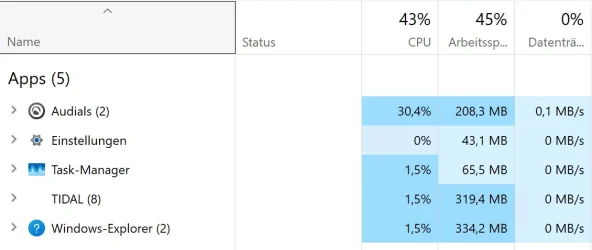
The five biggest processes use not even 1 GB.
 

My Computer

System One

  • OS
    Windows 11 Pro 25H2
    Computer type
    PC/Desktop
    Manufacturer/Model
    Gigabyte
    CPU
    Intel i5-11500
    Motherboard
    Z590 Aorus Elite AX
    Memory
    32 GB DDR4-3200 Fury Beast Kingston
    Graphics Card(s)
    AMD Radeon RX 6700 XT
    Sound Card
    Topping DX3 Pro
    Monitor(s) Displays
    LG 4K monitor
    Screen Resolution
    4K
    Hard Drives
    WD Black 850 2TB, WD 1TB, Crucial P3 1TB, Crucial BX500 1TB, Samsung 870 EVO 1TB, 860 EVO 1TB, 860 Pro 256GB.
    PSU
    Seasonic Prime fanless PX-450
    Case
    Midi Tower
    Cooling
    Big CPU cooler + 2 Fans
    Keyboard
    rapoo wireless multimedia
    Mouse
    Microsoft Wireless Mouse 2000
    Internet Speed
    mostly 900 Mbps
    Browser
    Brave, Firefox, Edge
    Antivirus
    Defender
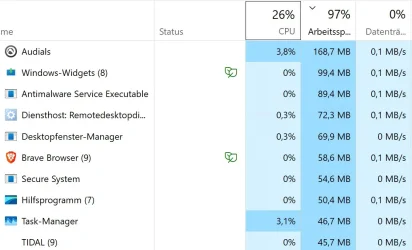
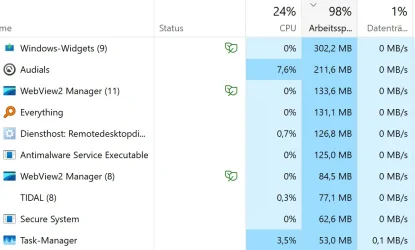
Here the Taskmanager-InfosAce-TV RAM.webpTV-schwarz RAM.webpAce-Ecke RAM.webp
 

My Computer

System One

  • OS
    Windows 11 Pro 25H2
    Computer type
    PC/Desktop
    Manufacturer/Model
    Gigabyte
    CPU
    Intel i5-11500
    Motherboard
    Z590 Aorus Elite AX
    Memory
    32 GB DDR4-3200 Fury Beast Kingston
    Graphics Card(s)
    AMD Radeon RX 6700 XT
    Sound Card
    Topping DX3 Pro
    Monitor(s) Displays
    LG 4K monitor
    Screen Resolution
    4K
    Hard Drives
    WD Black 850 2TB, WD 1TB, Crucial P3 1TB, Crucial BX500 1TB, Samsung 870 EVO 1TB, 860 EVO 1TB, 860 Pro 256GB.
    PSU
    Seasonic Prime fanless PX-450
    Case
    Midi Tower
    Cooling
    Big CPU cooler + 2 Fans
    Keyboard
    rapoo wireless multimedia
    Mouse
    Microsoft Wireless Mouse 2000
    Internet Speed
    mostly 900 Mbps
    Browser
    Brave, Firefox, Edge
    Antivirus
    Defender
Try running a Clean Boot.
If this works, you can add one or more Services or Startup Items at a time until the RAM Usage becomes high again, then you will know what the culprit is.
 

My Computer

System One

  • OS
    Windows 11 Pro Insider 64 bit 25H2 26200.5742
    Computer type
    PC/Desktop
    Manufacturer/Model
    Gigabyte Z390 UD
    CPU
    Intel Core i7 9700K 3.60
    Motherboard
    Gigabyte Z390 UD
    Memory
    16 GB
    Graphics Card(s)
    nVidia GEForce RTX 2060 Super
    Sound Card
    onboard
    Monitor(s) Displays
    Two 27" Dell 4K monitors
    Screen Resolution
    3840 x 2160
    Hard Drives
    M.2 NVME SSD, 500 GB; Two 2TB Mechanical HDD's
    PSU
    850w PSU
    Case
    Cyberpower PC
    Cooling
    Water cooled
    Keyboard
    Backlit Cyberpower gaming keyboard
    Mouse
    Backlit Cyberpower gaming mouse
    Internet Speed
    1 GB mbps
    Browser
    Brave
    Antivirus
    Windows Security
Depending on the pattern of usage, your free memory will vary between the Computers. Windows keeps de-allocated process memory cached in case the process starts up, and it will be freed 9immediately it if there is demand. Look at this graph. This is designated "standby" memory.

Look at the Physical memory bar in the resource monitor below. The standby memory below is 55GB, To compare apples to apples between computers, ignore the standby cache.

Screenshot 2026-04-12 210739.webp
 

My Computers

System One System Two

  • OS
    Windows 11 Pro x64
    Computer type
    PC/Desktop
    Manufacturer/Model
    📷🔈🎧 🪛 DIY Photoshop/Audio/Game/tinker
    CPU
    i9 14900K P/E 5.8/4.5 GHz, cache 5.0 GHz
    Motherboard
    Asus ROG Maximus Z790 Dark Hero
    Memory
    🐏 96GB (2x48) G.skill Ripjaws 6800 MT/s
    Graphics Card(s)
    Asus ROG Strix 4070 Ti OC
    Sound Card
    🔊Bowers & Wilkins 606 S3 speakers; Audiolabs 7000a integrated amp; RSL 10S Mk2 sub; Creative Pebble Pro Minimilist
    Monitor(s) Displays
    🖥️🖥️ Eizo CG2730 ColorEdge, ViewSonic VP2768
    Screen Resolution
    🖥️🖥️ 2560 x 1440p x 2
    Hard Drives
    💾 WDC SN850X 4TB nvme, SN850 1TB nvme, SK-Hynix 2 TB P41 nvme,. Sabrent USB-C DS-SC5B 5-bay docking station: 6TB WDC Black, 6TB Ironwolf Pro; 2x 2TB WDC Black HDD
    PSU
    ⚡️ 850W Seasonic Vertex PX-850 ATX 3.0/PCI-E 5.0
    Case
    Fractal Design North XL Mesh, Black Walnut
    Cooling
    ❄️ EK Nucleus black 360 AIO w/Phanteks T30-120 fans, 2 Noctua NF-A14 Chromax case fan, 1 T30-120 fan cooling memory
    Keyboard
    ⌨️ Keychron Q3 Max TKL with custom GMK Redsuns Red Samuri keycaps, TX Stabs
    Mouse
    🖱️ Logitech G305 wireless gaming
    Internet Speed
    ⬇️ 500 Mb/s ⬆️ 12 Mb/s
    Browser
    🔥🦊 Firefox
    Antivirus
    🦺 Defender, Macrium Reflect X 🏆
    Other Info
    Phangkey Amaterasu V2 Desk Mat
  • Computer type
    Laptop
    Manufacturer/Model
    💻 Apple 13" Macbook Pro 2020 (m1)
    CPU
    Apple M1
    Screen Resolution
    2560x1600
    Browser
    Firefox
You don't seem to have the same conditions in all systems. I see different processes using memory in all 3. You can't expect teh same systems to use the same amount if they have different conditions.

As others said, you will need to use clean boot to track down what processes are being started and which aren't. You gotta check your setup is identical in each system.

Also, if this systems are perfectly equal / identical with each other, you should setup one system, and then clone it into the other PC's using cloning software, that way you ensure you have the same software, drivers, startup items and setup.
 

My Computers

System One System Two

  • OS
    Windows 11 Pro 25H2
    Computer type
    PC/Desktop
    Manufacturer/Model
    Built PC
    CPU
    AMD Ryzen 5 5600G @ 3.9/4.4Ghz
    Motherboard
    MSI B550M-PRO-WiFi Ver. 1.4
    Memory
    2 x 16 GB DDR4 Kingston Fury Beast 3200 Mhz
    Graphics Card(s)
    AMD Radeon RX 6600 XT MSI Mech 2X OC Edition 8 GB
    Sound Card
    Realtek High Definition Audio (Integrated)
    Monitor(s) Displays
    Samsung C50Rx 27" LED / HP S2031 20" LCD
    Screen Resolution
    1920 x 1080 px / 1600 x 900 px
    Hard Drives
    WD Blue SN570 NVME M.2 SSD [1 TB] -- External Drives: - WD Scorpion Blue 250 GB 5400 RPM (Data Backup) - Hitachi 500 GB 5400 RPM (Software / ISOs Backup) - Toshiba MQ01ABD100 1 TB 5400 RPM (OS Images) - HGST TravelStar 7K1000 1 TB, 7200 RPM USB 3.0 - ADATA SU800 2TB SSD USB 3.0
    PSU
    Corsair RM750e 750W Fully Modular
    Case
    Naceb Hydra NA-1602
    Cooling
    Naceb Orpheus x 3 (Front) + Naceb Cepheus 1200 RPM Max (Rear) + ThemalRight Assasin X 90 SE (CPU)
    Keyboard
    Logitech MK470 Wireless
    Mouse
    Logitech MK470 Wireless
    Internet Speed
    120 MB Symetrical
    Browser
    Firefox / Brave / Edge
    Antivirus
    Windows Defender
    Other Info
    - VMs: WMware Player - Windows 8.1 Pro x64 / Windows 11 Pro
    - Wacom Intuos Pro Small Tablet PTH-460
  • Operating System
    Windows 11 Pro 25H2
    Computer type
    Laptop
    Manufacturer/Model
    HP Pavilion 15-eh3000la (80M53LA)
    CPU
    AMD Ryzen 7 7730U @ 2.0/4.5 Ghz
    Motherboard
    HP 8BC7
    Memory
    2 x 16 GB Kingston Fury Impact DDR4 3200 Mhz
    Graphics card(s)
    Radeon (tm) Graphics Vega 8 (512 MB)
    Sound Card
    Realtek High Definition Audio (Integrated)
    Monitor(s) Displays
    AU Optronics
    Screen Resolution
    1920 x 1080 px (125% size)
    Hard Drives
    WD Blue SN570 1TB NVME M.2 Drive
    PSU
    45 Watt Charger
    Cooling
    Laptop Cooling Pad
    Keyboard
    Free Wolf Foldable Portable Keyboard
    Mouse
    Free Wolf Wireless Mouse
    Internet Speed
    120 MB Symetrical
    Browser
    Firefox / Brave / Edge
    Antivirus
    Windows Defender
    Other Info
    - 41mWh battery.
    - Wacom Intuos Pro Small Tablet PTH-460
if this systems are perfectly equal / identical with each other, you should setup one system, and then clone it into the other PC's
That is no good idea, as I have learned the hard way: Then all PCs have the same Security Identifier (ID) and MachineGUID. I had to install Wwindows and the needed apps on all three machines anew.
 

My Computer

System One

  • OS
    Windows 11 Pro 25H2
    Computer type
    PC/Desktop
    Manufacturer/Model
    Gigabyte
    CPU
    Intel i5-11500
    Motherboard
    Z590 Aorus Elite AX
    Memory
    32 GB DDR4-3200 Fury Beast Kingston
    Graphics Card(s)
    AMD Radeon RX 6700 XT
    Sound Card
    Topping DX3 Pro
    Monitor(s) Displays
    LG 4K monitor
    Screen Resolution
    4K
    Hard Drives
    WD Black 850 2TB, WD 1TB, Crucial P3 1TB, Crucial BX500 1TB, Samsung 870 EVO 1TB, 860 EVO 1TB, 860 Pro 256GB.
    PSU
    Seasonic Prime fanless PX-450
    Case
    Midi Tower
    Cooling
    Big CPU cooler + 2 Fans
    Keyboard
    rapoo wireless multimedia
    Mouse
    Microsoft Wireless Mouse 2000
    Internet Speed
    mostly 900 Mbps
    Browser
    Brave, Firefox, Edge
    Antivirus
    Defender
Yes, the three machines differ somewhat. Anyway I deinstalled all unneccessary apps from all, ran a virus scan, checked Autostart (not much in it anyway) and now I have only 4GB RAM usage and CPU usage is down to under 5% after start up without additional apps opened. This seems usable.
 

My Computer

System One

  • OS
    Windows 11 Pro 25H2
    Computer type
    PC/Desktop
    Manufacturer/Model
    Gigabyte
    CPU
    Intel i5-11500
    Motherboard
    Z590 Aorus Elite AX
    Memory
    32 GB DDR4-3200 Fury Beast Kingston
    Graphics Card(s)
    AMD Radeon RX 6700 XT
    Sound Card
    Topping DX3 Pro
    Monitor(s) Displays
    LG 4K monitor
    Screen Resolution
    4K
    Hard Drives
    WD Black 850 2TB, WD 1TB, Crucial P3 1TB, Crucial BX500 1TB, Samsung 870 EVO 1TB, 860 EVO 1TB, 860 Pro 256GB.
    PSU
    Seasonic Prime fanless PX-450
    Case
    Midi Tower
    Cooling
    Big CPU cooler + 2 Fans
    Keyboard
    rapoo wireless multimedia
    Mouse
    Microsoft Wireless Mouse 2000
    Internet Speed
    mostly 900 Mbps
    Browser
    Brave, Firefox, Edge
    Antivirus
    Defender
Yes, the three machines differ somewhat. Anyway I deinstalled all unneccessary apps from all, ran a virus scan, checked Autostart (not much in it anyway) and now I have only 4GB RAM usage and CPU usage is down to under 5% after start up without additional apps opened. This seems usable.
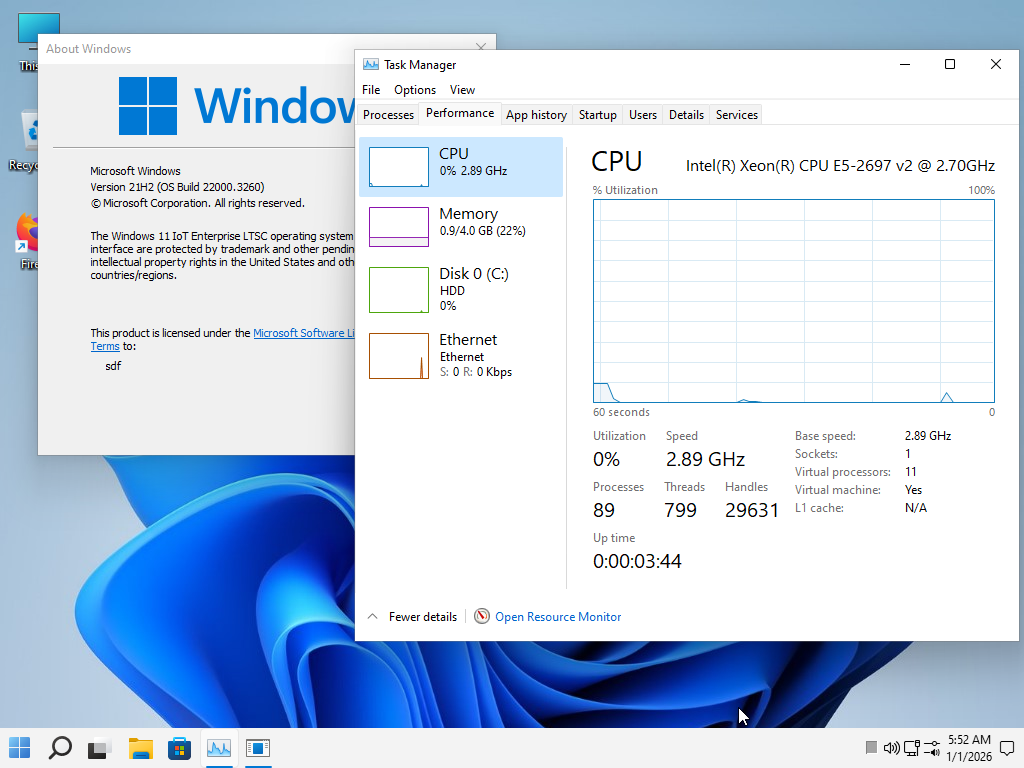
Here I'm using Windows 11 21h2 Lite without Defender Edge and without Blobware, and the consumption is very low. Humiliates modern Windows 11 25h2 26h1 uses half or less of the resources. It's worth using this version because, in addition to low power consumption, the CPU is also used very little. You can open several things that the CPU uses very little in modern Windows versions; this aspect is much greater as well. In other words, Windows 11 has gotten worse in the last 5 years, it just makes things slower. If you want, test this version to see for yourself, the link is in my signature. Let me know what you think if you try it.
fcajCX.png
 

My Computer

System One

  • OS
    Windows 11 Iot Enterprise 21h2 22000.3260
    Computer type
    PC/Desktop
    Manufacturer/Model
    Asus
    CPU
    xeon E5-2697v2
    Motherboard
    rampage iv extreme
    Memory
    32gb 8x4gb ddr3 1333 mhz
    Graphics Card(s)
    gtx 570 poit of view
    Sound Card
    realtek HD (ALC898)
    Monitor(s) Displays
    samsung b2030
    Screen Resolution
    1600x900
    Hard Drives
    2tb hd 5400 rpm
    3tb hd 5400 rpm
    1tb nvme pcie 3.0
    PSU
    hx850w
    Keyboard
    mtek
    Internet Speed
    500/250 gpon
    Browser
    r3dfox 146.0
    Antivirus
    none
That is no good idea, as I have learned the hard way: Then all PCs have the same Security Identifier (ID) and MachineGUID. I had to install Wwindows and the needed apps on all three machines anew.
In those cases (I assume you talk about TPM and Secure Boot), you can just disable security features and clone, BIOS and Windows will take care of generating new numbers when you enable security options again. It shouldn't be an issue if you reset numbers that way (and make sure Bitlocker is disabled as well)

Other than that, the only remedy I can think of is what you did, check everything and see that all is exactly the same in the 3 machines, is the only way to ensure you get same numbers in all.
 

My Computers

System One System Two

  • OS
    Windows 11 Pro 25H2
    Computer type
    PC/Desktop
    Manufacturer/Model
    Built PC
    CPU
    AMD Ryzen 5 5600G @ 3.9/4.4Ghz
    Motherboard
    MSI B550M-PRO-WiFi Ver. 1.4
    Memory
    2 x 16 GB DDR4 Kingston Fury Beast 3200 Mhz
    Graphics Card(s)
    AMD Radeon RX 6600 XT MSI Mech 2X OC Edition 8 GB
    Sound Card
    Realtek High Definition Audio (Integrated)
    Monitor(s) Displays
    Samsung C50Rx 27" LED / HP S2031 20" LCD
    Screen Resolution
    1920 x 1080 px / 1600 x 900 px
    Hard Drives
    WD Blue SN570 NVME M.2 SSD [1 TB] -- External Drives: - WD Scorpion Blue 250 GB 5400 RPM (Data Backup) - Hitachi 500 GB 5400 RPM (Software / ISOs Backup) - Toshiba MQ01ABD100 1 TB 5400 RPM (OS Images) - HGST TravelStar 7K1000 1 TB, 7200 RPM USB 3.0 - ADATA SU800 2TB SSD USB 3.0
    PSU
    Corsair RM750e 750W Fully Modular
    Case
    Naceb Hydra NA-1602
    Cooling
    Naceb Orpheus x 3 (Front) + Naceb Cepheus 1200 RPM Max (Rear) + ThemalRight Assasin X 90 SE (CPU)
    Keyboard
    Logitech MK470 Wireless
    Mouse
    Logitech MK470 Wireless
    Internet Speed
    120 MB Symetrical
    Browser
    Firefox / Brave / Edge
    Antivirus
    Windows Defender
    Other Info
    - VMs: WMware Player - Windows 8.1 Pro x64 / Windows 11 Pro
    - Wacom Intuos Pro Small Tablet PTH-460
  • Operating System
    Windows 11 Pro 25H2
    Computer type
    Laptop
    Manufacturer/Model
    HP Pavilion 15-eh3000la (80M53LA)
    CPU
    AMD Ryzen 7 7730U @ 2.0/4.5 Ghz
    Motherboard
    HP 8BC7
    Memory
    2 x 16 GB Kingston Fury Impact DDR4 3200 Mhz
    Graphics card(s)
    Radeon (tm) Graphics Vega 8 (512 MB)
    Sound Card
    Realtek High Definition Audio (Integrated)
    Monitor(s) Displays
    AU Optronics
    Screen Resolution
    1920 x 1080 px (125% size)
    Hard Drives
    WD Blue SN570 1TB NVME M.2 Drive
    PSU
    45 Watt Charger
    Cooling
    Laptop Cooling Pad
    Keyboard
    Free Wolf Foldable Portable Keyboard
    Mouse
    Free Wolf Wireless Mouse
    Internet Speed
    120 MB Symetrical
    Browser
    Firefox / Brave / Edge
    Antivirus
    Windows Defender
    Other Info
    - 41mWh battery.
    - Wacom Intuos Pro Small Tablet PTH-460

Latest Support Threads

Back
Top Bottom