Proper way to deal with Onedrive posted here more times than I can count.
How to PROPERLY Remove OneDrive from Windows 11
When you sign in with a Microsoft account, Windows automatically sets
Documents, Desktop, Pictures, and Videos folders to use OneDrive as their default storage location.These folders are NOT on your system drive.
If you don’t want to use OneDrive, you’ll need to carefully follow the steps below. Skipping or rearranging them can cause issues with your files and folders.
Important:
These instructions assume that OneDrive is still installed on your PC.
If you’ve already uninstalled it, for this procedure to work, you will need to first reinstall OneDrive by downloading it from
Microsoft’s official site.
- sign in to OneDrive, and then continue with the tutorial.
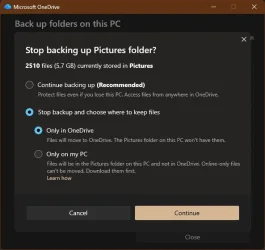
Step 1: Turn Off OneDrive Folder Backup Syncing
First, you need to stop OneDrive from automatically syncing your
Desktop, Documents, Pictures, and Videos folders. This guide will also help you get your files back on to your local drive.
Turn On or Off OneDrive Folder Backup Syncing in Windows 11
Only If the folders don’t automatically return to their default local location under C:\Users\YourUserName in step 1:
Use the tutorials below (Option Three) to manually restore the default location of each folder and move your files from Onedrive into it.
Move or Restore Default Location of Desktop Folder in Windows 11
Move or Restore Default Location of Documents Folder in Windows 11
Move or Restore Default Location of Pictures Folder in Windows 11
Move or Restore Default Location of Videos Folder in Windows 11 |
-----------------------------------------------------------------
Step 2: Unlink Account & PC from OneDrive
After syncing is turned off, disconnect your account and computer from OneDrive:
Unlink account & PC from Onedrive.
Once you do this the files you have in onedrive will remain there until you login to Onedrive on the Web and delete them.
Microsoft OneDrive
----------------------------------------------------------------------
Step 3: Prevent OneDrive from Starting Automatically or Uninstall Onedrive
At this point, you can either disable OneDrive from autostart or uninstall it.
NOTE: Office 365 and Ofc 2019-2024 DEFAULT save location is Onedrive. You will have to go into each Office app and change its default save location to a folder on your computer. (file>options>Save>
Uncheck save to onedrive by default and
Check Save to computer by default.
Select a local folder where you want files saved.) Note : Auto correct will NOT work with files not saved in Onedrive.
Option 1- disable Onedrive from auto-starting. This is my preference since Microsoft can reinstall Onedrive through Windows or Office updates. This setting tends to hold during those updates.
- Open Task Manager (Ctrl+Shift+Esc).
- Go to the Startup Apps list in left pane.
- Find OneDrive.exe, right-click it, and select Disable
It you want to remove it from file explorer navigation pane
Add or Remove OneDrive in Navigation Pane of File Explorer in Windows 11
If you want to hide it in the task tray, Settings > Personalization > Taskbar "Other system tray icons". Find Onedrive and toggle it off. Alternatively, you can quickly hide an icon by dragging it from the taskbar onto the upward-pointing arrow that opens the hidden icons menu.
Once you re-start, OneDrive will no longer launch at startup and the only place you will see it is in your start menu.
Option 2 - Uninstall OneDrive
Method 1 – Using Revo Uninstaller (recommended):
Download
Revo Uninstaller Freeware Portable.
- Open Revo and look under Windows Apps to find OneDrive.
- Uninstall it using Revo, then run its scan feature. Check all the leftover files and registry entries Revo finds and remove.
Method 2 – Built-in Windows option:
You can also uninstall OneDrive through Windows settings, but this will leave some registry entries behind.
Uninstall and Reinstall OneDrive in Windows 11
--------------------------------------------------------------
Following this sequence ensures your files are safe and your folders return to their proper locations, while OneDrive is disabled or completely removed from your system.
Note: Whether this will work as written for you depends on what steps were taken in your prior attempts to get rid of Onedrive. Sometimes a user’s incorrect actions can have unwanted results. Nevertheless, your files should still be in Onedrive so they are not lost.