OneDrive - Keeping documents folder on my PC and backing up to Onedrive on Partitioned Hard Drive


Memsahib

Active member
Local time
2:59 PM
Posts
14
Location
Western Australia
OS
Windows 11 Home
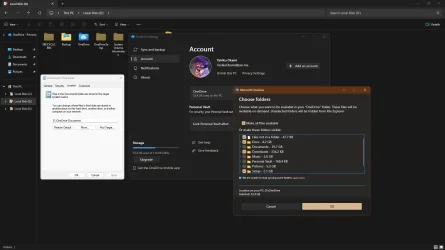
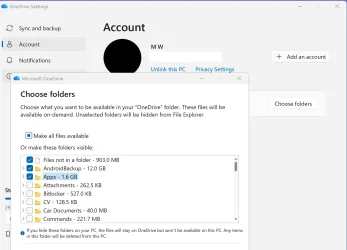
As I am sometimes in a place without internet I like to keep my documents folder on my PC but I also like it to be in the OneDrive cloud so I can access documents on my Galaxy mobile phone. But even though I have followed exactly the steps that I have been given by a guru - and managed to get the documents folder in d:\users\name\documents as soon as I included documents in the Onedrive backup it went back to D:\users\Onedrive\documents and i have so many copies of every file and the D:\users\name\Documents folder is empty. And the worst thing many of the folders in Onedrive are now also empty. Fortunately I do a Filehistory backup to an external harddrive, so not all lost. The other problem is that the documents folder and a few folders in it have a red cross next to them . Checking forums etc this is apparently due to syncing issues or full Onedrive. I have 800gb available in the cloud - so not full- and these same files were all syncing fine until I tried to move documents to D drive and back them up to Onedrive. I have many folders ticked to stay on this PC but not all of them and did try 'setting the whole documents folder that way but it seems I need to pick specific files. Apologies for rather long winded explanation but trying to avoid getting advice I have already tried. Thanks to anyone can help me.
 
Windows Build/Version
Win 11 25h2 (os build 26200.7705)

My Computer

System One

  • OS
    Windows 11 Home
    Computer type
    Laptop
    Manufacturer/Model
    Asus Zenbook 14
    CPU
    Intel® Core™ i7-1165G7 Processor 2.8 GHz (12M Cache, up
    Memory
    16GB PDDR4X on board - Max Total system memory up to:16GB *Supports dual-channel memory.
    Graphics Card(s)
    Intel® Iris Xe Graphics 154481 *Intel Iris Xᵉ Graphics is only available in models with Intel® Core™ i5/i7/i9 processors with up to 80 graphics execution units (EUs) and dual-channel memory.
    Sound Card
    Audio by ICEpower®\nBuilt-in speaker\nBuilt-in array microphone, harman/kardon (Premium), with Cortana voice-recognition support
    Monitor(s) Displays
    13.3-inch, FHD (1920 x 1080) OLED 16:9 aspect ratio, 0.2ms response time, 60Hz refresh rate, 550nits HDR peak brightness, DCI-P3: 100%, 1,000,000:1, VESA CERTIFIED Display HDR True Black 500, 1.07 billion colors, PANTONE Validated, Glossy display, 70% less harmful blue light, SGS Eye Care Display, - (Screen-to-body ratio)88%
    Hard Drives
    512GB M.2 NVMe™ PCIe® 3.0 SSD
    Keyboard
    Wired
    Mouse
    Wired
    Internet Speed
    53Mbps download
    Browser
    Chrome
    Antivirus
    MS Defender
    Other Info
    Laptop using an Asus monitor when not travelling
managed to get the documents folder in d:\users\name\documents as soon as I included documents in the Onedrive backup it went back to D:\users\Onedrive\documents and i have so many copies of every file and the D:\users\name\Documents folder is empty

It's how Onedrive works. It's a trap that OneDrive’s Known Folder Move (KFM) creates. OneDrive’s KFM does not like custom folder locations.
Once you successfully got your documents folder locally onto your D: drive, your error was then choosing to backup that folder to Onedrive.
The moment you clicked “Back up Documents,” in OneDrive, the folder was moved, D:\Documents emptied, duplicates got created, and you started getting the red X sync errors.
---------------------------
@Memsahib I think this would be the only way to do what you want to do, but I need @Brink's help here.
Brink, old buddy, ol' pal HELP!
Would the only way to do what he wants be to turn off backup for his Documents folder and use either a symbolic link or junction point to D:/Documents to sync that folder to Onedrive?

I'm thinking he would have to again move the default location of Documents back to D:\Documents (if it's been changed) and manually copy his files into this folder.

Once EVERYTHING is safely in this folder and stored locally, in Onedrive online would he remove his mess of files before creating his link or junction point or would he leave them? If he leaves them I believe he would end up with more dupllicates.

Then, create a symbolic link or junction point (I'm not sure which it would be) so that the files in that folder would sync to Onedrive.
You woud need to tell us how to properly do this.
At this point, how will this affect his other devices that are syncing to Onedrive using KFM or would it affect them at all.?
 
Last edited:

My Computers

System One System Two

  • OS
    Windows 11 Pro 25H2
    Computer type
    PC/Desktop
    Manufacturer/Model
    Dell Optiplex 7080
    CPU
    i9-10900 10 core 20 threads
    Motherboard
    DELL 0J37VM
    Memory
    32 gb
    Graphics Card(s)
    none-Intel UHD Graphics 630
    Sound Card
    Integrated Realtek
    Monitor(s) Displays
    Benq 27
    Screen Resolution
    2560x1440
    Hard Drives
    2x1tb Solidigm m.2 nvme /External drives 512gb Samsung m.2 sata+2tb Kingston m2.nvme
    PSU
    500w
    Case
    MT
    Cooling
    Dell Premium
    Keyboard
    Logitech wired
    Mouse
    Logitech wireless
    Internet Speed
    so slow I'm too embarrassed to tell
    Browser
    #1 Edge #2 Firefox
    Antivirus
    Defender+MWB Premium
  • Operating System
    Windows 11 Pro 24H2 26200.8457
    Computer type
    PC/Desktop
    Manufacturer/Model
    Beelink Mini PC SER5
    CPU
    AMD Ryzen 7 6800U
    Memory
    32 gb
    Graphics card(s)
    integrated
    Sound Card
    integrated
    Monitor(s) Displays
    Benq 27
    Screen Resolution
    2560x1440
    Hard Drives
    1TB Crucial nvme
    Keyboard
    Logitech wired
    Mouse
    Logitech wireless
    Internet Speed
    still too embarrassed to tell
    Browser
    Firefox
    Antivirus
    Defender
    Other Info
    System 3 is non compliant Dell 9020 i7-4770/24gb ram Win11 PRO 26200.8457

My Computer

System One

  • OS
    Windows 11 Pro + Win11 Canary VM.
    Computer type
    Laptop
    Manufacturer/Model
    ASUS Zenbook 14
    CPU
    I9 13th gen i9-13900H 2.60 GHZ
    Motherboard
    Yep, Laptop has one.
    Memory
    16 GB soldered
    Graphics Card(s)
    Integrated Intel Iris XE
    Sound Card
    Realtek built in
    Monitor(s) Displays
    laptop OLED screen
    Screen Resolution
    2880x1800 touchscreen
    Hard Drives
    1 TB NVME SSD (only weakness is only one slot)
    PSU
    Internal + 65W thunderbolt USB4 charger
    Case
    Yep, got one
    Cooling
    Stella Artois (UK pint cans - 568 ml) - extra cost.
    Keyboard
    Built in UK keybd
    Mouse
    Bluetooth , wireless dongled, wired
    Internet Speed
    900 mbs (ethernet), wifi 6 typical 350-450 mb/s both up and down
    Browser
    Edge
    Antivirus
    Defender
    Other Info
    TPM 2.0, 2xUSB4 thunderbolt, 1xUsb3 (usb a), 1xUsb-c, hdmi out, 3.5 mm audio out/in combo, ASUS backlit trackpad (inc. switchable number pad)

    Macrium Reflect Home V8
    Office 365 Family (6 users each 1TB onedrive space)
    Hyper-V (a vm runs almost as fast as my older laptop)
@cereberus Yes, that was what I said in my post, but there still questions about the proper sequence to handle the procedure since is onedrive is so messed up.
 

My Computers

System One System Two

  • OS
    Windows 11 Pro 25H2
    Computer type
    PC/Desktop
    Manufacturer/Model
    Dell Optiplex 7080
    CPU
    i9-10900 10 core 20 threads
    Motherboard
    DELL 0J37VM
    Memory
    32 gb
    Graphics Card(s)
    none-Intel UHD Graphics 630
    Sound Card
    Integrated Realtek
    Monitor(s) Displays
    Benq 27
    Screen Resolution
    2560x1440
    Hard Drives
    2x1tb Solidigm m.2 nvme /External drives 512gb Samsung m.2 sata+2tb Kingston m2.nvme
    PSU
    500w
    Case
    MT
    Cooling
    Dell Premium
    Keyboard
    Logitech wired
    Mouse
    Logitech wireless
    Internet Speed
    so slow I'm too embarrassed to tell
    Browser
    #1 Edge #2 Firefox
    Antivirus
    Defender+MWB Premium
  • Operating System
    Windows 11 Pro 24H2 26200.8457
    Computer type
    PC/Desktop
    Manufacturer/Model
    Beelink Mini PC SER5
    CPU
    AMD Ryzen 7 6800U
    Memory
    32 gb
    Graphics card(s)
    integrated
    Sound Card
    integrated
    Monitor(s) Displays
    Benq 27
    Screen Resolution
    2560x1440
    Hard Drives
    1TB Crucial nvme
    Keyboard
    Logitech wired
    Mouse
    Logitech wireless
    Internet Speed
    still too embarrassed to tell
    Browser
    Firefox
    Antivirus
    Defender
    Other Info
    System 3 is non compliant Dell 9020 i7-4770/24gb ram Win11 PRO 26200.8457
@glasskuter
If you deleted some files on OneDrive online, then emptied the Recycle Bin online, would you loose the local files as well?
 

My Computers

System One System Two

  • OS
    Windows 11 Pro
    Computer type
    PC/Desktop
    Manufacturer/Model
    ASUS ROG Strix
  • Operating System
    Windows 11 Pro
    Computer type
    Laptop
    Manufacturer/Model
    ASUS VivoBook
@glasskuter
If you deleted some files on OneDrive online, then emptied the Recycle Bin online, would you loose the local files as well?
@Edwin, @glasskuter
It kind of depends on situation but normally if a file is synced from the local onedrive folders to online and you delete the file online, its corresponding local file is deleted.

To avoid this, copy files online to new folder first.

PS just tested this to make sure.

However if you use a symlink from a directory outside onedrive folder, pretty sure the local file being symlinked to onedrive folder is not deleted. Not tested it though for a while, so I advise doing a test first.
 

My Computer

System One

  • OS
    Windows 11 Pro + Win11 Canary VM.
    Computer type
    Laptop
    Manufacturer/Model
    ASUS Zenbook 14
    CPU
    I9 13th gen i9-13900H 2.60 GHZ
    Motherboard
    Yep, Laptop has one.
    Memory
    16 GB soldered
    Graphics Card(s)
    Integrated Intel Iris XE
    Sound Card
    Realtek built in
    Monitor(s) Displays
    laptop OLED screen
    Screen Resolution
    2880x1800 touchscreen
    Hard Drives
    1 TB NVME SSD (only weakness is only one slot)
    PSU
    Internal + 65W thunderbolt USB4 charger
    Case
    Yep, got one
    Cooling
    Stella Artois (UK pint cans - 568 ml) - extra cost.
    Keyboard
    Built in UK keybd
    Mouse
    Bluetooth , wireless dongled, wired
    Internet Speed
    900 mbs (ethernet), wifi 6 typical 350-450 mb/s both up and down
    Browser
    Edge
    Antivirus
    Defender
    Other Info
    TPM 2.0, 2xUSB4 thunderbolt, 1xUsb3 (usb a), 1xUsb-c, hdmi out, 3.5 mm audio out/in combo, ASUS backlit trackpad (inc. switchable number pad)

    Macrium Reflect Home V8
    Office 365 Family (6 users each 1TB onedrive space)
    Hyper-V (a vm runs almost as fast as my older laptop)
It kind of depends on situation but normally if a file is synced from the local onedrive folders to online and you delete the file online, its corresponding local file is deleted.
That's nuts!!!
I still can't wrap my head around this confusion!!!
So, if you wanted to use OneDrive online strictly as a backup solution, don't install OneDrive on your PC, and just manually upload items via a browser, right?
 

My Computers

System One System Two

  • OS
    Windows 11 Pro
    Computer type
    PC/Desktop
    Manufacturer/Model
    ASUS ROG Strix
  • Operating System
    Windows 11 Pro
    Computer type
    Laptop
    Manufacturer/Model
    ASUS VivoBook
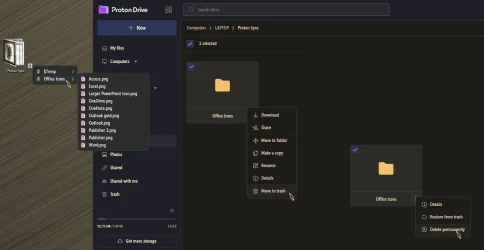
I just tested this kind of scenario with Proton.
Proton lets you choose a folder..., I synced everything completely, then Deleted and Permanently Deleted items online..., my stuff is still there locally...
(I even permanently deleted the Proton Sync folder itself online)

0008457.webp

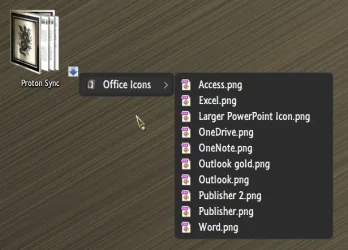
Then, I willy-nilly Revo'd Proton Drive from my PC..., my stuff is still there.

0008461.webp
 

My Computers

System One System Two

  • OS
    Windows 11 Pro
    Computer type
    PC/Desktop
    Manufacturer/Model
    ASUS ROG Strix
  • Operating System
    Windows 11 Pro
    Computer type
    Laptop
    Manufacturer/Model
    ASUS VivoBook

My Computers

System One System Two

  • OS
    Windows 11 Pro for Workstations
    Computer type
    PC/Desktop
    Manufacturer/Model
    Custom self build
    CPU
    Intel i7-8700K 5 GHz
    Motherboard
    ASUS ROG Maximus XI Formula Z390
    Memory
    64 GB (4x16GB) G.SKILL TridentZ RGB DDR4 3600 MHz (F4-3600C18D-32GTZR)
    Graphics Card(s)
    ASUS ROG-STRIX-GTX1080TI-O11G-GAMING (11GB GDDR5X)
    Sound Card
    Integrated Digital Audio (S/PDIF)
    Monitor(s) Displays
    2 x Samsung Odyssey G75 27"
    Screen Resolution
    2560x1440
    Hard Drives
    1TB Samsung 990 PRO M.2,
    4TB Samsung 990 PRO M.2,
    TerraMaster F8 SSD Plus NAS
    PSU
    Seasonic Prime Titanium 850W
    Case
    Thermaltake Core P3 wall mounted
    Cooling
    Corsair Hydro H115i
    Keyboard
    Amazon Basics Wired Full Keyboard MD005
    Mouse
    Logitech MX Master 4
    Internet Speed
    2 Gbps Download and 100 Mbps Upload
    Browser
    Chrome and Edge
    Antivirus
    Microsoft Defender
    Other Info
    Logitech Z625 speaker system,
    Logitech BRIO 4K Pro webcam,
    HP Color LaserJet Pro MFP M477fdn,
    CyberPower CP1500PFCLCD
    Galaxy S23 Plus phone
  • Operating System
    Windows 11 Pro
    Computer type
    Laptop
    Manufacturer/Model
    Surface Laptop 7 Copilot+ PC
    CPU
    Snapdragon X Elite (12 core) 3.42 GHz
    Memory
    16 GB LPDDR5x-7467 MHz
    Monitor(s) Displays
    15" HDR
    Screen Resolution
    2496 x 1664
    Hard Drives
    1 TB SSD
    Internet Speed
    Wi-Fi 7 and Bluetooth 5.4
    Browser
    Chrome and Edge
    Antivirus
    Microsoft Defender
Guys, In a normal scenario I know that one can sync any folder to Onedrive using a junction point, and if this user had done that for his documents after he managed to get his files onto D:, his onedrive folder wouldn't be so messed up.
It also appears instead of moving documents/desktop/pictures/videos folders to his D: drive, he moved his entire user folder which includes his onedrive folder. That will have a bearing on this as well.

@Memsahib I didn't get all my answers but I will take a stab at this anyway. As you will see after reading this there ARE some caveats to what you are trying to do if you sync multiple devices to Onedrive and if you use Office 365, which it appears you do going by the amount of onedrive storage you have.

1. Turn off documents folder backup in Oneddrive settings. You WILL NOT turn this back on.
OneDrive → Settings → Sync and Backup → Manage Backup → Turn OFF Documents.

2. Manually Copy your files from File History into the documents folder on D: drive. Go to Onedrive Online and copy any files that are missing in file history and put those in the folder too.
At this point I strongly suggest you copy this folder to external media to protect yourself just in case this all goes south.

3. Inside D:\users\Onedrive folder, create the folder that will hold the cloud copy. This must be a new folder name that isn't already in your OneDrive folder such as DocumentsBackup

4. Open command prompt as administrator and enter
mklink /J "D:\Users\<youruserame>\OneDrive\DocumentsBackup" "D:\Users\<yourusername>\Documents"
reference Sync Any Folder to OneDrive in Windows 10
Onedrive should now sync your local folder to the new folder you created, but Windows still sees Documents in its correct location.

Note: If you turned sync back on for any of your other user folders, you will have to deal with them this same way.

Once you verify you have everything working, Go into Onedrive Online and clean up all the duplicate files.

Keep in mind, if you have other devices syncing to Onedrive(KFM enabled) that those devices will continue to use the folders already in Onedrive rather than the new folder you created in step 3 so don't delete the folders, just the duplicated files. Changes made in this new folder will sync to only this device. However, other devices can still access the folder using Onedrive Online.

Also know that if you use Office365, 365 saves to Onedrive by default. If you want files created in 365 to save locally by default on this device, you will have to open each 365 app that you use, select options,save, check 'save to computer by default' and select the folder path to be D:\Users\<yourusername>\Documents.
Autosave will no longer work once you do this. Files have to be saved to onedrive for autosave to work.

Please let me know if this works.
 

My Computers

System One System Two

  • OS
    Windows 11 Pro 25H2
    Computer type
    PC/Desktop
    Manufacturer/Model
    Dell Optiplex 7080
    CPU
    i9-10900 10 core 20 threads
    Motherboard
    DELL 0J37VM
    Memory
    32 gb
    Graphics Card(s)
    none-Intel UHD Graphics 630
    Sound Card
    Integrated Realtek
    Monitor(s) Displays
    Benq 27
    Screen Resolution
    2560x1440
    Hard Drives
    2x1tb Solidigm m.2 nvme /External drives 512gb Samsung m.2 sata+2tb Kingston m2.nvme
    PSU
    500w
    Case
    MT
    Cooling
    Dell Premium
    Keyboard
    Logitech wired
    Mouse
    Logitech wireless
    Internet Speed
    so slow I'm too embarrassed to tell
    Browser
    #1 Edge #2 Firefox
    Antivirus
    Defender+MWB Premium
  • Operating System
    Windows 11 Pro 24H2 26200.8457
    Computer type
    PC/Desktop
    Manufacturer/Model
    Beelink Mini PC SER5
    CPU
    AMD Ryzen 7 6800U
    Memory
    32 gb
    Graphics card(s)
    integrated
    Sound Card
    integrated
    Monitor(s) Displays
    Benq 27
    Screen Resolution
    2560x1440
    Hard Drives
    1TB Crucial nvme
    Keyboard
    Logitech wired
    Mouse
    Logitech wireless
    Internet Speed
    still too embarrassed to tell
    Browser
    Firefox
    Antivirus
    Defender
    Other Info
    System 3 is non compliant Dell 9020 i7-4770/24gb ram Win11 PRO 26200.8457
it went back to D:\users\Onedrive\documents
Do not fight OneDrive, it will always win, make it happy, move folders into OneDrive.
Create - D:\OneDrive - Unlink This PC - Link it to - D:\OneDrive - copy files there.
Additionally move Documents or any system folders directly into OneDrive.

capture_02062026_212144.webp

Note that OneDrive is not a backup, it is a sync, mirroring. If files are removed from PC, they are removed from OneDrive and vice versa. Make sure to backup files manually via copy/paste or by using some backup software. I paid for my misplaced trust.
 

My Computer

System One

  • OS
    Home26H2Can
    Computer type
    PC/Desktop
    CPU
    AMD Ryzen 5 8600G (07/24)
    Motherboard
    ASROCK B650M-HDV/M.2 (07/24) BIOS 4.21 AGESA ComboAM5 1.3.0.1 (04/26)
    Memory
    2x32GB Kingston FURY DDR5 5600 MHz CL36 @5200 CL36 (07/24)
    Graphics Card(s)
    ASROCK Radeon RX 6600 Challenger D 8G @48FPS (08/24)
    Sound Card
    Creative Sound BlasterX AE-5 Plus (05/24)
    Monitor(s) Displays
    24" Philips 24M1N3200ZS/00 (05/24)
    Screen Resolution
    1920×1080@165Hz via DP1.4
    Hard Drives
    Kingston KC3000 NVMe 2TB (05/24)
    ADATA XPG GAMMIX S11 Pro 512GB (07/19)
    PSU
    Seasonic Core GM 550 Gold (04/24)
    Case
    Fractal Design Define 7 Mini with 3x Noctua NF-P14s/12@555rpm (04/24)
    Cooling
    Noctua NH-U12S with Noctua NF-P12 (04/24)
    Keyboard
    HP Pavilion Wired Keyboard 300 (07/24) + Rabalux 76017 Parker (01/24)
    Mouse
    Logitech M330 Silent Plus (01/26)
    Internet Speed
    500/100 Mbps via RouterOS (05/21) & TCP Optimizer
    Browser
    Edge, Brave for YouTube, LibreWolf for FB
    Antivirus
    NextDNS blocking 1/3 Traffic
    Other Info
    Phone: Motorola Moto G86 (02/26)
    Backup: Hasleo Backup Suite (PreOS)
    Headphones: Sennheiser RS170 (09/10)
    Chair: Huzaro Force 4.4 Grey Mesh (05/24)
    Notifier: Xiaomi Mi Band 9 Milanese (10/24)
    FlexCore USB-C 3.2 Gen 1 (M) to LAN (F) (08/25)
That's nuts!!!
I still can't wrap my head around this confusion!!!
So, if you wanted to use OneDrive online strictly as a backup solution, don't install OneDrive on your PC, and just manually upload items via a browser, right?
How is it nuts?

It is a syncing app not a backup app. All syncing apps work like that.

There is nothing stopping you manually uploading files to onedrive and you set which folders you wish to sync to pc.

You can choose to not sync any folders if you wish - it is not rocket science.

I suggest people experiment with throwaway files to work out how to use it.

How do you think I and many others on this forum have learnt how to use onedrive effectively?

It is not as complicated as people think!
 

My Computer

System One

  • OS
    Windows 11 Pro + Win11 Canary VM.
    Computer type
    Laptop
    Manufacturer/Model
    ASUS Zenbook 14
    CPU
    I9 13th gen i9-13900H 2.60 GHZ
    Motherboard
    Yep, Laptop has one.
    Memory
    16 GB soldered
    Graphics Card(s)
    Integrated Intel Iris XE
    Sound Card
    Realtek built in
    Monitor(s) Displays
    laptop OLED screen
    Screen Resolution
    2880x1800 touchscreen
    Hard Drives
    1 TB NVME SSD (only weakness is only one slot)
    PSU
    Internal + 65W thunderbolt USB4 charger
    Case
    Yep, got one
    Cooling
    Stella Artois (UK pint cans - 568 ml) - extra cost.
    Keyboard
    Built in UK keybd
    Mouse
    Bluetooth , wireless dongled, wired
    Internet Speed
    900 mbs (ethernet), wifi 6 typical 350-450 mb/s both up and down
    Browser
    Edge
    Antivirus
    Defender
    Other Info
    TPM 2.0, 2xUSB4 thunderbolt, 1xUsb3 (usb a), 1xUsb-c, hdmi out, 3.5 mm audio out/in combo, ASUS backlit trackpad (inc. switchable number pad)

    Macrium Reflect Home V8
    Office 365 Family (6 users each 1TB onedrive space)
    Hyper-V (a vm runs almost as fast as my older laptop)
Do not fight OneDrive,
So true. If one wants to use it, they better learn it, backwards, forwards, and sideways and follow its rules to the letter, or they will have a grim awakening like this user and a lot more out there who made the wrong move.

I don't fight it. I just don't use it. I take that back, I'll drop a file I want to share on this forum into onedrive on the web. That's it. No syncing.
If I want to access files between systems on my network I use sharing or remote desktop. I never have to access files when away from home but if I did, I'd use a NAS..

I do synce a few sub-folders to Google Drive which lets me select any folder located anywhere that I want to sync in a straightforward manner, the way that Onedrive should be but isn't. OD offered selective folder sync at one time and it worked well. But MS and their infinite wisdom decided to remove the feature.
 

My Computers

System One System Two

  • OS
    Windows 11 Pro 25H2
    Computer type
    PC/Desktop
    Manufacturer/Model
    Dell Optiplex 7080
    CPU
    i9-10900 10 core 20 threads
    Motherboard
    DELL 0J37VM
    Memory
    32 gb
    Graphics Card(s)
    none-Intel UHD Graphics 630
    Sound Card
    Integrated Realtek
    Monitor(s) Displays
    Benq 27
    Screen Resolution
    2560x1440
    Hard Drives
    2x1tb Solidigm m.2 nvme /External drives 512gb Samsung m.2 sata+2tb Kingston m2.nvme
    PSU
    500w
    Case
    MT
    Cooling
    Dell Premium
    Keyboard
    Logitech wired
    Mouse
    Logitech wireless
    Internet Speed
    so slow I'm too embarrassed to tell
    Browser
    #1 Edge #2 Firefox
    Antivirus
    Defender+MWB Premium
  • Operating System
    Windows 11 Pro 24H2 26200.8457
    Computer type
    PC/Desktop
    Manufacturer/Model
    Beelink Mini PC SER5
    CPU
    AMD Ryzen 7 6800U
    Memory
    32 gb
    Graphics card(s)
    integrated
    Sound Card
    integrated
    Monitor(s) Displays
    Benq 27
    Screen Resolution
    2560x1440
    Hard Drives
    1TB Crucial nvme
    Keyboard
    Logitech wired
    Mouse
    Logitech wireless
    Internet Speed
    still too embarrassed to tell
    Browser
    Firefox
    Antivirus
    Defender
    Other Info
    System 3 is non compliant Dell 9020 i7-4770/24gb ram Win11 PRO 26200.8457
I don't fight it. I just don't use it. I take that back, I'll drop a file I want to share on this forum into onedrive on the web. That's it. No syncing.
Yeah, that is one way to do it. I have accepted that MS wants us, forces us to use OneDrive.
I myself use IceDrive the way you do, then I use USBs and external SSDs. OneDrive just exists.
My fingers tend to remove folders at random, OneDrive removes them, IceDrive keeps them safe.
 

My Computer

System One

  • OS
    Home26H2Can
    Computer type
    PC/Desktop
    CPU
    AMD Ryzen 5 8600G (07/24)
    Motherboard
    ASROCK B650M-HDV/M.2 (07/24) BIOS 4.21 AGESA ComboAM5 1.3.0.1 (04/26)
    Memory
    2x32GB Kingston FURY DDR5 5600 MHz CL36 @5200 CL36 (07/24)
    Graphics Card(s)
    ASROCK Radeon RX 6600 Challenger D 8G @48FPS (08/24)
    Sound Card
    Creative Sound BlasterX AE-5 Plus (05/24)
    Monitor(s) Displays
    24" Philips 24M1N3200ZS/00 (05/24)
    Screen Resolution
    1920×1080@165Hz via DP1.4
    Hard Drives
    Kingston KC3000 NVMe 2TB (05/24)
    ADATA XPG GAMMIX S11 Pro 512GB (07/19)
    PSU
    Seasonic Core GM 550 Gold (04/24)
    Case
    Fractal Design Define 7 Mini with 3x Noctua NF-P14s/12@555rpm (04/24)
    Cooling
    Noctua NH-U12S with Noctua NF-P12 (04/24)
    Keyboard
    HP Pavilion Wired Keyboard 300 (07/24) + Rabalux 76017 Parker (01/24)
    Mouse
    Logitech M330 Silent Plus (01/26)
    Internet Speed
    500/100 Mbps via RouterOS (05/21) & TCP Optimizer
    Browser
    Edge, Brave for YouTube, LibreWolf for FB
    Antivirus
    NextDNS blocking 1/3 Traffic
    Other Info
    Phone: Motorola Moto G86 (02/26)
    Backup: Hasleo Backup Suite (PreOS)
    Headphones: Sennheiser RS170 (09/10)
    Chair: Huzaro Force 4.4 Grey Mesh (05/24)
    Notifier: Xiaomi Mi Band 9 Milanese (10/24)
    FlexCore USB-C 3.2 Gen 1 (M) to LAN (F) (08/25)
I do synce a few sub-folders to Google Drive which lets me select any folder located anywhere that I want to sync in a straightforward manner, the way that Onedrive should be but isn't. OD offered selective folder sync at one time and it worked well. But MS and their infinite wisdom decided to remove the feature.
Huh - you can select which folders to sync which are under the onedrive folder.

You have never been able to sync folders outside Onedrive since it was first introduced.

Maybe it was possible in skydrive the precursor to onedrive but I do not recollect being able to synce any folders.

The only truly significant change since onedrive was first released was Files On Demand.

Of course, it is easy to sync folders outside onedrive folder with symlinks anyway. I am proud to have inspired the tenforums tutorial on that.

1770481695865.webp
 
Last edited by a moderator:

My Computer

System One

  • OS
    Windows 11 Pro + Win11 Canary VM.
    Computer type
    Laptop
    Manufacturer/Model
    ASUS Zenbook 14
    CPU
    I9 13th gen i9-13900H 2.60 GHZ
    Motherboard
    Yep, Laptop has one.
    Memory
    16 GB soldered
    Graphics Card(s)
    Integrated Intel Iris XE
    Sound Card
    Realtek built in
    Monitor(s) Displays
    laptop OLED screen
    Screen Resolution
    2880x1800 touchscreen
    Hard Drives
    1 TB NVME SSD (only weakness is only one slot)
    PSU
    Internal + 65W thunderbolt USB4 charger
    Case
    Yep, got one
    Cooling
    Stella Artois (UK pint cans - 568 ml) - extra cost.
    Keyboard
    Built in UK keybd
    Mouse
    Bluetooth , wireless dongled, wired
    Internet Speed
    900 mbs (ethernet), wifi 6 typical 350-450 mb/s both up and down
    Browser
    Edge
    Antivirus
    Defender
    Other Info
    TPM 2.0, 2xUSB4 thunderbolt, 1xUsb3 (usb a), 1xUsb-c, hdmi out, 3.5 mm audio out/in combo, ASUS backlit trackpad (inc. switchable number pad)

    Macrium Reflect Home V8
    Office 365 Family (6 users each 1TB onedrive space)
    Hyper-V (a vm runs almost as fast as my older laptop)
Thanks everyone , thanks for all the information By the way I am a her ( some may know that Memsahib' is swahili for lady/madam). I have been busy with other stuff and also had advice from elsewhere but still seem to have lost many folders - I am assured they will be somewhere - have unlinked my laptop from Onedrive but when I visit https://onedrive.live.com I see todays date -apparently files that I have used today - but not updated. So how am I connected? I cannot believe that the folders that were being backed up to Onedrive are no longer there , not even in the online Onedrive recycle bin ( lo s of files but not in folders) . There is an option to restore Onedrive but I am concernd that to do that I may have to link to Onedrive and may lose even more. This has all seemed to have occurred since the most recent update.
 

My Computer

System One

  • OS
    Windows 11 Home
    Computer type
    Laptop
    Manufacturer/Model
    Asus Zenbook 14
    CPU
    Intel® Core™ i7-1165G7 Processor 2.8 GHz (12M Cache, up
    Memory
    16GB PDDR4X on board - Max Total system memory up to:16GB *Supports dual-channel memory.
    Graphics Card(s)
    Intel® Iris Xe Graphics 154481 *Intel Iris Xᵉ Graphics is only available in models with Intel® Core™ i5/i7/i9 processors with up to 80 graphics execution units (EUs) and dual-channel memory.
    Sound Card
    Audio by ICEpower®\nBuilt-in speaker\nBuilt-in array microphone, harman/kardon (Premium), with Cortana voice-recognition support
    Monitor(s) Displays
    13.3-inch, FHD (1920 x 1080) OLED 16:9 aspect ratio, 0.2ms response time, 60Hz refresh rate, 550nits HDR peak brightness, DCI-P3: 100%, 1,000,000:1, VESA CERTIFIED Display HDR True Black 500, 1.07 billion colors, PANTONE Validated, Glossy display, 70% less harmful blue light, SGS Eye Care Display, - (Screen-to-body ratio)88%
    Hard Drives
    512GB M.2 NVMe™ PCIe® 3.0 SSD
    Keyboard
    Wired
    Mouse
    Wired
    Internet Speed
    53Mbps download
    Browser
    Chrome
    Antivirus
    MS Defender
    Other Info
    Laptop using an Asus monitor when not travelling
A couple of weeks ago I began wondering about whether I should have an additional local copy of my OneDrive folder which is currently syncing to the cloud. (As background, I had installed and begun using FreeFileSync last year for other things on my PC.)

So, with a little help from Copilot, I created a scheduled task that launches a script in FreeFileSync each day to Mirror my OneDrive local folder to another drive on my PC. I also learned that as long as I only mirror (copy from) my local OneDrive folder, I will not harm my files or cloud sync at all.
I learned that I do NOT want to execute a two-way sync as that causes all sorts of problems.

For myself, this methodology (Mirroring) has worked quite well and has caused no problems.
 

My Computer

System One

  • OS
    Windows 11 Pro 26200.8457
    Computer type
    PC/Desktop
    Manufacturer/Model
    Home Built
    CPU
    Ryzen 5 5600G
    Motherboard
    ASUS X470 Prime Pro
    Memory
    24GB
    Monitor(s) Displays
    Alienware 2518HF
    Screen Resolution
    1920 x 1080
    Hard Drives
    Boot: NVME WDC WDS500G; ASUS M.2 Riser card with 3 additional NVME drives
    Various Internal SDD (Samsung and WDC) and HDD drives mostly Western Digital
    PSU
    Seasonic Focus Gold 650W
    Case
    Corsair 200R
    Cooling
    Noctua PWM fans x 3
    Keyboard
    Corsair K60 SE Pro
    Mouse
    Corsair Dark Core RGB Pro SE
    Internet Speed
    500/500
    Browser
    MS Edge
    Antivirus
    Malwarebytes Premium
This thread has convinced me to focus on using Google Drive for syncing my files. Since it already does so with my Samsung Android photos, the learning curve for syncing files from my P.C. should be less steep than learning the One Drive system. Thanks everyone.
 

My Computer

System One

  • OS
    Windows 11 64-bit
    Computer type
    Laptop
    Manufacturer/Model
    Samsung
    CPU
    Intel® Core™ i7-1065G7 CPU @ 1.30GHz
    Motherboard
    SAMSUNG ELECTRONICS CO., LTD. Model NP950QCG-K01US
    Memory
    12GB
    Graphics Card(s)
    Intel Iris Graphics
    Hard Drives
    SAMSUNG MZVLB512HBJQ-000 SSD 476.94 GB
    Mouse
    Logitech MX Mobile BlueTooth
    Internet Speed
    686.6 Mbps download 23.6 Mbps upload Latency: 8 ms Server: Chicago
    Browser
    Edge (Default) and FireFox installed.

My Computers

System One System Two

  • OS
    Windows 11 Pro 25H2
    Computer type
    PC/Desktop
    Manufacturer/Model
    Dell Optiplex 7080
    CPU
    i9-10900 10 core 20 threads
    Motherboard
    DELL 0J37VM
    Memory
    32 gb
    Graphics Card(s)
    none-Intel UHD Graphics 630
    Sound Card
    Integrated Realtek
    Monitor(s) Displays
    Benq 27
    Screen Resolution
    2560x1440
    Hard Drives
    2x1tb Solidigm m.2 nvme /External drives 512gb Samsung m.2 sata+2tb Kingston m2.nvme
    PSU
    500w
    Case
    MT
    Cooling
    Dell Premium
    Keyboard
    Logitech wired
    Mouse
    Logitech wireless
    Internet Speed
    so slow I'm too embarrassed to tell
    Browser
    #1 Edge #2 Firefox
    Antivirus
    Defender+MWB Premium
  • Operating System
    Windows 11 Pro 24H2 26200.8457
    Computer type
    PC/Desktop
    Manufacturer/Model
    Beelink Mini PC SER5
    CPU
    AMD Ryzen 7 6800U
    Memory
    32 gb
    Graphics card(s)
    integrated
    Sound Card
    integrated
    Monitor(s) Displays
    Benq 27
    Screen Resolution
    2560x1440
    Hard Drives
    1TB Crucial nvme
    Keyboard
    Logitech wired
    Mouse
    Logitech wireless
    Internet Speed
    still too embarrassed to tell
    Browser
    Firefox
    Antivirus
    Defender
    Other Info
    System 3 is non compliant Dell 9020 i7-4770/24gb ram Win11 PRO 26200.8457
Again have been busy and to be honest the issues I have had are thanks to asking Copilot how to keep my documents folder on my PC but to also have it backedup in Onedrive so I can access it on my smasung mobile which has Onedrive on it. The instructions i received is what caused the issue and since then I have been sharing my issues with Copilt but we are going round in circles and I have now lost my D:\users\name\documents folder and it doesn't exsist on OneDrive any more which I have unlinked. There are blue icon document folders which have some of my folders but some are empty. Apparently my D:\users\name\documents folder still exists as we ( Copilot and I ) found a folder from it which has the right path but doesn't show when I go to D drive right click go to users and there is only the blue icon name which is incomplete. Hope that ll makes sense to someone!
 

My Computer

System One

  • OS
    Windows 11 Home
    Computer type
    Laptop
    Manufacturer/Model
    Asus Zenbook 14
    CPU
    Intel® Core™ i7-1165G7 Processor 2.8 GHz (12M Cache, up
    Memory
    16GB PDDR4X on board - Max Total system memory up to:16GB *Supports dual-channel memory.
    Graphics Card(s)
    Intel® Iris Xe Graphics 154481 *Intel Iris Xᵉ Graphics is only available in models with Intel® Core™ i5/i7/i9 processors with up to 80 graphics execution units (EUs) and dual-channel memory.
    Sound Card
    Audio by ICEpower®\nBuilt-in speaker\nBuilt-in array microphone, harman/kardon (Premium), with Cortana voice-recognition support
    Monitor(s) Displays
    13.3-inch, FHD (1920 x 1080) OLED 16:9 aspect ratio, 0.2ms response time, 60Hz refresh rate, 550nits HDR peak brightness, DCI-P3: 100%, 1,000,000:1, VESA CERTIFIED Display HDR True Black 500, 1.07 billion colors, PANTONE Validated, Glossy display, 70% less harmful blue light, SGS Eye Care Display, - (Screen-to-body ratio)88%
    Hard Drives
    512GB M.2 NVMe™ PCIe® 3.0 SSD
    Keyboard
    Wired
    Mouse
    Wired
    Internet Speed
    53Mbps download
    Browser
    Chrome
    Antivirus
    MS Defender
    Other Info
    Laptop using an Asus monitor when not travelling
Back
Top Bottom