OneDrive on Mac gets Liquid Glass with an All-New Activity Center


 Microsoft OneDrive Blog:

OneDrive on macOS is a core part of the OneDrive ecosystem, designed to deliver a great experience for working with your files directly on your Mac. Over the years, we’ve continued to improve OneDrive for Mac, and we’ve also listened closely to your feedback. We want OneDrive to feel truly native on macOS, with a fast, reliable sync experience you can count on every day.

Over the past several years our team has been working behind the scenes to make the macOS experience better. Today, we’re shipping two major improvements coming soon to OneDrive on macOS:
  • An all-new Mac-first experience in the OneDrive Activity Center, giving you clean sync status and control that embraces the visual design of the Mac, including support for Liquid Glass on macOS 26 and beyond.
  • New Mac-native dialogs with the familiar look and feel of macOS 26.

The new Activity Center​

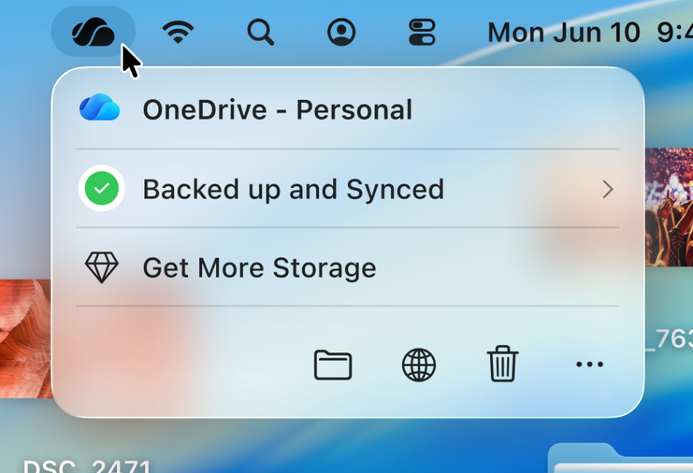
The all-new OneDrive Activity Center on the Mac is the small window that appears when you click on the OneDrive icon in the menu bar, and right away you’ll notice the new, snappier interface that embraces the Swift UI design language, including support for Liquid Glass on macOS 26.
bS00NDk1NTAxLVJxbjFCOQ

OneDrive Sync acivity center on MacOS

The design is simple and straightforward, showing only essential information initially and letting you easily explore further details as needed. It also offers enhanced accessibility options such as VoiceOver and Full Keyboard Access, making OneDrive easier for everyone to use than ever before.
bS00NDk1NTAxLUNFdUQ5UA

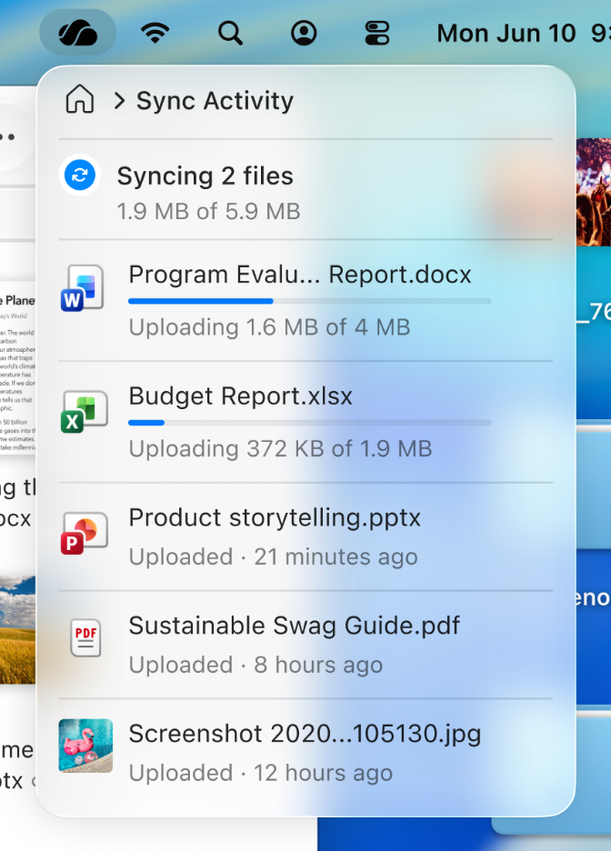
OneDrive Sync activity feed

The list of changes you’ve made to your OneDrive is just a click away, and shows you the same information as before, but in a more compact, easier way to understand. Additionally, images and videos that appear here show a helpful thumbnail of the content when available, making it easier to identify what files changed.
bS00NDk1NTAxLTZkUjZ6Sg

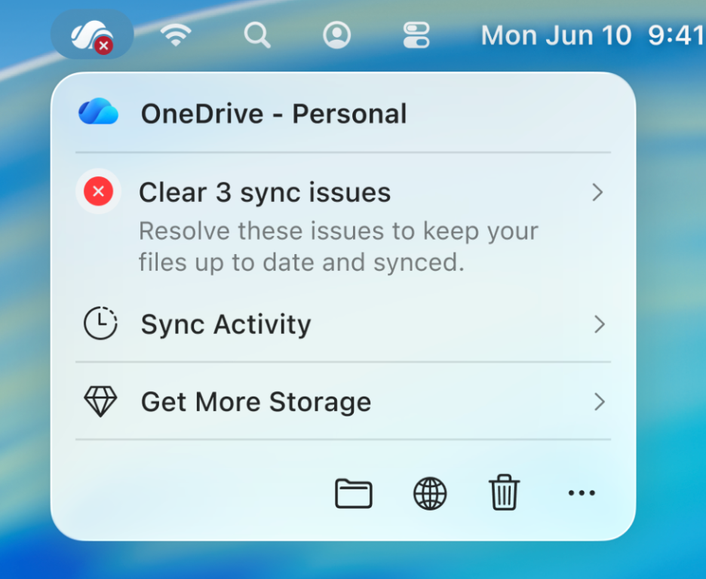
OneDrive Sync errors

If you encounter an error or anything else that requires your attention, you can easily access it with just one click.

The new Activity Center is built entirely in SwiftUI, and it looks and works great on any version of macOS where OneDrive runs.

Mac-native dialogs​

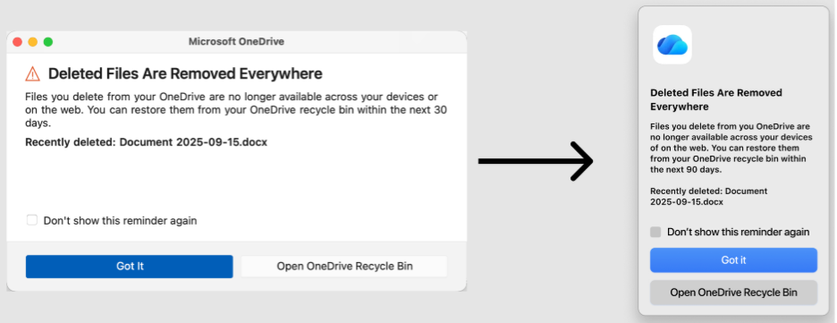
When using OneDrive, you'll sometimes see dialogs that provide information or prompt action—for example, when deleting a file for the first time, you learn how deletions work in OneDrive. These task dialogs are now built with native Mac controls to better fit its look and feel.
bS00NDk1NTAxLTU4ZjNhSg

OneDrive Mac-native dialogs

Rollout​

Starting today, we are rolling out this new experience to our Insiders audience with build 26.017. Once the new experience becomes accessible, OneDrive will upgrade automatically in the background. We welcome your feedback regarding this change. Please use the "Send Feedback" option in the OneDrive Activity Center to share your insights.


 Source:

 
I have a 13" iPad Pro that lives permanently on the music rack of my concert grand piano. It runs OneDrive on iOS and on OneDrive is a folder called Music PDF which holds a large collection of my music scores in PDF format. Those scores are displayed on my iPad Pro using the iOS forScore music app. OneDrive on iPad OS has worked beautifully for me for many years.
 

My Computers

System One System Two

  • OS
    Windows 11 Pro
    Computer type
    Laptop
    Manufacturer/Model
    Dell XPS 16 DA16260
    CPU
    Intel Series 3 Core Ultra X9 388H
    Memory
    64GB LPDDR5x 9600 MT/s
    Graphics Card(s)
    Intel Arc graphics B390 Panther Lake
    Monitor(s) Displays
    16" 3.2K Tandem OLED Infinity Edge
    Screen Resolution
    3200 x 2000 16:10 236 PPI
    Hard Drives
    1 Terabyte M.2 PCIe NVMe SSD
    Case
    Black Anodized Aluminum
    Cooling
    Vapor Chamber Cooling
    Mouse
    None
    Internet Speed
    942 Mbps Netgear Mesh + 2 Satellites
    Browser
    Microsoft Edge (Chromium)
    Antivirus
    Windows Security (Defender)
    Other Info
    NPU delivering 67 TOPS
    Microsoft 365 subscription
    Microsoft OneDrive 1TB Cloud
    Microsoft Visual Studio
    Microsoft Visual Studio Code
    Microsoft Sysinternals Suite
    Microsoft BitLocker
    Microsoft Copilot
    Dell Support Assist
    Dell Command | Update
    Macrium Reflect X subscription
    1Password Password Manager
    Amazon Kindle for PC
    Lightroom/Photoshop subscription
    Interactive Brokers Trader Workstation
  • Operating System
    Windows 11 Pro
    Computer type
    Laptop
    Manufacturer/Model
    Microsoft Surface Laptop 7
    CPU
    Snapdragon® X Elite (12 Core) with Hexagon NPU delivering 45 TOPS
    Memory
    32GB LPDDR5x 8448 MT/s
    Graphics card(s)
    Integrated Adreno GPU
    Sound Card
    Omnisonic speakers with Dolby Atmos spatial sound
    Monitor(s) Displays
    13.8″ PixelSense Flow touchscreen 120 Hz 600 NIT
    Screen Resolution
    2304 × 1536 (201 PPI), 3:2 aspect ratio
    Hard Drives
    1 TB PCIe NVMe Gen 4 SSD
    Case
    Black Anodized Aluminum
    Cooling
    Vapor Chamber Cooling
    Mouse
    None
    Internet Speed
    942 Mbps Netgear Mesh + 2 Satellites
    Browser
    Microsoft Edge (Chromium)
    Antivirus
    Windows Security (Defender)
    Other Info
    Microsoft 365 subscription (Office)
    Microsoft OneDrive 1TB Cloud
    Microsoft Visual Studio 2026
    Microsoft Visual Studio Code
    Interactive Brokers Trader Workstation
    Lightroom/Photoshop subscription
    1Password Password Manager
    Microsoft Sysinternals
    Amazon Kindle for PC
    Microsoft BitLocker
    Microsoft Copilot

Similar threads

Latest Support Threads

Back
Top Bottom